1. Introduction
This manual provides instructions for the proper setup, operation, and maintenance of your Tosuny TK8108 Speaker Microphone with Mini Keyboard. This device is designed for use with specific Kenwood radio models, including TM481, TM281, TM471, TM271, TK868G, and TK768G, offering enhanced communication capabilities with its integrated speaker, microphone, and numeric keypad.
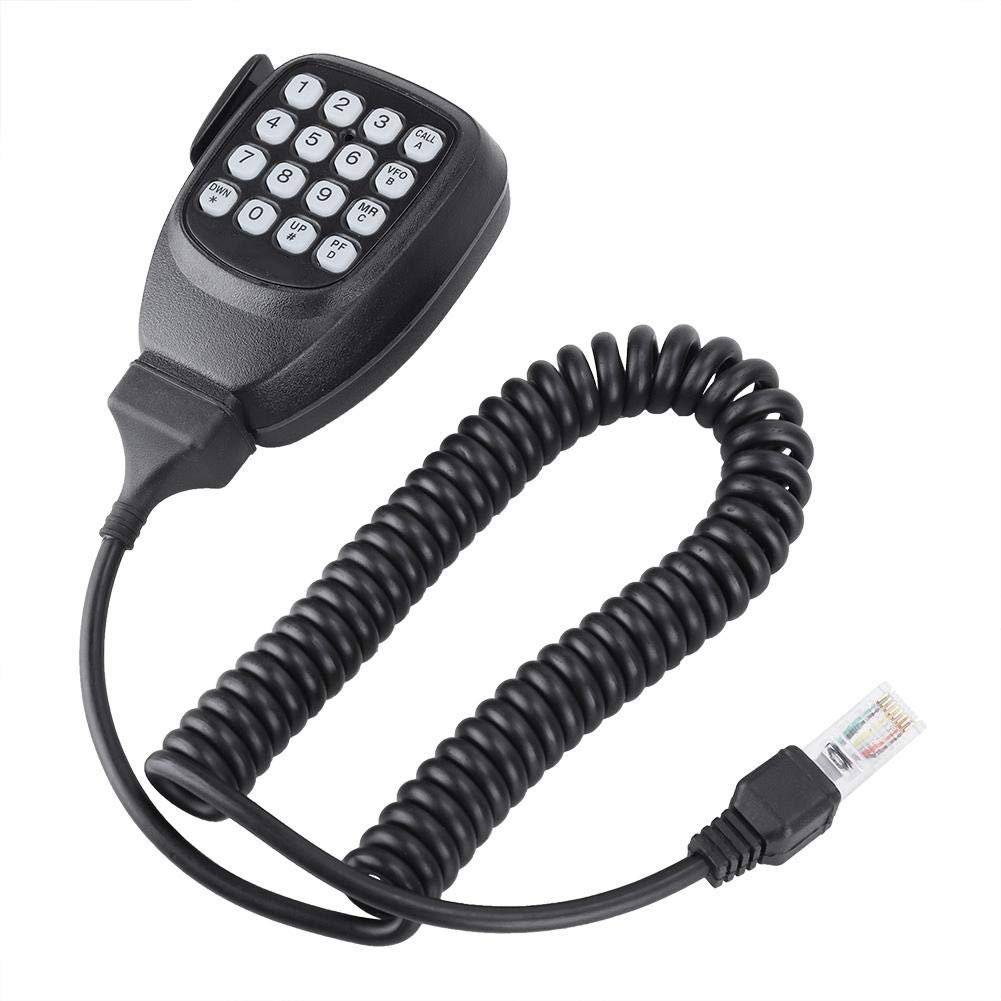
Figure 1: Tosuny TK8108 Speaker Microphone with Mini Keyboard. This image displays the complete speaker microphone unit, featuring the handheld microphone with an integrated keypad, a coiled cable, and an 8-pin modular connector.
2. Setup
Follow these steps to properly connect your speaker microphone to your compatible Kenwood radio.
- Identify the Connector: Locate the 8-pin modular connector on the end of the speaker microphone's coiled cable. This connector is designed to fit into the microphone port of your Kenwood radio.
- Locate Radio Microphone Port: On your Kenwood radio (e.g., TM481, TM281), identify the corresponding 8-pin microphone input port. Refer to your radio's manual if you are unsure of its location.
- Connect the Microphone: Carefully align the 8-pin modular connector with the radio's microphone port. Push firmly until it clicks into place, ensuring a secure connection. Do not force the connector if it does not align easily.
- Secure the Microphone: The speaker microphone features a mounting clip on its back. This clip can be used to attach the microphone to a suitable holder in your vehicle or operating area for easy access.
- Power On Radio: Once connected, power on your Kenwood radio. The speaker microphone should now be ready for use.

Figure 2: Close-up view of the 8-pin modular connector. This image highlights the transparent 8-pin connector, showing the internal wiring, which plugs into the radio's microphone port.

Figure 3: Front and back view of the speaker microphone. This image shows both sides of the microphone, illustrating the keypad on the front and the integrated mounting clip on the rear.
3. Operating Instructions
This section details the basic functions and keypad operations of your speaker microphone.

Figure 4: A hand holding the speaker microphone, illustrating the ergonomic design and the layout of the numeric and function keys on the keypad.
3.1 Basic Communication
- To Transmit: Press and hold the Push-To-Talk (PTT) button, typically located on the side of the microphone. Speak clearly into the microphone. Release the PTT button to stop transmitting.
- To Receive: When the PTT button is not pressed, the microphone acts as a speaker, allowing you to hear incoming transmissions from your radio.
3.2 Keypad Functions
The integrated mini keyboard provides direct access to various radio functions. Refer to your specific Kenwood radio's manual for detailed information on how these functions interact with your radio model.
| Key | Primary Function | Secondary Function (if applicable) |
|---|---|---|
| 0-9 | Numeric input for frequencies, memory channels, or other settings. | Varies by radio model. |
| CALL (A) | Initiates a call or accesses a call channel. | Function 'A' (Varies by radio model). |
| VFO (B) | Switches to VFO (Variable Frequency Oscillator) mode. | Function 'B' (Varies by radio model). |
| MR (C) | Switches to Memory Recall mode. | Function 'C' (Varies by radio model). |
| UP (#) | Increases frequency, channel number, or menu selection. | Accesses '#' function. |
| DWN (*) | Decreases frequency, channel number, or menu selection. | Accesses '*' function. |
| PF (D) | Accesses a programmable function. | Function 'D' (Varies by radio model). |
Note: The exact functionality of the CALL, VFO, MR, UP, DWN, and PF keys may vary depending on the specific Kenwood radio model you are using. Always consult your radio's instruction manual for detailed key assignments and programming options.
4. Maintenance
Proper care and maintenance will ensure the longevity and optimal performance of your speaker microphone.
- Cleaning:
- Wipe the exterior of the microphone with a soft, damp cloth.
- For stubborn dirt, use a mild soap solution. Avoid harsh chemicals or abrasive cleaners, as they can damage the Acrylonitrile Butadiene Styrene and Crystal materials.
- Ensure no liquid enters the microphone grille or keypad gaps.
- Storage:
- Store the microphone in a cool, dry place away from direct sunlight and extreme temperatures.
- Avoid tightly coiling the cable to prevent damage to the internal wires.
- Handling:
- Do not drop or subject the microphone to strong impacts.
- Avoid pulling the cable forcefully when disconnecting from the radio; always grasp the connector itself.
5. Troubleshooting
If you encounter issues with your speaker microphone, refer to the following common problems and solutions.
| Problem | Possible Cause | Solution |
|---|---|---|
| No audio from speaker mic. |
|
|
| Cannot transmit (PTT button unresponsive). |
|
|
| Keypad buttons do not function. |
|
|
If the problem persists after attempting these solutions, please refer to the Support section for further assistance.
6. Specifications
| Feature | Detail |
|---|---|
| Model Number | TK8108 |
| Brand | Tosuny |
| Compatible Kenwood Radios | TM481, TM281, TM471, TM271, TK868G, TK768G |
| Connector Type | 8-Pin Modular Connector (RJ45-style) |
| Microphone Form Factor | Handheld |
| Polar Pattern | Unidirectional |
| Material | Acrylonitrile Butadiene Styrene, Crystal |
| Item Dimensions (L x W x H) | 7.87 x 5.51 x 1.97 inches (20 x 14 x 5 cm) |
| Item Weight | 5.6 ounces (160 Grams) |
| Special Feature | Ergonomic design, Integrated Mini Keyboard |
7. Warranty Information
Specific warranty details for the Tosuny TK8108 Speaker Microphone are not provided in this manual. For information regarding warranty coverage, duration, and claims, please refer to the documentation included with your purchase or contact the manufacturer directly.
8. Customer Support
If you require technical assistance, have questions about product functionality, or need to report an issue, please contact Tosuny customer support. Contact information can typically be found on the product packaging, the manufacturer's official website, or through your retailer.