1. Introduction
The GlocalMe G4 Pro is a portable 4G LTE mobile hotspot designed to provide reliable internet connectivity across over 200 countries and regions without the need for a physical SIM card. Featuring a 5-inch touchscreen, it offers an intuitive interface for managing data, connecting devices, and accessing built-in travel applications. This manual provides essential information for setting up, operating, maintaining, and troubleshooting your G4 Pro device.

Image: GlocalMe G4 Pro Mobile Hotspot, showcasing its sleek design and user interface.
2. Package Contents
Please verify that all items are present in your GlocalMe G4 Pro package:
- GlocalMe G4 Pro Device
- Instruction Manual
- USB-C Cable

Image: Front view of the GlocalMe G4 Pro retail packaging.

Image: Rear view of the GlocalMe G4 Pro retail packaging, showing product information.
3. Device Overview
The GlocalMe G4 Pro features a user-friendly design with a large touchscreen display and essential ports.
3.1. Physical Features
- 5-inch HD Touchscreen: For intuitive navigation and control.
- USB-C Port: For charging and data transfer.
- SIM Card Slot: Supports physical SIM cards in addition to Cloud SIM technology.
- Power Button: Located on the side for turning the device on/off.

Image: The G4 Pro's screen displaying the Cloud SIM interface with data usage information.

Image: The G4 Pro's screen showing pre-installed applications like Translator, Exchange Rate, and TripAdvisor.

Image: A world map highlighting GlocalMe's extensive coverage in over 200 countries.

Image: A visual representation of the G4 Pro's support for both 2.4GHz and 5GHz Wi-Fi bands.

Image: Illustration of multiple users connecting up to 10 devices simultaneously to the G4 Pro hotspot.

Image: An exploded view highlighting the G4 Pro's 3900mAh battery, providing extended usage.

Image: A hand holding the G4 Pro, emphasizing its large 5-inch touchscreen for easy navigation.
4. Setup
4.1. Initial Charging
Before first use, fully charge your GlocalMe G4 Pro device using the provided USB-C cable and a compatible power adapter (not included). The device's screen will indicate charging status.
4.2. Powering On/Off
- To Power On: Press and hold the power button on the side of the device until the screen lights up.
- To Power Off: Press and hold the power button until the power-off options appear on the screen, then select 'Power Off'.
4.3. Activating the Device and Data Plans
To utilize the GlocalMe G4 Pro's features and access data, follow these steps:
- Get Your GlocalMe Device: Unpack and turn on your G4 Pro.
- Download GlocalMe App: Scan the QR code displayed on the device or search for 'GlocalMe' in the Google Play Store or Apple App Store on your mobile phone.
- Create a GlocalMe Account and Activate Data Plans: Open the GlocalMe app, create an account, and choose the data plans that suit your needs.
- Link Device with GlocalMe App: In the GlocalMe app, go to 'My Device' and scan the QR code shown on your G4 Pro device.
- Connect to Wi-Fi and Enjoy: Find the Wi-Fi name and password on the back of the device or on the screen, then connect your phone or other devices to the G4 Pro's Wi-Fi network.
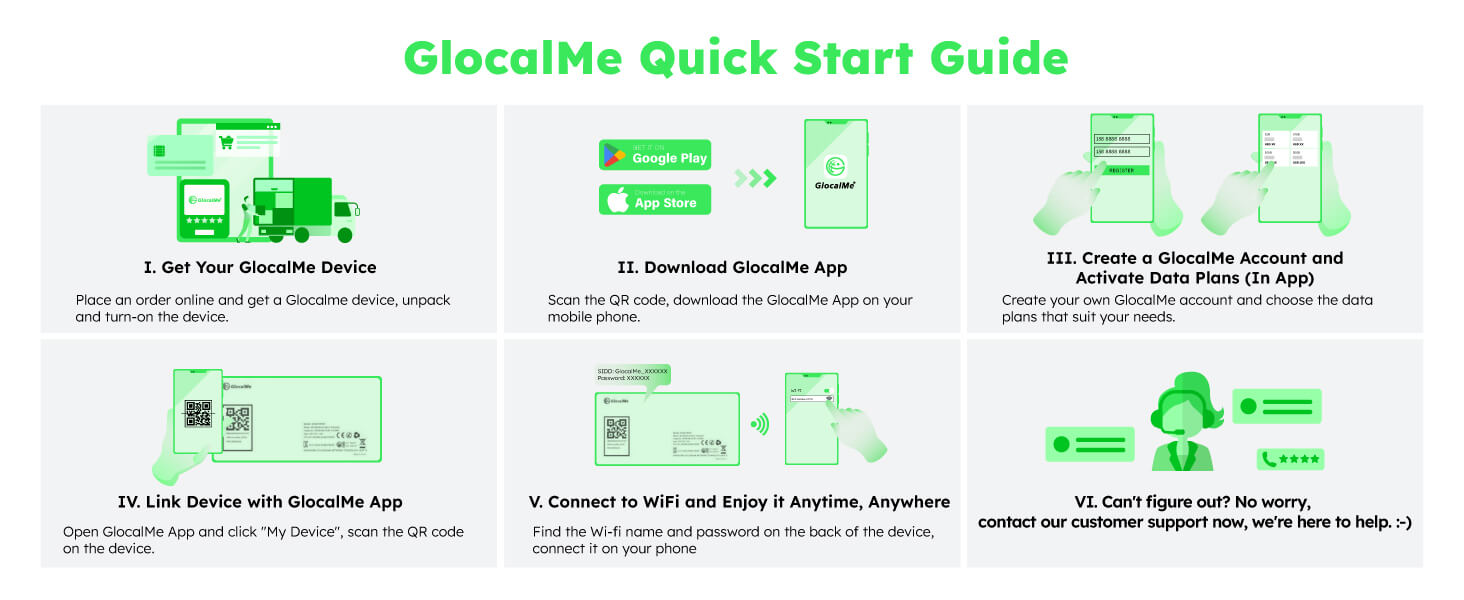
Image: A visual quick start guide illustrating the steps to set up and activate your GlocalMe device.
5. Operating Instructions
5.1. Connecting to Wi-Fi
Once your G4 Pro is powered on and has an active data plan, you can connect other devices:
- On your phone, tablet, or laptop, search for available Wi-Fi networks.
- Select the network name (SSID) displayed on your G4 Pro's screen or on the label on the back of the device.
- Enter the Wi-Fi password (key) shown on the G4 Pro's screen.
- Your device should now be connected to the internet.
5.2. Managing Data Plans
Data plans can be managed directly through the GlocalMe app. You can monitor data usage, purchase new packages (by GB, day, or region), and view your remaining data balance.
5.3. Using the Touchscreen Interface
The 5-inch touchscreen allows you to:
- Check current data usage and remaining balance.
- View signal strength and network status.
- Access settings for Wi-Fi band selection (2.4GHz/5GHz).
- Manage connected devices and set up data usage protection.
5.4. SIM Card Usage
While the G4 Pro primarily uses Cloud SIM technology, it also includes a physical SIM card slot. You can insert your own Nano-SIM card to use local data plans if preferred. The device will automatically prioritize the Cloud SIM or physical SIM based on your settings and availability.
5.5. Supported Features
The G4 Pro comes with pre-installed applications to enhance your travel experience:
- Translator: Provides real-time language translation.
- Exchange Rate: Offers up-to-date currency exchange rates.
- TripAdvisor: Access travel information, reviews, and recommendations.
6. Maintenance
6.1. Battery Care
- To prolong battery life, avoid exposing the device to extreme temperatures.
- Charge the device regularly, but avoid leaving it fully charged or fully depleted for extended periods.
- Use only the provided USB-C cable for charging.
6.2. Cleaning
Wipe the device with a soft, dry cloth. Do not use liquid cleaners or abrasive materials, as they may damage the screen or casing.
6.3. Software Updates
Periodically check for software updates through the GlocalMe app or the device's settings menu. Keeping your device's software up-to-date ensures optimal performance and security.
7. Troubleshooting
If you encounter issues with your GlocalMe G4 Pro, try the following solutions:
| Problem | Possible Solution |
|---|---|
| No internet connection |
|
| Slow internet speed |
|
| Device not turning on |
|
| Cannot connect to GlocalMe App |
|
8. Technical Specifications
| Feature | Specification |
|---|---|
| Brand | GlocalMe |
| Model Name | G4 Pro |
| Item Model Number | GLMG19A01 |
| Product Dimensions | 13.6 x 7.22 x 1.22 cm |
| Item Weight | 188 g |
| Battery Cell Composition | Lithium Polymer |
| Data Transfer Rate | 150 Megabits Per Second (Download) / 50 Megabits Per Second (Upload) |
| Wireless Standard | 802.11a, 802.11ac, 802.11b, 802.11g, 802.11n |
| Frequency Band Class | Dual-Band (2.4 GHz, 5 GHz) |
| Compatible Devices | Personal Computer, Smartphone, Tablet |
| Memory Storage Capacity | 1 GB |
| Flash Memory Installed Size | 8 GB |
| OS | ZyNOS |
| Human Interface Input | Touchscreen |
| Number of Ports | 2 (USB-C, SIM Card Slot) |
9. Warranty and Support
9.1. Warranty Information
The GlocalMe G4 Pro comes with a standard manufacturer's warranty. Please refer to the warranty card included in your package or visit the official GlocalMe website for detailed warranty terms and conditions.
9.2. Customer Support
For further assistance, technical support, or inquiries regarding your GlocalMe G4 Pro, please contact GlocalMe customer service. You can find contact information on the official GlocalMe website or within the GlocalMe app.
For the complete guide and more information, please visit the official GlocalMe website: glocalme.com/manuals
For the Declaration of Conformity, visit: Declaration of Conformity (PDF)
Your device's IMEI (International Mobile Equipment Identity) is: 351068610188049 (Click to view)