
1. Product Overview
The BAOFENG GT-22 is a compact and easy-to-use FRS radio designed for reliable communication. It is suitable for various environments, providing clear communication for staff and users. This manual provides essential information for the setup, operation, and maintenance of your GT-22 walkie-talkies.

Figure 1: BAOFENG GT-22 Walkie Talkies and included accessories.
2. Package Contents
Verify that all items are present in the package:
- 4 x GT-22 Portable Radio
- 4 x Rechargeable 1500mAh Li-ion battery
- 4 x Unique Belt Clip
- 4 x Earpiece
- 4 x Hand Strap
- 2 x USB Y-cable for Charging
- 2 x Dual Port USB Charger Adapter
- 2 x English User Manual
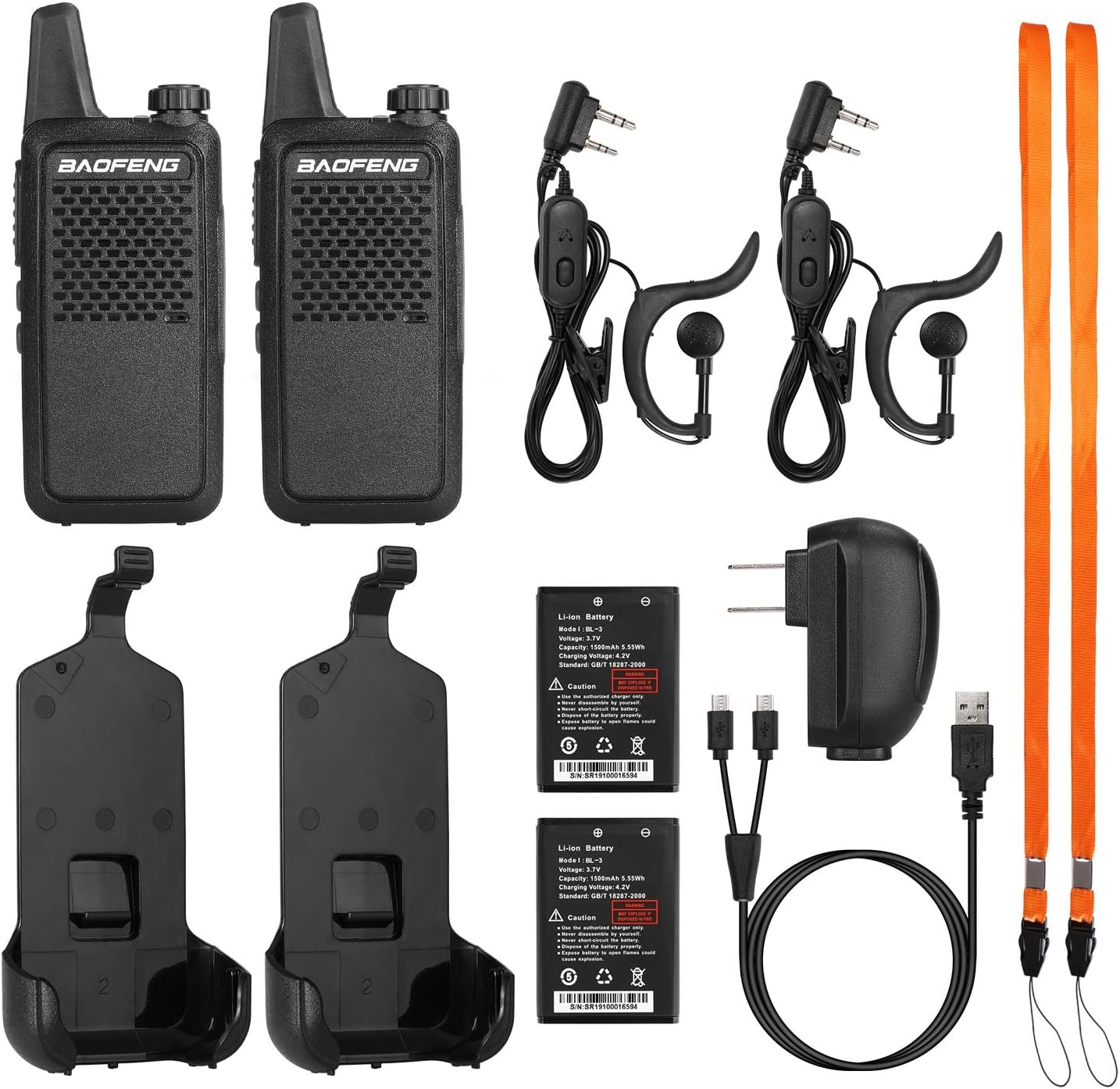
Figure 2: Complete package contents of the BAOFENG GT-22.
3. Setup
3.1 Battery Installation
The GT-22 radios come with 1500mAh Li-ion batteries. To install, align the battery with the back of the radio and slide it into place until it clicks securely. Ensure the battery is fully seated to maintain proper contact and water resistance (though the device is not water resistant).

Figure 3: Installing the 1500mAh Li-ion battery into the GT-22 radio.
3.2 Charging the Radios
The GT-22 walkie-talkies feature a convenient micro USB port for charging. Use the provided USB Y-cable and dual port USB charger adapter. The radios can be recharged via a power bank, car charger, or laptop. A full charge takes approximately 3 hours and provides up to 40 working hours.

Figure 4: Charging the GT-22 radios using the Micro USB Y-cable.

Figure 5: Flexible charging options for the GT-22.
3.3 Attaching the Belt Clip
The GT-22 comes with a unique belt clip for easy portability. To attach, slide the radio into the belt clip holster until it snaps securely into place. To remove, slide the radio upwards out of the clip.

Figure 6: Attaching and detaching the unique belt clip.
4. Operating Instructions
4.1 Basic Controls
The GT-22 radios are designed for straightforward operation. Key controls include:
- Power/Volume Knob: Located at the top of the radio. Rotate clockwise to turn on and increase volume, counter-clockwise to decrease volume and turn off.
- Push-to-Talk (PTT) Button: Located on the side. Press and hold to transmit, release to listen.
- Channel Up/Down Buttons: Located below the PTT button. Use to select desired FRS channels (1-16).

Figure 7: Key controls and ports on the GT-22 radio.
4.2 VOX Function (Hands-Free Operation)
The GT-22 supports VOX (Voice Operated Exchange) for hands-free communication. To activate VOX:
- Press the side key and the PTT button together.
- Turn on the radio. You will hear "VOX on" to confirm activation.
This function allows you to transmit by speaking into the microphone without pressing the PTT button. The radios also feature CTCSS and DCS private codes for enhanced privacy.
4.3 Communication Range
With its short high-gain antenna, the BAOFENG GT-22 walkie-talkies support clear communication within a range of up to 4 miles, depending on terrain and environmental conditions.
Video: An unboxing and overview of the BAOFENG GT-22 walkie talkies, demonstrating their size, controls, and belt clip functionality. The video highlights the power/volume knob, PTT button, channel selection, and the micro USB charging port.
5. Specifications
| Frequency Range | FRS |
| Battery Capacity | 1500 mAh Li-ion |
| Output Power | 2W/0.5W (High/Low) |
| Working Voltage | DC 3.7V |
| Sensitivity | <0.16 µV |
| Squelch Selectivity | <0.2 µV |
| Item Weight | 2.14 pounds (for 4-pack) |
| Product Dimensions | 8.46 x 6.81 x 2.17 inches (for 4-pack) |
| Item Model Number | GT-22 |
| Number of Channels | 16 |
| Talking Range Maximum | 3-4 Miles (terrain dependent) |
| Water Resistance Level | Not Water Resistant |

Figure 8: Compact dimensions and light weight of the GT-22 radio.

Figure 9: The super slim design of the GT-22.
6. Maintenance
6.1 Battery Care
- Always use the authorized charger only.
- Never disassemble the battery pack yourself.
- Never short-circuit the battery.
- Dispose of the battery properly according to local regulations.
- Never expose the battery to open flames or high temperatures, as this may cause explosion.
6.2 Cleaning
Wipe the radio surface with a soft, damp cloth. Do not use harsh chemicals or abrasive cleaners. Ensure all ports are dry before charging.
7. Troubleshooting
| Problem | Possible Cause | Solution |
|---|---|---|
| Radio does not turn on. | Low or depleted battery. | Charge the battery fully. |
| Cannot communicate with other radios. | Radios are on different channels or privacy codes. | Ensure all radios are set to the same channel and CTCSS/DCS code. |
| Poor audio quality or static. | Out of range, interference, or low battery. | Move closer to the other radio, avoid sources of interference, or charge the battery. |
| VOX function not working. | VOX not activated or sensitivity too low. | Activate VOX as per section 4.2. Check user manual for sensitivity adjustment if available. |
8. Warranty and Support
For warranty information and technical support, please refer to the contact details provided on the product packaging or visit the official BAOFENG website. Keep your purchase receipt as proof of purchase for warranty claims.
For additional support, you may visit the BAOFENG Store on Amazon.