
WilTec NW SOFT D
WilTec Naturewater NW-SOFT-D Water Softener User Manual
Model: NW-SOFT-D
1. Introduction
The WilTec Naturewater NW-SOFT-D is an advanced water softening system designed to effectively combat limescale issues in your water supply. This system utilizes an ion exchange process to remove calcium and magnesium ions, which are responsible for water hardness, replacing them with sodium ions. This results in softer water, protecting your appliances and plumbing from scale buildup and improving the efficiency of water-using devices.
With a capacity to soften up to 1000 liters of water per hour, the NW-SOFT-D is suitable for various applications, from household use (cooking, showering, laundry) to commercial settings. Its automatic control system simplifies operation, requiring only the initial water hardness setting via the display. The system also features automatic resin regeneration, ensuring continuous performance without manual resin replacement, only requiring the addition of regeneration salt to the brine tank.
2. Safety Instructions
Please read all safety instructions carefully before installation, operation, or maintenance of the water softener. Failure to follow these instructions may result in property damage, injury, or improper operation of the device.
- Electrical Safety: Ensure the unit is connected to a properly grounded electrical outlet. Do not operate with damaged cords or plugs. Disconnect power before any maintenance or service.
- Water Pressure: Ensure your water supply pressure is within the specified operating range (see Specifications section). Install a pressure reducer if necessary.
- Water Leaks: Regularly check all connections for leaks. In case of a leak, shut off the water supply to the unit immediately.
- Salt Handling: Use only water softener salt. Avoid contact with eyes and skin. Store salt in a dry place, away from children and pets.
- Installation Environment: Install the unit in a location protected from freezing temperatures, direct sunlight, and excessive humidity. Ensure adequate drainage is available.
- Professional Installation: If you are unsure about any installation steps, consult a qualified plumber or technician.
3. Product Overview and Components
The WilTec Naturewater NW-SOFT-D water softener consists of several key components working together to provide soft water. Understanding these parts is crucial for proper installation and maintenance.

Figure 3.1: Overall view of the WilTec Naturewater NW-SOFT-D water softener. This image shows the complete unit, including the main tank and the control head.

Figure 3.2: Side view with key dimensions in millimeters. This diagram illustrates the height (1065 mm), depth (390 mm), and width (220 mm) of the unit, essential for planning installation space.

Figure 3.3: Front view with specific dimensions, including the height of the main tank (960 mm) and the diameter of the connection point (14 mm).
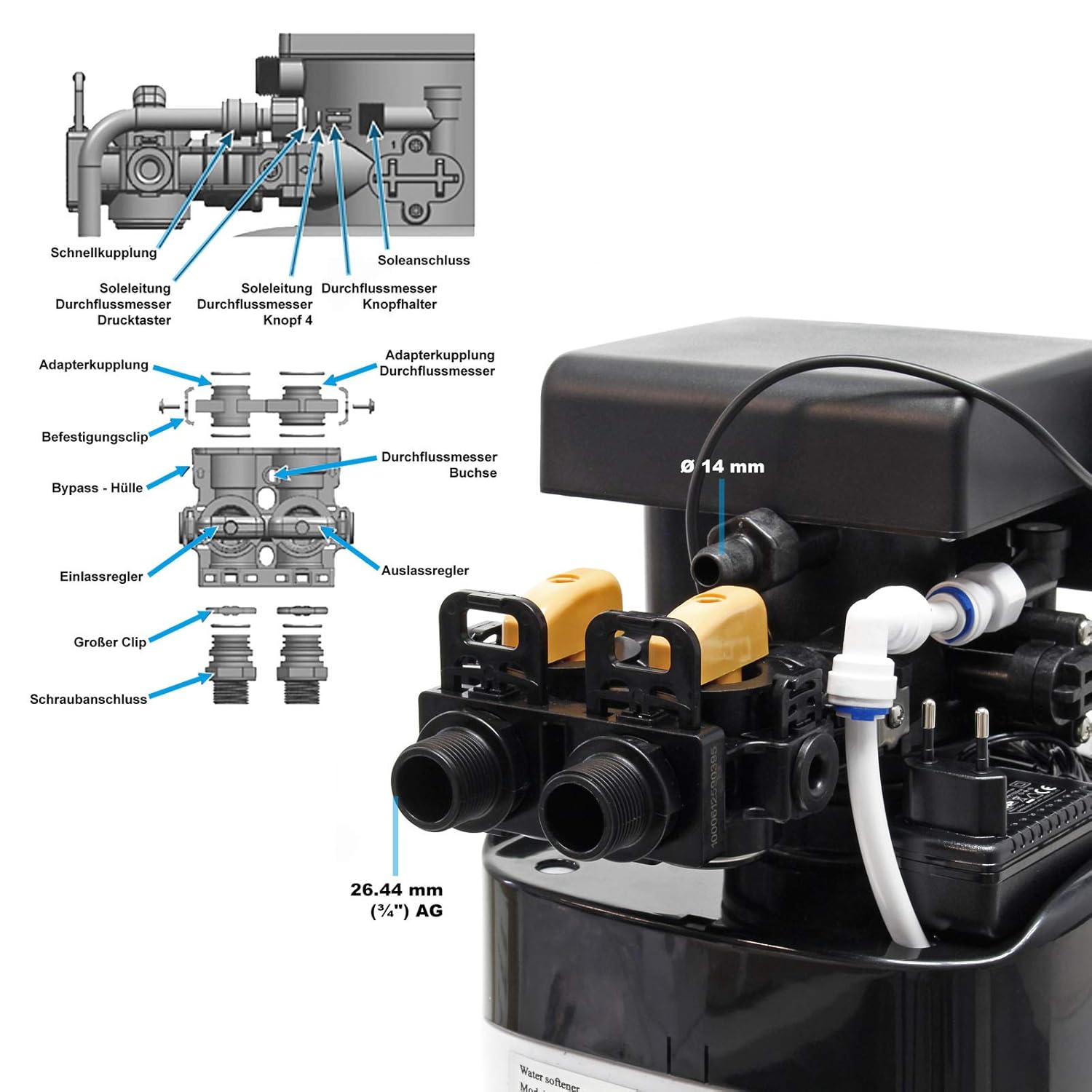
Figure 3.4: Detailed view of the control head and connection points. This image highlights the quick couplings, brine line, bypass valve, and inlet/outlet regulators, along with their respective dimensions (e.g., 26.44 mm or 3/4" AG for main connections).

Figure 3.5: Interior view of the brine tank, showing internal dimensions (120 mm and 175 mm). This space is where the regeneration salt is stored.

Figure 3.6: Diagram illustrating the ion exchange process. This visual explains how calcium (Ca²⁺) and magnesium (Mg²⁺) ions are exchanged for sodium (Na⁺) ions by the resin beads, softening the water.

Figure 3.7: Schematic diagram showing the internal flow of water and the regeneration process. It labels components such as the central control valve, brine hose, safety brine valve, pressure tank, resin bed, and cabinet tank, illustrating how hard water enters and softened water exits.
4. Setup and Installation
Proper installation is critical for the optimal performance and longevity of your water softener. It is recommended to have the unit installed by a qualified professional.
4.1 Pre-Installation Checklist
- Location: Choose a dry, level area near the main water supply line, a drain, and an electrical outlet. Ensure the location is protected from freezing temperatures.
- Water Supply: Identify the main water inlet to your property. The softener should be installed after the main shut-off valve and before any branch lines leading to outdoor faucets or non-softened water uses.
- Drainage: A floor drain or utility sink is required for the regeneration cycle's discharge water. Ensure the drain line has an air gap to prevent back-siphonage.
- Power: A standard electrical outlet (230V, 50Hz) is needed within reach of the unit's power cord.
- Tools and Materials: Gather necessary plumbing tools, pipe fittings, Teflon tape, and a water hardness test kit.
4.2 Plumbing Connections
- Shut off Water: Turn off the main water supply to your home.
- Install Bypass Valve: The unit typically comes with a bypass valve. Install this valve first, allowing you to bypass the softener for maintenance without shutting off the main water supply.
- Connect Inlet/Outlet: Connect the main water supply line to the softener's inlet port and the softened water line to the outlet port. Ensure all connections are secure and leak-free. Refer to Figure 3.4 for connection details.
- Connect Drain Line: Attach the drain hose from the control head to your designated drain. Secure the hose to prevent dislodging during regeneration.
- Connect Brine Line: Connect the small brine line from the control head to the brine well in the salt tank.
4.3 Electrical Connection and Initial Startup
- Plug In: Once all plumbing connections are complete and checked, plug the power adapter into the control head and then into the electrical outlet.
- Fill Resin Tank: Slowly open the main water supply valve to allow water to fill the resin tank. Check for any leaks during this process.
- Add Salt: Add water softener salt to the brine tank. The tank has a capacity of 30 kg.
- Set Initial Water Hardness: Use the control panel display to set the initial water hardness level according to your local water supply. This is a crucial step for efficient operation.
- Initiate Manual Regeneration (Optional): For the first startup, it is often recommended to initiate a manual regeneration cycle to properly flush the system and prepare the resin. Refer to the operating instructions for how to do this.
Note: For detailed, language-specific installation guides and diagrams, please refer to the official WilTec website or the comprehensive manual provided with your unit. Some users have noted that manuals may be in German; an English version is typically available for download online.
5. Operating Instructions
The WilTec Naturewater NW-SOFT-D water softener is designed for user-friendly operation with its automatic control system.
5.1 Control Panel and Display
The unit features an electronic control head with a display. This display allows you to:
- View current system status.
- Set the initial water hardness.
- Monitor water usage (if applicable).
- Initiate manual regeneration cycles.
Refer to the specific instructions in your full manual for detailed navigation and programming of the control panel.
5.2 Setting Water Hardness
After initial setup, it is crucial to program the control head with your specific water hardness level. This allows the system to accurately calculate when regeneration is needed. Use a water hardness test kit to determine your water's hardness in dH (German hardness degrees) or ppm (parts per million).
- Access the settings menu on the control panel.
- Locate the water hardness setting.
- Input your measured water hardness value.
- Save the settings.
5.3 Automatic Regeneration
The NW-SOFT-D features an automatic regeneration process. Based on the programmed water hardness and your water usage, the system will automatically initiate a regeneration cycle when the resin bed is saturated. During regeneration, the system flushes the accumulated hardness minerals from the resin using a brine solution from the salt tank, then rinses the resin, and prepares it for continued softening.
Regeneration typically occurs during periods of low water usage (e.g., overnight) to minimize disruption. Avoid using hot water during regeneration cycles as unsoftened water may enter your hot water tank.
6. Maintenance
Regular maintenance ensures the efficient and long-term operation of your water softener.
6.1 Salt Replenishment
The most important maintenance task is to regularly check and replenish the salt level in the brine tank. The system requires salt to create the brine solution for regeneration.
- Check the salt level at least once a month, or more frequently depending on your water usage and hardness.
- Ensure the salt level remains above the water level in the brine tank.
- Use only high-quality water softener salt (pellets, crystals, or block salt). Do not use rock salt or ice melt salt.
- Add salt when the tank is about one-quarter full to ensure continuous soft water.
6.2 Cleaning the Brine Tank
Over time, a sludge or residue may accumulate at the bottom of the brine tank. This "salt bridge" can prevent the salt from dissolving properly, leading to inefficient regeneration.
- Periodically inspect the brine tank for salt bridges or excessive residue.
- If a salt bridge forms, carefully break it up using a blunt object (e.g., a broom handle).
- For thorough cleaning, bypass the softener, drain the brine tank, remove any remaining salt, and clean the tank with warm, soapy water. Rinse thoroughly before refilling with salt.
6.3 General Checks
- Leaks: Regularly inspect all plumbing connections for any signs of leaks.
- Drain Line: Ensure the drain line is clear and free of obstructions.
- Water Hardness: Occasionally test your softened water to ensure the system is still producing soft water. If not, check salt levels and regeneration settings.
7. Troubleshooting
This section provides solutions to common issues you might encounter with your water softener. For problems not listed here, or if solutions do not resolve the issue, please contact customer support.
| Problem | Possible Cause | Solution |
|---|---|---|
| Water is not soft |
|
|
| Unit is regenerating too frequently or not enough |
|
|
| Low water pressure |
|
|
| Excessive salt usage |
|
|
| Water in brine tank is too high |
|
|
If you experience a major defect or issue, as some users have reported receiving defective units, please contact WilTec customer support immediately for assistance with troubleshooting or replacement.
8. Specifications
Below are the technical specifications for the WilTec Naturewater NW-SOFT-D water softener:
| Characteristic | Value |
|---|---|
| Model Number | NW SOFT D |
| Manufacturer | WilTec |
| Product Dimensions (L x W x H) | 22L x 48W x 106.5H centimeters |
| Item Weight | 24.22 Kilograms |
| Capacity | 1000 Liters/hour (max flow) |
| Material | Resin (ion exchange) |
| Power Source | Electricity |
| Special Feature | Automatic Control |
| Installation Type | Freestanding |
| Brine Tank Capacity | 30 kg (salt) |
| Max Pressure | 6.0 bar (from technical info table) |
| Min Pressure | 1.0 bar (from technical info table) |
| Salt Consumption per Regeneration | 1.28 kg (for NW-SOFT-D, from technical info table) |
| Regeneration Time | 30 min (from technical info table) |

Figure 8.1: Comprehensive technical information table, including specifications for various Naturewater softener models. The NW-SOFT-D model's specific data is highlighted in the table.
9. Warranty and Support
WilTec stands behind the quality of its products. For specific warranty terms and conditions, please refer to the documentation included with your purchase or visit the official WilTec website.
If you require technical assistance, have questions about installation, operation, or need to report a defect, please contact WilTec customer support. Having your model number (NW-SOFT-D) and purchase information ready will help expedite your request.
You can find more information and contact details by visiting the official WilTec store: WilTec Store on Amazon.
Related documentsNW SOFT D


Ask a question about this manual
Ask about setup, troubleshooting, compatibility, parts, safety, or missing instructions. Manuals+ will review the question and use this page’s manual context to help answer it.