
1. Introduction and Overview
The Celestron Focus Motor provides electronic focusing capabilities for compatible Celestron Schmidt-Cassegrain (SCT), EdgeHD, and Rowe-Ackermann Schmidt Astrograph (RASA) optical tubes. This motor allows for precise adjustment of focus using a computer or the telescope's hand controller, eliminating the need for manual adjustments at the focuser knob. This is particularly beneficial for visual observers seeking exact focus and essential for astroimagers who require remote control over their equipment.
With the focus motor installed, users can achieve sharp focus on celestial objects remotely, enhancing the convenience and precision of astronomical observations and imaging sessions.
2. What's in the Box
Verify that all components are present before proceeding with installation.
- Focus Motor
- Screwdriver
- Wrench
- Hex Key
- AUX Cable
- Mounting Hardware (screws, small ring, large rings)
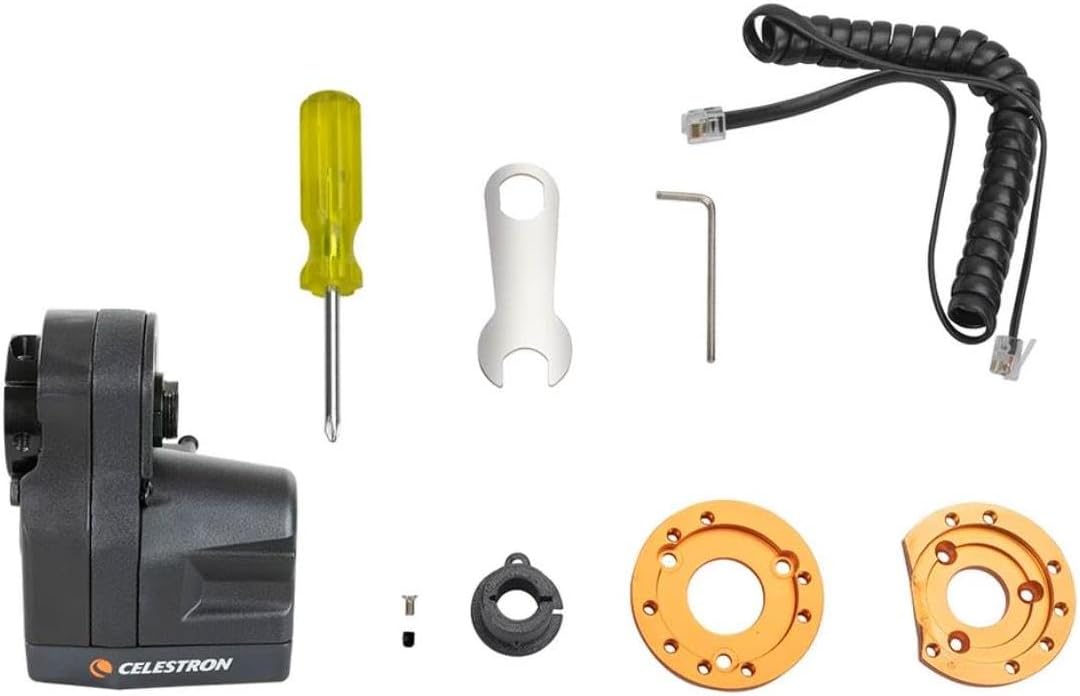
Image Description: An overhead view displaying the contents of the Celestron Focus Motor package. Visible items include the black focus motor unit, a yellow-handled screwdriver, a small silver wrench, a hex key, a coiled black AUX cable, and various orange and black mounting rings and screws.
3. Compatibility
The Celestron Focus Motor is designed for broad compatibility with various Celestron optical tubes:
- All SCTs from 6" to 14" aperture produced since 2006.
- 8" Rowe-Ackermann Schmidt Astrograph (RASA).
- 36cm RASA.
- 7" Maksutov-Cassegrain.
- All EdgeHD optical tubes.
Important Notes:
- Not compatible with 5" SCTs or older models (pre-2006).
- For the 11" RASA, the Focuser Retrofit Kit for RASA 11 is required.
- When installed on 6" Schmidt-Cassegrain telescopes, the Off-Axis Guider (#93648) cannot be used due to mechanical interference.
4. Setup and Installation
Follow these steps to install the Celestron Focus Motor onto your compatible telescope:
- Prepare the Focuser: Ensure your telescope's focuser knob is accessible and clean.
- Attach Mounting Rings: Depending on your telescope model, select the appropriate mounting ring. Secure it to the focuser mechanism according to the specific instructions for your telescope type.
- Mount the Focus Motor: Align the focus motor with the mounting ring and secure it using the provided screws and tools. Ensure it is firmly attached and does not obstruct any other telescope components.
- Connect Cables: Connect the necessary power and control cables as described in the "Powering the Focus Motor" section.

Image Description: A close-up view of the Celestron Focus Motor installed on a telescope. The motor is black and attached to the focuser, which is connected to a T-adapter and a camera. The telescope's orange accents are visible in the background. Text overlay indicates "CAMERA AND TELESCOPE NOT INCLUDED".

Image Description: A side view of the black Celestron Focus Motor. The focuser attachment point is visible on the top, with a small arrow indicating rotation direction. The Celestron logo is on the side of the motor.

Image Description: A front-angled view of the black Celestron Focus Motor. The central focuser attachment point is prominent, surrounded by small adjustment screws. The Celestron logo is visible on the lower front section.
5. Powering the Focus Motor
The Celestron Focus Motor offers three primary power options:
- Via Celestron Computerized Mount: If using a Celestron computerized mount, connect the supplied AUX cable from the focus motor to an available AUX port on the mount. The mount will provide power and allow control via its hand controller (NexStar+ or StarSense) or a connected computer.
- Via Computer USB Port: If not using a Celestron mount, the focus motor can be powered and controlled directly from a computer's USB port. A user-supplied USB A-to-B cable is required for this connection.
- Via External 12V DC Power Source: An external 12V DC power source (not included) can be connected to the motor's power jack. This option is suitable for standalone operation or when other power sources are unavailable.

Image Description: A close-up view of the rear panel of the Celestron Focus Motor. Clearly visible are the 12V 1A power input, a USB-B port, and an AUX port (RJ12 type). The ports have tethered covers for protection when not in use.
6. Operating the Focus Motor
Once installed and powered, the focus motor provides advanced control over your telescope's focus:
- Multiple Speed Rates: Adjust the focusing speed from fine to coarse for precise control.
- Automatic GoTo Indexed Focus Position: Program and return to specific focus positions for repeatable results, especially useful for imaging.
- Focus Backlash Compensation: Minimize mechanical play in the focuser mechanism for smoother and more accurate adjustments.
Control is typically achieved through the connected Celestron hand controller or via software on a computer. The Focuser Utility software for Windows provides a user-friendly interface, and the motor is also compatible with Celestron PWI software.
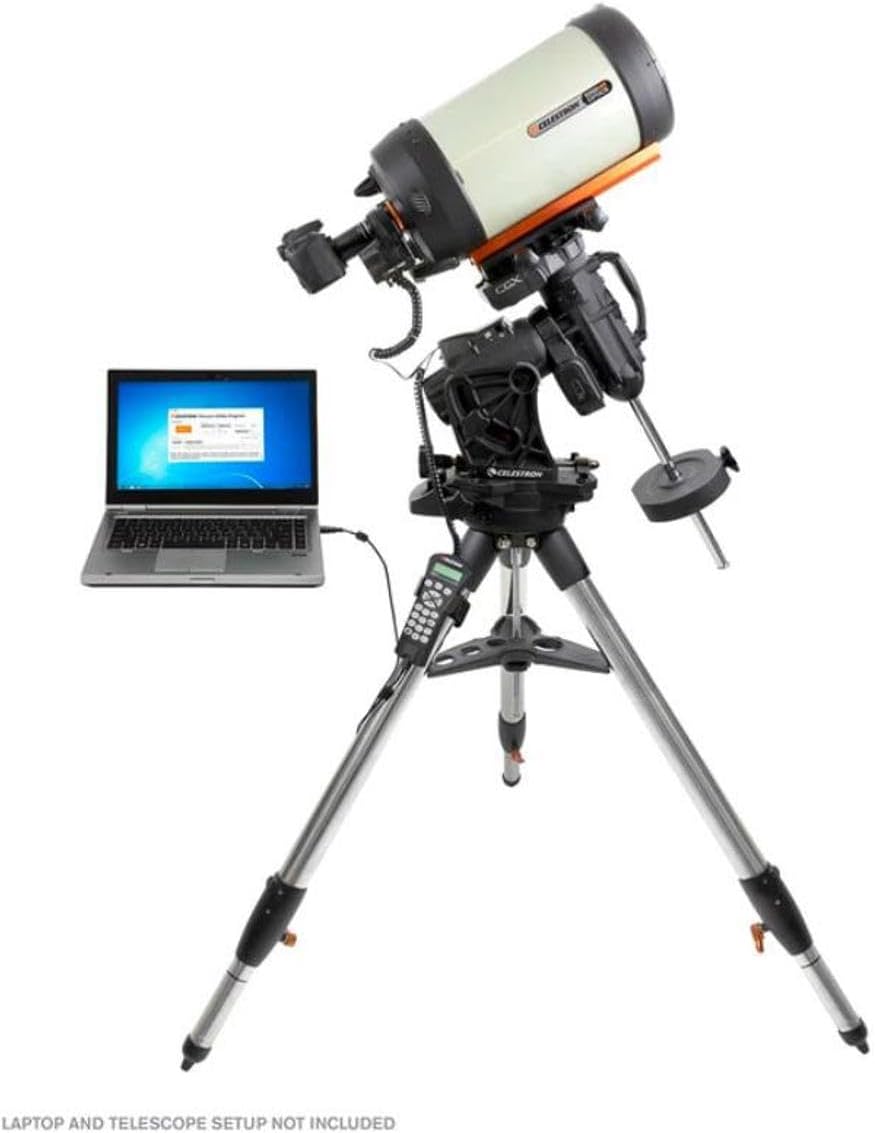
Image Description: A laptop screen showing the "Celestron Focuser Utility Program" interface. A cable connects the laptop to a telescope, which has the focus motor installed. The image illustrates computer control of the focus motor. Text overlay indicates "LAPTOP AND TELESCOPE SETUP NOT INCLUDED".
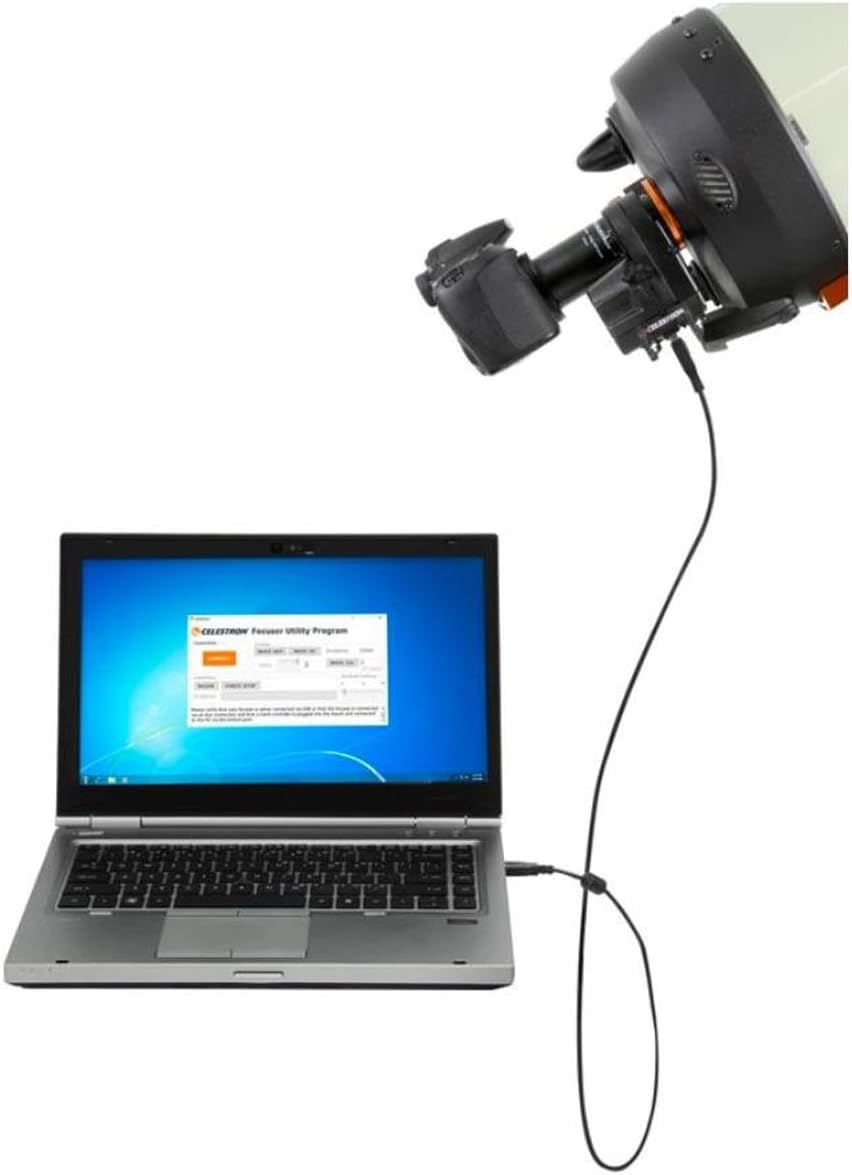
Image Description: A complete astronomical setup featuring a large telescope on an equatorial mount, connected via cables to a laptop. The Celestron Focus Motor is visible on the telescope. The laptop screen displays a software interface, demonstrating remote control capabilities. Text overlay indicates "LAPTOP AND TELESCOPE SETUP NOT INCLUDED".
7. Specifications
| Feature | Detail |
|---|---|
| Brand | Celestron |
| Model Name | 94155-A |
| Model Number | 94155-A-CGL |
| Focus Type | Auto Focus |
| Power Source | Celestron computerized mount, Computer USB, External 12V DC |
| Product Dimensions (D x W x H) | 6.3"D x 4.53"W x 4.92"H |
| Item Weight | 0.57 Kilograms |
| Compatible Devices | Celestron Schmidt-Cassegrain (SCT), EdgeHD, and Rowe-Ackermann Schmidt Astrograph optical tubes |
| Additional Features | Electronic Focusing, Multiple Speed Rates, Automatic GoTo Indexed Focus Position, Focus Backlash Compensation, Wide Compatibility, Multiple Power Options |
8. Warranty and Support
The Celestron Focus Motor is covered by a CELESTRON TWO YEAR LIMITED WARRANTY. For warranty claims or technical assistance, please contact Celestron customer support. Detailed support information can typically be found on the official Celestron website or through your product's registration.
9. Product Video Overview
Watch this official product video for a visual overview of the Celestron Focus Motor's features and benefits.
Video Description: An official product overview video demonstrating the Celestron Focus Motor for SCT and EdgeHD telescopes. The video highlights its electronic focusing capabilities, remote control options, and various features like multiple speed rates and backlash compensation. It shows the motor's components and how it connects to a telescope.


