
1. Introduction
Thank you for choosing the CHIQ U43H7A 43-inch UHD Smart TV. This manual provides essential information for setting up, operating, maintaining, and troubleshooting your new television. Please read this manual thoroughly before using the product to ensure proper and safe operation.
2. Safety Information
Always follow basic safety precautions when using this television to reduce the risk of fire, electric shock, and injury. Do not expose the TV to rain or moisture. Do not open the cabinet. Refer all servicing to qualified personnel. Ensure proper ventilation and avoid blocking ventilation openings.
3. Package Contents
Please check that all items listed below are included in your package:
- Television
- Instruction Manual
- Remote Control
- Stand Base
- Accessories (e.g., screws, batteries)
4. Setup
4.1 Physical Installation
Your CHIQ U43H7A TV can be placed on a stand or mounted on a wall. Ensure the TV is placed on a stable, level surface or securely mounted to a wall using a VESA-compatible bracket (200 x 200 mm M6 screw).

Image: Front view of the CHIQ U43H7A TV with dimensions (963mm width, 567mm height without stand, 617mm height with stand, 180mm stand depth) and the included remote control. VESA wall mount standard is 200 x 200 mm.
4.2 Connecting Devices
Connect your external devices such as set-top boxes, gaming consoles, or sound systems to the appropriate ports on the back of the TV.
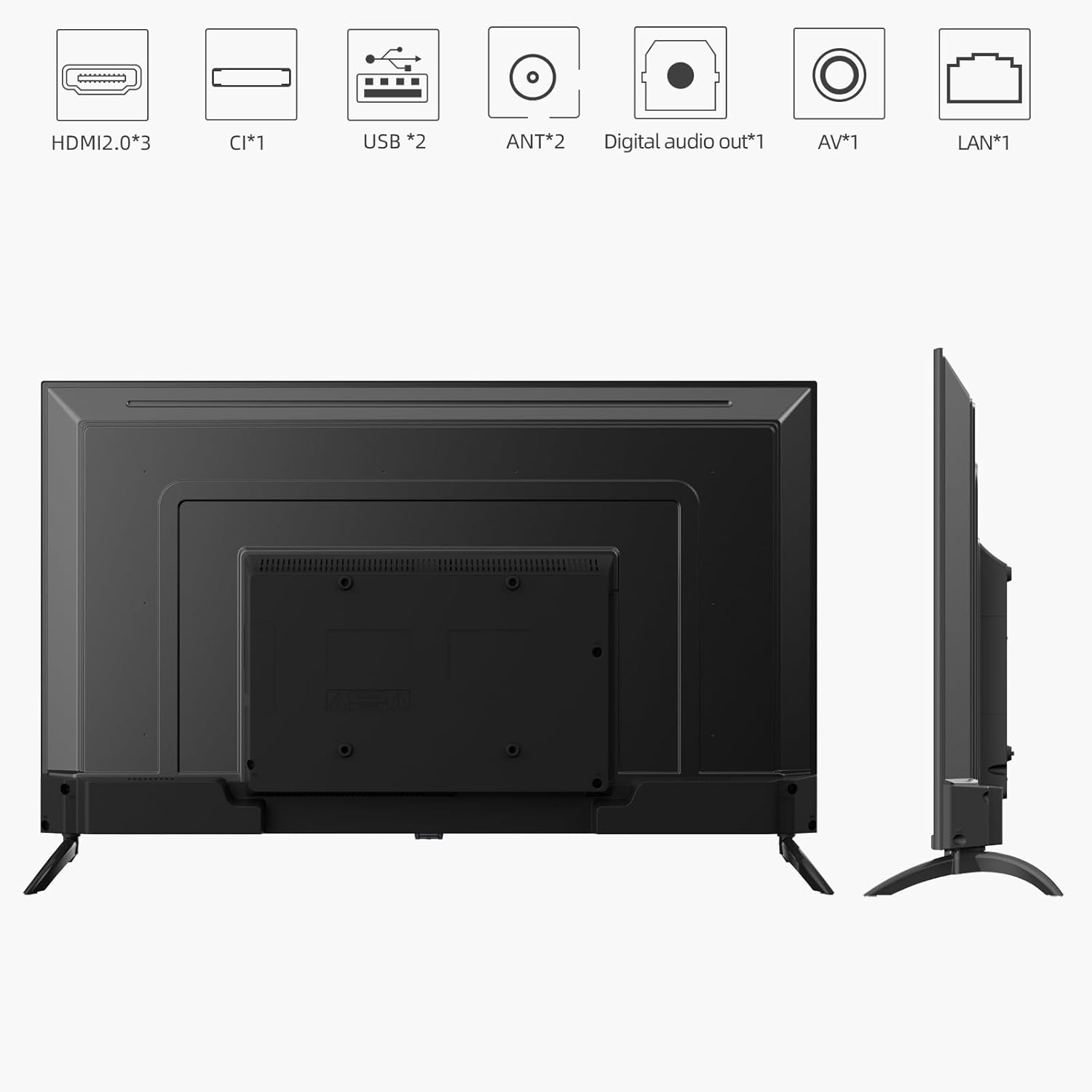
Image: Rear view of the CHIQ U43H7A TV showing various input and output ports including 3 HDMI 2.0 ports, 2 USB ports, CI+ slot, AV Mini, Digital Audio Out, LAN, RF, and LNB.
- HDMI: Connect Blu-ray players, game consoles, or other HDMI-enabled devices. This model features 3 HDMI 2.0 ports with CEC and ARC support.
- USB: Connect USB storage devices for media playback. Two USB 2.0 ports are available.
- Antenna/Cable: Connect your antenna or cable TV signal for DVB-T/T2/C/S2 reception.
- LAN: For wired internet connection.
- Digital Audio Out: For connecting to external audio systems.
- Earphone: 3.5mm jack for headphones.
4.3 Initial Setup
Upon first power-on, the TV will guide you through the initial setup process, including language selection, network connection (Wi-Fi 2.4 GHz or LAN), and channel scanning for the integrated triple tuner (DVB-T, DVB-T2 HD (H.265), DVB-C, DVB-S2 HD).
5. Operating Instructions
5.1 Remote Control
The included Bluetooth remote control allows for 360-degree operation and features a dedicated button for Google Assistant voice control.

Image: The CHIQ U43H7A TV remote control, featuring dedicated buttons for Netflix, YouTube, Amazon Prime Video, and Google Play, along with navigation, volume, channel, and Google Assistant voice control buttons.
5.2 Smart TV Features (Android TV 11)
The CHIQ U43H7A runs on Android TV 11.0, providing access to a vast array of applications and smart functionalities.

Image: Overview of CHIQ H7A Series features, highlighting Ideal Picture & Design (4K UHD, Dolby Vision, Frameless, HDR10), Android TV with Google Assistant, Google Play, Google Play Movies & TV, Google Play Games, Google Play Music, Chromecast built-in, HDMI 2.0, Wi-Fi, and Bluetooth 5.0.
- Google Play Store: Download thousands of apps, including streaming services like Netflix, YouTube, Amazon Prime Video, Disney+, and DAZN.
- Google Assistant: Use voice commands via the remote control to search for content, control smart home devices, and get information.
- Chromecast Built-in: Easily cast content from your smartphone, tablet, or computer directly to the TV screen.
- Bluetooth 5.0: Connect wireless headphones, soundbars, or other Bluetooth devices.

Image: Screenshot of the Android TV home screen, displaying recommended content and favorite apps such as YouTube, Google Play Store, Google Play Movies & TV, Google Play Games, YouTube Kids, and Music.
5.3 Picture and Sound Settings
The U43H7A supports advanced picture and sound technologies for an immersive viewing experience.
- Dolby Vision & HDR10: Enjoy enhanced contrast, brightness, and color with HDR content.
- Dolby Audio: Provides rich, clear, and powerful sound. Adjust audio settings in the TV menu for optimal sound quality.
6. Maintenance
6.1 Cleaning
To clean the screen, gently wipe with a soft, lint-free cloth. For stubborn marks, dampen the cloth with a small amount of screen cleaner. Do not spray cleaner directly onto the screen. Clean the TV cabinet with a soft, dry cloth.
6.2 Software Updates
The TV supports Over-The-Air (OTA) updates. Ensure your TV is connected to the internet to receive the latest software improvements and features. You can check for updates in the TV's settings menu.
7. Troubleshooting
If you encounter any issues with your TV, refer to the table below for common problems and their solutions.
| Problem | Possible Cause / Solution |
|---|---|
| No picture/sound | Check power connection, input source, and cable connections. Ensure the TV is turned on. |
| Poor picture quality | Check antenna/cable connection. Adjust picture settings (brightness, contrast, sharpness). Ensure content source is high resolution. |
| Remote control not working | Check batteries. Ensure no obstructions between remote and TV. Re-pair Bluetooth remote if necessary. |
| Smart TV software issues / Slow response | Restart the TV by unplugging it from the power outlet for a few minutes. Check for and install software updates. Clear app caches. |
| HDMI input not switching to 4K automatically | Try unplugging and re-plugging the HDMI cable after the device is powered on. Check TV and device settings for 4K output options. |
| Bluetooth connectivity problems | Ensure the Bluetooth device is in pairing mode. Restart the TV and the Bluetooth device. Check for interference. |
8. Specifications
Key technical specifications for the CHIQ U43H7A TV:
| Feature | Detail |
|---|---|
| Model Number | U43H7A |
| Screen Size | 43 inches (108 cm) |
| Display Technology | LED |
| Resolution | 4K UHD (3840x2160) |
| Refresh Rate | 60 Hz |
| Operating System | Android 11 |
| Connectivity | 3x HDMI 2.0 (CEC, ARC), 2x USB 2.0, CI+ Slot, AV Mini, 3.5mm Earphone, RF, LNB, Digital Audio Output, WiFi 2.4 GHz, Ethernet (LAN), Bluetooth 5.0 |
| Special Features | Google Assistant, Play Store, Netflix, YouTube, Amazon Prime Video, Dolby Vision, Dolby Audio, Chromecast built-in, Frameless Design, Triple Tuner (DVB-T/T2/S2/C), HbbTV 2.0 |
| Dimensions (without stand) | 96.3 x 8.1 x 56.7 cm |
| Dimensions (with stand) | 96.3 x 18.0 x 61.7 cm |
| Weight | 6.4 kg |
| Wall Mount Standard | VESA MIS-F 200 x 200 mm M6 screw |
8.1 Energy Efficiency
The CHIQ U43H7A TV has an energy efficiency class G. Its power consumption in on-mode is 70 watts, with an annual energy consumption of 54 kWh per year (based on 4 hours of operation per day for 365 days).

Image: The EU energy label for the CHIQ U43H7A TV, showing energy efficiency class G and 54 kWh/1000h consumption for SDR content.
For more detailed energy information, please refer to the EPREL database: https://eprel.ec.europa.eu/qr/458099

Image: A product data sheet detailing various specifications and energy consumption figures for the CHIQ U43H7A television, including visible screen diagonal, power consumption, and minimum guaranteed software and firmware updates.
9. Warranty and Support
CHIQ products typically come with a 2-year warranty. For specific warranty terms and conditions, please refer to your purchase documentation or the official CHIQ website.
If you require technical assistance or have questions not covered in this manual, an online hotline with professional staff is available on weekdays. Please visit the official CHIQ support page for contact details.


