
1. Introduction
This manual provides comprehensive instructions for the safe and efficient use of your BAOFENG GT-22 FRS Walkie Talkies. Please read this manual thoroughly before operating the device to ensure optimal performance and to prevent damage.
The BAOFENG GT-22 is a compact, easy-to-use FRS two-way radio designed for reliable communication. It features a 1500mAh battery for extended use, VOX hands-free operation, and is suitable for various environments.
2. Package Contents
Verify that all items listed below are included in your package:
- 2 x GT-22 Portable Radios
- 2 x Rechargeable 1500mAh Li-ion Batteries
- 2 x Unique Belt Clips
- 2 x Earpieces
- 2 x Hand Straps
- 1 x USB Y-charging Cable (2-in-1)
- 1 x Dual Port USB Charger Adapter
- 1 x English User Manual (This document)
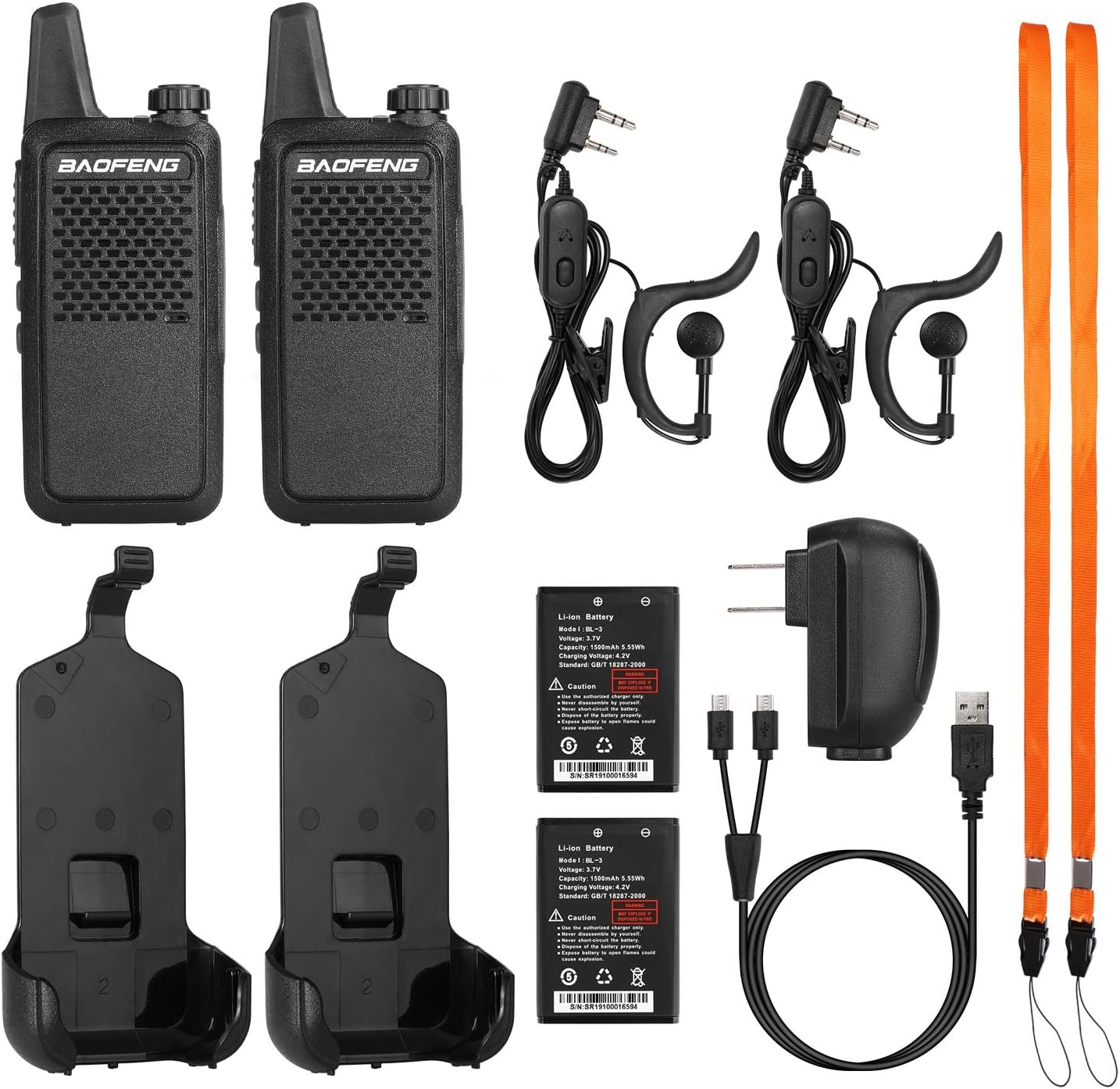
Figure 2.1: Complete package contents of the BAOFENG GT-22 walkie talkie set.
3. Product Overview
3.1. Radio Components
The BAOFENG GT-22 walkie talkie is designed for ease of use with essential controls and indicators.

Figure 3.1: Front and side views of the GT-22 radio.
- Antenna: Integrated for signal transmission and reception.
- Power/Volume Knob: Rotate to turn the radio on/off and adjust volume.
- Speaker/Microphone: For audio output and input.
- PTT (Push-to-Talk) Button: Press and hold to transmit, release to receive.
- Side Key 1 (Top): Function button, often used for VOX activation.
- Side Key 2 (Bottom): Function button, often used for monitoring.
- Micro USB Charging Port: For connecting the USB charging cable.
- Accessory Jack: For connecting earpieces or programming cables.
3.2. Dimensions and Weight
The GT-22 is designed to be compact and lightweight for portability.
- Dimensions: Approximately 5.3 inches (13.5 cm) in height (including antenna) x 2.0 inches (5 cm) in width.
- Weight: Approximately 0.23 lbs (104 grams) per radio.

Figure 3.2: GT-22 radio dimensions and weight.
4. Setup
4.1. Battery Installation
- Ensure the radio is powered off.
- Locate the battery compartment on the back of the radio.
- Align the 1500mAh Li-ion battery with the compartment contacts.
- Gently press the battery into place until it clicks securely.

Figure 4.1: Battery installation and specifications.
4.2. Charging the Battery
Before first use, fully charge the battery. A full charge typically takes about 3 hours and provides up to 40 working hours.
- Connect the USB Y-charging cable to the Micro USB port on the radio(s).
- Connect the other end of the USB Y-charging cable to the dual port USB charger adapter.
- Plug the adapter into a standard wall outlet. Alternatively, you can charge using a power bank, car charger, or laptop via the USB cable.
- The charging indicator light on the radio will show charging status (refer to radio's LED indicator for specifics, usually red for charging, green for charged).

Figure 4.2: Micro USB charging port and cable.

Figure 4.3: Various charging methods for the GT-22 radios.
4.3. Attaching Accessories
- Belt Clip: Slide the belt clip onto the designated slot on the back of the radio until it locks.
- Hand Strap: Thread the hand strap through the loop on the top or side of the radio.
- Earpiece: Insert the earpiece plug into the accessory jack on the side of the radio.
5. Operating Instructions
5.1. Power On/Off and Volume Adjustment
- To power on, rotate the Power/Volume knob clockwise until you hear a click and the radio announces the current channel.
- To adjust volume, continue rotating the Power/Volume knob.
- To power off, rotate the Power/Volume knob counter-clockwise until you hear a click.
5.2. Channel Selection
The GT-22 radios come pre-programmed with FRS channels 1-16. Use the channel up/down buttons (usually located on the side or front) to select your desired channel. The radio will announce the channel number.
Note: There is no key lock feature. Be mindful of accidental channel changes.
5.3. Transmitting and Receiving
- Ensure all radios you wish to communicate with are on the same channel and privacy code (CTCSS/DCS) settings.
- To transmit, press and hold the PTT (Push-to-Talk) button. Speak clearly into the microphone.
- Release the PTT button to stop transmitting and return to receive mode.
- When receiving a transmission, the radio's LED indicator may light up, and you will hear the incoming audio.
5.4. VOX (Voice Operated Exchange) Function
VOX allows for hands-free transmission without pressing the PTT button. When VOX is active, the radio will automatically transmit when it detects your voice.
- To activate VOX: Press the side key (often the top one) and the PTT button simultaneously.
- While holding them, turn on the radio. You should hear a "VOX on" voice prompt.
- To deactivate VOX: Repeat the same steps. You should hear "VOX off".
5.5. Squelch and CTCSS/DCS (Privacy Codes)
Squelch helps to eliminate background noise when no signal is being received. CTCSS (Continuous Tone-Coded Squelch System) and DCS (Digitally Coded Squelch) are privacy codes that filter out unwanted conversations from other radios not using the same code. Your GT-22 radios support these functions.
Note: Programming CTCSS/DCS codes typically requires specific software (e.g., CHIRP or BAOFENG GT-22 software) and a programming cable. Refer to the software's instructions for detailed programming steps.
6. Maintenance
6.1. Cleaning
- Wipe the radio's surface with a soft, damp cloth.
- Do not use harsh chemicals or abrasive cleaners.
- Ensure the radio is dry before use or charging.
6.2. Battery Care
- Always use the provided charger and battery.
- Do not short-circuit the battery terminals.
- Do not expose the battery to fire or extreme temperatures.
- If the radio will not be used for an extended period, remove the battery.
- Dispose of batteries according to local regulations.
6.3. Storage
- Store the radio in a cool, dry place away from direct sunlight.
- Avoid storing in dusty or humid environments.
7. Troubleshooting
| Problem | Possible Cause | Solution |
|---|---|---|
| Radio does not power on. | Battery is not installed correctly or is depleted. | Ensure battery is properly seated. Charge the battery fully. |
| Cannot transmit or receive. | Incorrect channel or privacy code. Radios out of range. | Verify all radios are on the same channel and CTCSS/DCS settings. Move closer to the other radio. |
| Poor audio quality or static. | Weak signal, interference, or low battery. | Move to an open area. Charge the battery. Adjust squelch level if programmable. |
| Accidental channel changes. | No key lock feature on this model. | Be mindful of button presses. Consider programming a limited channel set if accidental changes are frequent. |
| "Battery Low" warning. | Battery is running low. | Recharge the radio immediately. |
8. Specifications
| Feature | Detail |
|---|---|
| Model | GT-22 |
| Frequency Range | FRS (Family Radio Service) |
| Number of Channels | 16 |
| Output Power | 2W/0.5W (High/Low) |
| Battery Capacity | 1500 mAh Li-ion |
| Working Voltage | DC 3.7V |
| Sensitivity | <0.16 μV |
| Squelch Selectivity | <0.2 μV |
| Estimated Battery Life | Up to 40 working hours |
| Charging Time | Approximately 3 hours |
| Dimensions | 8.46 x 6.81 x 2.17 inches (Product package dimensions) |
| Item Weight | 1.08 pounds (Product package weight) |
| Special Features | VOX, TOT, Squelch, Voice Broadcast, QT/DQT (CTCSS/DCS), Busy Channel Lockout, Battery Save Function, Low Battery Indication |
9. Safety and Compliance Information
9.1. FCC Compliance
This device complies with Part 95 of the FCC Rules. Its FCC ID is 2AJGM-BFR5. Operation is subject to the condition that this device does not cause harmful interference.
Important Note on Power Levels and Frequencies:
While the BAOFENG GT-22 is FCC certified for FRS, users should be aware of specific regulations:
- FCC regulations allow FRS radios to transmit at 2W on channels 1-7 and 15-16.
- Channels 8-14 are restricted to 0.5W.
- The GT-22 may come factory-set to transmit at 2W on channels 8-14, which is not compliant with FRS regulations. Users are responsible for ensuring their radio operates within legal power limits for each channel.
- The radio is programmable and can potentially be set to frequencies outside the legal FRS band. It is strictly prohibited and illegal to transmit with this radio on frequencies other than the specific FRS frequencies allocated by the FCC.
- Users who wish to adjust power levels or verify frequency settings may need a programming cable and software (e.g., CHIRP or BAOFENG GT-22 software) to ensure compliance.
For detailed information on FRS regulations, please visit the FCC website.
9.2. General Safety Precautions
- Do not operate the radio in explosive atmospheres (e.g., near flammable gas, dust particles, metallic powders).
- Do not modify the radio. Unauthorized modifications can void your warranty and violate FCC regulations.
- Keep the radio away from medical devices to avoid interference.
- Avoid exposing the radio to extreme temperatures, direct sunlight, or water. This product is not water-resistant.
- Use only BAOFENG approved accessories.