
Introduction
This document provides instructions for the Easytry123 replacement remote control, model Easytry8691, designed for use with specific York air conditioner units. This remote operates using infrared technology. Please note that as a replacement unit, some advanced functions of your original air conditioner remote may not be supported.
Setup
Battery Installation
The remote control requires two AAA batteries (not included).
- Locate the battery compartment cover on the back of the remote control.
- Slide the cover downwards to open the compartment.
- Insert two AAA batteries, ensuring the positive (+) and negative (-) terminals align correctly with the markings inside the compartment.
- Slide the battery compartment cover back into place until it clicks securely.
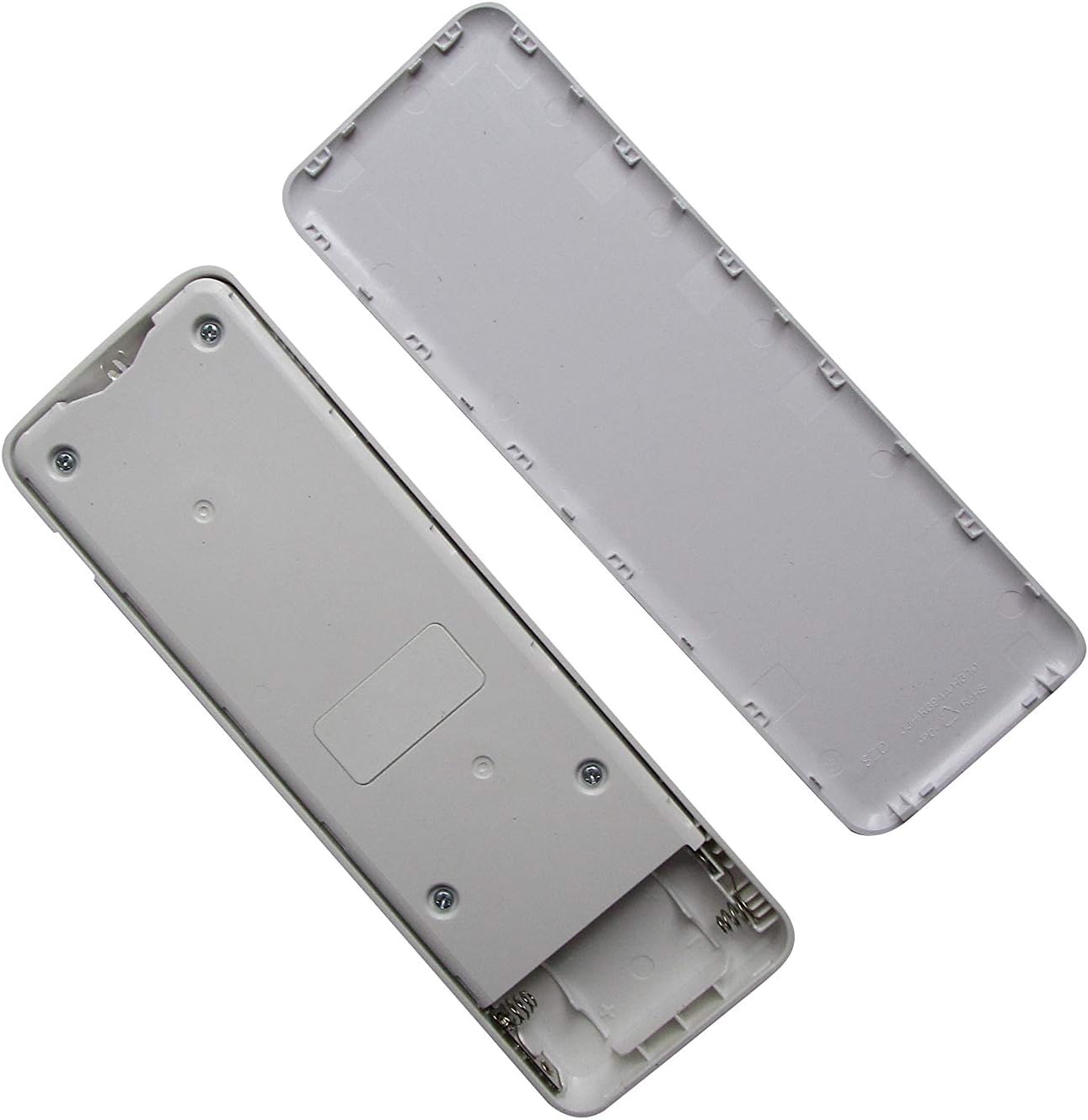
Image: Rear view of the Easytry123 remote control with the battery compartment open, showing the slots for two AAA batteries.
Operating Instructions
Point the remote control directly at the air conditioner's receiver when operating. Ensure there are no obstructions between the remote and the unit.

Image: Front view of the Easytry123 remote control, displaying all buttons and the LCD screen.
Button Functions
- ON/OFF: Press to turn the air conditioner on or off.
- MODE: Cycles through operating modes (e.g., Cool, Heat, Fan, Dry, Auto).
- FAN: Adjusts fan speed (e.g., Auto, Low, Medium, High).
- SLEEP: Activates or deactivates sleep mode, which adjusts temperature for comfortable sleep and saves energy.
- SILENCE: Reduces fan noise for quieter operation.
- LED: Turns the display light on the air conditioner unit on or off.
- TURBO: Activates rapid cooling or heating for quick temperature changes.
- TIMER: Sets a timer for the air conditioner to turn on or off automatically.
- CLOCK: Sets the current time on the remote control's display.
- Up/Down Arrows (Temperature/Selection): Adjusts the temperature setting or navigates menu options.
- FOLLOW ME / ION: Activates the "Follow Me" function (remote acts as a thermostat) or the Ionizer function (if available on the AC unit).
- SWING (Vertical): Controls the vertical swing of the air deflector.
- SWING (Horizontal): Controls the horizontal swing of the air deflector.
Maintenance
Battery Replacement
Replace batteries when the remote control's display dims or the air conditioner no longer responds reliably. Always replace both batteries simultaneously with new AAA alkaline batteries.
Cleaning
Wipe the remote control with a soft, dry cloth. Do not use liquid cleaners or abrasive materials, as these can damage the remote.
Troubleshooting
- Remote not responding to AC unit:
- Check if the batteries are inserted correctly and have sufficient charge. Replace if necessary.
- Ensure there are no obstructions between the remote control and the air conditioner's infrared receiver.
- Verify that the remote control is pointed directly at the AC unit.
- Confirm that the air conditioner unit is powered on.
- Note: As a replacement remote, some specific functions of your original AC unit might not be fully supported.
- Display is dim or blank:
- Replace the batteries with new AAA alkaline batteries.
Specifications
- Model Number: Easytry8691
- Brand: Easytry123
- Connectivity Technology: Infrared
- Controller Type: Button Control
- Compatible Devices: York Air Conditioners (RG94A10/BGEF, YHKF12YEEBMHO-X, YHKF18YEEBMHO-X, YHKE09XE-MJ-RX, YHKE12XE-MJ-RX, YHKE18XE-MJ-RX, YHKE24XE-MJ-RX)
- Power Source: 2 x AAA Alkaline Batteries (not included)
- Special Feature: Ergonomic design
Note: Specifications are subject to change without prior notice.