
1. Introduction and Overview
This manual provides essential information for the USARMT replacement remote control, designed for seamless operation with compatible LG Roku TVs. This remote is pre-programmed and requires no complex setup, offering a straightforward solution for controlling your television.

Image 1: Front view of the USARMT Replacement Remote Control.
2. Compatibility
The USARMT LF-RCRUS-16 replacement remote control is specifically designed to be compatible with the following LG Roku TV models:
- 5313X
- 55LF5700
- 55LF5700UA
- 65LF5700
- 65LF5700UA
It also functions with LG HAIER ROKU TV models. This remote is exclusively for ROKU TV systems. Please verify that your television is a standard LG or Haier Roku TV.
Important Note:
- This remote is NOT compatible with standalone ROKU players.
- It will NOT work with any Roku streaming devices (e.g., Roku Streaming Players, Roku Stick).
- This is a standard IR (Infrared) remote and does NOT feature voice control or a headphone jack. It is NOT an RF (Radio Frequency) remote.

Image 2: Visual guide illustrating compatibility with Roku TVs and incompatibility with Roku Boxes or Sticks.
3. Setup Instructions
This USARMT replacement remote control is designed for immediate use with compatible LG Roku TVs. No programming or pairing is required.
- Insert Batteries: Open the battery compartment on the back of the remote control. Insert two AAA batteries, ensuring correct polarity (+/-). Batteries are not included with the remote.
- Begin Operation: Once batteries are inserted, the remote is ready to control your compatible LG Roku TV. Point the remote directly at your television for optimal performance.
4. Operating Instructions and Key Features
The remote control features a standard layout for intuitive navigation and control of your LG Roku TV. Below is a guide to the main buttons and their functions:
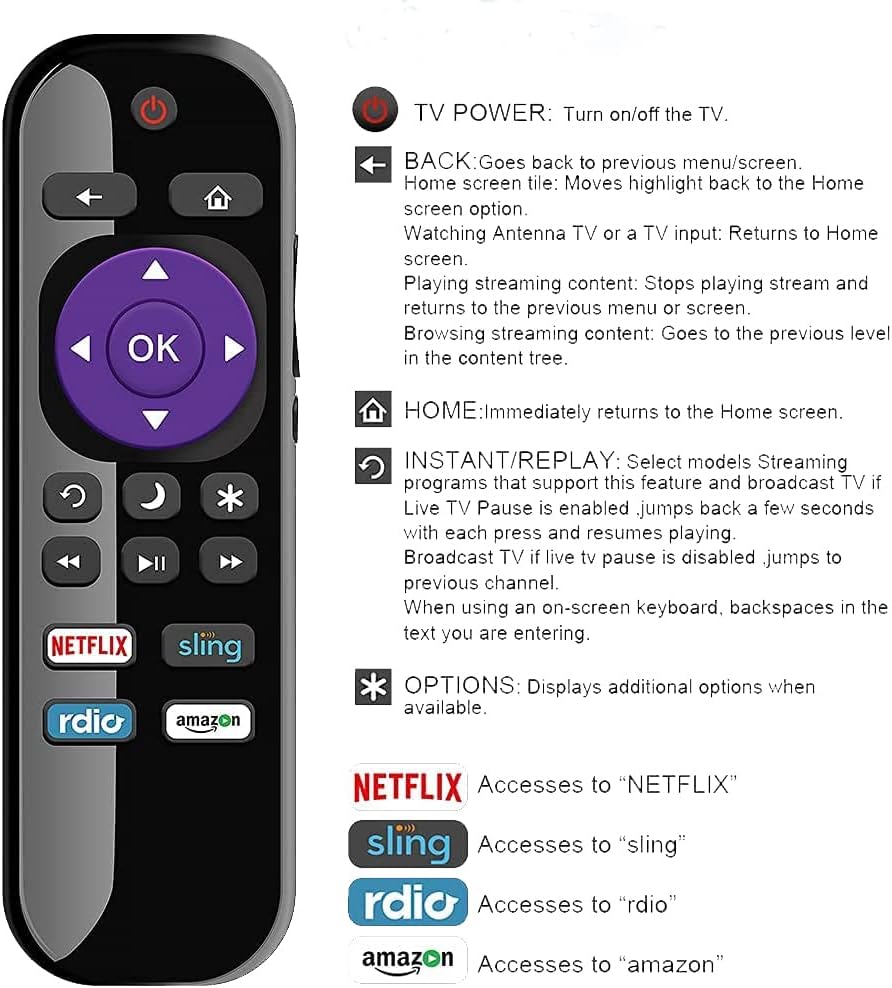
Image 3: Detailed diagram of the remote control buttons and their corresponding functions.
- TV POWER: Turns the television on or off.
- BACK: Navigates back to the previous menu or screen. When watching Antenna TV or a TV input, it returns to the Home screen. During streaming, it stops playback and returns to the previous menu, or goes to the previous level in the content tree.
- HOME: Immediately returns to the Home screen.
- INSTANT REPLAY: Select models supporting this feature will jump back a few seconds with each press. If Live TV Pause is enabled, it resumes playing. If Live TV Pause is disabled, it jumps to the previous channel. When using an on-screen keyboard, this button acts as a backspace.
- OPTIONS: Displays additional options when available.
- Directional Pad (Arrows & OK): Used for navigating menus and selecting items. The 'OK' button confirms selections.
- Volume Up/Down: Adjusts the television's volume.
- Mute: Mutes or unmutes the television's audio.
- Channel Up/Down: Changes television channels.
- Dedicated App Buttons: Direct access buttons for popular streaming services including NETFLIX, SLING, Rdio, and Amazon.
5. Maintenance
To ensure the longevity and optimal performance of your remote control, follow these maintenance guidelines:
- Battery Replacement: Replace batteries when the remote's response becomes sluggish or stops working. Always replace both batteries simultaneously with new AAA batteries.
- Cleaning: Use a soft, dry cloth to clean the remote's surface. Avoid using liquid cleaners or abrasive materials, as these can damage the remote.
- Storage: Store the remote in a dry place, away from extreme temperatures, direct sunlight, and moisture.
- Handling: Avoid dropping the remote or exposing it to strong impacts, which can damage internal components.
6. Troubleshooting
If you encounter issues with your USARMT replacement remote control, please refer to the following common problems and solutions:
| Problem | Possible Cause | Solution |
|---|---|---|
| Remote not responding | Dead or incorrectly inserted batteries. Obstruction between remote and TV. | Replace batteries with new AAA batteries, ensuring correct polarity. Remove any objects blocking the remote's signal path to the TV's IR receiver. |
| Some buttons not working | Dirty contacts under buttons. Remote not fully compatible with a specific TV function. | Clean the remote surface. Verify TV model compatibility (refer to Section 2). Note that some advanced features like voice control or headphone jack are not supported by this IR remote. |
| TV not turning on/off | Remote out of range. TV's IR receiver issue. | Ensure you are within a reasonable range and have a clear line of sight to the TV. Test with another remote if available to rule out TV issues. |
7. Specifications
- Brand: USARMT
- Model Number: USARMT Replaced LG LF-RCRUS-16
- Item Weight: 2 ounces
- Connectivity Technology: Infrared (IR)
- Number of Buttons: 35
- Special Feature: Ergonomic design
- Compatible Devices: Television (specifically LG Roku TVs as listed in Section 2)
8. Official Product Videos
No official seller-created product videos are available for this item at this time.
9. Warranty and Support
For warranty information and customer support regarding your USARMT replacement remote control, please refer to the documentation provided with your purchase or contact the manufacturer directly. Specific warranty terms and support channels may vary.