1. Introduction
This manual provides detailed instructions for the proper use and maintenance of your ACEIRMC SOIC16 SOP16 Flash Chip IC Test Clip. Please read this manual thoroughly before operation to ensure correct usage and to prevent damage to the device or the integrated circuit (IC) being tested.
2. Product Overview
The ACEIRMC SOIC16 SOP16 Flash Chip IC Test Clip is designed to establish a temporary, non-invasive connection between an on-board surface mount SOIC16 or SOP16 integrated circuit (IC) and an external programmer or testing device. This tool facilitates in-circuit programming or testing without the need for desoldering the IC from the printed circuit board (PCB).
Key features include:
- Provides a reliable connection to on-board SOIC16/SOP16 ICs.
- Gold-plated contacts for optimal signal integrity.
- Spring-loaded design for secure attachment.
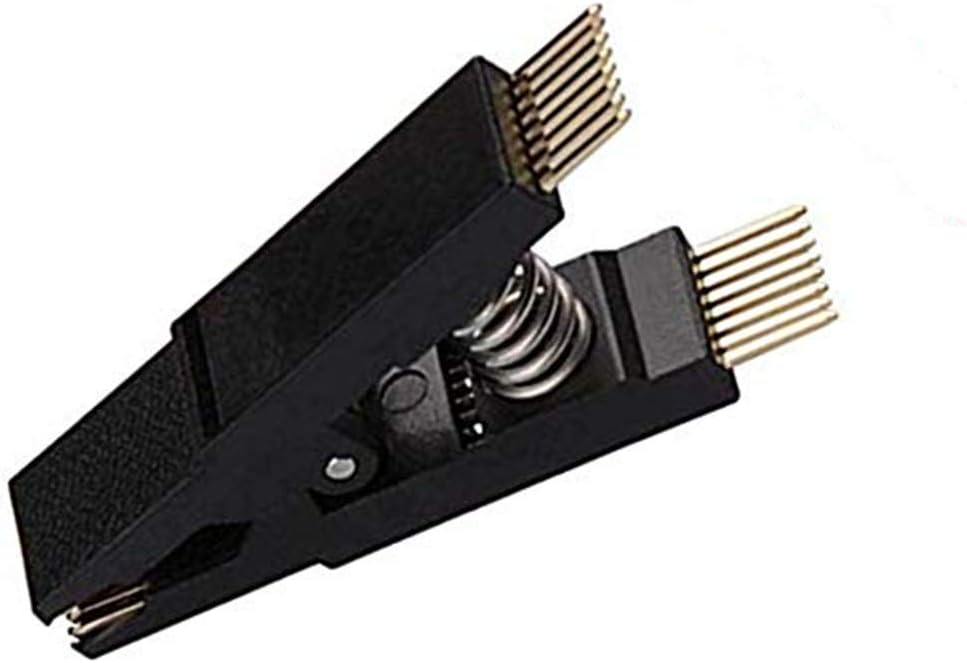
Figure 2.1: Main view of the ACEIRMC SOIC16 SOP16 Flash Chip IC Test Clip.
3. Specifications
| Feature | Specification |
|---|---|
| Contacting Material | Copper Alloy |
| Contacting Plating | Gold |
| Connector Type | Test Clip |
| Mounting Type | PC Board |
| Case Style | SOIC |
| Pin Format | SOIC 16 |
| Lead Spacing | 2.54mm |
| Row Pitch | 3.81mm |
| IC Lead Pitch | 1.27mm |
| Item Weight | 0.352 ounces |
| Package Dimensions | 2.24 x 1.18 x 0.43 inches |
4. Setup
Before using the test clip, ensure that the target IC and the surrounding area on the PCB are clean and free of debris.
- Identify Target IC: Locate the SOIC16 or SOP16 IC on your PC board that requires programming or testing.
- Power Off: Ensure that the target device and its power supply are completely turned off and disconnected from any power source. This prevents damage to the IC, the clip, or the programmer.
- Align Clip: Carefully align the pins of the test clip with the corresponding pins of the IC. The clip is designed to fit over the IC package.
- Attach Clip: Gently compress the spring-loaded clip and position it over the IC. Release the clip slowly, ensuring that each pin of the clip makes firm contact with the corresponding pin of the IC. Verify that no pins are bent or misaligned.

Figure 4.1: Open view of the test clip, showing the internal contact pins.

Figure 4.2: The test clip held by hand, illustrating its compact size.
5. Operating Instructions
Once the test clip is securely attached to the target IC and connected to your programmer or testing device:
- Connect Programmer: Connect your external programmer or testing device to the output pins of the test clip. Ensure the connection is secure and correctly oriented.
- Power On: Power on the target device and the programmer.
- Perform Operation: Initiate the desired programming, reading, or testing operation using your external device's software. Follow the instructions provided with your programmer for specific procedures.
- Monitor Process: Observe the operation for any errors or warnings indicated by your programmer.
- Power Off: After the operation is complete, power off the target device and the programmer.
- Remove Clip: Carefully compress the test clip and gently lift it straight off the IC to avoid bending the IC pins or the clip's contacts.

Figure 5.1: Close-up view of the gold-plated contact pins on the test clip.
6. Maintenance
Proper maintenance ensures the longevity and reliability of your test clip:
- Cleaning: Periodically inspect the gold-plated contacts for dust, dirt, or residue. Use a soft, lint-free cloth and a small amount of isopropyl alcohol to gently clean the contacts if necessary. Ensure the clip is dry before storage or next use.
- Storage: Store the test clip in a dry, dust-free environment, preferably in its original packaging or a protective case, to prevent damage to the pins.
- Handling: Avoid applying excessive force when attaching or detaching the clip, as this can bend or damage the delicate pins.
- Inspection: Regularly inspect the pins for any signs of bending, corrosion, or wear. Damaged pins can lead to unreliable connections.

Figure 6.1: Side view of the test clip, highlighting the spring mechanism.
7. Troubleshooting
If you encounter issues while using the ACEIRMC SOIC16 SOP16 Flash Chip IC Test Clip, consider the following:
- No Connection or Read Errors:
- Verify that the test clip pins are correctly aligned with the IC pins.
- Ensure the clip is fully and securely engaged on the IC.
- Confirm that the target device's power is off during clip attachment and removal.
- Inspect the clip's pins for any damage, bending, or debris that might obstruct contact.
- Check the connection between the test clip and your programmer.
- Ensure your programmer software settings are correct for the specific IC model.
- Clip Not Holding Securely:
- Confirm that the IC package type (SOIC16/SOP16) matches the clip.
- Avoid over-compressing the clip, which can weaken the spring mechanism over time.
- If the clip has been used extensively, the spring tension might decrease. Consider replacement if consistent issues persist.
8. Warranty and Support
For technical assistance, product support, or inquiries regarding warranty information, please contact ACEIRMC customer service through the retailer where the product was purchased or visit the official ACEIRMC website. Please have your product model and purchase details available when contacting support.


