
Helmet MXA300.1
Memphis Audio MXA300.1 Marine/Powersport Audio Amplifier User Manual
Model: MXA300.1
Introduction
Thank you for choosing the Memphis Audio MXA300.1 Monoblock Marine/Powersport Audio Amplifier. This amplifier is engineered for durability and high performance in challenging environments, including marine and powersport applications. Its robust design features conformal circuit boards, sealed controls, and upgraded terminals, ensuring reliable operation in wet and harsh conditions. This manual provides essential information for proper installation, operation, and maintenance of your amplifier.
Safety Information
- Always disconnect the vehicle's battery before installing or servicing any electrical components.
- Ensure all wiring is properly insulated and secured to prevent short circuits and damage.
- Install the amplifier in a location that allows for adequate ventilation to prevent overheating.
- Avoid installing the amplifier in areas exposed to direct sunlight or excessive heat.
- Use appropriate gauge wiring as recommended for your audio system to ensure optimal performance and safety.
- This amplifier is designed for 12V DC negative ground systems. Do not attempt to use it with other voltage systems.
- Refer to a professional installer if you are unsure about any installation steps.
Features
- IP66 Water Resistant: Designed to withstand water jets and dust, making it suitable for marine and powersport environments.
- High/Low Level Inputs: Versatile input options for compatibility with various head units.
- Sealed Connectors and Controls: Enhanced protection against moisture and contaminants.
- Compact Footprint: Ideal for installations where space is limited.
- Subsonic Filter: Helps protect subwoofers from damaging ultra-low frequencies.
- Durable Construction: Conformal circuit boards and upgraded terminals for long-lasting performance.
Setup and Installation
Proper installation is crucial for the performance and longevity of your MXA300.1 amplifier. Follow these guidelines carefully.
Mounting Location
Choose a mounting location that is dry, well-ventilated, and protected from direct sunlight. While the amplifier is water-resistant, avoiding direct exposure to extreme elements will prolong its life. The amplifier is designed for surface mounting.
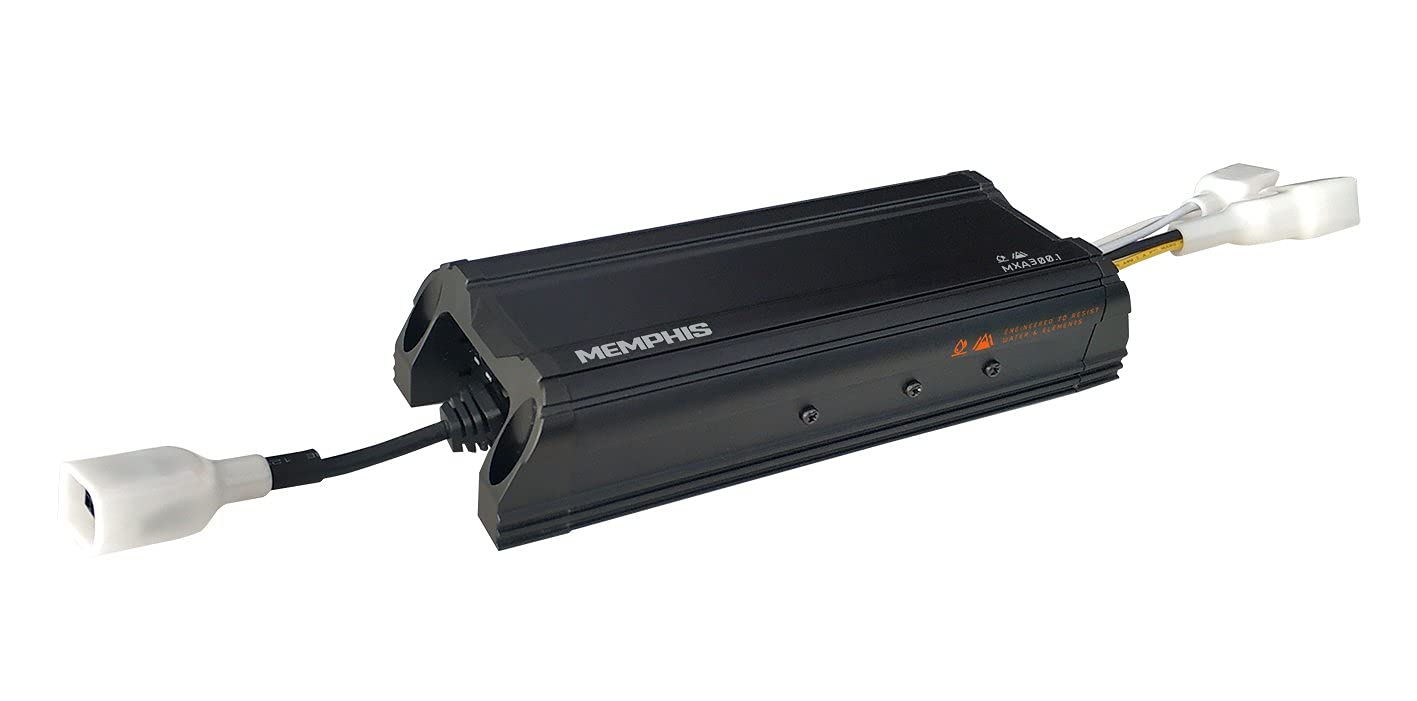
Figure 1: Top-down view of the Memphis Audio MXA300.1 amplifier, highlighting its compact black casing and integrated wiring harnesses for power and signal connections.
Wiring Connections
Ensure all connections are secure and properly insulated. The amplifier features sealed connections for enhanced element resistance.
- Power Connection: Connect the positive (+) power wire to the vehicle's battery (or power distribution block) via an appropriate fuse (not included). The recommended amp kit is 8GKIT. Connect the negative (-) ground wire to a clean, unpainted metal surface on the vehicle chassis.
- Remote Turn-On: Connect the remote turn-on wire from your head unit to the amplifier's remote input.
- Audio Input: Use either the high-level (speaker level) inputs or low-level (RCA) inputs from your head unit. Ensure correct polarity for all connections.
- Speaker Output: Connect your subwoofer(s) to the amplifier's speaker output terminals. Observe correct polarity.

Figure 2: Side view of the Memphis Audio MXA300.1 amplifier, illustrating the various input and output connections, including power, ground, remote, and audio signal ports.
Operation
Once properly installed, your MXA300.1 amplifier is ready for operation. The amplifier features a subsonic filter to optimize subwoofer performance.
- Power On/Off: The amplifier will power on automatically when it receives a signal from the remote turn-on wire from your head unit. It will power off when the head unit is turned off.
- Gain Adjustment: Adjust the gain control to match the output voltage of your head unit. Start with the gain at minimum and slowly increase it until you achieve clear, undistorted sound at your desired volume level.
- Subsonic Filter: The built-in subsonic filter helps protect your subwoofer by filtering out extremely low frequencies that are inaudible and can cause damage. This filter is pre-set for optimal performance.

Figure 3: A different perspective of the Memphis Audio MXA300.1 amplifier, emphasizing its compact dimensions and the rugged design suitable for harsh environments.
Maintenance
The MXA300.1 amplifier is designed for minimal maintenance due to its robust, sealed construction. However, periodic checks can ensure optimal performance.
- Cleaning: Periodically wipe the exterior of the amplifier with a soft, damp cloth to remove dust and dirt. Do not use harsh chemicals or abrasive cleaners.
- Connection Checks: Annually inspect all wiring connections to ensure they remain tight and free from corrosion.
- Ventilation: Ensure that the area around the amplifier remains clear of obstructions to allow for proper airflow and heat dissipation.
Troubleshooting
| Problem | Possible Cause | Solution |
|---|---|---|
| No Power/No Sound | Blown fuse; Loose power/ground connection; No remote turn-on signal; Amplifier in protect mode. | Check and replace fuse; Verify all power and ground connections are secure; Check remote wire connection and head unit output; Disconnect power for 30 seconds to reset amplifier. |
| Distorted Sound | Gain set too high; Speaker impedance too low; Poor ground connection; Damaged speaker. | Reduce gain setting; Verify speaker impedance matches amplifier specifications; Ensure ground connection is clean and secure; Test speakers individually. |
| No Bass Output | Incorrect wiring polarity for subwoofer; Subwoofer not connected; Low-pass filter setting incorrect (if applicable). | Check subwoofer wiring polarity; Verify subwoofer connection; Ensure head unit or amplifier settings are correct for bass output. |
| Amplifier Overheating | Insufficient ventilation; Speaker impedance too low; Prolonged high volume use. | Ensure adequate airflow around amplifier; Verify speaker impedance; Reduce volume or allow amplifier to cool down. |
Specifications
| Feature | Specification |
|---|---|
| Model | MXA300.1 |
| RMS Power @ 4Ω | 190 x 1 Watts |
| RMS Power @ 2Ω | 300 x 1 Watts |
| THD% @ 4Ω | <1% |
| Frequency Response | 19Hz - 280Hz |
| Dimensions (L x W x H) | 8.625 x 3.25 x 1.75 inches |
| Input Range | 350mV - 11V |
| Recommended Amp Kit | 8GKIT |
| Item Weight | 2.65 Pounds |
| Voltage | 11 Volts (DC) |
| Minimum Supply Voltage | 350 Millivolts |
| Mounting Type | Surface Mount |
Warranty Information
The Memphis Audio MXA300.1 amplifier comes with a 2-year warranty from the date of purchase. This warranty covers defects in materials and workmanship under normal use. It does not cover damage caused by improper installation, accident, misuse, abuse, negligence, or unauthorized modification. Please retain your proof of purchase for warranty claims.
Customer Support
For technical assistance, troubleshooting beyond this manual, or warranty inquiries, please contact Memphis Audio customer support. Visit the official Memphis Audio website for the most up-to-date contact information and additional resources.
Website: www.memphiscaraudio.com (Example link, actual link may vary)
Related documentsMXA300.1


Ask a question about this manual
Ask about setup, troubleshooting, compatibility, parts, safety, or missing instructions. Manuals+ will review the question and use this page’s manual context to help answer it.