
CaDA C51058W
CaDA C51058W Remote Controlled Wheel Loader Instruction Manual
Model: C51058W | Brand: CaDA
Introduction
This manual provides comprehensive instructions for assembling, operating, and maintaining your CaDA C51058W Remote Controlled Wheel Loader. Please read this manual carefully before beginning assembly or operation to ensure proper use and longevity of the product.
The CaDA C51058W is a remote-controlled front loader/wheel loader building set consisting of 491 parts. It features two motors, a rechargeable battery pack, and a 2.4 GHz remote control. The model is designed to be compatible with building blocks and parts from the Lego Technic series.

Image: The complete CaDA C51058W Remote Controlled Wheel Loader, showcasing the assembled model, its packaging, and the included remote control unit.
Safety Information
WARNING: This product contains small parts and is a toy. Adult supervision is highly recommended, especially for children under the age of 6, to prevent choking hazards and ensure safe operation.
- Keep small parts away from young children.
- Do not operate the model near water or in wet conditions.
- Ensure all connections are secure before operation.
- Use only the specified batteries and charging methods.
- Avoid direct impact or dropping the model.
Package Contents
Verify that all components are present before beginning assembly:
- 491 Building Blocks and Parts
- 2 x Motors
- 1 x Rechargeable Battery Pack (500 mAh)
- 1 x 2.4 GHz Remote Control
- 1 x Micro-USB Charging Cable
- 1 x Printed Instruction Manual (47 pages)

Image: The front of the product box, displaying the CaDA C51058W Wheel Loader, indicating 491 pieces and suitable for ages 6+.
Setup and Assembly
The CaDA C51058W comes with a detailed 47-page printed instruction manual. Follow the step-by-step diagrams in the manual for proper assembly.
- Unpack Components: Carefully remove all parts from the packaging. Organize them by type or color to facilitate assembly.
- Review Manual: Before starting, familiarize yourself with the assembly steps outlined in the included instruction booklet.
- Battery Installation (Remote Control):
- Locate the battery compartment on the remote control unit.
- Insert 2 x AA batteries, ensuring correct polarity (+/-).
- Close the battery compartment securely.

Image: A detailed view of the 2.4 GHz remote control unit for the CaDA C51058W Wheel Loader, showing its various controls.
- Battery Pack Charging:
- Connect the included micro-USB cable to the battery pack.
- Connect the other end of the cable to a suitable USB power source (e.g., computer USB port, USB wall adapter).
- Allow the battery pack to fully charge before first use. Charging time may vary.
- Assembly Steps: Follow the visual instructions in the manual. The manual guides you through connecting the 491 building blocks, motors, and battery pack to form the complete wheel loader.
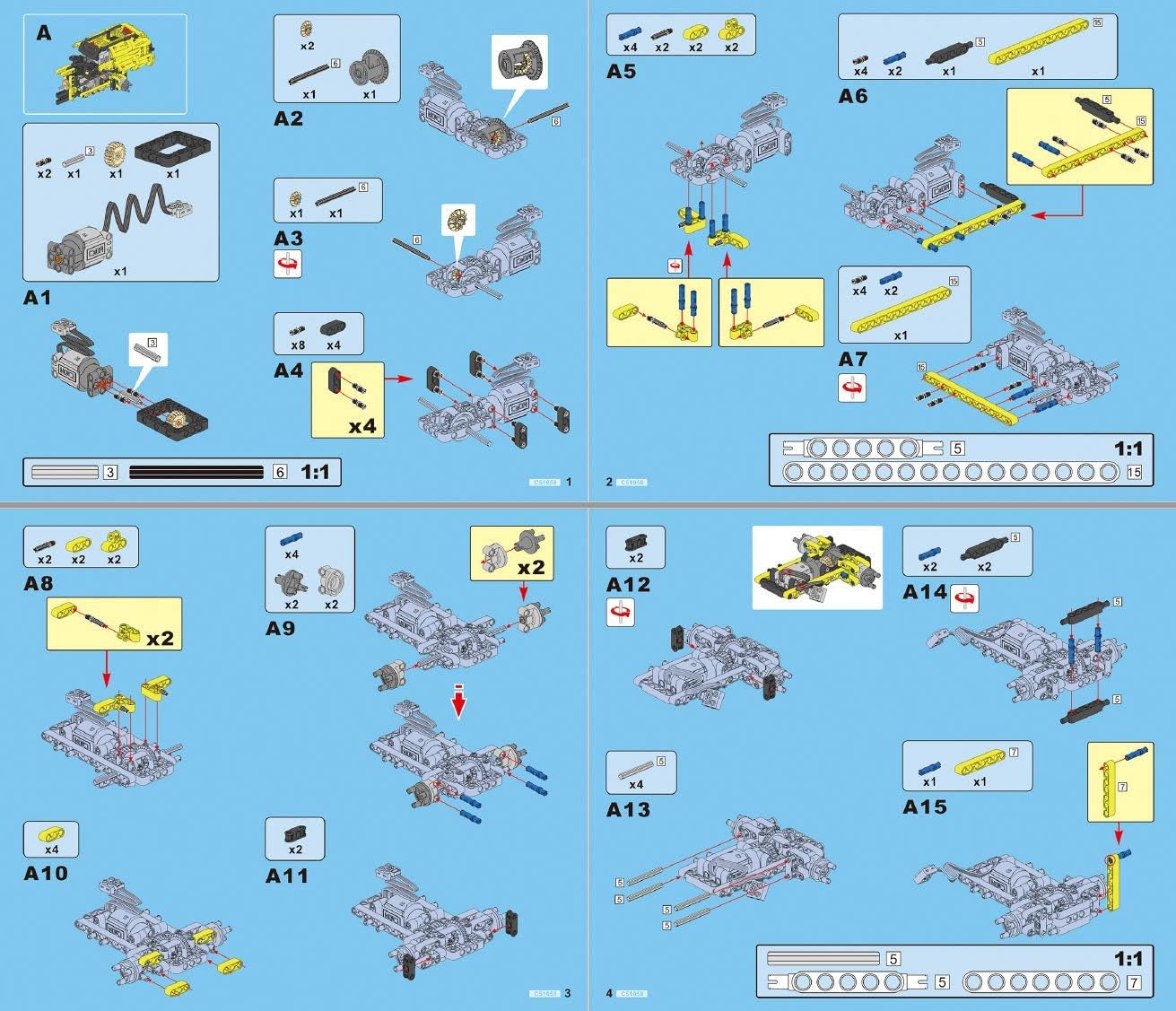
Image: A page from the instruction manual illustrating early assembly steps, detailing how to connect various building components.
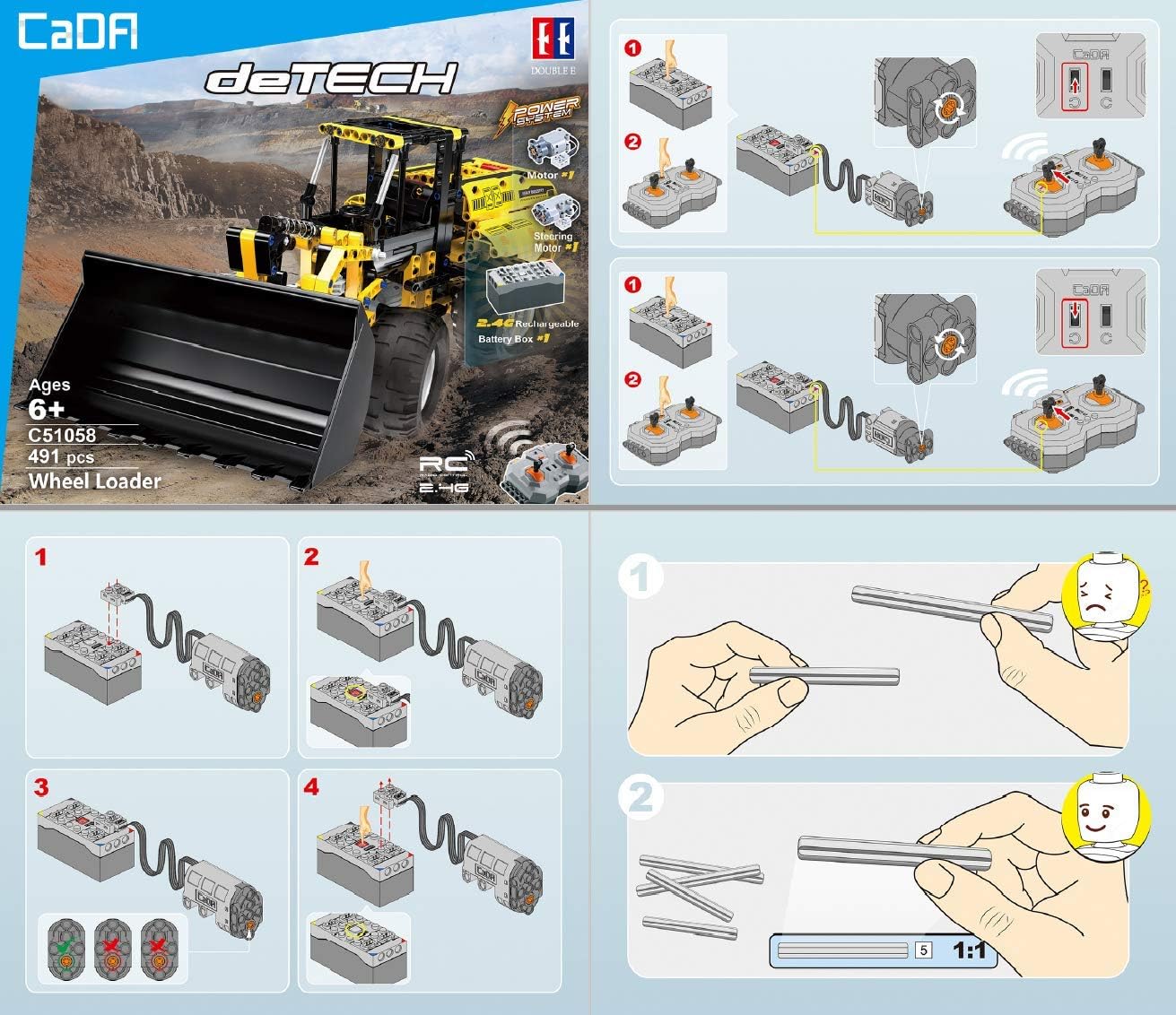
Image: A section of the instruction manual demonstrating the correct wiring and connection of the motors, battery box, and remote control receiver.

Image: A page from the instruction manual displaying various views of the assembled model and a comprehensive parts list.
Operating Instructions
Once assembled and powered, your CaDA C51058W Wheel Loader is ready for operation.
- Power On: Ensure the battery pack is connected to the wheel loader and fully charged. Turn on the power switch on the battery pack/loader. Turn on the remote control.
- Pairing: The remote control and the wheel loader should automatically pair. If not, refer to the manual for specific pairing instructions.
- Driving Controls:
- Use the left joystick/lever on the remote control to move the wheel loader forward and backward.
- Use the right joystick/lever to steer the wheel loader left and right.
- Bucket and Arm Controls: The wheel loader features mechanisms for controlling the bucket and arm.
- Specific levers or buttons on the remote control operate the raising and lowering of the bucket arm.
- Additional controls allow for tilting and rotating the bucket.

Image: A side view of the CaDA C51058W Wheel Loader, demonstrating the bucket in a raised position, highlighting its operational range.

Image: The rear of the product box, illustrating key operational features such as controllable bucket, raise/lower bucket arm, switching engine compartment, and controllable steering wheel.
- Engine Compartment: The model includes a switching engine compartment for added realism and access.
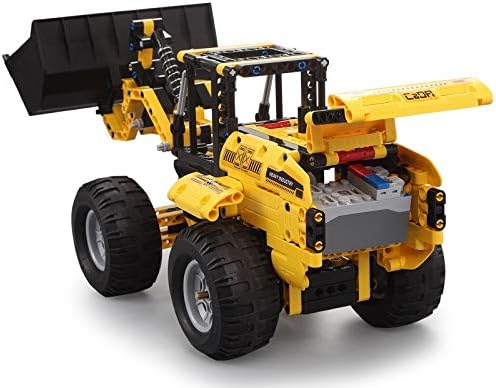
Image: A rear view of the CaDA C51058W Wheel Loader, showing the detailed engine compartment area, which can be opened for access.
Maintenance
Regular maintenance ensures the longevity and optimal performance of your CaDA C51058W Wheel Loader.
- Cleaning: Use a soft, dry cloth to wipe down the model. Avoid using water or cleaning solutions that could damage the electronic components or plastic.
- Storage: Store the model in a cool, dry place away from direct sunlight and extreme temperatures.
- Battery Care:
- Fully charge the battery pack before long-term storage.
- Remove AA batteries from the remote control if not in use for an extended period to prevent leakage.
- Part Inspection: Periodically check for any loose or damaged parts. Replace broken components as needed.
Troubleshooting
If you encounter issues with your CaDA C51058W, refer to the following common problems and solutions:
| Problem | Possible Cause | Solution |
|---|---|---|
| Model does not respond to remote control. |
|
|
| Motors are weak or slow. |
|
|
| Parts are breaking easily. |
|
Specifications
| Feature | Detail |
|---|---|
| Model Number | C51058W |
| Brand | CaDA |
| Number of Parts | 491 |
| Product Dimensions (L x W x H) | 424 x 160 x 174 mm (assembled) |
| Product Weight | 1.41 kg |
| Material | 100% ABS Plastic |
| Color | Yellow |
| Motors | 2 (drive and steering) |
| Battery Pack | 500 mAh Rechargeable (via Micro-USB) |
| Remote Control Type | 2.4 GHz |
| Remote Control Batteries | 2 x AA (not included) |
| Recommended Age | 6 years and older |
| Educational Goals | Building skills, Logical thinking, Motor skills, Problem-solving skills, Technical skills |
| Assembly Required | Yes |
Warranty and Support
For warranty information, replacement parts, or technical support, please contact CaDA customer service. Refer to the product packaging or the official CaDA website for contact details.
Official building instructions can also be found at www.doubleeagle.cc.
Ask a question about this manual
Ask about setup, troubleshooting, compatibility, parts, safety, or missing instructions. Manuals+ will review the question and use this page’s manual context to help answer it.