
Introduction
The EWA A101C Mini Bluetooth Speaker is a compact and versatile audio device designed for portable use. It features Bluetooth connectivity for wireless audio streaming from smartphones, tablets, and computers. Additionally, it includes an FM radio function and a microSD card slot for MP3 playback, offering standalone audio capabilities. Its robust metallic casing, protected by silicone, provides enhanced resistance to impacts and drops. The speaker is also capable of stereo pairing with a second A101C unit for an expanded sound experience.

Figure 1: EWA A101C Mini Bluetooth Speaker on a smartphone, demonstrating its compact size.
Package Contents
Please check the box for the following items:
- EWA A101C Mini Bluetooth Speaker
- Micro-USB Charging Cable
- Quick Start Guide
Setup
3.1 Charging the Speaker
Before first use, fully charge the speaker. Connect the supplied Micro-USB cable to the charging port on the speaker and the other end to a USB power adapter (not included) or a computer's USB port.

Figure 2: Micro-USB charging port.
The charging indicator light will illuminate during charging and turn off or change color when fully charged (refer to the Quick Start Guide for specific indicator behavior).
3.2 Power On/Off
- To Power On: Press and hold the power button (usually located on the bottom or side) until you hear an audible prompt or see an indicator light.
- To Power Off: Press and hold the power button again until you hear an audible prompt or the indicator light turns off.
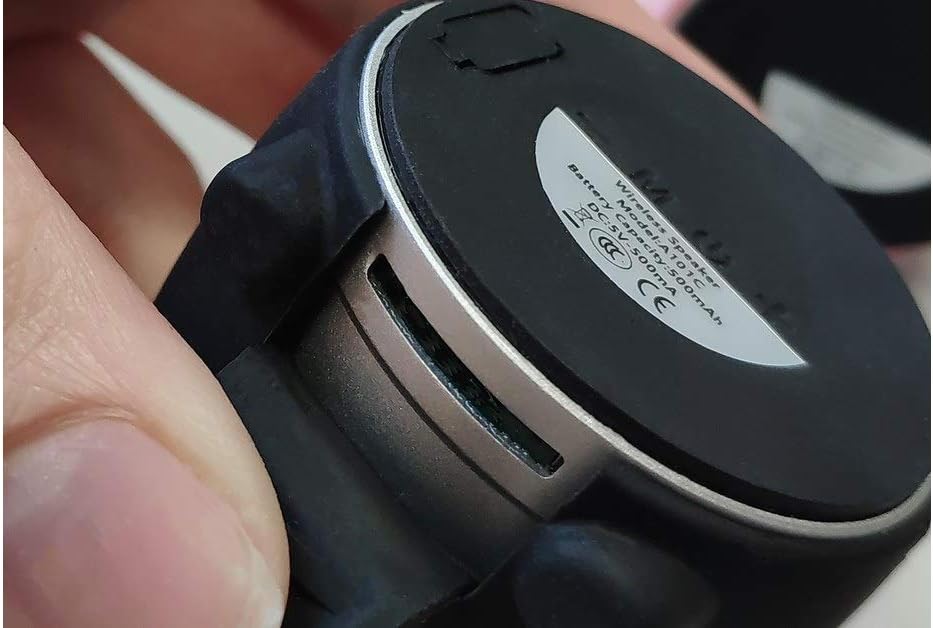
Figure 3: Speaker bottom with power button and product information label.
3.3 Bluetooth Pairing
- Ensure the speaker is powered on and in Bluetooth pairing mode (indicated by a flashing LED, refer to Quick Start Guide).
- On your smartphone, tablet, or computer, enable Bluetooth and search for available devices.
- Select "EWA Audio A101C" from the list of devices.
- Once connected, you will hear a confirmation sound, and the LED indicator will typically stop flashing.
3.4 Stereo Pairing (TWS Function)
To create a stereo sound experience, you can connect two EWA A101C speakers together. One speaker will act as the left channel, and the other as the right channel.
- Power on both EWA A101C speakers.
- Double-press the power button on either of the two speakers. You will hear a validation sound.
- A second confirmation sound will be heard from both speakers, indicating successful stereo pairing.
- Now, connect your Bluetooth device to "EWA Audio A101C". The audio will play in stereo through both speakers.

Figure 4: Multiple EWA A101C speakers, illustrating the potential for stereo pairing.
3.5 MicroSD Card Playback
The speaker supports MP3 playback directly from a microSD card. Insert a microSD card (sold separately) with MP3 files into the designated slot. The speaker should automatically switch to microSD playback mode. Use the speaker's controls to navigate tracks.
3.6 FM Radio Function
To use the FM radio, power on the speaker. Press the mode button (if available, refer to Quick Start Guide) to switch to FM radio mode. The speaker will automatically scan and save available stations. Use the volume/track buttons to change stations.
Operating Instructions
The EWA A101C speaker features intuitive controls, typically located on the bottom or side of the unit. Specific button functions may vary slightly; refer to the Quick Start Guide for detailed diagrams.
- Power Button: Press and hold to power on/off. Short press for play/pause or to answer/end calls. Double-press for stereo pairing (TWS).
- Volume Up/Next Track: Short press for volume up. Long press to skip to the next track/station.
- Volume Down/Previous Track: Short press for volume down. Long press to go to the previous track/station.
- Mode Button (if present): Short press to switch between Bluetooth, FM Radio, and MicroSD modes.
The integrated microphone allows for hands-free calling when connected via Bluetooth to a smartphone.
Maintenance
5.1 Cleaning
Wipe the speaker with a soft, dry, or slightly damp cloth. Do not use abrasive cleaners, alcohol, or chemical solvents, as these may damage the surface or internal components.
5.2 Storage
Store the speaker in a cool, dry place away from direct sunlight and extreme temperatures. If storing for an extended period, charge the battery periodically to maintain its lifespan.
5.3 Water Resistance (IPX4)
The EWA A101C speaker is rated IPX4, meaning it is resistant to splashing water from any direction. It is not designed to be submerged in water. Ensure the charging port cover is securely closed to maintain water resistance.
Troubleshooting
| Problem | Possible Cause | Solution |
|---|---|---|
| Speaker does not power on. | Low battery. | Charge the speaker using the Micro-USB cable. |
| Cannot pair via Bluetooth. | Speaker not in pairing mode; Bluetooth disabled on device; device too far. | Ensure speaker is in pairing mode. Enable Bluetooth on your device. Move device closer to speaker (within 10 meters). |
| No sound. | Volume too low; speaker not connected; incorrect mode. | Increase volume on both speaker and connected device. Re-pair Bluetooth. Check if speaker is in the correct mode (Bluetooth, MicroSD, FM). |
| Stereo pairing fails. | Incorrect pairing procedure. | Ensure both speakers are powered on. Double-press the power button on one speaker only. Wait for both confirmation sounds. |
| MicroSD card not playing. | Card not inserted correctly; unsupported file format; corrupted card. | Reinsert the microSD card. Ensure files are in MP3 format. Try a different microSD card. |
Specifications
- Model: A101C
- Dimensions (L x W x H): 7 x 7.5 x 7.5 cm
- Weight: 200 grams
- Connectivity: Bluetooth
- Max Speaker Output Power: 25 Watts
- Special Features: Shockproof, High-resolution audio, Integrated microphone, FM Radio, MicroSD MP3 Player
- Water Resistance: IPX4 (Splash-proof)
- Power Source: Electric cable (Micro-USB charging)
- Recommended Use: Computer, Smartphone, Tablet
- Color: Black (as per product details, other colors may exist)
Warranty Information
Specific warranty details for the EWA A101C speaker are not provided in the product information. Please refer to the documentation included in your product packaging or contact the retailer/manufacturer for warranty terms and conditions.
Support
For technical assistance, troubleshooting beyond this manual, or customer service inquiries, please refer to the contact information provided in your product's Quick Start Guide or visit the official EWA website (if available).


