
Depusheng U6
Contents
Depusheng U6 Audio Mixer Instruction Manual
Model: U6
1. Introduction
The Depusheng U6 Audio Mixer is a versatile 6-channel USB audio interface mixer designed for various audio applications, including PC recording, home music production, and live streaming. It features a built-in soundcard, 48V phantom power, Bluetooth wireless streaming, and multiple input/output options to provide a comprehensive audio control solution.

Figure 1: Depusheng U6 Audio Mixer
2. Key Features
- Bluetooth Wireless Streaming: Seamlessly stream music from devices like iPads, iPhones, and Android smartphones directly to the mixer.
- USB Audio Interface: Connects directly to your PC for high-quality audio recording, editing, and monitoring with various software (e.g., Pro Tools, Logic Pro X, GarageBand, Audacity).
- 6 Channels: Offers versatile connectivity with 4 XLR/LINE combo microphone inputs, 1 pair 1/4'' stereo input, and 1 pair RCA stereo inputs.
- Multiple Outputs: Includes 1 pair RCA stereo output, 1 pair 1/4'' Main output, and a headphone jack.
- Clean Sound Quality: Delivers clear sound with minimal hiss noise, suitable for small venues and travel.
- Built-in Effects: Features DELAY and REPEAT effects for added audio personality.
- 48V Phantom Power: Supports condenser microphones.
- Power Options: Can be powered via adapter or USB.
3. Component Overview
Familiarize yourself with the various inputs, outputs, and controls on your Depusheng U6 Audio Mixer.

Figure 2: Labeled Components of the U6 Mixer
3.1. Inputs and Outputs
- MIC/LINE Inputs (1-4): XLR/6.35mm combo jacks for microphones or line-level instruments.
- +48V Phantom Power Switch: Activates phantom power for condenser microphones on channels 1-4.
- Stereo Inputs (5/6): RCA (L/R) and 6.35mm (L/R) jacks for stereo audio sources.
- MAIN OUT: 6.35mm (L/R) outputs for connecting to main speakers or amplifiers.
- PHONES: 6.35mm stereo headphone output.
- USB Port: For PC connection and USB drive playback.
3.2. Controls
- GAIN Knob: Adjusts the input sensitivity for each channel.
- HIGH/LOW Knobs: Equalization controls for high and low frequencies on each channel.
- EFX Knob: Controls the amount of effect (Delay/Repeat) applied to each channel.
- VOL Knob: Adjusts the volume level for each channel.
- MAIN Knob: Controls the overall output volume.
- PHONE Knob: Adjusts the headphone output volume.
- DELAY/REPEAT Knobs: Adjusts the parameters of the built-in effects.
- MP3 Control Buttons: Play/Pause, Next/Previous track, Mode/BT (Bluetooth) selection.
4. Setup
4.1. Power Supply
The Depusheng U6 mixer can be powered via a power adapter, a computer's USB port, or a power bank, offering flexibility for various setups.

Figure 3: USB Power Supply Options
4.2. Connecting Microphones and Instruments
Connect your microphones (condenser or dynamic) and instruments to the appropriate input channels. Ensure phantom power is enabled for condenser microphones.
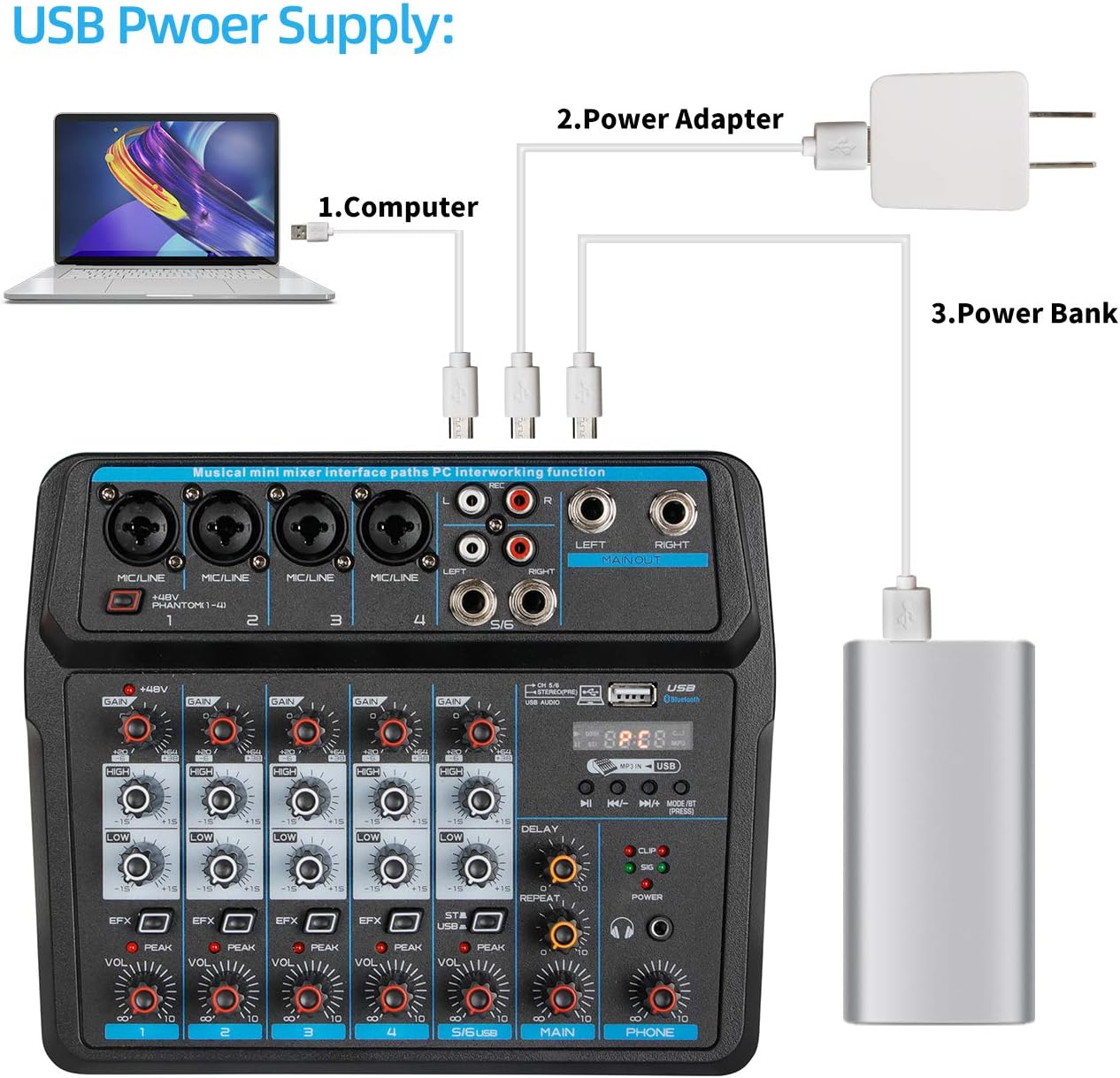
Figure 4: Connecting Various Peripherals
5. Operating Instructions
5.1. PC Play and Record
The U6 mixer functions as a USB audio interface for your computer. Connect the mixer to your PC using a USB cable. The mixer should be recognized as an audio device, allowing you to record and play back audio through your computer's software.
Video 1: Demonstrates connecting the U6 mixer to a PC for recording and playback. It shows the USB connection and the mixer's display indicating PC mode.
5.2. USB Playback and Recording
You can play audio files directly from a USB drive inserted into the mixer's USB port. The mixer also supports recording directly to a USB drive.
Video 2: Illustrates USB playback and recording functionality. It shows inserting a USB drive and controlling playback/recording via the mixer's MP3 section.
5.3. Bluetooth Connection
To stream audio wirelessly, activate Bluetooth on your mobile device and pair it with the mixer. Select the 'BT' mode on the mixer's MP3 section.
Video 3: Shows the process of connecting a mobile device via Bluetooth to the mixer and playing audio wirelessly.
6. Maintenance
- Cleaning: Use a soft, dry cloth to clean the exterior of the mixer. Avoid using liquid cleaners or solvents.
- Storage: Store the mixer in a cool, dry place away from direct sunlight and extreme temperatures.
- Handling: Handle the mixer with care to prevent damage to knobs, faders, and ports.
7. Troubleshooting
| Problem | Possible Cause | Solution |
|---|---|---|
| No sound output | Incorrect cable connections, low volume levels, incorrect input/output selection. | Check all cable connections. Ensure MAIN, channel, and headphone volumes are up. Verify correct input source is selected. |
| Microphone not working | Phantom power off (for condenser mics), incorrect gain, faulty cable/mic. | Activate +48V phantom power if using a condenser microphone. Adjust GAIN knob. Test with a different cable or microphone. |
| Bluetooth connection issues | Mixer not in BT mode, device not paired, interference. | Press the MODE/BT button to switch to Bluetooth mode. Ensure your device is discoverable and paired. Reduce distance between devices. |
| Humming or static noise | Ground loop, faulty cables, interference from other electronics. | Use shielded cables. Try plugging the mixer into a different power outlet. Keep audio cables away from power cables. |
8. Specifications
| Feature | Detail |
|---|---|
| Item Weight | 1.45 pounds (658 Grams) |
| Product Dimensions | 8.86 x 7.4 x 2.2 inches (7.48"D x 8.78"W x 2.28"H) |
| Hardware Interface | Bluetooth |
| Number of Channels | 6 |
| Power Source | Corded Electric |
| Connectivity Technology | XLR, USB, BLUETOOTH, 6.5MM, RCA |

Figure 5: Product Dimensions
9. Warranty and Support
Specific warranty information for the Depusheng U6 Audio Mixer is not provided in this manual. For detailed warranty terms, technical support, or service inquiries, please refer to the product packaging or contact Depusheng customer service directly through their official website or the retailer where the product was purchased.
Ask a question about this manual
Ask about setup, troubleshooting, compatibility, parts, safety, or missing instructions. Manuals+ will review the question and use this page’s manual context to help answer it.