
1. Introduction
This manual provides essential information for the installation, operation, and maintenance of your CDP UPO11-1 RT 1000VA/900W Online Double Conversion Uninterruptible Power Supply (UPS). The UPO11-1 RT is designed to provide clean, stable, and reliable power to critical electronic equipment, protecting against power outages, surges, and fluctuations. Please read this manual thoroughly before installation and operation to ensure proper use and safety.
2. Safety Instructions
Observe the following safety precautions to prevent injury and damage to the UPS or connected equipment:
- Electrical Safety: The UPS operates with hazardous voltages. Do not attempt to disassemble the unit. Servicing should only be performed by qualified personnel.
- Grounding: The UPS must be connected to a grounded AC power outlet. Do not remove the grounding prong from the power cord.
- Indoor Use Only: This UPS is intended for indoor use in a controlled environment. Do not expose it to rain, snow, direct sunlight, or excessive humidity.
- Ventilation: Ensure adequate airflow around the UPS. Do not block ventilation openings. Maintain a minimum clearance of 20 cm (8 inches) from any obstruction.
- Battery Safety: Batteries can present a risk of electrical shock and high short-circuit current. Observe proper precautions when working with batteries.
- Overload: Do not connect appliances that exceed the UPS's rated capacity (1000VA / 900W).
3. Package Contents
Verify that all items are present in the package:
- CDP UPO11-1 RT 1000VA/900W Online UPS Unit
- User Manual
- AC Power Cord
- USB Communication Cable
- RS232 Communication Cable
- Rackmount Kit (if applicable to your specific model variant)
4. Product Features
The CDP UPO11-1 RT UPS offers advanced features for superior power protection:
- Online Double Conversion Topology: Provides continuous, clean, and stable sine wave power output, isolating connected equipment from input power disturbances.
- High Capacity: 1000VA / 900W power rating suitable for various critical applications.
- Multiple Output Receptacles: Equipped with 8 NEMA 5-15R outlets for connecting multiple devices.
- Communication Ports: Includes RS232 and USB ports for monitoring and management software integration.
- External Battery Connector: Allows for the connection of an optional external battery bank to extend runtime.
- Rack/Tower Convertible Design: Flexible installation options for rackmount or tower configurations.
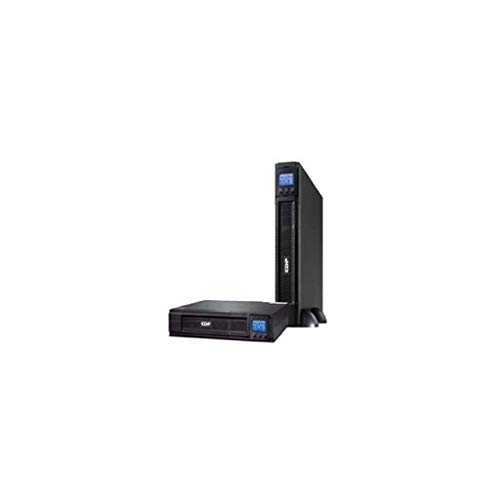
Image: Front view of the CDP UPO11-1 RT Online UPS, showing the display panel and output receptacles.
5. Setup
Follow these steps for initial setup:
- Unpacking and Inspection: Carefully unpack the UPS and inspect it for any shipping damage. If damage is found, do not install and contact your dealer.
- Placement: Place the UPS in a well-ventilated area, away from direct sunlight, heat sources, and excessive dust or moisture. Ensure sufficient clearance around the unit for proper airflow. For rack installation, refer to the rackmount kit instructions.
- Connecting to AC Power: Connect the supplied AC power cord to the UPS input receptacle and then to a grounded 120V AC wall outlet.
- Connecting Equipment: Plug your critical electronic devices (computers, servers, networking equipment) into the 8 NEMA 5-15R output receptacles on the rear of the UPS. Ensure the total load does not exceed 900W.
- Connecting External Battery Pack (Optional): If using an external battery pack, connect it to the designated external battery connector on the UPS, following the battery pack's instructions.
- Connecting Communication Cables: Connect the USB cable from the UPS to your computer for basic monitoring. For advanced monitoring and management, connect the RS232 cable. Install the provided monitoring software on your computer.
6. Operating the UPS
Understand the basic operation of your UPS:
- Turning On the UPS: After connecting the UPS to AC power and your equipment, press and hold the power button on the front panel for a few seconds until the UPS powers on. The display will illuminate, and the UPS will perform a self-test.
- Initial Charging: Allow the UPS to charge for at least 8 hours before initial use to ensure optimal battery runtime.
- Display Indicators: The front panel display provides real-time status information, including input/output voltage, load level, battery capacity, and operational mode (Online, Battery, Bypass, Fault). Refer to the detailed display section in the full manual for specific icon meanings.
- Battery Mode: In the event of an AC power failure, the UPS will automatically switch to battery mode, providing power to connected equipment. An audible alarm will sound, and the display will indicate battery operation.
- Turning Off the UPS: To turn off the UPS, press and hold the power button until the unit shuts down. Ensure all connected equipment is properly shut down before turning off the UPS.
7. Maintenance
Regular maintenance helps ensure the longevity and performance of your UPS:
- Battery Care: The internal batteries have a typical lifespan of 3-5 years. Perform a battery self-test periodically using the UPS management software or front panel controls. Replace batteries when their capacity significantly diminishes. Battery replacement should only be performed by qualified service personnel.
- Cleaning: Keep the UPS clean and free of dust. Use a dry cloth to wipe the exterior. Do not use liquid cleaners or solvents. Ensure ventilation openings are clear of obstructions.
- Storage: If storing the UPS for an extended period, ensure it is fully charged, then disconnect it from AC power. Recharge the UPS every 3 months to prevent battery discharge. Store in a cool, dry place.
8. Troubleshooting
Refer to the table below for common issues and their solutions:
| Problem | Possible Cause | Solution |
|---|---|---|
| UPS does not turn on | No AC input power; Battery deeply discharged; Power button not pressed correctly. | Check AC power connection and outlet; Allow UPS to charge for several hours; Press and hold power button for 3 seconds. |
| UPS is in battery mode frequently | Unstable AC input power; Battery nearing end of life. | Check AC power quality; Perform battery self-test and consider replacement if necessary. |
| Overload alarm | Connected equipment exceeds UPS capacity. | Disconnect non-essential equipment to reduce the load. |
| UPS beeps continuously | Low battery; Overload; Fault condition. | Check battery level; Reduce load; Refer to the display for specific fault codes and contact support if persistent. |
If the problem persists after attempting these solutions, please contact CDP technical support.
9. Specifications
| Feature | Specification |
|---|---|
| Model | UPO11-1 RT |
| Capacity | 1000 VA / 900 W |
| Input Voltage | 120 Volts (AC) |
| Output Receptacles | 8 x NEMA 5-15R |
| Communication Ports | RS232, USB |
| External Battery Connector | Yes |
| Form Factor | Rack |
| Dimensions (L x W x H) | 44 x 40 x 8 cm |
| Weight | 8 kg |
| Color | Black |
10. Warranty and Support
For warranty information, please refer to the warranty card included with your product or visit the official CDP website. If you encounter any issues or require technical assistance, please contact CDP customer support. Have your model number (UPO11-1 RT) and serial number ready when contacting support.


