
1. Introduction
Thank you for choosing the EMOS P4533 Rechargeable LED Work Light. This manual provides essential information for the safe and effective operation, maintenance, and troubleshooting of your device. Please read this manual thoroughly before first use and retain it for future reference.
2. Safety Instructions
- Always ensure the work light is fully charged before extended use to avoid unexpected power loss.
- Do not look directly into the LED light when it is on, as this may cause eye strain or temporary vision impairment.
- Keep the device away from extreme temperatures, direct sunlight, and open flames.
- Do not attempt to disassemble, modify, or repair the device. Refer all servicing to qualified personnel.
- Ensure the micro-USB charging port cover is securely closed when not charging to maintain IP44 water resistance.
- Use only the provided micro-USB cable or a certified equivalent for charging.
- Dispose of the battery according to local regulations. Do not incinerate.
3. Package Contents
Verify that all items are present in the package:
- 1 x EMOS P4533 Rechargeable LED Work Light
- 1 x Micro-USB Charging Cable
- 1 x User Manual (this document)
4. Product Overview
Familiarize yourself with the components and features of your EMOS P4533 work light.

Figure 4.1: Front view of the EMOS P4533 Rechargeable LED Work Light, showcasing the COB LED panel and robust black and green casing.
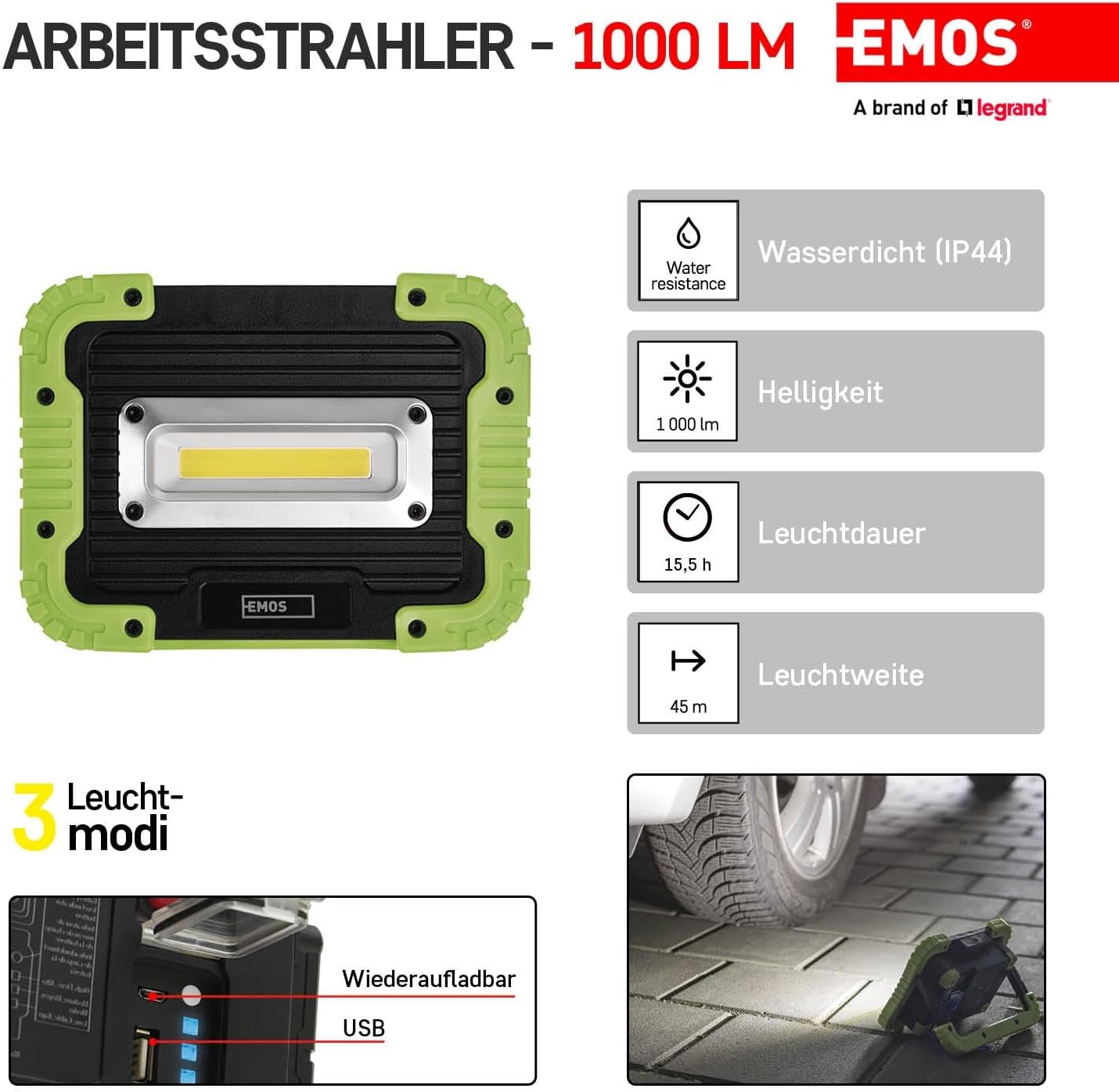
Figure 4.2: Overview of key features including IP44 water resistance, 1000 lumens brightness, 15.5 hours battery life, and 45 meters beam range.

Figure 4.3: The work light featuring an adjustable handle that doubles as a stand, a powerful COB LED, shock-resistant ABS plastic and rubber construction, a quick-off function, and a battery indicator.

Figure 4.4: The back panel showing the power switch, battery charge level indicator button, charging power input (micro-USB), and USB output charging port for devices.
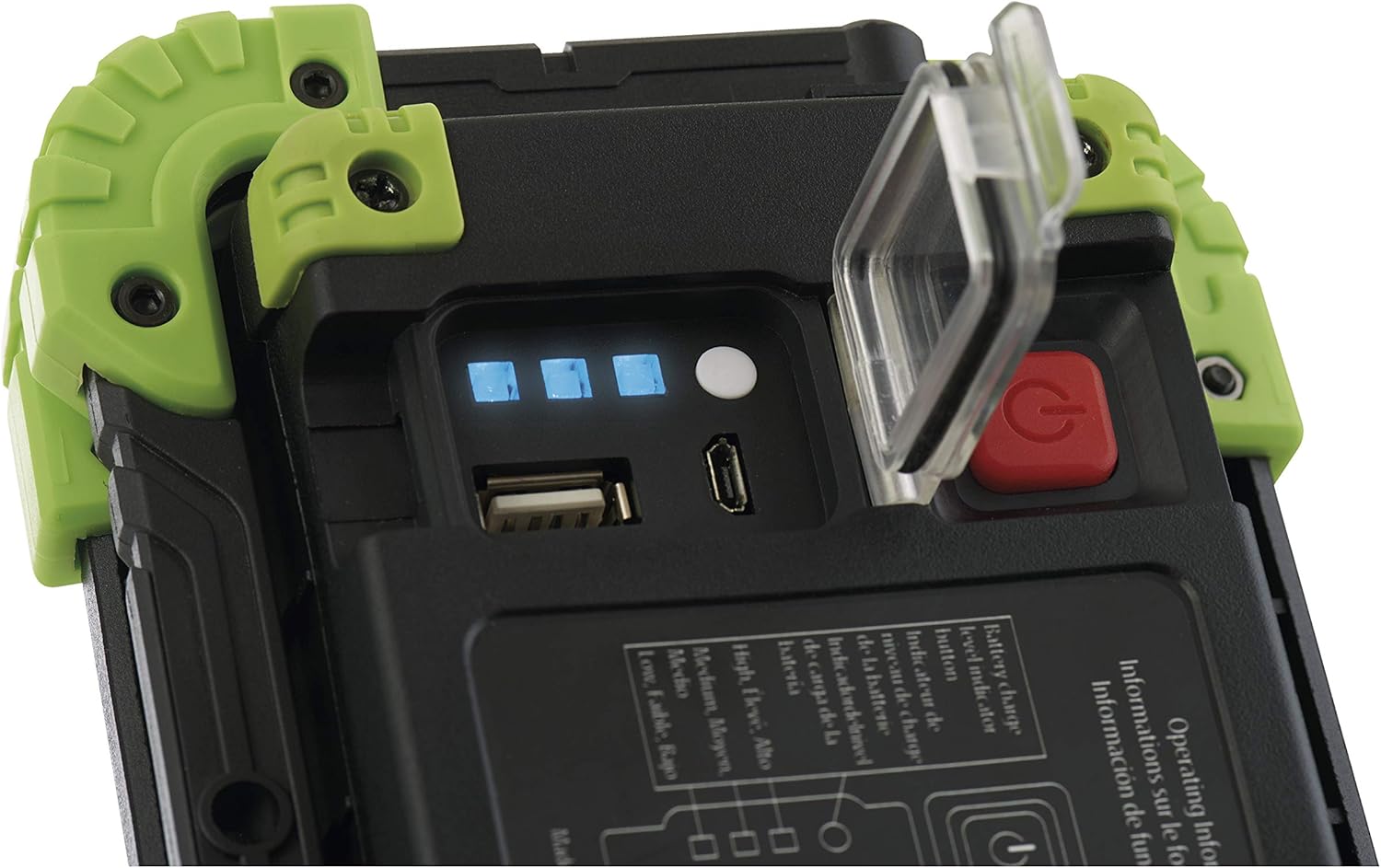
Figure 4.5: A close-up view of the charging ports and battery level indicators, showing four blue LEDs indicating charge status.

Figure 4.6: The EMOS P4533 work light being used outdoors, demonstrating its portability and utility in various environments.
5. Setup
5.1 Initial Charging
- Before first use, fully charge the work light.
- Open the protective cover on the back panel to access the micro-USB charging port.
- Connect the provided micro-USB cable to the charging port on the work light and the other end to a suitable USB power adapter (not included).
- The battery indicator LEDs (Figure 4.5) will illuminate to show the charging progress. All four LEDs will be solid blue when fully charged.
- Once charging is complete, disconnect the cable and securely close the protective cover to maintain water resistance.
6. Operating Instructions
6.1 Power On/Off and Light Modes
- Press the red power button (Figure 4.4) once to turn on the light at 100% brightness (Mode 1).
- Press the power button again within a few seconds to cycle to 50% brightness (Mode 2).
- Press the power button a third time to cycle to 20% brightness (Mode 3).
- Press the power button a fourth time to turn the light off.
- Quick Off Function: If the light has been on in any mode for more than a few seconds, a single press of the power button will turn it off directly, without cycling through other modes.
6.2 Checking Battery Level
Press the small white button next to the charging ports (Figure 4.4) to display the current battery charge level via the blue indicator LEDs.
6.3 Charging External Devices (Power Bank Function)
The EMOS P4533 can be used to charge other USB-powered devices:
- Open the protective cover on the back panel.
- Connect your device's USB charging cable to the USB output port on the work light (Figure 4.4).
- The work light will begin charging your device.
- Monitor the battery level of the work light to ensure sufficient power remains for its primary function.
- Once charging is complete, disconnect the cable and securely close the protective cover.
7. Maintenance
7.1 Cleaning
- Ensure the device is turned off and disconnected from any power source before cleaning.
- Wipe the exterior with a soft, damp cloth. Do not use abrasive cleaners, solvents, or harsh chemicals.
- Ensure the charging port cover is closed during cleaning to prevent water ingress.
7.2 Storage
- Store the work light in a cool, dry place away from direct sunlight and extreme temperatures.
- For long-term storage, charge the battery to approximately 50% every 3-6 months to prolong battery life.
8. Troubleshooting
| Problem | Possible Cause | Solution |
|---|---|---|
| Light does not turn on. | Battery is depleted. | Charge the work light fully. |
| Light output is dim. | Low battery level. | Recharge the work light. |
| Work light not charging. | Faulty cable or power adapter. | Try a different micro-USB cable or USB power adapter. Ensure connections are secure. |
| External device not charging from USB output. | Work light battery too low; incompatible cable; device not supported. | Ensure work light is sufficiently charged. Try a different USB cable. Verify your device supports charging via a standard USB-A port. |
9. Specifications
| Feature | Specification |
|---|---|
| Model Number | P4533 |
| Light Source | COB LED |
| Light Output (Max) | 1000 Lumens |
| Light Modes | 100%, 50%, 20% |
| Beam Range (Max) | 45 meters |
| Battery Type | 1 x Lithium Ion (included) |
| Battery Capacity | 4400 mAh |
| Battery Life (Max) | 15.5 hours |
| Charging Input | Micro-USB |
| USB Output | Yes (for charging external devices) |
| Water Resistance | IP44 (Splash-proof) |
| Shock Resistance | Yes |
| Material | ABS Plastic, Rubber |
| Dimensions (L x W x H) | 17 x 4.5 x 12.5 cm |
| Weight | 552 g |
10. Warranty and Support
For warranty information and customer support, please refer to the documentation provided at the point of purchase or contact your local EMOS distributor. Keep your proof of purchase for any warranty claims.


