
1. Introduction
Thank you for choosing the SunSun JVP 100a Wave Maker. This device is designed to create natural wave-like water movement in your aquarium, promoting a healthier environment for your aquatic inhabitants by improving water circulation and oxygenation. Please read this manual thoroughly before installation and operation to ensure safe and efficient use.
2. Important Safety Instructions
- Always disconnect the power supply before performing any maintenance or installation.
- This appliance is designed for indoor use only and specifically for aquariums. Do not use it for other purposes.
- Ensure your hands are dry before handling the power plug.
- Do not operate the pump if the power cord or plug is damaged.
- Never run the pump dry. It must be fully submerged in water during operation.
- Keep out of reach of children.
- Ensure the voltage rating on the pump matches your local power supply (110V).
3. Package Contents
Please check the package to ensure all components are present and undamaged:
- SunSun JVP 100a Wave Maker Unit
- Power Cord with Plug
- Suction Cup Mounting Bracket
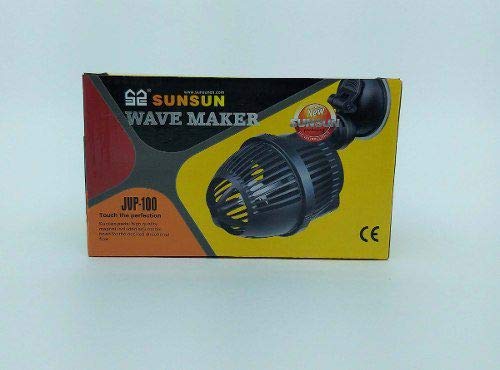
Image 1: Contents of the SunSun JVP 100a Wave Maker package, including the main unit, power cord, and suction cup, shown alongside its product box.
4. Setup and Installation
- Clean the Unit: Before first use, rinse the wave maker unit thoroughly with clean water to remove any manufacturing residues. Do not use soap or detergents.
- Attach Mounting Bracket: Securely attach the suction cup mounting bracket to the back of the wave maker unit.
- Position in Aquarium: Submerge the wave maker completely in your aquarium water. Choose a location that allows for optimal water flow and circulation without disturbing substrate or decorations excessively. Press the suction cup firmly against the clean inner glass surface of the aquarium to secure the unit.
- Adjust Direction: The wave maker unit can be rotated to direct the water flow as desired.
- Connect Power: Ensure your hands are dry. Plug the power cord into a suitable 110V electrical outlet. It is recommended to use a drip loop to prevent water from traveling down the cord to the outlet.
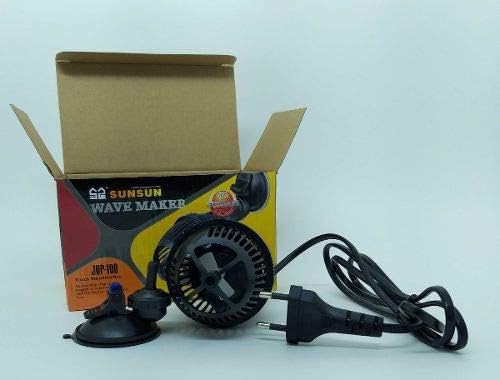
Image 2: Side view of the SunSun JVP 100a Wave Maker, highlighting its protective casing and compact form factor for discreet placement in an aquarium.

Image 3: Front view of the SunSun JVP 100a Wave Maker, displaying the internal propeller and the protective grille designed to prevent debris from entering the pump.
5. Operating Instructions
Once installed and plugged in, the SunSun JVP 100a Wave Maker will begin operating immediately. This model provides a continuous, powerful flow to simulate natural currents.
- Power On/Off: The unit is controlled by plugging it into or unplugging it from the power outlet. For scheduled operation, consider using an external timer (not included).
- Flow Direction: The direction of the water flow can be adjusted by rotating the wave maker unit on its suction cup mount. Experiment with different angles to achieve the desired water movement in your aquarium.
6. Maintenance
Regular maintenance ensures optimal performance and extends the lifespan of your wave maker.
- Disconnect Power: Always unplug the wave maker from the power outlet before performing any maintenance.
- Remove from Aquarium: Carefully detach the unit from the aquarium glass.
- Disassemble (if necessary): The front grille can typically be removed for access to the impeller. Gently twist or unclip the grille.
- Clean Impeller and Housing: Use a soft brush (like a toothbrush) and clean water to remove any algae, debris, or mineral deposits from the impeller, impeller shaft, and pump housing. Ensure the impeller spins freely.
- Inspect Power Cord: Check the power cord for any signs of damage, fraying, or kinks.
- Reassemble and Reinstall: Reassemble the unit, ensuring all parts are securely in place. Reinstall the wave maker in the aquarium and reconnect power.
Frequency: It is recommended to clean the wave maker at least once a month, or more frequently if you notice reduced flow or increased noise.
7. Troubleshooting
| Problem | Possible Cause | Solution |
|---|---|---|
| Pump does not start or operate. | No power supply. Impeller jammed or blocked. | Check power connection and outlet. Unplug, remove, and clean the impeller and housing. |
| Weak or inconsistent flow. | Impeller or intake grille is dirty/blocked. Pump not fully submerged. | Unplug, remove, and clean the impeller and grille. Ensure the pump is completely underwater. |
| Excessive noise or vibration. | Impeller dirty or damaged. Unit not securely mounted. Air trapped in the pump. | Unplug, remove, and clean/inspect the impeller for damage. Replace if necessary. Re-secure the suction cup mount. Gently shake the unit underwater to release trapped air. |
If the problem persists after attempting these solutions, please contact customer support.
8. Specifications
- Model: SunSun JVP 100a
- Brand: SunSun
- Voltage: 110V
- Type: Wave Maker / Circulation Pump
- (Specific flow rate and power consumption are not provided in the source data, so these are omitted.)
9. Warranty and Support
For warranty information, please refer to the documentation provided with your purchase or contact your retailer. If you require technical support or have questions not covered in this manual, please contact SunSun customer service or your authorized dealer.
Contact Information: Please refer to the packaging or the official SunSun website for the most current contact details.


