
PowerLocus P1
PowerLocus P1 Wireless Bluetooth Headphones User Manual
Model: P1
1. Introduction
Thank you for choosing PowerLocus P1 Wireless Bluetooth Headphones. This manual provides essential information for the proper use, setup, and maintenance of your headphones. Please read it carefully before use.
The PowerLocus P1 headphones offer a high-definition stereo audio experience with noise reduction technology. They are designed for portability, comfort, and universal compatibility with various Bluetooth-enabled devices or via a 3.5mm audio cable.
2. What's in the Box
- PowerLocus P1 Bluetooth Headphones
- 3.5mm AUX Cable
- Premium Carrying Bag
- User Manual
- USB Charging Cable (Micro USB)

Figure 2.1: Included accessories with the PowerLocus P1 headphones. This image shows the headphones folded, a black carrying case, a user manual, a 3.5mm AUX cable, and a USB charging cable.
3. Product Overview
The PowerLocus P1 headphones feature an over-ear design with soft earcups for comfort. They are foldable and extendable, making them highly portable. The controls are intuitively placed on the earcup for easy access.

Figure 3.1: Front view of the PowerLocus P1 headphones in orange and black, alongside their protective carrying case.

Figure 3.2: Illustration highlighting the lightweight (165 grams) and foldable design of the PowerLocus P1 headphones, with views from different angles and a folded state.
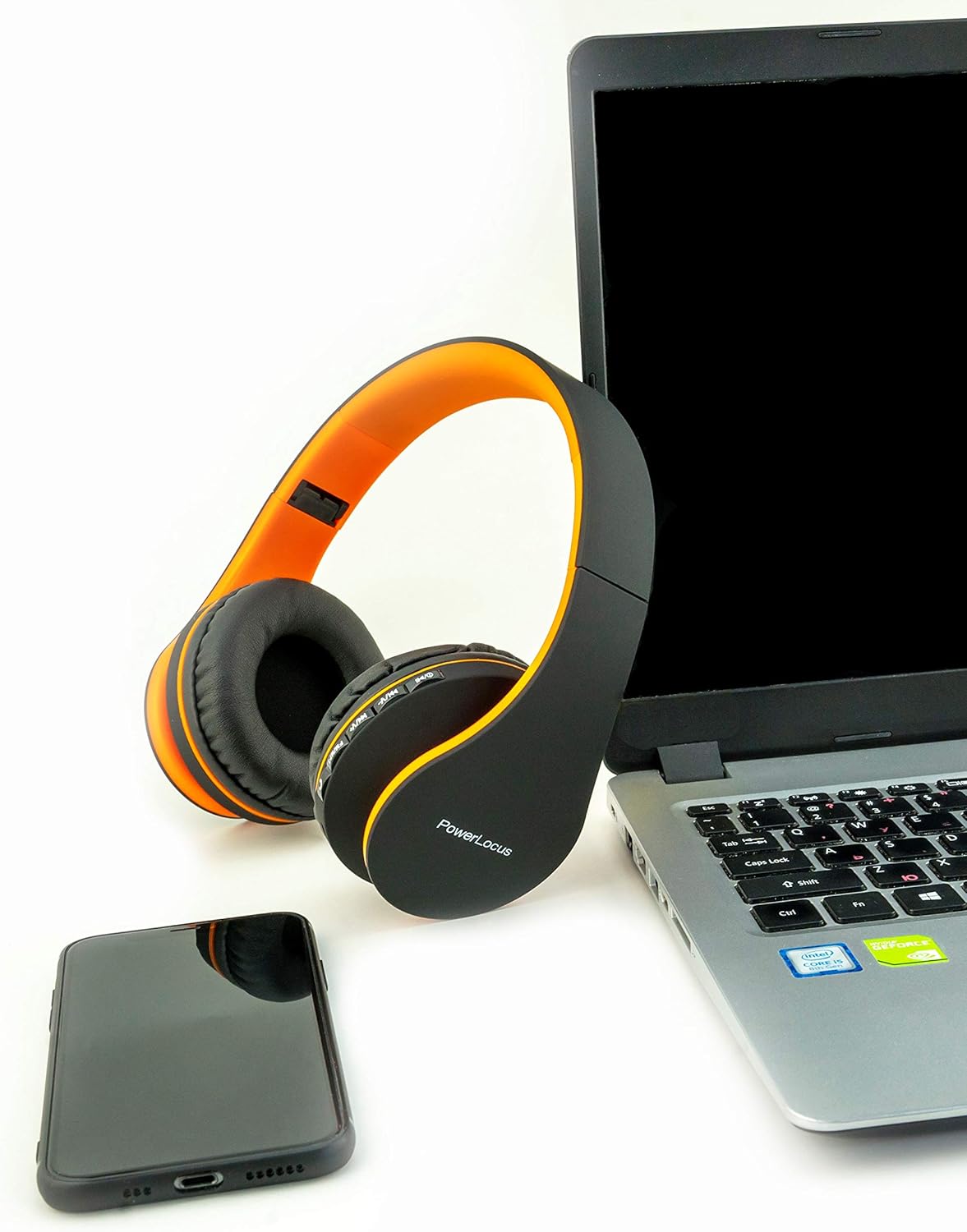
Figure 3.3: The PowerLocus P1 headphones positioned next to a laptop and a smartphone, demonstrating their compatibility with various devices.
4. Setup
4.1 Charging the Headphones
Before first use, fully charge your PowerLocus P1 headphones. Connect the supplied USB charging cable to the Micro USB port on the headphones and the other end to a USB power source (e.g., computer USB port, wall adapter).
- Charging time: Approximately 2.5 hours.
- The LED indicator will show charging status (e.g., red for charging, blue for fully charged).
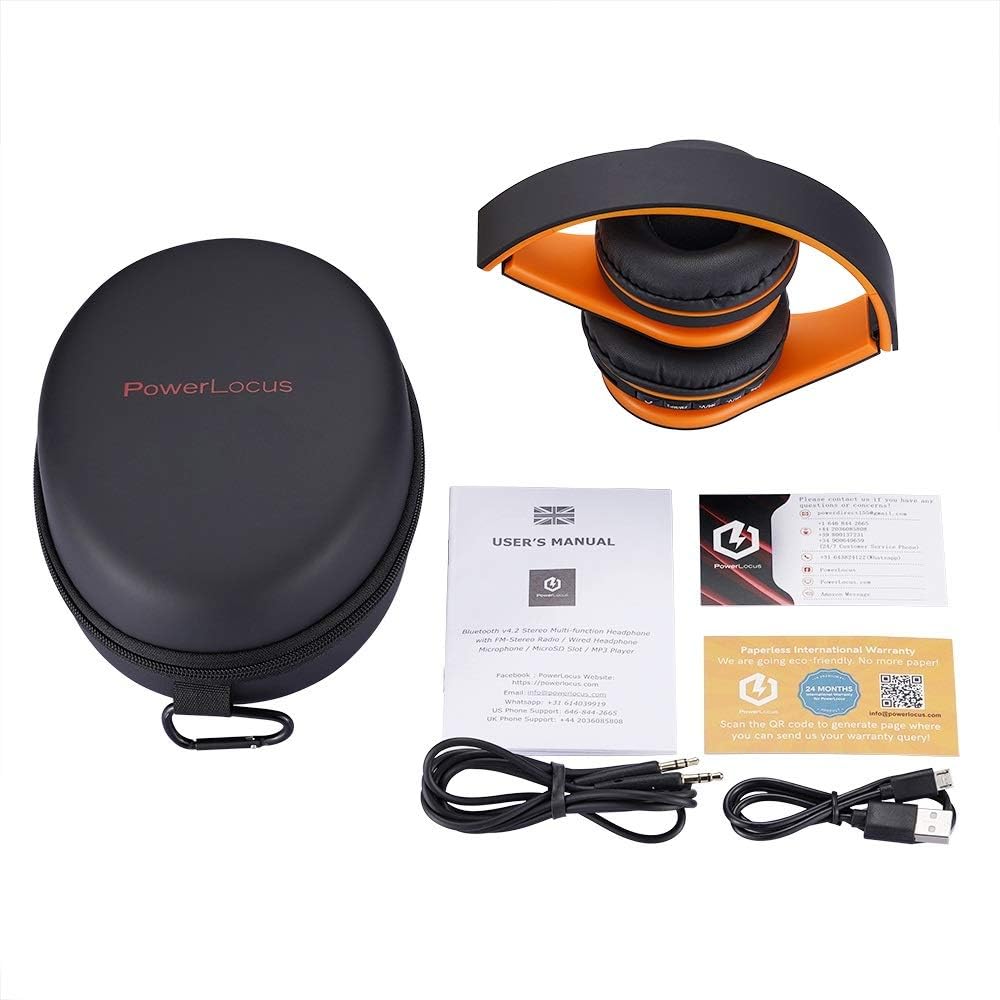
Figure 4.1: Close-up view of the PowerLocus P1 headphone earcup, highlighting the 3.5mm AUX input and the Micro USB charging port.
4.2 Bluetooth Pairing
- Ensure the headphones are charged and turned off.
- Press and hold the Power button on the headphones until the LED indicator flashes blue and red, indicating pairing mode.
- On your device (smartphone, tablet, PC), enable Bluetooth and search for available devices.
- Select "PowerLocus P1" from the list of found devices.
- Once paired, the LED indicator will turn solid blue or flash slowly.
Note: If prompted for a password, enter "0000".
4.3 Wired Connection (AUX Mode)
You can use the headphones with the included 3.5mm AUX cable for a wired connection, which is useful when the battery is low or for devices without Bluetooth.
- Connect one end of the 3.5mm AUX cable to the headphone's AUX port.
- Connect the other end to the 3.5mm audio jack of your device.
- The headphones will automatically switch to wired mode.
Note: In wired mode, the headphone controls (volume, track skip) may not function, and the microphone might be disabled depending on the device.
5. Operating Instructions
5.1 Basic Functions
| Button/Control | Action | Function |
|---|---|---|
| Power Button | Press and Hold | Power On/Off |
| Power Button | Short Press (during call) | Answer/End Call |
| Power Button | Long Press (during call) | Reject Call |
| Volume + / Next Track | Short Press | Volume Up |
| Volume + / Next Track | Long Press | Next Track |
| Volume - / Previous Track | Short Press | Volume Down |
| Volume - / Previous Track | Long Press | Previous Track |
| Play/Pause Button | Short Press | Play/Pause Music |
5.2 Making Calls
The PowerLocus P1 headphones include an integrated microphone for hands-free calling.
- Answering a Call: Short press the Power button.
- Ending a Call: Short press the Power button during a call.
- Rejecting a Call: Long press the Power button when a call comes in.
- Redial Last Number: Double-press the Power button.
5.3 Micro SD/TF Card Playback
The headphones support Micro SD/TF card playback. Insert a card with MP3 files into the designated slot. The headphones will automatically switch to MP3 mode and begin playback.
6. Maintenance and Care
- Clean the headphones with a soft, dry cloth. Do not use abrasive cleaners or solvents.
- Keep the headphones dry. Do not expose them to water or excessive moisture, as they are not water-resistant.
- Store the headphones in the provided carrying bag when not in use to protect them from dust and scratches.
- Avoid extreme temperatures.
- Do not attempt to disassemble or modify the headphones, as this will void the warranty.
7. Troubleshooting
| Problem | Possible Cause | Solution |
|---|---|---|
| Headphones do not turn on. | Low battery. | Charge the headphones fully. |
| Cannot pair with device. | Headphones not in pairing mode; Bluetooth disabled on device; device too far. | Ensure headphones are in pairing mode (flashing blue/red); enable Bluetooth on device; move device closer (within 10 meters). |
| No sound or distorted sound. | Volume too low; headphones not connected properly; audio source issue. | Increase volume on headphones and device; re-pair Bluetooth or re-insert AUX cable; test with another audio source. |
| Microphone not working. | In wired mode (AUX); device settings. | Microphone may not function in AUX mode. Ensure Bluetooth connection. Check device's microphone privacy settings. |
| Echo during calls. | Microphone sensitivity; environmental factors. | Try lowering the volume on the headphones or connecting via the AUX cable for calls if the issue persists. |
8. Specifications
| Feature | Detail |
|---|---|
| Model | P1 |
| Connectivity Technology | Bluetooth 5.0, 3.5mm AUX |
| Frequency Response | 110 Hz - 20,000 Hz |
| Impedance | 32 Ohm |
| Battery Life (Average) | 20 Hours |
| Charging Time | 2.5 Hours |
| Weight | 175 Grams |
| Material | Plastic |
| Microphone Form Factor | Integrated |
| Water Resistance Level | Not water-resistant |
| Compatible Devices | iPhone, iPad, Samsung, Macbook, PC, Laptops, iPod, Mp3/Mp4 |
9. Warranty and Support
PowerLocus provides a 24-month warranty for this product, ensuring 100% customer satisfaction. For any issues, questions, or support needs, please contact PowerLocus customer service.
You can find contact information and further support on the official PowerLocus website or through your purchase platform.
For more information, visit the PowerLocus Store on Amazon.
10. Safety Information
- Do not use headphones at high volume for extended periods to prevent hearing damage.
- Do not use headphones while driving, cycling, or in situations where inability to hear ambient sounds could be dangerous.
- Keep out of reach of children.
- Dispose of batteries and electronic components responsibly according to local regulations.
Related documentsP1


Ask a question about this manual
Ask about setup, troubleshooting, compatibility, parts, safety, or missing instructions. Manuals+ will review the question and use this page’s manual context to help answer it.