
1. Introduction and Overview
This manual provides comprehensive instructions for the installation, operation, and maintenance of your PIKASOLA 1400W Off Grid Hybrid Wind Solar Controller. This advanced controller is designed to efficiently manage power from both wind turbines (up to 800W) and solar panels (up to 600W) for 12V/24V battery systems, including Lithium batteries. It features MPPT (Maximum Power Point Tracking) technology for wind charging and PWM (Pulse Width Modulation) for solar charging, ensuring optimal energy harvesting and stable battery management for off-grid applications such as homes, boats, and street lighting.

Figure 1: PIKASOLA 1400W Off Grid Hybrid Wind Solar Controller and included components.
2. Safety Information
Please read all safety instructions carefully before installation and operation. Failure to follow these instructions may result in electric shock, fire, or serious injury.
- Ensure all power sources (wind turbine, solar panels, battery) are disconnected before installation or maintenance.
- Work with appropriate personal protective equipment (PPE), including insulated gloves and eye protection.
- This controller is designed for 12V/24V battery systems. Do not connect to higher voltage systems.
- Ensure proper grounding of the system to prevent electrical hazards.
- Do not disassemble or attempt to repair the controller. Refer to qualified personnel for service.
- Install the controller in a well-ventilated area, away from flammable materials and direct sunlight.
- Verify correct polarity for all connections to prevent damage to the controller and other components.
- The external dump-load resistor can become very hot during operation. Install it in a safe location where it will not be touched accidentally and has adequate ventilation.
3. Package Contents
Please check the package contents upon receipt to ensure all items are present and undamaged:
- 1 x PIKASOLA Hybrid Wind/Solar Controller
- 1 x Unloading Resistor (Dump Load)
- 1 x Set of Connection Cables (Red and Black)
- 2 x MC4 Wrenches
- 1 x Operation Manual (this document)

Figure 2: Unboxing the PIKASOLA Hybrid Wind Solar Controller and its accessories.
4. Product Features
The PIKASOLA Hybrid Wind Solar Controller offers a range of advanced features for efficient and reliable power management:
- Wide Compatibility: Compatible with all 12V/24V battery types, including Lithium batteries.
- High Power Capacity: Supports a maximum 800W wind generator and a maximum 600W solar panel array.
- Advanced Wind Charging: Utilizes booster MPPT (Maximum Power Point Tracking) technology for continuous and efficient charging, even at low wind speeds.
- Stepless Unloading Function: Includes an external dump-load resistance for smooth and continuous power dissipation, preventing overcharge.
- Efficient Solar Charging: Employs PWM (Pulse Width Modulation) technology via MOS tube in series for stable solar charging.
- Intelligent & Stable System: Automatically sets optimal parameters based on battery type, with user-adjustable options. Features updated intelligent control for absolute stable charge voltage.
- User-Friendly Display: Equipped with a large LCD screen for easy browsing and handling of system parameters.
- Versatile DC Load Output: Offers 3 DC load output modes, each configurable for different operational models.
- Comprehensive Protection: Includes reversed charging protection for solar, overcharge/undervoltage protection, overload voltage protection, battery reverse connection protection, open circuit protection, and lightning protection.
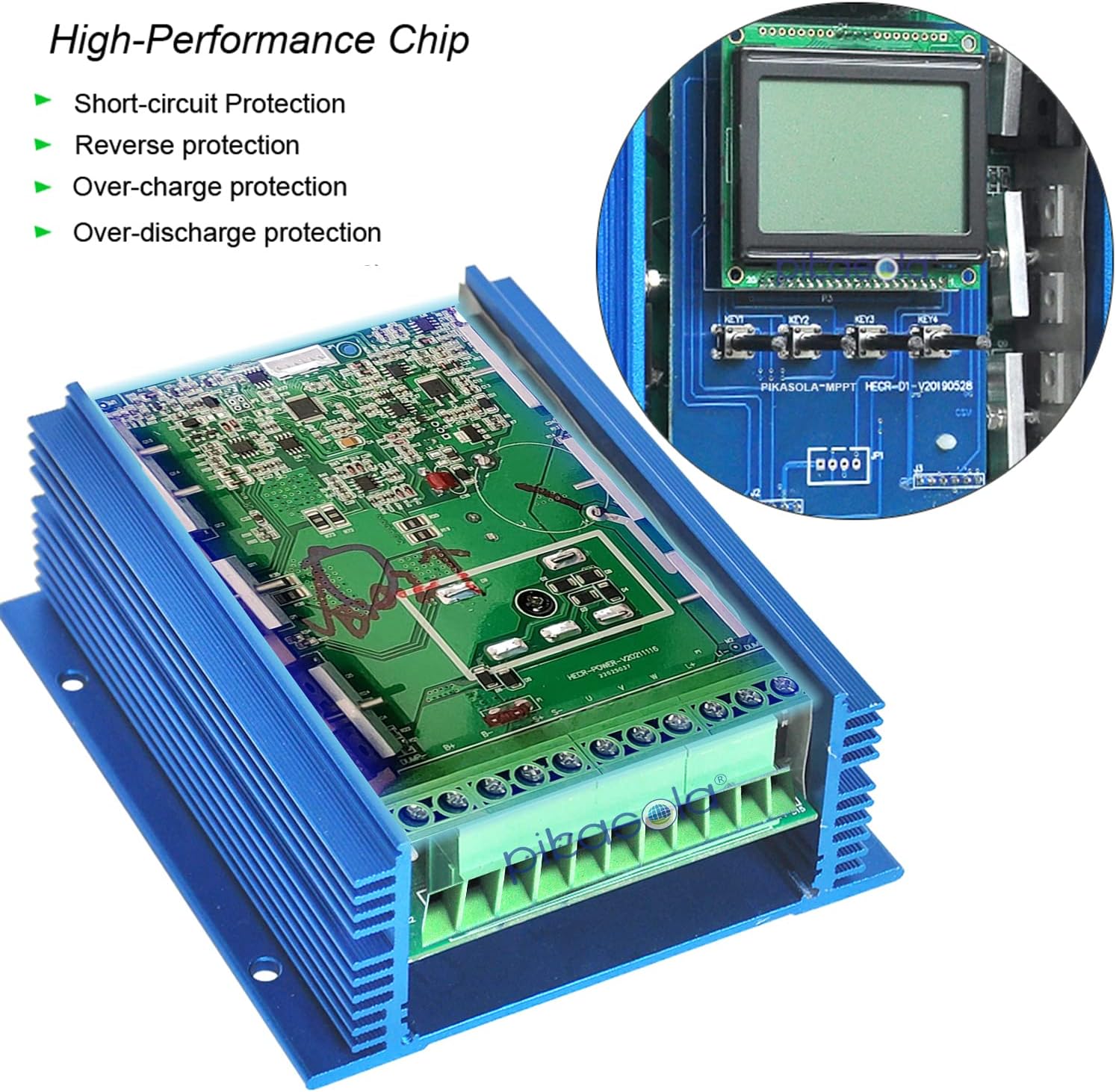
Figure 3: High-Performance Chip and Protection Features within the Controller.

Figure 4: Detailed view of the LCD display, control keys, and robust aluminum housing for efficient heat dissipation.
5. Specifications
| Attribute | Value |
|---|---|
| Product Dimensions | 6.3 x 5.46 x 2.5 inches |
| Item Weight | 5 pounds |
| Manufacturer | PIKASOLA |
| Model (ASIN) | B07Z5QZ6RQ |
| Brand | Pikasola |
| Input Voltage | 12V/24V Auto-sensing |
| Max Wind Turbine Power | 800W |
| Max Solar Panel Power | 600W |
| Mounting Type | Wall Mount |
| Color | Blue |
| Special Feature | Short Circuit Protection, Overcharge/Undervoltage Protection, Overload Protection, Battery Reverse Connect Protection, Open Circuit Protection, Lightning Protection |
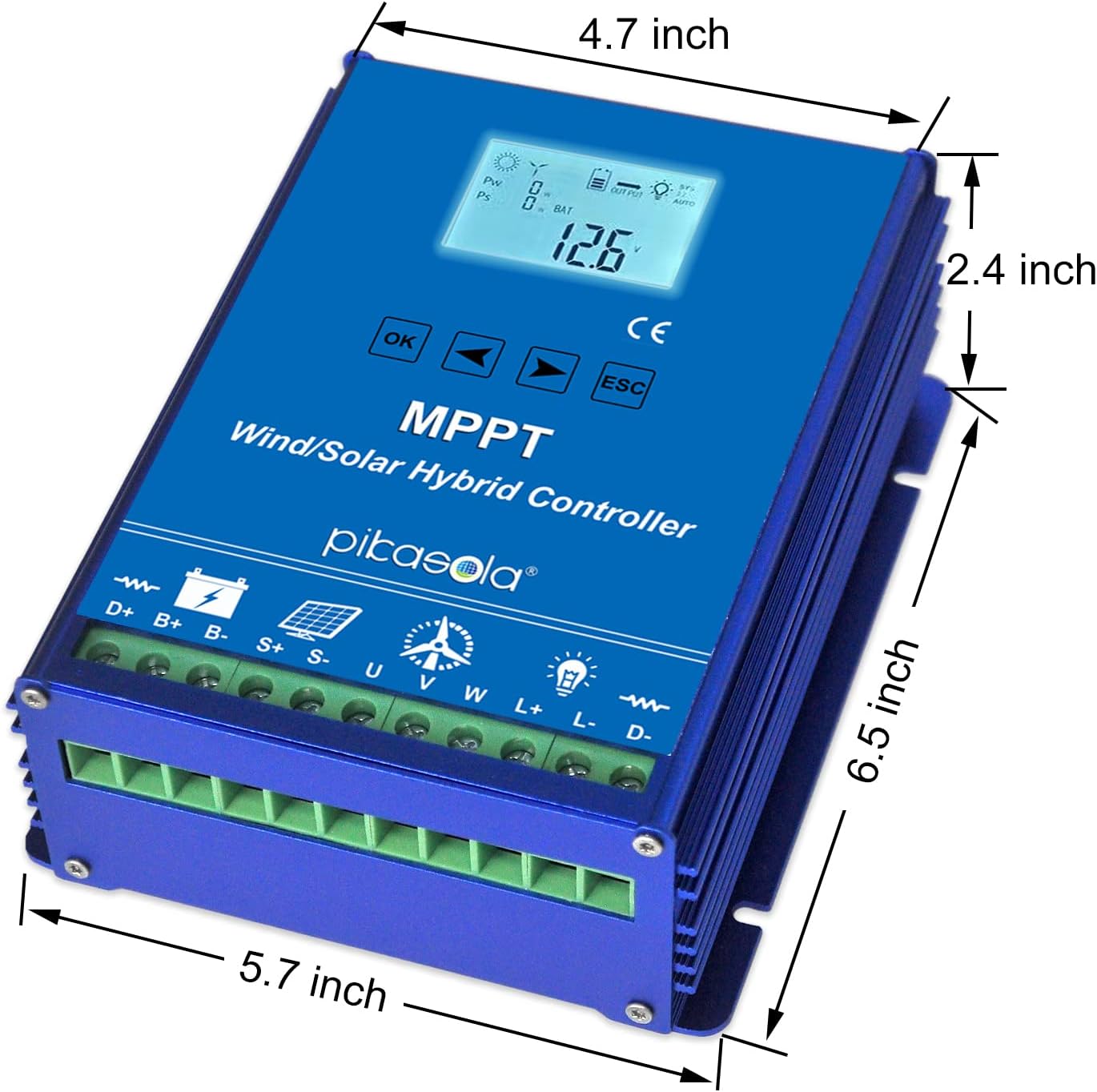
Figure 5: Physical dimensions of the PIKASOLA Hybrid Wind Solar Controller.
6. Setup and Installation
Follow these steps carefully for proper installation. It is highly recommended to consult with a qualified electrician if you are unsure about any part of the installation process.
- Mounting: Choose a suitable wall-mount location that is dry, well-ventilated, and protected from direct sunlight and extreme temperatures. Ensure there is enough space around the controller for heat dissipation.
- Battery Connection: ALWAYS connect the battery to the controller FIRST. Connect the positive (+) terminal of the battery to the B+ terminal on the controller and the negative (-) terminal of the battery to the B- terminal. Ensure secure connections. The controller will automatically detect 12V or 24V system voltage.
- Wind Turbine Connection: Connect the three phase wires from your wind turbine to the U, V, W terminals on the controller. Ensure these connections are tight and secure.
- Solar Panel Connection: Connect the positive (+) wire from your solar panel array to the S+ terminal and the negative (-) wire to the S- terminal on the controller. Observe correct polarity.
- Dump Load Resistor Connection: Connect the external dump-load resistor to the L+ and L- terminals. This resistor is crucial for dissipating excess energy from the wind turbine when the battery is full or during high wind conditions.
- DC Load Connection (Optional): If you are using the DC load output, connect your DC loads to the D+ and D- terminals. Refer to the operating instructions for configuring DC load modes.
- Verify Connections: Double-check all wiring connections for correct polarity and tightness before applying power.

Figure 6: System wiring diagram for the Hybrid Wind Solar Controller.
7. Operating Instructions
Once installed, the controller will automatically begin operation. Use the LCD display and buttons to monitor and adjust settings.
- LCD Display: The large LCD screen displays real-time system information such as battery voltage, charging current from wind and solar, and load status.
- Navigation Buttons: Use the "OK", arrow (left/right), and "ESC" buttons to navigate through menus and adjust parameters.
- Battery Type Selection: The controller will auto-detect the system voltage (12V/24V). You can manually select the battery type (e.g., Lead-Acid, Gel, Lithium) through the menu to optimize charging algorithms. Refer to the detailed manual for specific menu navigation.
- DC Load Output Modes: The controller offers three distinct DC load output modes. These can be configured to operate the load at specific times (e.g., dusk to dawn, timed operation) or based on battery voltage.
- MPPT Wind Charging: The controller continuously tracks the maximum power point of the wind turbine to extract the most power possible, even in varying wind conditions.
- PWM Solar Charging: Solar charging is managed using PWM technology, which efficiently charges the battery while preventing overcharging.
Figure 7: LCD Display and Control Buttons for system operation.
8. Maintenance
Regular maintenance ensures the longevity and optimal performance of your PIKASOLA Hybrid Wind Solar Controller.
- Periodic Inspection: Regularly inspect all wiring connections for tightness and signs of corrosion. Clean any dust or debris from the controller's vents to ensure proper heat dissipation.
- Battery Check: Monitor battery voltage and health. Ensure battery terminals are clean and free of corrosion.
- Dump Load Resistor: Periodically check the dump load resistor for any signs of damage or overheating. Ensure it is clear of obstructions.
- Environmental Conditions: Ensure the installation environment remains dry and within the specified operating temperature range.
- Software Updates: Check the manufacturer's website for any available firmware updates for improved performance or new features.
9. Troubleshooting
This section addresses common issues you might encounter. For problems not listed here, please contact customer support.
| Problem | Possible Cause | Solution |
|---|---|---|
| Controller display is off. | No power from battery or incorrect battery connection. | Check battery connections and ensure battery voltage is within operating range. Reconnect battery first. |
| No charging from wind turbine. | Low wind speed, turbine not spinning, incorrect wiring, or turbine fault. | Verify wind conditions. Check wind turbine wiring (U, V, W) and ensure no short circuits. Inspect turbine for mechanical issues. |
| No charging from solar panels. | Insufficient sunlight, incorrect solar panel wiring, or panel fault. | Ensure panels are receiving direct sunlight and are not shaded. Check solar panel wiring (S+, S-) for correct polarity and secure connections. |
| Battery not fully charging or overcharging. | Incorrect battery type setting, faulty battery, or dump load issue. | Verify the correct battery type is selected in the controller settings. Test battery health. Ensure dump load resistor is properly connected and functioning. |
| DC Load not working. | Incorrect load mode setting, overload, or faulty load. | Check DC load wiring (D+, D-). Verify the DC load output mode settings. Reduce load if it exceeds controller capacity. Test the DC load device. |
10. Warranty and Support
PIKASOLA products are manufactured to high-quality standards. For warranty information, technical support, or service inquiries, please contact PIKASOLA customer service through the retailer where you purchased the product or visit the official PIKASOLA website. Please have your product model number (B07Z5QZ6RQ) and purchase date ready when contacting support.
For additional resources and product information, you may visit the Pikasola Store on Amazon.