1. Product Overview
The AQUAPHOR Prestige is a modern and comfortable table water filter. Its thoughtful design and size make it a versatile solution for any household: it fits conveniently in most refrigerator doors while offering ample capacity for family use. The integrated ecological, battery-free cartridge change indicator provides continuous feedback on the remaining filter capacity, promoting environmental responsibility.
All components of the filter jug are crafted from high-quality, BPA-free plastic, ensuring safety and durability. The included AQUAPHOR A5 filter cartridge is engineered to effectively reduce chlorine, sediments, and heavy metals such as lead and copper, in addition to preventing limescale buildup, delivering clean and delicious drinking water.

Image 1.1: AQUAPHOR Prestige Cherry Water Filter Jug packaging, highlighting the product and included A5 filter.
Key Features
- Effective Filtration: The A5 cartridge significantly reduces limescale, chlorine, heavy metals (mercury, lead, copper), pesticides, and other undesirable substances from tap water.
- High Capacity: Provides up to 350 liters of fresh and delicious filtered water per cartridge.
- Convenient Design: Slim jug profile with a practical slider for easy filling, designed to fit perfectly in refrigerator doors.
- Safe Materials: All water-contacting parts are made from BPA-free plastic.
- Aqualen Technology: Utilizes ion-exchange fiber (Aqualen) to enhance water flow through the cartridge, thereby increasing filtration efficiency and contact time.
- Ecological Indicator: Features a battery-free indicator that displays the remaining capacity of the MAXFOR+ filter cartridge, ensuring optimal performance and timely replacement.

Image 1.2: Illustration of Aqualen Technology, showing improved water flow and filtration efficiency.
2. Initial Setup
2.1 Unpacking
- Carefully remove all components from the packaging: the filter jug, lid, funnel, and the A5 filter cartridge.
- Retain the packaging for future storage or transport, if desired.
2.2 Preparing the Filter Jug
- Wash the jug, lid (excluding the indicator part), and funnel with warm soapy water.
- Rinse all parts thoroughly with clean water.
- The jug and funnel are dishwasher safe. The lid with the indicator should be wiped clean with a damp cloth and not submerged in water or placed in a dishwasher.
2.3 Installing the Filter Cartridge
- Remove the new A5 filter cartridge from its protective packaging.
- Immerse the new filter cartridge in cold water for approximately 5-10 minutes to remove any air bubbles.
- Insert the filter cartridge firmly into the opening in the funnel until it clicks into place. Ensure a snug fit to prevent unfiltered water from bypassing the cartridge.
- Place the funnel with the installed cartridge into the jug.
- Attach the lid securely to the jug.
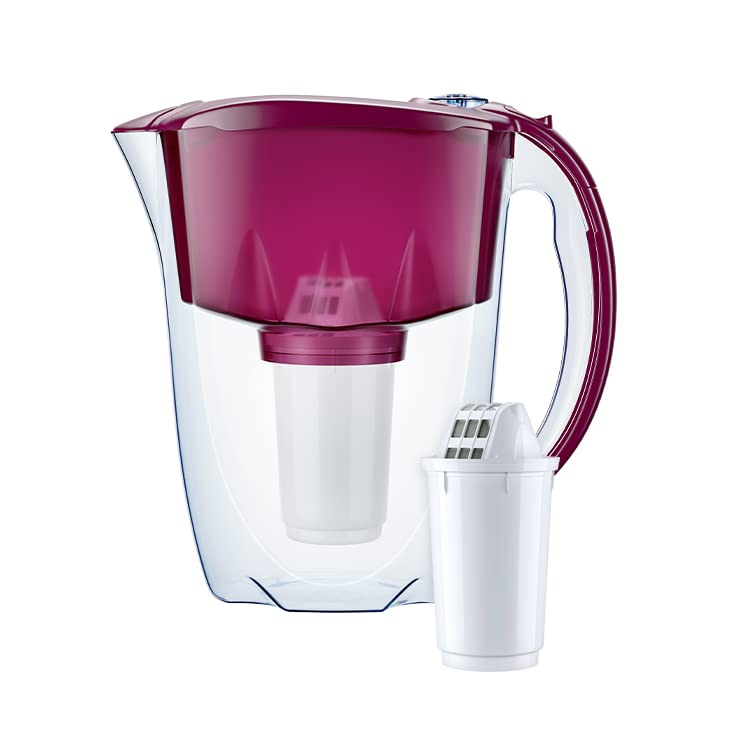
Image 2.1: The AQUAPHOR Prestige jug with its A5 filter cartridge, ready for installation.
3. Operation
3.1 Filling the Jug
- Open the convenient slider on the lid.
- Fill the funnel with cold tap water. Do not overfill; ensure the water level does not exceed the maximum fill line indicated on the funnel.
- Allow the water to filter through the cartridge into the main jug reservoir. This process may take a few minutes.
- Discard the first two full jugs of filtered water. This primes the filter and removes any loose carbon particles.
- The third jug of filtered water is ready for consumption.
3.2 Using the Filter Capacity Indicator
The AQUAPHOR Prestige features a battery-free mechanical indicator on the lid that tracks the filter's remaining capacity. This indicator helps you know when it's time to replace the cartridge for optimal performance.
- Upon installing a new filter cartridge, manually set the indicator to 100% or the 'New Filter' mark, if available. Refer to the markings on the indicator dial.
- As you filter water, the indicator will gradually decrease, showing the percentage of remaining filter life.
- When the indicator reaches the '0%' or 'Replace Filter' mark, it is time to replace the filter cartridge.

Image 3.1: Top view of the jug, highlighting the mechanical filter capacity indicator on the lid.
4. Maintenance
4.1 Cleaning the Jug
- Regularly clean the jug and funnel with warm soapy water.
- The jug and funnel are dishwasher safe.
- The lid with the filter capacity indicator should not be placed in the dishwasher or submerged in water. Wipe it clean with a damp cloth.
- Ensure all parts are completely dry before reassembling.
4.2 Replacing the Filter Cartridge
The A5 filter cartridge has a capacity of up to 350 liters or approximately 1-2 months of use, depending on water quality and consumption. Replace the cartridge when the indicator shows 0% or when you notice a decrease in filtration speed or water quality.
- Remove the lid and the funnel with the old filter cartridge from the jug.
- Carefully remove the old filter cartridge from the funnel and dispose of it responsibly.
- Follow the steps in Section 2.3 "Installing the Filter Cartridge" to install a new A5 filter.
- Remember to discard the first two full jugs of filtered water from the new cartridge.
- Reset the filter capacity indicator on the lid to 100% for the new cartridge.

Image 4.1: The AQUAPHOR A5 filter cartridge, which requires periodic replacement.

Image 4.2: Visual demonstration of limescale reduction benefits from using filtered water.
5. Troubleshooting
| Problem | Possible Cause | Solution |
|---|---|---|
| Slow filtration speed. | Filter cartridge is clogged or nearing end of life. | Replace the filter cartridge (refer to Section 4.2). |
| Unusual taste or odor in filtered water. | Filter cartridge needs priming or is expired/damaged. | Ensure the first two jugs of water were discarded after new filter installation. If issue persists, replace the filter cartridge. |
| Water bypassing the filter. | Filter cartridge not properly seated in the funnel. | Remove and re-insert the filter cartridge, ensuring it is firmly clicked into place. |
| Filter capacity indicator not working. | Indicator mechanism is stuck or damaged. | Ensure the indicator was manually reset after filter change. If it remains unresponsive, contact customer support. |
6. Technical Specifications
| Specification | Value |
|---|---|
| Brand | AQUAPHOR |
| Model Number | B202 |
| Product Dimensions (L x W x H) | 25.5 x 11.7 x 25.3 cm |
| Weight | 870 grams |
| Material | Plastic (BPA-free) |
| Capacity | 2.8 Liters |
| Included Components | 1 filter cartridge (A5), 1 table water filter jug, 1 user manual |
| Purification Method | Ion Exchange |
| Special Features | Dishwasher safe (except lid), Fits refrigerator door, BPA-free |
| Power Source (for indicator) | Battery-free mechanical indicator |
| Language (Manual) | German, English |
7. Warranty and Support
AQUAPHOR products are manufactured to high-quality standards. For specific warranty information, please refer to the documentation included with your purchase or visit the official AQUAPHOR website.
If you encounter any issues or have questions regarding your AQUAPHOR Prestige Cherry Water Filter Jug, please contact AQUAPHOR customer support. Contact details can typically be found on the product packaging, the official AQUAPHOR website, or through your retailer.
Please note that spare parts availability information is not explicitly provided in the product details. For filter cartridge replacements, please ensure you purchase genuine AQUAPHOR A5 cartridges to maintain optimal performance and water quality.


