
Introduction
Thank you for choosing the JOYROOM JR-T06 TWS Earphones. These true wireless stereo earbuds feature Bluetooth 5.0 for stable connectivity, sensitive touch controls, and high-fidelity audio with HD noise reduction. This manual provides essential information for proper setup, operation, and maintenance of your earphones.
Package Contents
- JOYROOM JR-T06 TWS Earphones (Left and Right)
- Wireless Charging Case
- USB Charging Cable
- User Manual
- Ear Tips (various sizes)
Product Overview
The JOYROOM JR-T06 earphones are designed for comfort and high-quality audio. The compact charging case not only protects your earbuds but also provides extended battery life and can function as a power bank.

Image: JOYROOM JR-T06 TWS Earphones and their charging case, showcasing the sleek design.
Setup
1. Charging the Earphones and Case
Before first use, fully charge the earphones and the charging case.
- Place the earphones into the charging case. Ensure they are correctly seated to initiate charging.
- Connect the charging case to a power source using the provided USB cable. The charging indicator lights on the case will show the charging status.
- A full charge for both the earphones and the case typically takes approximately 2 hours.
- The charging case has a capacity of 2500 mAh, providing multiple recharges for the earphones and can also function as a power bank for other devices.
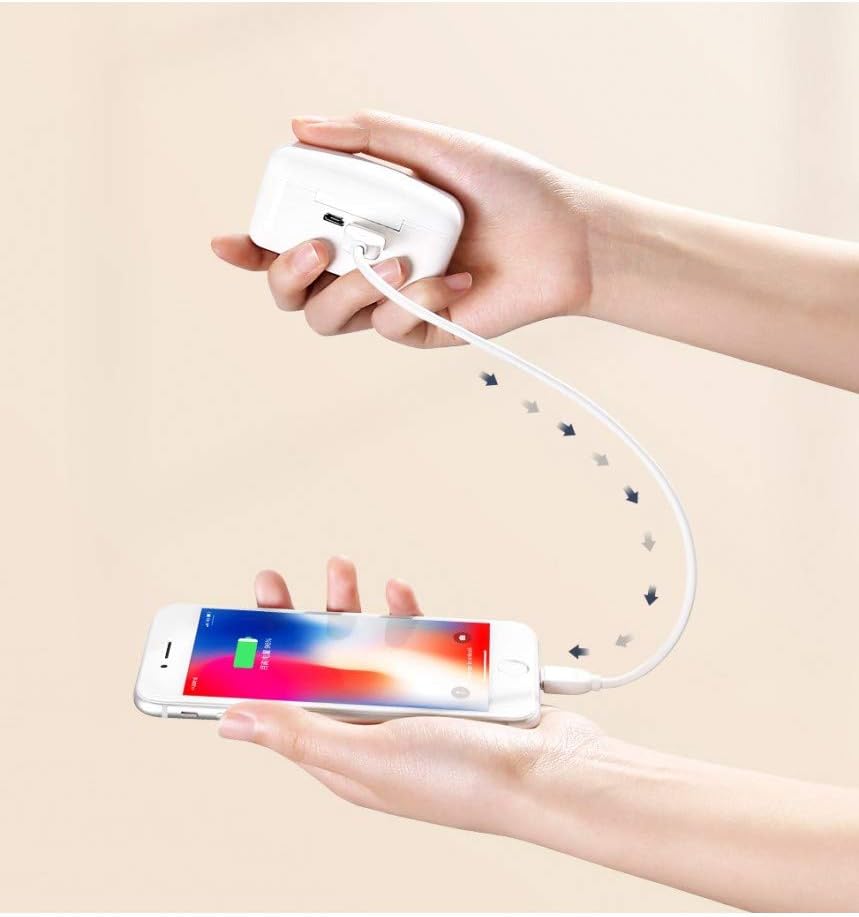
Image: The charging case can also be used to charge other devices, functioning as a portable power bank.
2. Pairing with Your Device
The JR-T06 earphones feature automatic pairing for convenience.
- Open the charging case. The earphones will automatically power on and enter pairing mode.
- On your mobile device (smartphone, tablet, etc.), enable Bluetooth.
- Search for available Bluetooth devices and select "JR-T06" from the list.
- Once connected, you will hear a confirmation tone, and the earphones will be ready for use.
- The earphones will automatically reconnect to the last paired device when taken out of the case, if Bluetooth is enabled on the device.
Operating Instructions
The JOYROOM JR-T06 earphones utilize sensitive touch controls for various functions.
Touch Controls
| Action | Function |
|---|---|
| Single Tap (Left/Right Earbud) | Play/Pause Music, Answer/End Call |
| Double Tap (Right Earbud) | Next Track |
| Double Tap (Left Earbud) | Previous Track |
| Triple Tap (Left/Right Earbud) | Activate Voice Assistant (Siri, Google Assistant) |
| Long Press (Left/Right Earbud) | Reject Call |
Calling
The built-in microphone with HD noise reduction ensures clear communication during calls.
- Answering a Call: Single tap either earbud.
- Ending a Call: Single tap either earbud.
- Rejecting a Call: Long press either earbud.
Music Playback
Enjoy high-fidelity stereo sound with your JR-T06 earphones.
- Play/Pause: Single tap either earbud.
- Next Track: Double tap the right earbud.
- Previous Track: Double tap the left earbud.
Maintenance
Proper care will extend the lifespan of your JOYROOM JR-T06 TWS Earphones.
- Cleaning: Use a soft, dry, lint-free cloth to clean the earbuds and charging case. Do not use harsh chemicals or abrasive materials.
- Storage: When not in use, store the earphones in their charging case to protect them from dust and damage.
- Water Resistance: The earphones are waterproof. However, avoid prolonged submersion in water and ensure they are dry before placing them back in the charging case.
- Temperature: Avoid exposing the earphones to extreme temperatures (hot or cold) or high humidity.
Troubleshooting
If you encounter issues with your earphones, refer to the following common solutions.
- Earphones not pairing:
- Ensure both earphones are fully charged.
- Turn off Bluetooth on your device, then turn it back on.
- Delete "JR-T06" from your device's Bluetooth list and attempt to re-pair.
- Place both earbuds back into the charging case, close the lid, wait a few seconds, then open the lid to reset.
- Only one earbud working:
- Ensure both earbuds are charged.
- Try placing both earbuds back in the case, closing it, and then taking them out again.
- Perform a full reset as described in the pairing section.
- No sound or low volume:
- Check the volume level on both your device and the earphones.
- Ensure the earphones are properly connected to your device.
- Clean any debris from the earbud speakers.
- Charging issues:
- Ensure the charging cable is securely connected to both the case and the power source.
- Verify the power source is active.
- Clean the charging contacts on both the earbuds and the case.
Specifications
| Feature | Detail |
|---|---|
| Brand | JOYROOM |
| Model Number | JR-T06 mini |
| Connectivity Technology | Bluetooth 5.0 |
| Wireless Communication | Wireless |
| Ear Placement | In-Ear |
| Noise Control | Active Noise Cancellation (HD Noise Reduction) |
| Control Method | Touch Control |
| Microphone | Included (Imported Silicon Microphone) |
| Sound Track System | Stereo |
| Effective Distance | 10 meters |
| Earphone Playtime | 4-5 hours |
| Earphone Talk Time | 4-5 hours |
| Standby Time | 200 hours |
| Charging Case Capacity | 2500 mAh |
| Battery Charging Time | Approx. 2 hours (Earphones & Case) |
| Compatible Devices | iOS, Android, Mobile Phones (All devices) |
| Water Resistance Level | Waterproof |
| Materials | Silicone |
| Item Weight | 205 grams |
Warranty and Support
JOYROOM products come with a standard warranty. For detailed warranty information, technical support, or customer service inquiries, please refer to the warranty card included in your package or visit the official JOYROOM website.
You can also contact your retailer for assistance.