1. Introduction
The FidgetGear GTMEDIA V8 Finder Meter (V-73HD) is a high-definition digital satellite finder designed for quick and accurate setup of satellite dishes. It supports DVB-S/S2/S2X signals and features H.265 hardware decoding. This manual provides essential information for operating and maintaining your device.

Image 1.1: The GTMEDIA V8 Finder Meter product packaging.
2. Safety Information
- Read all instructions carefully before use.
- Do not expose the device to rain or moisture.
- Use only the provided power adapter and car charger cable.
- Avoid extreme temperatures. Operating temperature: 0℃ to +45℃; Storage temperature: -10℃ to +60℃.
- Do not attempt to disassemble or repair the unit yourself. Refer all servicing to qualified personnel.
- Keep the device away from strong magnetic fields.
3. Package Contents
Verify that all items listed below are included in your package:
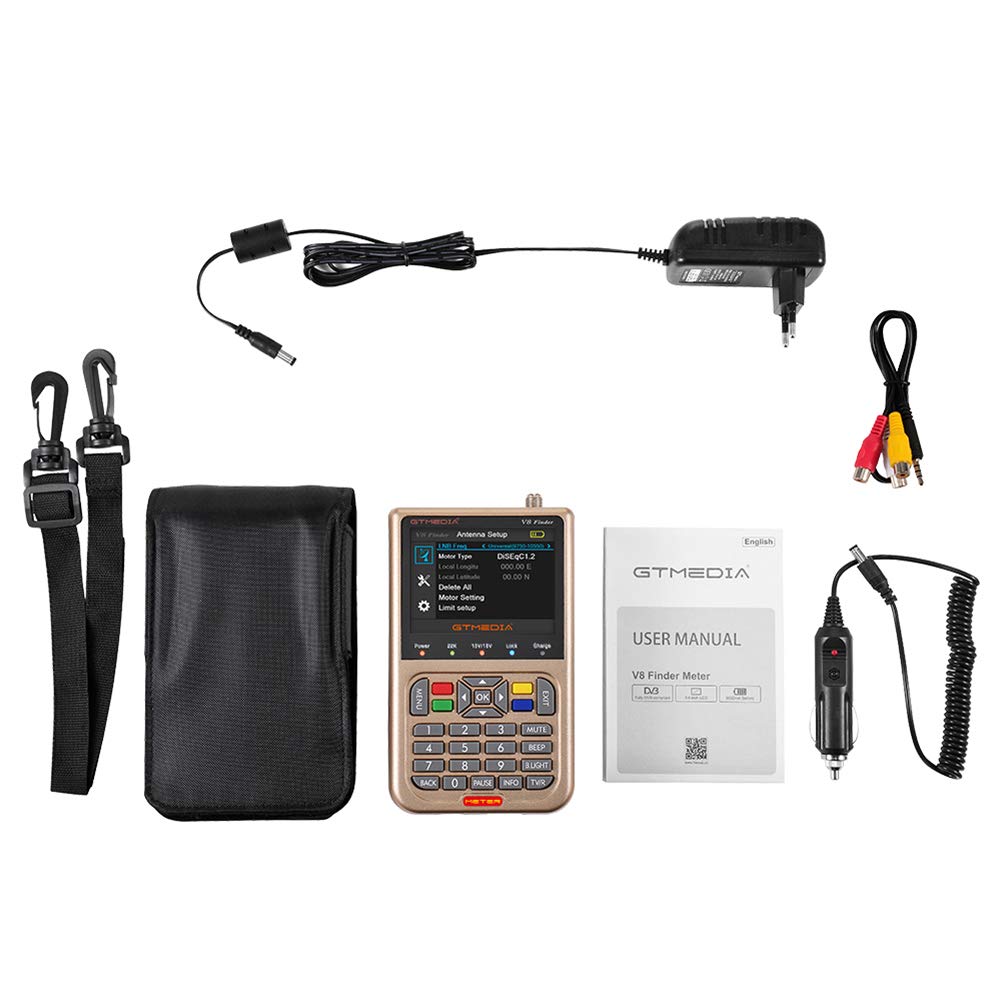
Image 3.1: All components included in the GTMEDIA V8 Finder Meter package.
- 1x Digital Satellite Meter (GTMEDIA V8 Finder Meter)
- 1x Power Adapter (UK Plug)
- 1x AV Cable
- 1x Car Charger Cable
- 1x Carrying Bag
- 1x Strap for Carrying Bag
- 1x User Manual
4. Product Overview
4.1 Front Panel and Controls
The front panel features a 3.5-inch LCD screen for displaying menus and signal information, along with 28 operational keys for navigation and control.

Image 4.1: Front view of the GTMEDIA V8 Finder Meter.
- 3.5 Inch High Definition LCD Screen: Displays signal strength, quality, and menu options.
- 28 Key Operation: For navigating menus, entering values, and controlling functions.
- LED Indicators: Status panel LED display for power, 22KHz, 13V/18V, Lock, and Charge status.
4.2 Rear Panel Connections
The rear panel provides various input and output ports for connectivity.

Image 4.2: Rear view of the GTMEDIA V8 Finder Meter.
- LNB IN: F-type connector for satellite dish LNB input (Frequency Range: 950MHz to 2150MHz).
- HD OUT: HDMI output for connecting to a display.
- AV OUT: 4-pin 3.5 mm jack for analog video/audio output.
- AV IN: 4-pin 3.5 mm jack for analog video/audio input.
- USB Port: For software upgrades and data transfer.
- Power Input: DC 12V/1.5A input for charging and operation.
5. Setup
5.1 Charging the Device
- Connect the provided power adapter to the DC 12V/1.5A input port on the rear panel of the V8 Finder Meter.
- Plug the adapter into a standard AC 110-240V, 50/60Hz power outlet.
- The Charge LED indicator will illuminate during charging. A full charge provides up to 4 hours of operating time.
- Alternatively, use the car charger cable to charge the device in a vehicle.
5.2 Initial Power On
- Ensure the device is sufficiently charged or connected to power.
- Press the Power button to turn on the device.
- The 3.5-inch LCD screen will display the startup logo, followed by the main menu or last used screen.
6. Operating Instructions
6.1 Satellite Dish Alignment
The V8 Finder Meter simplifies satellite dish installation by providing real-time signal measurements.

Image 6.1: The V8 Finder Meter displaying the main installation menu.
- Connect the LNB cable from your satellite dish to the LNB IN port on the V8 Finder Meter.
- Navigate to the Installation menu using the arrow keys and OK button.
- Select Antenna Connection or Satellite List to choose the desired satellite.
- Adjust your satellite dish's azimuth, elevation, and polarization while observing the signal strength and quality indicators on the screen.
- Fine-tune the dish position until the signal strength and quality are maximized. The device will provide audible feedback (BEEP) and visual lock indication.
6.2 Menu Navigation
Use the following buttons for menu navigation:
- MENU: Access the main menu.
- Arrow Keys (Up/Down/Left/Right): Navigate through menu options and adjust settings.
- OK: Confirm selections or enter sub-menus.
- EXIT: Go back to the previous menu or exit the current function.
- Number Keys (0-9): Enter numerical values.
- INFO: Display detailed information about the current selection.
- B.LIGHT: Adjust backlight brightness.
7. Maintenance
- Cleaning: Use a soft, dry cloth to clean the device. Do not use liquid cleaners or solvents.
- Storage: Store the device in a cool, dry place when not in use. If storing for extended periods, ensure the battery is partially charged (around 50%) and recharge every few months to maintain battery health.
- Battery Care: The device uses a Li-Ion battery (7.4V/3000mAh). Avoid fully discharging the battery frequently.
- Software Updates: Periodically check the manufacturer's website (http://www.freesat.cn) for firmware updates. Updates can be performed via the USB port.
8. Troubleshooting
| Problem | Possible Cause | Solution |
|---|---|---|
| Device does not power on. | Low battery or power adapter issue. | Charge the device using the provided adapter. Ensure the adapter is properly connected and the power outlet is functional. |
| No signal detected. | Incorrect LNB connection, wrong satellite selected, or dish misalignment. | Check LNB cable connection. Verify the correct satellite is selected in the menu. Adjust dish alignment carefully. |
| Screen is blank or frozen. | Software glitch or temporary error. | Perform a soft reset by holding the Power button until the device turns off, then restart. If persistent, consider a firmware update. |
| Poor signal quality despite high strength. | Interference or LNB/cable issue. | Check for obstructions near the dish. Inspect LNB and cables for damage. Ensure LNB skew is correctly set. |
9. Specifications
| Feature | Specification |
|---|---|
| Model Number | SZZSC-LD1014DZ-PEL_06I01BMN |
| CPU | Ali M3S10 MPEG-4, MPEG-2, H.265 |
| DDR | 1G DDR3 |
| Flash | 64M SPI |
| Demodulation | M1502 + Tuner M3031 |
| Video Decode | MPEG-2 MP@HL; MPEG4/H.265, BP MP HP@L4.1; AVS profile@L6.1/4.0/2.0 |
| HDMI Output | 480i/p, 576i/p, 720p, 1080i, 1080P |
| Audio Decode | MPEG1 layer I, II, III; MPEG2 AAC; MPEG4 HE-AAC; Dolby |
| Panel Display | 3.5 Inch LCD Screen |
| LNB Input Connector | F type, male |
| Frequency Range | 950MHz - 2150MHz |
| Input Impedance | 75Ω |
| Input Signal Level | -65dBm ~ -25dBm (average power) |
| Active Antenna Power | 13/18V DC @ 400mA MAX, Overload Protection |
| DiSEqC Support | DiSEqC1.0/1.1/1.2/USALS Motor fully support |
| LNB Switch Control | 22KHz |
| Power Supply | AC IN 110-240V, DC 12V/1.5A |
| Battery | Li-oN 3000mA/7.4V |
| Operating Temperature | 0℃ ~ +45℃ |
| Storage Temperature | -10℃ ~ +60℃ |
| Humidity | 20% ~ 90%, non-condensed |
| Product Dimensions | 95 x 155 x 45 mm (L*W*H) |
| Unit Weight | 0.85 Kg (with gift box) |
10. Warranty and Support
This FidgetGear product is covered by a standard manufacturer's warranty. Please refer to the warranty card included in your package for specific terms and conditions. For technical support, troubleshooting assistance, or warranty claims, please contact your retailer or visit the official GTMEDIA website at http://www.freesat.cn.
The serial number for your device is V8FA18000198. Please have this information ready when contacting support.


