1. Introduction
The OBO HANDS 7-inch TFT-LCD Wired Video Intercom System is designed for multi-apartment or multi-family buildings, providing secure communication and monitoring. This system includes a 7-inch TFT-LCD indoor monitor and an outdoor camera with IR night vision. It supports two-way intercom, video chat, and call transfer functionalities, enhancing security and convenience for residents.
2. Package Contents
Please verify that all items listed below are included in your package. If any items are missing or damaged, please contact customer support.

Image showing the complete package contents, including the outdoor camera, indoor monitors, mounting plates, screws, power adapters, cables, and user manual.
- Outdoor Camera Unit (x1)
- 7-inch TFT-LCD Indoor Monitor (x4)
- Mounting Plate for Indoor Monitor (x4)
- Set of Screws and Wall Plugs (x4)
- Power Adapter for Indoor Monitor (x4)
- Connection Cable (x1)
- Wiring Harnesses (x4)
- User Manual (x1)
3. Product Overview
3.1. Components and Dimensions

Image illustrating the dimensions of the 7-inch indoor monitor and the outdoor camera unit.
The system consists of an indoor monitor and an outdoor camera unit. Key dimensions are:
- Indoor Monitor: Approximately 230mm (width) x 165mm (height) x 19mm (depth).
- Outdoor Camera Unit: Approximately 112mm (width) x 276mm (height) x 45mm (depth).
3.2. Indoor Monitor Controls and Connections

Image detailing the buttons on the side of the indoor monitor and the connection ports on the rear and top edges.
The indoor monitor features several controls and connection points:
- Side Buttons: Working LED, Ring Cancel, Ringtone Adjust, Monitor Button, Unlock Button, Intercom Button.
- Front: 7-inch TFT LCD Screen, Microphone.
- Top Adjustments: Screen brightness, Intercom volume, Screen color.
- Rear Connections: Connect to DC15V Power, Speaker, Connect to Outdoor Camera, Connect to Another Indoor Monitor, Mounting Plate attachment points.
3.3. Outdoor Camera Unit Components

Image showing the external features of the outdoor camera unit, including the camera lens, microphone, LED light, and call buttons, as well as an internal view of the wiring connections.
The outdoor camera unit includes:
- Camera lens
- Microphone (MIC)
- LED Light for night vision
- Four Call Buttons, each connectable to an indoor monitor.
- Internal connections for lock and indoor units.
4. Setup and Installation
Proper installation is crucial for optimal performance. It is recommended to consult a qualified electrician for complex wiring.
4.1. Wiring Diagram for Multiple Monitors
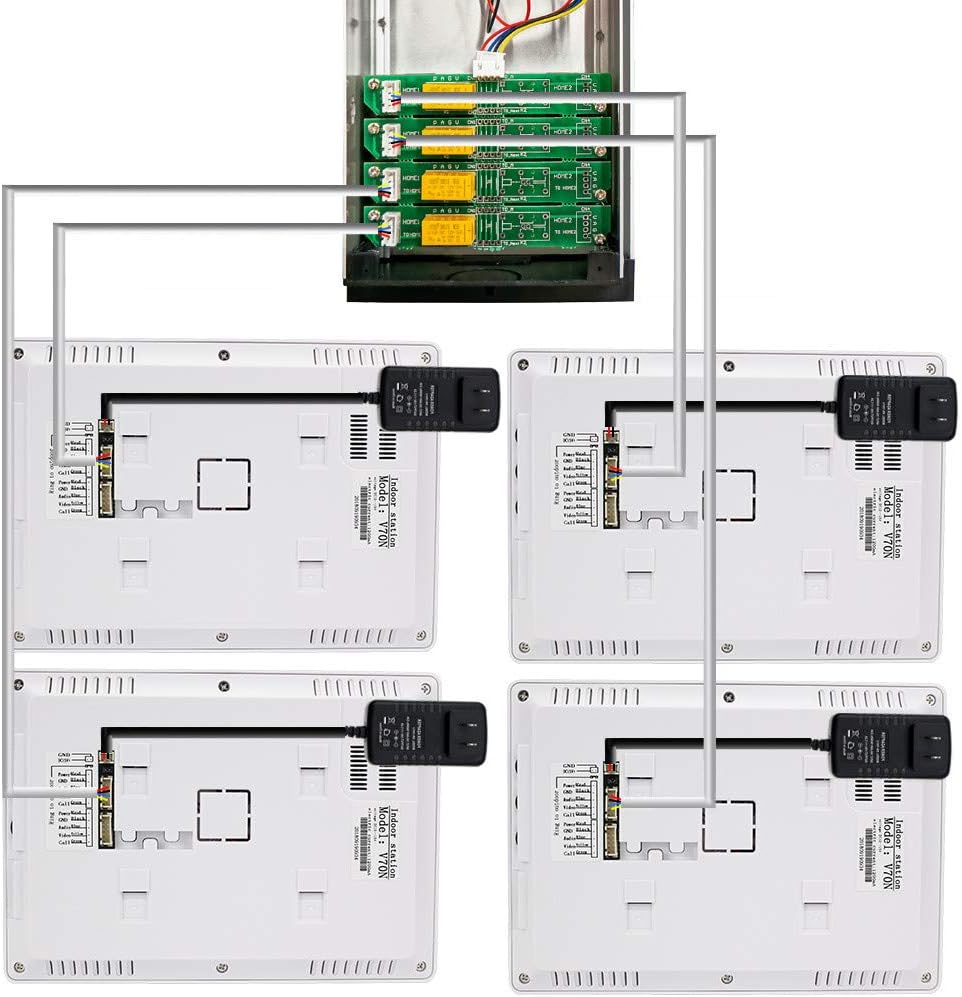
Image illustrating the wiring connections from the outdoor camera unit to four indoor monitors, including power adapters for each monitor.
Each indoor monitor connects to the outdoor camera unit and its dedicated power adapter. Ensure all connections are secure and follow the provided wiring diagram carefully.
4.2. Electric Lock Compatibility and Wiring

Image demonstrating how the intercom system can be connected to different types of electric locks (Electronic Control Lock, Magnetic Lock, Electric Bolt Lock, Electric Strike Lock) for remote unlocking. Also includes a table for recommended cable specifications based on distance.
The system is compatible with various electric locks. The lock itself is not included in the package. Connect the lock to the designated 'Link lock' terminals on the outdoor unit as shown in the diagram.
Recommended Cable Specifications:
| Distance | Cable Type |
|---|---|
| 30m | RVV4*0.30 |
| 50m | RVV4*0.50 |
| 100m | RVV4*1.0 |
4.3. Mounting
Securely attach the mounting plate for each indoor monitor to a wall using the provided screws and wall plugs. Ensure the outdoor camera unit is mounted in a suitable, rainproof location at an appropriate height for clear viewing.
5. Operating Instructions
5.1. Answering a Call
When a visitor presses a call button on the outdoor unit, the corresponding indoor monitor will ring. Press the Intercom Button on the indoor monitor to establish two-way audio and video communication with the visitor.
5.2. Monitoring
To view the outdoor area without a visitor call, press the Monitor Button on the indoor unit. This activates the outdoor camera feed on your screen.
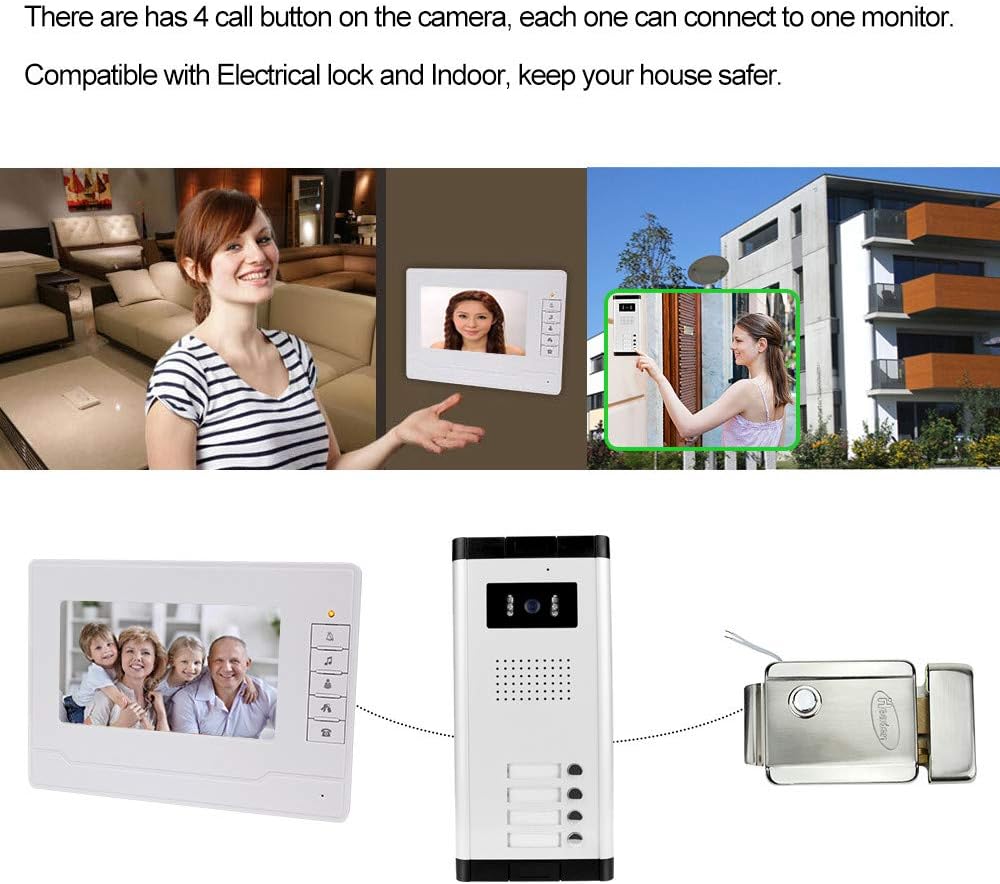
Image depicting an indoor monitor displaying the outdoor camera feed, with a person interacting with the outdoor unit.
5.3. Unlocking the Door
During an active call or while monitoring, press the Unlock Button on the indoor monitor to remotely open a connected electric lock.
5.4. Adjusting Settings
Use the adjustment dials on the top edge of the indoor monitor to modify:
- Screen Brightness: Adjust the display's luminosity.
- Intercom Volume: Control the audio level during communication.
- Screen Color: Fine-tune the color balance of the display.
5.5. Intercom Between Monitors
The system supports call transfer between indoor monitors. Refer to the specific instructions in the full manual for detailed steps on initiating and receiving calls between different indoor units.
6. Maintenance
To ensure the longevity and optimal performance of your video intercom system, follow these maintenance guidelines:
- Cleaning: Use a soft, dry cloth to clean the indoor monitor screen and the outdoor camera lens. Avoid abrasive cleaners or solvents that could damage the surfaces.
- Environmental Protection: Ensure the outdoor unit is protected from direct heavy rain and extreme weather conditions, despite its rainproof design.
- Connection Checks: Periodically check all wiring connections to ensure they are secure and free from corrosion.
- Software Updates: If applicable, check the manufacturer's website for any firmware updates for improved functionality or security.
7. Troubleshooting
If you encounter issues with your OBO HANDS video intercom system, refer to the following common problems and solutions:
- No Video or Audio:
- Check all power connections to both the indoor monitors and the outdoor camera unit.
- Verify that all wiring between the outdoor unit and indoor monitors is correctly connected and not damaged.
- Ensure the power adapters are functioning correctly.
- Poor Image Quality:
- Clean the outdoor camera lens to remove any dirt or obstructions.
- Check the screen color and brightness settings on the indoor monitor.
- Ensure adequate lighting in front of the outdoor camera, especially during the day.
- Door Unlock Function Not Working:
- Verify that the electric lock is correctly wired to the outdoor camera unit.
- Ensure the electric lock itself is receiving power and functioning independently.
- Check the wiring for any breaks or loose connections.
- No Ringing from Outdoor Unit:
- Confirm that the indoor monitor is powered on.
- Check the ringtone volume setting on the indoor monitor.
- Ensure the call button on the outdoor unit is not stuck and is making proper contact.
If these steps do not resolve the issue, please contact OBO HANDS customer support for further assistance.
8. Specifications
| Feature | Description |
|---|---|
| Brand | OBO HANDS |
| Model | 520 |
| Connectivity Technology | Wired |
| Indoor Monitor Screen | 7-inch TFT-LCD |
| Outdoor Camera Resolution | 700TVL IR Night Vision |
| Special Feature | Night Vision |
| Indoor/Outdoor Use | Outdoor (Camera), Indoor (Monitor) |
| Recommended Use | Monitoring, Multi-apartment Intercom |
| Intercom Type | Two-way audio and video |
| Ringtone Options | 25 |
9. Warranty and Support
For information regarding warranty coverage, duration, and terms, please refer to the documentation provided with your purchase or contact the retailer/manufacturer directly. For technical support or further assistance, please reach out to OBO HANDS customer service through their official channels.


