
Introduction
This manual provides instructions for the Easytry123 replacement remote control, designed for use with various Philips Mini CD Changer Systems. Please read this manual carefully to ensure proper operation and longevity of your remote control.
Compatible Models
This remote control is compatible with the following Philips Mini CD Changer System models:
- FW-C399/21M
- FW-C39/21M
- FW-C30
- FW-C38
- FW-C30/21
- FW-C38/21M
- FW545C/22
- FW555C/37
- FW555
- FW585C
Note: This replacement remote may not support all functions of the original remote control.
Setup
1. Battery Installation
The remote control requires two (2) AAA batteries (not included).
- Locate the battery compartment on the back of the remote control.
- Slide the battery compartment cover downwards to open it.
- Insert two AAA batteries, ensuring the positive (+) and negative (-) terminals align with the markings inside the compartment.
- Slide the battery compartment cover back into place until it clicks securely.
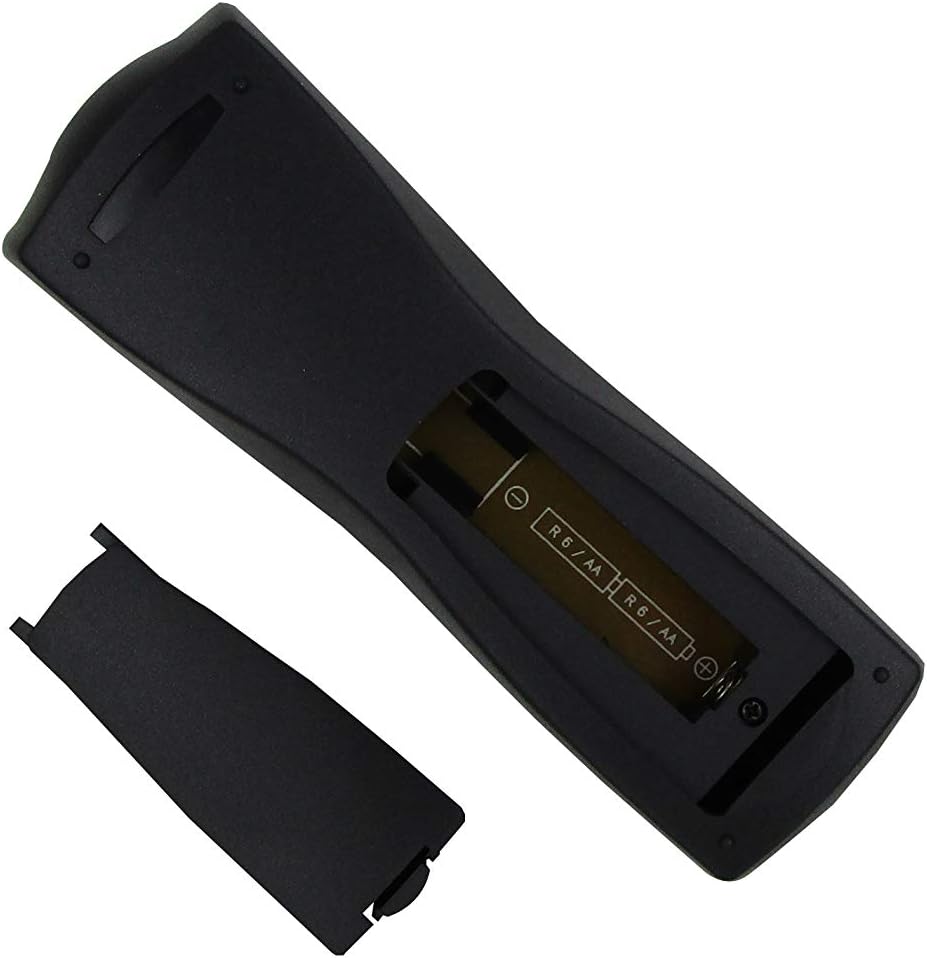
Figure 1: Battery compartment with cover removed, showing battery orientation.
Operating Instructions
Point the remote control directly at the infrared sensor on your Philips Mini CD Changer System. Ensure there are no obstructions between the remote and the system.
Key Functions Overview

Figure 2: Front view of the remote control with button layout.
- Power (Red Button): Turns the system on or off.
- TV / Tuner / CD / Tape 1/2 / AUX: Selects the input source.
- CD Direct: Directly switches to CD playback.
- Numeric Buttons (1, 2, 3): Used for direct track selection or programming.
- Sleep Timer: Activates or adjusts the sleep timer function.
- Program: Initiates program mode for CD tracks.
- DBB (Dynamic Bass Boost): Enhances bass output.
- Shuffle: Plays tracks in a random order.
- Test Tone: Used for speaker setup and testing.
- DSC (Digital Sound Control): Selects preset equalizer settings.
- Mute: Silences the audio output.
- Repeat: Repeats the current track or entire CD.
- Play/Pause (▶/‖): Starts or pauses playback.
- Stop (■): Stops playback.
- Volume (+/-): Adjusts the main system volume.
- TV VOL (+/-): Adjusts the television volume (if compatible and programmed).
- Navigation Buttons (▲, ◀, ▶, ▼): Used for menu navigation or track skipping.
- DPL (Dolby Pro Logic): Activates Dolby Pro Logic sound mode.
- Balance (L/R): Adjusts the left and right audio balance.
- Center (+/-): Adjusts the center speaker volume.
- Rear (+/-): Adjusts the rear speaker volume.
Maintenance
Battery Replacement
Replace batteries when the remote control's range decreases or it becomes unresponsive. Always replace both batteries simultaneously with new AAA batteries. Do not mix old and new batteries, or different types of batteries.
Cleaning
To clean the remote control, wipe it with a soft, dry cloth. Do not use liquid cleaners, abrasive pads, or chemical solvents, as these can damage the remote's surface or internal components.
Troubleshooting
Remote Control Not Responding
- Check Batteries: Ensure batteries are inserted correctly with the correct polarity (+/-). Replace old batteries with new ones.
- Line of Sight: Make sure there are no objects blocking the path between the remote control and the system's infrared sensor.
- Distance: Operate the remote within its effective range (typically up to 20 feet or 6 meters).
- System Power: Confirm that your Philips Mini CD Changer System is powered on.
Limited Functionality
- This is a replacement remote control. Some advanced or specific functions of your original Philips remote may not be supported. Refer to the "Compatible Models" section for details.
Specifications
- Brand: Easytry123
- Connectivity Technology: Infrared (IR)
- Controller Type: Button Control
- Special Feature: Ergonomic design
- Power Source: 2 x AAA batteries (not included)
Warranty and Support
Information regarding warranty coverage or specific customer support for this Easytry123 replacement remote control is not provided in the product details. Please refer to the seller or your purchase documentation for any available warranty information or support contacts.