Product Overview
The SKMEI 1456 is a robust digital chronograph watch designed for outdoor sports and daily wear. It features a precise electronic movement, a durable stainless steel case and band, and a range of functions including a stopwatch, countdown timer, alarm, dual time display, and EL backlight for visibility in low light conditions. This manual provides detailed instructions for setting up and operating your watch.
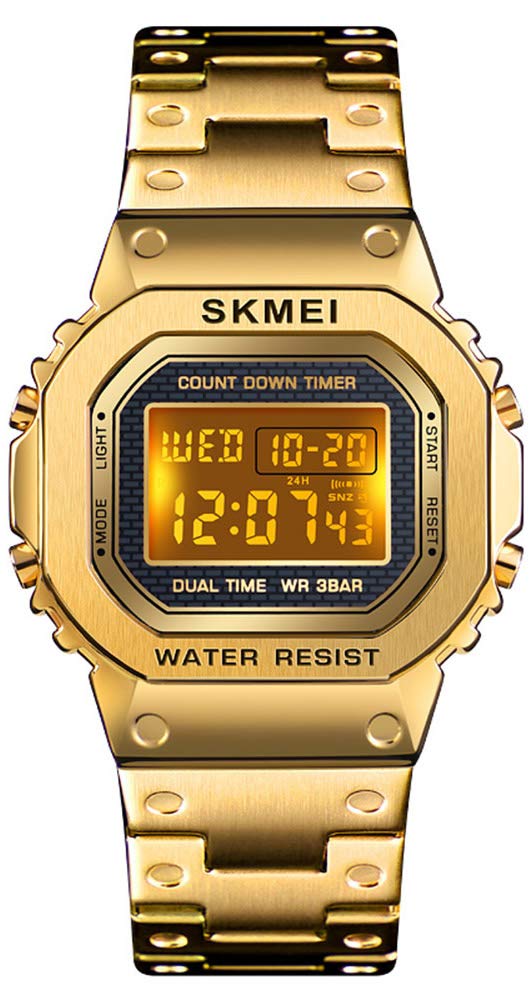
Figure 1: Front view of the SKMEI 1456 Digital Chronograph Watch.
Key Features
- Digital Electronic Movement: Provides accurate and precise timekeeping.
- Scratch-Resistant Dial: High-hardness resin glass mirror.
- 12/24 Hour Format: Military time display option.
- 1/100 Second Chronograph: Stopwatch function for precise timing.
- EL Backlight: Electro-Luminescent backlight for clear visibility in the dark.
- Calendar: Displays month, date, and day of the week.
- Dual Time: Allows tracking of a second time zone.
- Countdown Timer: Useful for various activities.
- Alarm and Hourly Chime (SIG): Customizable alerts.
- Stainless Steel Case and Band: Durable and comfortable design.
- 3 ATM Water Resistance: Suitable for daily splashes and rain (not for swimming or diving).

Figure 2: Overview of watch functions.
Setup
- Initial Inspection: Carefully remove the watch from its packaging. Check for any protective films on the watch face or band and remove them.
- Button Identification: Familiarize yourself with the four buttons on the watch:
- MODE: (Top Left) Used to cycle through different modes (Time, Stopwatch, Alarm, Countdown, Dual Time).
- LIGHT: (Bottom Left) Activates the EL backlight.
- START: (Top Right) Used to start/stop functions and adjust settings.
- RESET: (Bottom Right) Used to reset functions and select settings.
- Adjusting the Band: The stainless steel band is designed for easy length adjustment. If necessary, take it to a professional or use a watch band adjustment tool to remove links for a comfortable fit.

Figure 3: Watch face with button labels.
Operating Instructions
1. Time Setting (Normal Time Mode)
- From the normal time display, press the MODE button three times to enter the time setting mode. The seconds will flash.
- Press the RESET button to cycle through the setting items: Seconds → Hours → Minutes → Year → Month → Day.
- While an item is flashing, press the START button to adjust its value. Hold START to rapidly advance the value.
- To switch between 12-hour and 24-hour format, press the RESET button until the hour is flashing, then press START to toggle.
- Press the MODE button once to exit the setting mode and return to normal time display.
2. Alarm Setting
- From the normal time display, press the MODE button once to enter Alarm Mode.
- Press the RESET button to select the alarm time (hours or minutes). The selected item will flash.
- Press the START button to adjust the flashing value.
- To turn the alarm ON/OFF, press the START and RESET buttons simultaneously in Alarm Mode. An alarm icon will appear/disappear.
- To activate/deactivate the Hourly Chime (SIG), press the MODE button to return to normal time display, then press RESET and MODE simultaneously. The SIG icon will appear/disappear.
- Press the MODE button to return to normal time display.
3. Stopwatch Function
- From the normal time display, press the MODE button twice to enter Stopwatch Mode.
- Press the START button to begin timing.
- Press the START button again to stop timing.
- Press the RESET button to reset the stopwatch to zero.
- To record split times, press RESET while the stopwatch is running. The display will show the split time. Press RESET again to return to current timing.
- Press the MODE button to exit Stopwatch Mode.
4. Countdown Timer
- From the normal time display, press the MODE button four times to enter Countdown Timer Mode.
- Press the RESET button to select the setting item (hours, minutes, or seconds). The selected item will flash.
- Press the START button to adjust the flashing value.
- Once the desired countdown time is set, press the START button to begin the countdown.
- Press the START button again to pause/resume the countdown.
- Press the RESET button to reset the countdown timer to its initial set time.
- Press the MODE button to exit Countdown Timer Mode.
5. Dual Time Setting
- From the normal time display, press the MODE button five times to enter Dual Time Mode.
- Press the RESET button to select the setting item (hours or minutes). The selected item will flash.
- Press the START button to adjust the flashing value.
- Press the MODE button to exit Dual Time Mode.
6. EL Backlight
- Press the LIGHT button (bottom left) at any time to illuminate the display for a few seconds.
Maintenance
- Cleaning: Regularly clean the watch dial and band with a soft, dry cloth to remove dirt and oils.
- Water Resistance: The watch is 3 ATM (30 meters) water resistant. This means it is suitable for splashes, rain, and hand washing. Do not press buttons underwater. Avoid using the watch in extremely hot or cold temperatures, as this can affect its water resistance. It is not suitable for swimming, showering, or diving.
- Avoid Chemicals: Keep the watch away from solvents, detergents, perfumes, and other chemicals that may damage the case or band.
- Temperature Extremes: Avoid exposing the watch to sudden temperature changes or extreme temperatures.
Troubleshooting
| Problem | Possible Cause / Solution |
|---|---|
| Display is blank or dim. | The battery may be low or depleted. Replace the battery. |
| Time is incorrect. | The time may need to be reset. Follow the "Time Setting" instructions. |
| Water appears inside the watch. | Water resistance may have been compromised. Avoid pressing buttons underwater or exposing the watch to hot water/steam. Seek professional inspection. |
| Buttons are unresponsive. | Ensure the watch is not in a locked mode (if applicable, though not a feature of this model). A low battery can also affect button response. |
Specifications
| Feature | Detail |
|---|---|
| Brand | SKMEI |
| Model Number | 1456 |
| Movement | Digital Electronic |
| Case Material | Stainless Steel (Zinc Alloy for case, Stainless Steel for band) |
| Band Material | Stainless Steel |
| Mirror Surface | High Hardness Resin Glass |
| Water Resistance | 3 ATM (30 meters) |
| Case Width | 3.5 cm (35mm) |
| Case Thickness | 1.2 cm (12mm) |
| Band Length | 23 cm (230mm) |
| Band Width | 1.6 cm (16mm) |
| Weight | 62 g |
| Battery | 1 x Unknown (Included) |

Figure 4: Watch dimensions and basic information.
Warranty and Support
Your SKMEI 1456 watch comes with a commitment to customer satisfaction. If you encounter any issues or are not satisfied with your purchase, please contact the seller directly through Amazon's messaging system. They are dedicated to resolving any concerns you may have.
For general inquiries or assistance with product functions, refer to the detailed instructions provided in this manual.


