
1. Introduction
The GOLDEN BLUE MS-B126 Suction Pen is an electric vacuum tool designed for precise and safe handling of small electronic components, such as IC chips, SMD parts, and lenses. Its pen-style design and battery operation offer portability and ease of use for various electronic assembly and repair tasks.
2. Safety Information
- Always handle the device with care to prevent damage.
- Ensure proper battery insertion according to polarity markings.
- This device is ESD (Electrostatic Discharge) safe. However, always follow general ESD precautions when working with sensitive electronic components.
- Keep the device out of reach of children.
- Do not attempt to disassemble or modify the device, as this may void the warranty and pose safety risks.
3. Package Contents
Verify that all items are present in the package:
- 1 x GOLDEN BLUE MS-B126 Suction Pen
- 1 x Curved Nozzle
- 1 x Straight Nozzle
- 3 x Suction Cups (4mm, 6mm, 10mm)
4. Product Overview
The MS-B126 features a compact, pen-style body housing an ultra-small vacuum pump. It includes an anti-static cup tip and spring, a power button, and a battery case for portable operation.

Figure 1: Overview of the MS-B126 Suction Pen components. The image displays the pen with its key parts labeled, including the anti-static cup tip, power button, internal pump and motor, and the battery case.
5. Setup
5.1 Battery Installation
- Unscrew the battery case located at the bottom of the pen.
- Insert one AAA alkaline battery, ensuring correct polarity (+/-) as indicated inside the compartment.
- Screw the battery case back on securely.
5.2 Attaching Suction Cups and Nozzles
- Select the appropriate suction cup size (4mm, 6mm, or 10mm) based on the component you intend to handle.
- Attach the chosen suction cup firmly to either the curved or straight nozzle.
- Securely fit the assembled nozzle with the suction cup onto the pen's tip.

Figure 2: Various suction cup sizes. This image illustrates the three available suction cup sizes (4mm, 6mm, 10mm) and indicates their corresponding suction strengths, aiding in selecting the correct cup for different component sizes.
6. Operating Instructions
6.1 Powering On/Off
Press the power button located on the pen to activate the vacuum pump. The device will begin to generate suction. Press the button again to turn off the vacuum.
6.2 Picking Up Components
- Ensure the appropriate suction cup is attached and clean.
- Gently press the suction cup onto the flat, non-porous surface of the component you wish to pick up.
- Activate the vacuum by pressing the power button. The component will be held securely by suction.
6.3 Releasing Components
- Carefully position the component over its target location.
- Release the power button to deactivate the vacuum, allowing the component to be gently placed.
6.4 ESD Precautions
The MS-B126 is designed to be ESD safe. However, it is crucial to always work in an ESD-protected environment when handling sensitive electronic parts to prevent damage from static electricity.

Figure 3: Pen-style operation. This image demonstrates the ergonomic pen-like grip for comfortable and precise handling of the suction tool during operation.
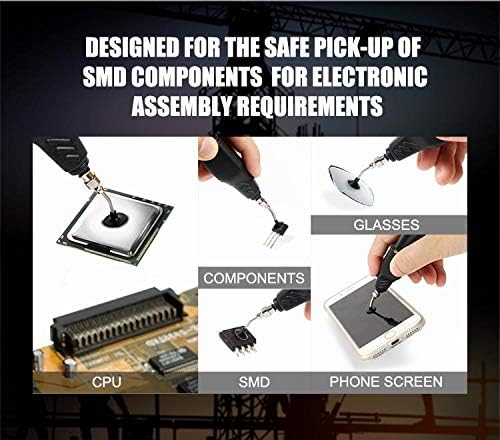
Figure 4: Applications of the suction pen. This collage illustrates the versatility of the suction pen for safely picking up different items, including CPUs, SMD components, glasses, and phone screens.
7. Maintenance
7.1 Cleaning
- Periodically clean the suction cups and nozzles with a soft, dry cloth to remove any dust, debris, or residue.
- Ensure no moisture enters the device's internal components.
7.2 Storage
- Store the suction pen in a dry, cool place away from direct sunlight and extreme temperatures.
- Remove the AAA battery if the device will not be used for an extended period to prevent potential battery leakage.
8. Troubleshooting
| Problem | Possible Cause | Solution |
|---|---|---|
| No suction or device does not turn on | Battery incorrectly installed or depleted. | Check battery polarity; replace with a fresh AAA alkaline battery. |
| Suction cup or nozzle not securely attached. | Ensure all parts are firmly connected. | |
| Weak suction | Low battery power. | Replace with a fresh AAA alkaline battery. |
| Suction cup is dirty or damaged, preventing a proper seal. | Clean the suction cup or replace it if damaged. | |
| Incorrect suction cup size for the component. | Use a larger suction cup for heavier or larger components. | |
| Component drops during transfer | Insufficient suction or improper contact. | Ensure the suction cup is clean and makes full, flat contact with the component. Verify component weight is within the tool's capacity. |
| Sudden movements during transfer. | Maintain steady hand movement when transporting components. |
9. Specifications
| Brand | GOLDEN BLUE |
| Model | MS-B126 Suction Pen |
| Dimensions (W x H) | 0.91" x 5.39" (approximately 2.3 cm x 13.7 cm) |
| Item Weight | 1.76 ounces (approximately 50 grams) |
| Power Source | 1 x AAA Alkaline Battery (not included) |
| Noise Level | 75 Decibels |
| Control Method | Push Button (Touch) |
| Vacuum Technology | Built-in Micro Air Pump |
| Included Suction Cups | 4mm (10gf suction), 6mm (35gf suction), 10mm (80gf suction) |
| Special Features | ESD Safe, Pen-style design, Portable |
10. Warranty and Support
For detailed warranty information, technical support, or service inquiries, please refer to the documentation provided at the time of purchase or contact the authorized seller or manufacturer directly. Keep your proof of purchase for warranty claims.