
1. Important Safety Instructions
Please read all instructions carefully before using the ProfiCare PC-BSR 3043 Robot Vacuum Cleaner. Keep this manual for future reference.
- This appliance is intended for household use only.
- Do not immerse the robot, charging station, or power adapter in water or other liquids.
- Keep the robot away from open flames and heat sources.
- Ensure the power voltage matches the rating label on the charging adapter.
- Do not use the robot on wet surfaces or in areas with standing water.
- Supervise children to ensure they do not play with the appliance.
- Only use original accessories and spare parts provided or approved by ProfiCare.
- The robot contains a lithium-ion battery. Do not expose it to high temperatures or direct sunlight.
- If the power cord is damaged, it must be replaced by the manufacturer, its service agent, or similarly qualified persons to avoid a hazard.
2. Package Contents
Verify that all components are present and in good condition upon unpacking:
- ProfiCare PC-BSR 3043 Robot Vacuum Cleaner
- Charging Station
- Power Adapter for Charging Station
- Remote Control
- 2 x Side Brushes (one pair)
- 1 x HEPA Filter (pre-installed or spare)
- Instruction Manual (this document)

Image: The ProfiCare PC-BSR 3043 robot vacuum cleaner, showcasing its sleek design, along with its remote control and a smartphone displaying the companion app interface.
3. Product Overview
The ProfiCare PC-BSR 3043 is a high-quality robot vacuum cleaner designed for efficient and autonomous floor cleaning. It features rotating floor and side brushes to effectively remove dirt, dust, crumbs, and pet hair from various surfaces.
- Versatile Cleaning: Suitable for all hard floors and short-pile carpets.
- Smart Navigation: Utilizes gyroscope technology for systematic and efficient cleaning paths.
- Compact Design: Extra-flat dimensions (only 7.5 cm high) allow cleaning under furniture.
- Advanced Filtration: Equipped with a HEPA filter for high-efficiency particle air filtration.
- Automated Functions: Automatic return to charging station, stair and obstacle detection.
- Multiple Control Options: Sensor touch display, multi-function remote control, and Wi-Fi app control.

Image: Side view of the ProfiCare PC-BSR 3043 robot vacuum cleaner, highlighting its compact height of 75 mm and a diameter of 300 mm, ideal for cleaning under furniture.
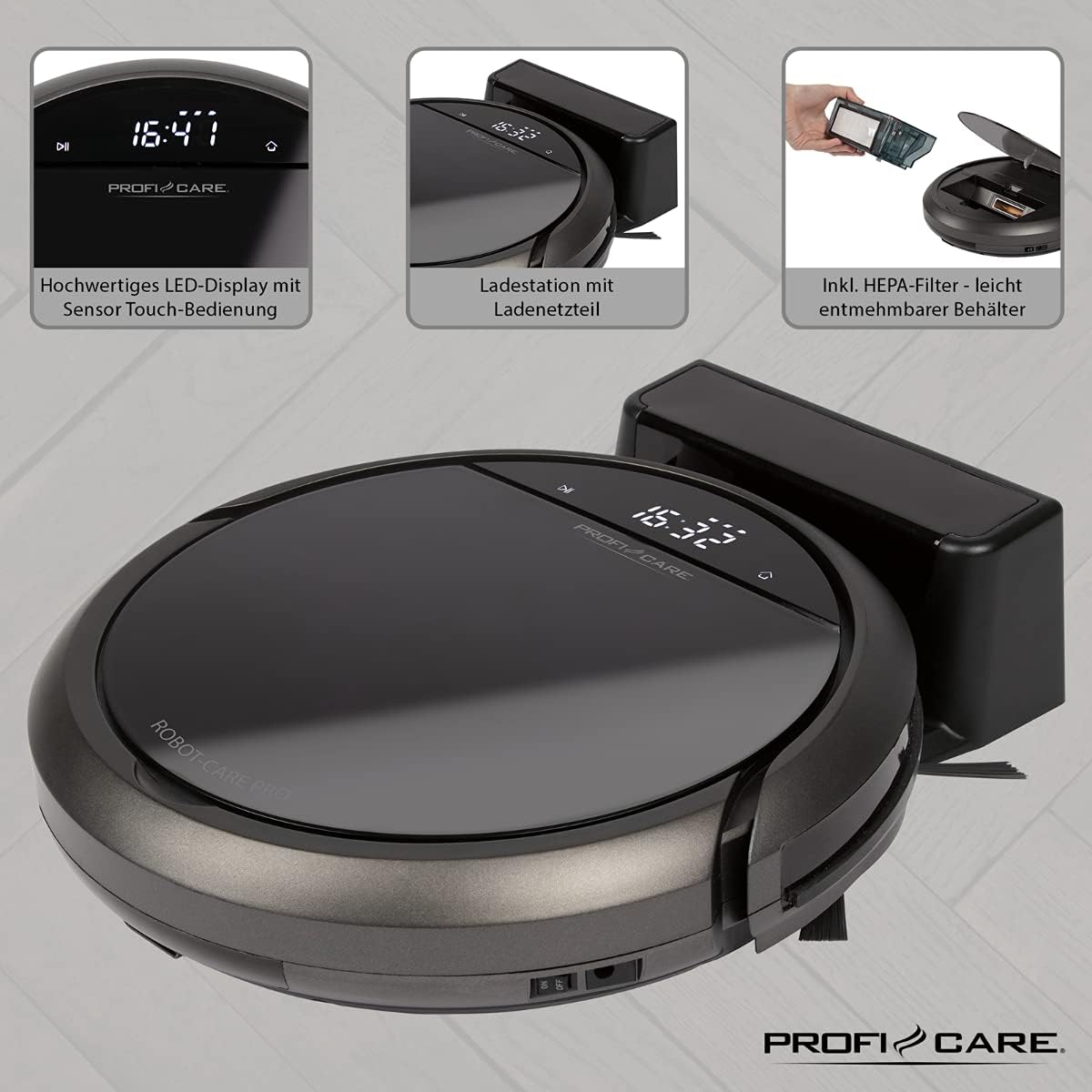
Image: Top view of the ProfiCare PC-BSR 3043 robot vacuum cleaner with key features labeled, including LED display, sensor touch operation, Wi-Fi app control, auto-return function, 2600 mAh / 14.8 V Lithium-ion battery, and 120 minutes runtime.
4. Setup
4.1 Charging the Robot
- Place the charging station against a wall in an open area, ensuring there are no obstacles within 1 meter to the sides and 2 meters in front.
- Connect the power adapter to the charging station and plug it into a power outlet. The indicator light on the charging station will illuminate.
- Place the robot vacuum onto the charging station. Ensure the charging contacts on the robot align with those on the station. The robot will emit a sound and the display will show charging status.
- Allow the robot to fully charge before first use (approximately 3 hours).

Image: The ProfiCare PC-BSR 3043 robot vacuum cleaner docked on its charging station, illustrating the automatic return and charging capability.
4.2 Installing Side Brushes
Gently push the side brushes onto the square posts on the underside of the robot until they click into place.
4.3 Wi-Fi and App Setup
- Download the ProfiCare app from the Google Play Store (for Android 4.4 or higher) or Apple App Store (for iOS 9.0 or higher).
- Open the app and follow the on-screen instructions to register an account and add your PC-BSR 3043 robot.
- Ensure your Wi-Fi network is 2.4 GHz, as 5 GHz is not supported.
5. Operating the Robot Vacuum
5.1 Powering On/Off
Press and hold the power button on the robot's display or the remote control to turn the robot on or off.
5.2 Cleaning Modes
The robot offers four distinct cleaning programs:
- Auto Mode: The robot cleans systematically, covering the entire area.
- Spot Mode: The robot cleans a concentrated area in a spiral pattern, ideal for heavily soiled spots.
- Corners Mode: The robot focuses on cleaning along walls and in corners.
- Systematic Mode (Gyroscope Controlled): Ensures independent orientation for faster and more efficient cleaning results.
5.3 Control Options
- Sensor Touch Display: Use the integrated LED display with touch controls for basic operations.
- Remote Control: The multi-function remote allows for timer settings, individual control, and recalling the robot to the charging station.
- App Control: The smartphone app provides advanced features like 2D map function, live tracking, remote control functions, cleaning plan creation (day, time, frequency), cleaning program selection, and battery status display.
- Voice Control: The robot supports voice control for convenient operation.
5.4 Automatic Functions
- Automatic Return: The robot automatically returns to the charging station after completing a program or when the battery level is low.
- Obstacle Detection: Infrared sensors detect obstacles, allowing the robot to navigate around furniture and other items. Mechanical soft protection is also included for sensitive furniture.
- Stair Detection: Infrared sensors prevent the robot from falling down stairs.
- Automatic Reset: After recharging, the robot continues cleaning from the last cleaned position.

Image: The ProfiCare PC-BSR 3043 robot vacuum cleaner actively cleaning a wooden floor in a home environment, demonstrating its ability to navigate and clean open spaces.
6. Maintenance
Regular maintenance ensures optimal performance and extends the lifespan of your robot vacuum cleaner.
6.1 Emptying the Dustbin
- Press the dustbin release button and pull out the 400 ml dirt tank.
- Open the dustbin lid and empty its contents into a trash can.
- Close the dustbin lid and reinsert it into the robot until it clicks into place.
6.2 Cleaning the HEPA Filter
The HEPA filter should be cleaned regularly and replaced periodically (e.g., every 3-6 months, depending on usage).
- Remove the dustbin as described above.
- Carefully remove the HEPA filter from the dustbin.
- Tap the filter gently over a trash can to remove loose dust. Do not wash the HEPA filter with water.
- Brush off any remaining debris with a soft brush.
- Reinsert the clean filter and dustbin.
6.3 Cleaning Side Brushes and Main Brush
Regularly check the side brushes and main brush for tangled hair or debris. Use scissors to cut away any tangled hair and pull out debris.
6.4 Cleaning Sensors and Charging Contacts
Wipe the infrared sensors (located around the robot's bumper and underside) and the charging contacts on both the robot and the charging station with a clean, dry cloth to ensure proper function.
7. Troubleshooting
If you encounter issues with your ProfiCare PC-BSR 3043, refer to the following common problems and solutions:
| Problem | Possible Cause | Solution |
|---|---|---|
| Robot does not turn on. | Battery is low or depleted. | Place the robot on the charging station and allow it to fully charge. |
| Robot does not charge. | Charging contacts are dirty or misaligned. | Clean the charging contacts on both the robot and the station. Ensure proper alignment. |
| Robot gets stuck frequently. | Too many obstacles or tangled cables. | Clear the cleaning area of excessive clutter, cables, and small objects. |
| Poor cleaning performance. | Dustbin is full, filter is clogged, or brushes are tangled. | Empty the dustbin, clean or replace the HEPA filter, and clean the side and main brushes. |
| Robot does not connect to Wi-Fi. | Incorrect Wi-Fi band (5 GHz not supported) or incorrect password. | Ensure your Wi-Fi network is 2.4 GHz. Re-enter Wi-Fi password carefully. Restart router and robot. |
| Robot falls down stairs. | Stair sensors are dirty or obstructed. | Clean the stair sensors on the underside of the robot. |
For issues not listed here, or if problems persist, please contact ProfiCare customer support.
8. Technical Specifications
| Feature | Specification |
|---|---|
| Model Number | PC-BSR 3043 |
| Brand | ProfiCare |
| Dimensions (L x W x H) | 33 x 33 x 7 cm (approx. 31 x 22 x 13 cm packaged) |
| Weight | 2.5 Kilograms |
| Battery Type | Lithium-ion |
| Battery Capacity | 14.8 V, 2600 mAh |
| Operating Time | Approx. 120 minutes |
| Charging Time | Approx. 3 hours |
| Dustbin Capacity | 400 ml |
| Filter Type | HEPA Filter |
| Noise Level | Approx. 61 dB |
| Connectivity | Wi-Fi 2.4 GHz (5 GHz not supported) |
| Control Type | App Control, Remote Control, Sensor Touch |
| Surface Recommendation | Tiles, Hard Floors, Short-Pile Carpets |
9. Warranty and Support
ProfiCare products are manufactured with high quality standards. For information regarding warranty terms and conditions, please refer to the warranty card included with your product or visit the official ProfiCare website.
If you require technical assistance, have questions about product operation, or need to order spare parts, please contact ProfiCare customer support. Contact details can typically be found on the product packaging, the official website, or through your retailer.
Please note that information regarding the availability of spare parts for this specific model is currently unavailable through standard channels. It is recommended to contact ProfiCare directly for any spare part inquiries.


