
Introduction
This manual provides essential information for the safe and efficient use of your Lenovo ThinkPad X270 laptop. Please read these instructions carefully before using your device and retain them for future reference.

Image: Top view of the Lenovo ThinkPad X270 laptop.
Setup
1. Unpacking and Initial Inspection
Carefully remove all components from the packaging. Verify that all items are present and undamaged. If any items are missing or damaged, contact your retailer immediately.
2. Connecting the Power Adapter
Connect the power adapter to the laptop's power input port and then plug it into a wall outlet. It is recommended to fully charge the battery before initial use.

Image: Right side ports including power input.
3. Initial Power On
Press the power button to turn on the laptop. Follow the on-screen instructions to complete the Windows 10 Pro setup process, including language selection, network connection, and user account creation.
4. Connecting Peripherals
The ThinkPad X270 features various ports for connecting external devices:
- USB Ports: For connecting USB devices such as mice, keyboards, and external storage.
- HDMI Port: For connecting to external displays or projectors.
- Ethernet Port: For wired network connections.
- Audio Jack: For headphones or external speakers.
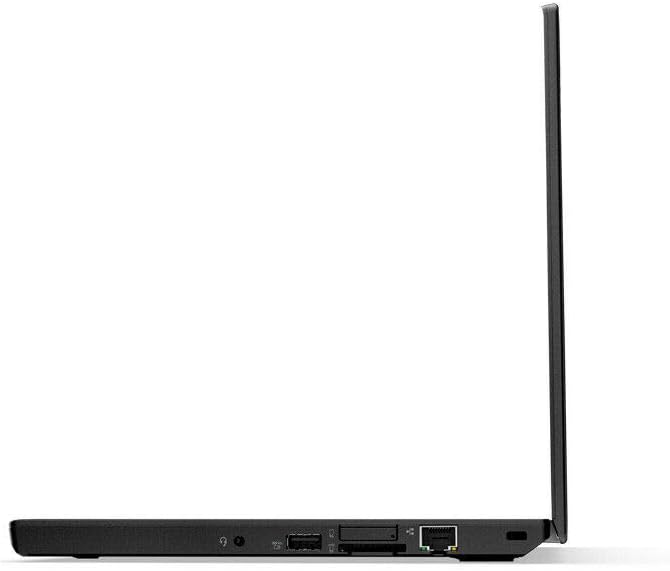
Image: Left side ports.
Operating Your Laptop
1. Keyboard and TrackPoint/Touchpad
The ThinkPad X270 features a full-sized keyboard, a TrackPoint pointing device, and a multi-touch touchpad for navigation and input.

Image: Keyboard, TrackPoint, and Touchpad.
2. Display Settings
The 12.5-inch HD (1366 x 768) anti-glare display can be adjusted for brightness and resolution through Windows display settings. The anti-glare feature reduces reflections for comfortable viewing.
3. Power Management
Utilize Windows power settings to optimize battery life and performance. The laptop is equipped with a 3-cell Li-Ion 23.2Wh battery. For extended use, keep the power adapter connected.
4. Wireless Connectivity
Connect to Wi-Fi networks using the integrated 802.11ac wireless adapter. Access network settings via the Windows taskbar.
Maintenance
1. Cleaning the Laptop
Use a soft, lint-free cloth slightly dampened with water or a specialized screen cleaner to clean the display. For the keyboard and chassis, use a soft cloth. Avoid harsh chemicals or abrasive materials.
2. Battery Care
To prolong battery life, avoid extreme temperatures and do not allow the battery to fully discharge frequently. For long-term storage, charge the battery to approximately 50% and store the laptop in a cool, dry place.
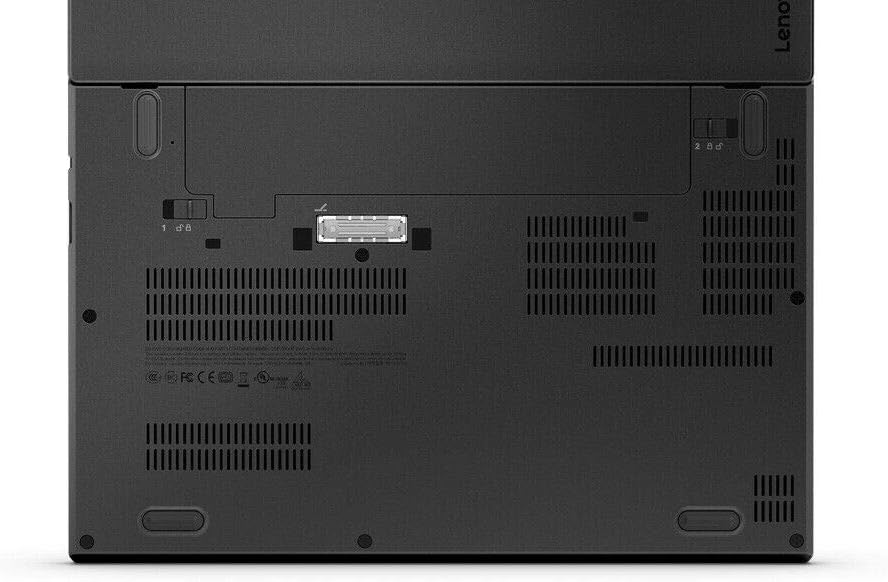
Image: Bottom view of the laptop, indicating areas for maintenance access.
3. Software Updates
Regularly update your Windows operating system and drivers to ensure optimal performance and security. These updates can be managed through Windows Update settings.
Troubleshooting
This section addresses common issues you might encounter with your ThinkPad X270. For more complex problems, refer to the official Lenovo support website.
- Laptop does not power on:
- Ensure the power adapter is securely connected to both the laptop and a working power outlet.
- Verify the battery has sufficient charge.
- Try holding the power button for 10-15 seconds to perform a hard reset.
- Screen is blank or black:
- Check if the laptop is powered on.
- Adjust screen brightness using the keyboard function keys.
- Connect an external monitor to check if the display output works. If it does, the internal display may require service.
- Wi-Fi connection issues:
- Ensure Wi-Fi is enabled in Windows settings.
- Restart your router and modem.
- Update wireless adapter drivers.
Specifications
| Feature | Detail |
|---|---|
| Model Number | 20K6S0X900 |
| Processor | 6th Gen Intel Core i7-6600U with vPro (2.60GHz, up to 3.40GHz with Turbo Boost, 2 Cores, 4MB Cache) |
| Display | 12.5" HD (1366 x 768) anti-glare |
| Graphics | Integrated Intel HD Graphics 520 |
| RAM | 8 GB DDR4 2400MHz |
| Storage | 256 GB SSD (SATA) |
| Operating System | Windows 10 Pro 64-bit |
| Wireless Connectivity | 802.11ac |
| Battery | 3-cell Li-Ion 23.2Wh |
| Dimensions (LxWxH) | 12 x 8.2 x 0.83 inches (30.48 x 20.83 x 2.11 cm) |
| Weight | 3.7 pounds (1.68 kg) |
Warranty Information
The Lenovo ThinkPad X270 typically comes with a 3-Year Depot or Carry-in Warranty. This warranty covers manufacturing defects and hardware failures under normal use conditions. Specific terms and conditions may vary based on region and purchase agreement.
For detailed warranty information and to register your product, please visit the official Lenovo support website.
Support and Contact
For technical assistance, driver downloads, or further support, please visit the official Lenovo Support website:
When contacting support, please have your product's model number (20K6S0X900) and serial number ready.