
1. Product Overview
The AVID POWER Metal Detector GC-1003 is a lightweight and adjustable device designed for detecting various metal objects. It features a 7.4-inch waterproof search coil and an LCD display for clear detection feedback. This manual provides instructions for setup, operation, maintenance, and troubleshooting.

Image 1.1: AVID POWER Metal Detector GC-1003 and included accessories.
Package Contents:
- 1 x AVID POWER Metal Detector
- 1 x 9V Battery
- 1 x Plastic Shovel
- 1 x Carrying Bag
- 1 x User Manual
2. Setup and Assembly
The AVID POWER Metal Detector is designed for quick and easy setup. No complex assembly is required due to its telescoping design.
2.1 Component Identification

Image 2.1: Labeled components of the metal detector.
2.2 Unfolding the Detector
- Gently unfold the detector from its compact position. The telescoping stem will extend.
- Adjust the stem length to a comfortable height (between 28 and 35 inches) by loosening the lock nut, extending the stem, and then tightening the lock nut to secure it.
- Ensure the search coil is securely attached to the stem using the fixing knob and connector.
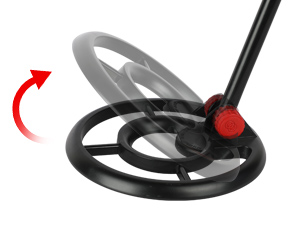
Image 2.2: Adjustable stem connection point.
2.3 Battery Installation
The detector requires one 9V battery (included).
- Locate the battery holder on the handle of the detector.
- Open the battery compartment cover.
- Insert the 9V battery, ensuring correct polarity (+/-).
- Close the battery compartment cover securely.

Image 2.3: Installing the 9V battery.
3. Operating Instructions
Follow these steps to operate your AVID POWER Metal Detector.
3.1 Powering On/Off
- To turn on the detector, push the POWER switch located on the handle.
- To turn off the detector, push the POWER switch again.

Image 3.1: Location of the ON/OFF switch.
3.2 Detection Process
- Hold the detector with the search coil parallel to the ground.
- Sweep the search coil in a slow, side-to-side motion over the area you wish to scan.
- When the detector approaches a metal object, the green light indicator will turn red, and a beeping sound will be emitted. The LCD display will also show a dart icon, indicating a target.
- The closer the detector is to the metal object, the louder the beeping sound and the stronger the signal displayed on the LCD.

Image 3.2: Detecting (Green Light) and Targeting (Red Light) indicators.

Image 3.3: LCD display showing target.
3.3 Detection Depth and Waterproof Coil
The 7.4-inch search coil is designed for sensitive detection, capable of finding coin-sized targets up to 4 inches deep. The search coil and adjustable stem are waterproof, allowing for use in shallow water or wet environments. Note: The control box (screen) is not waterproof and should not be submerged.

Image 3.4: Detection depth illustration.

Image 3.5: Waterproof search coil in use.
3.4 Operational Video
Video 3.1: Demonstration of the AVID POWER Metal Detector's features and operation, including assembly, use, and detection capabilities.
4. Maintenance
Proper maintenance ensures the longevity and optimal performance of your metal detector.
- Cleaning: After each use, especially in sandy or wet conditions, wipe down the search coil and stem with a damp cloth. Ensure the control box remains dry.
- Storage: Store the detector in a dry, cool place. Remove the 9V battery if the detector will not be used for an extended period to prevent leakage.
- Battery Care: Replace the battery when the low battery indicator appears on the LCD display. Dispose of used batteries responsibly.
- Transportation: Utilize the included carrying bag for safe transport and storage to protect the detector from damage.
5. Troubleshooting
If you encounter issues with your AVID POWER Metal Detector, refer to the following common problems and solutions.
| Problem | Possible Cause | Solution |
|---|---|---|
| Detector does not power on. | Battery is dead or incorrectly installed. | Check battery polarity. Replace with a new 9V battery. |
| No signal or weak signal when detecting. | Search coil not parallel to the ground; object too deep; battery low. | Ensure coil is parallel. Sweep slowly. Replace battery if needed. |
| Constant beeping or false signals. | Interference from other electronic devices; highly mineralized soil; nearby large metal objects. | Move away from interference sources. Try a different location. |
| LCD display is dim or not working. | Low battery; display damage. | Replace battery. If issue persists, contact customer service. |
6. Specifications
| Brand | AVID POWER |
| Model Number | GC-1003 |
| Color | Red |
| Material | Metal |
| Power Source | Battery Powered (1 x 9V battery required) |
| Item Weight | 1.3 Pounds (0.59 kg) |
| Product Dimensions | 35"L x 3.7"W x 35.4"H (89cm L x 9.4cm W x 90cm H) |
| Adjustable Stem Length | 28" to 35" (71cm to 89cm) |
| Search Coil Size | 7.4 Inches (18.8 cm) |
| Max Detection Depth | Up to 4 Inches (for coin-sized objects) |
| Waterproof Rating | IP54 (Control box); Search coil and stem are waterproof. |
| UPC | 765756398213 |
7. Warranty and Support
AVID POWER is committed to providing quality products and customer service.
7.1 Warranty Information
Specific warranty details for the AVID POWER Metal Detector GC-1003 may vary. Please refer to the warranty card included with your product or visit the official AVID POWER website for the most current information regarding warranty coverage and terms.
7.2 Customer Support
For any questions, technical assistance, or support needs, please contact AVID POWER customer service. Contact information can typically be found on the product packaging, the official AVID POWER website, or through your retailer.