
1. Introduction
This manual provides essential information for the safe and efficient operation, setup, and maintenance of your Boulder LEDZOOM 1915F LED Wash Lights. Please read this manual thoroughly before using the product to ensure proper function and to prevent damage or injury.

Figure 1: Boulder LEDZOOM 1915F LED Wash Light showcasing different color outputs.
2. Safety Information
WARNING: To prevent fire, electric shock, or injury, always follow these safety precautions.
- Ensure the input voltage (AC 90-260V, 50/60Hz) matches your local power supply.
- Always connect the unit to a grounded circuit.
- Do not open the housing. There are no user-serviceable parts inside. Refer all servicing to qualified personnel.
- Avoid direct eye exposure to the light source.
- Keep the unit away from rain, moisture, and liquids.
- Ensure adequate ventilation around the fixture. Do not block ventilation openings.
- Maximum ambient temperature for operation is 45°C.
- Disconnect from power before cleaning or servicing.
3. Product Features
- 19 x 15W 4-in-1 RGBW LEDs for vibrant color mixing.
- Motorized linear zoom from 8° to 50°.
- High light output: 6900 LUX (8°) and 1120 LUX (50°) at 5 meters (full RGBW).
- 50,000-hour LED lifespan and low power consumption.
- Variable speed LED shutter and smooth LED dimming.
- LED rainbow effect, strobe effect (up to 18 flashes/second), and pulse effect.
- 8 built-in programs with macro effects.
- Control modes: DMX512, master-slave, sound activated, or auto operation.
- 16 DMX channels.
- Blue LCD display for easy navigation.
- Efficient fan cooling system with low noise (55dB at 3 feet).
- PowerCON IN/OUT and 3-pin DMX IN/OUT connectors.
- Flicker-free operation.
4. Setup
4.1 Unpacking
Carefully unpack the fixture and check for any damage during transportation. Ensure all components listed in the packing list are present. If any damage or missing parts are found, contact your dealer immediately.
4.2 Mounting
The fixture can be mounted in various orientations (e.g., truss, floor). Always use appropriate mounting hardware and safety cables. Ensure the mounting surface or structure can support the weight of the fixture.

Figure 2: Front view of the LEDZOOM 1915F fixture.

Figure 3: Side view of the LEDZOOM 1915F fixture, showing mounting points.
4.3 Power Connection
Connect the PowerCON IN cable to a suitable AC power outlet (AC 90-260V, 50/60Hz). Use the PowerCON OUT for daisy-chaining power to other fixtures, ensuring not to exceed the maximum current rating of the circuit.
4.4 DMX Connection
Use standard 3-pin DMX cables to connect the fixture to a DMX controller or other DMX devices. Connect the DMX OUT of the controller to the DMX IN of the first fixture, then daisy-chain from DMX OUT to DMX IN for subsequent fixtures.
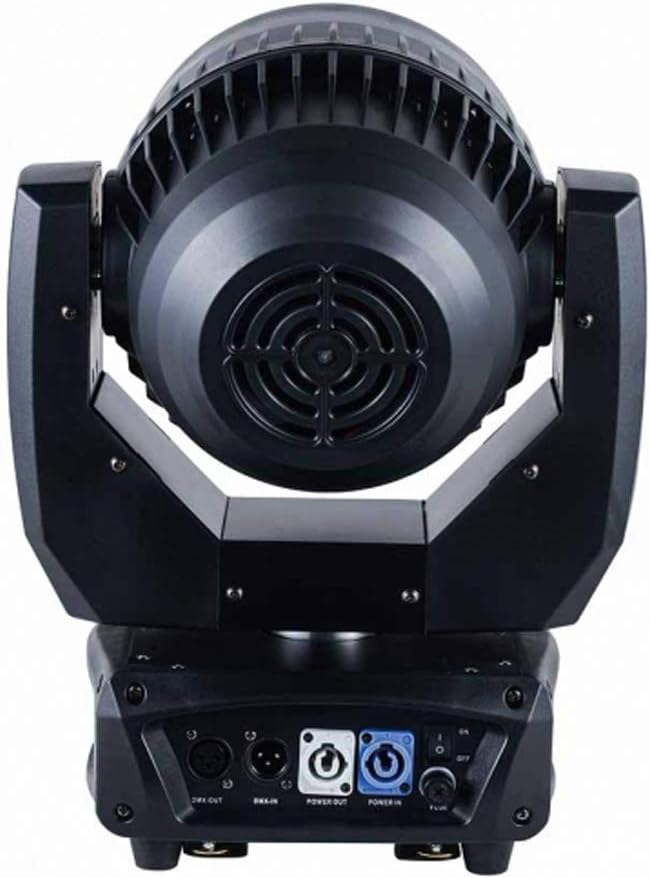
Figure 4: Rear view showing PowerCON IN/OUT and 3-pin DMX IN/OUT connectors.
5. Operating Instructions
5.1 Control Panel
The fixture features a blue LCD display and control buttons (MENU, UP, DOWN, ENTER) for navigating settings and selecting operating modes.

Figure 5: Control panel with LCD display and navigation buttons.
5.2 DMX Mode
Set the DMX address using the control panel. The fixture uses 16 DMX channels. Refer to the DMX channel chart (not provided in this manual, typically found in a separate DMX protocol document) for specific channel functions such as pan, tilt, zoom, RGBW dimming, strobe, and built-in programs.
5.3 Master-Slave Mode
Connect multiple fixtures via DMX cables. Set one fixture as the "Master" and the others as "Slave" through the control panel. The slave units will mirror the master unit's operation.
5.4 Sound Activated Mode
Enable sound activated mode via the control panel. The fixture will react to ambient sound, changing patterns and colors according to the detected audio input.
5.5 Auto Operation
Select one of the 8 built-in programs for automatic operation. The fixture will cycle through pre-programmed sequences without external control.
6. Maintenance
Regular maintenance ensures optimal performance and extends the lifespan of your fixture.
- Cleaning: Periodically clean the lenses and exterior housing with a soft, lint-free cloth. Do not use abrasive cleaners or solvents. Ensure the fixture is powered off and cooled down before cleaning.
- Fan and Ventilation: Keep the cooling fan and ventilation openings free from dust and debris to prevent overheating.
- Cable Inspection: Regularly inspect power and DMX cables for any signs of wear, cuts, or damage. Replace damaged cables immediately.
- Firmware Updates: Check the manufacturer's website for any available firmware updates.
7. Troubleshooting
| Problem | Possible Cause | Solution |
|---|---|---|
| Fixture does not power on. | No power supply; faulty cable; internal fuse blown. | Check power connection; test power cable; consult qualified technician for fuse replacement. |
| No DMX control. | Incorrect DMX address; faulty DMX cable; DMX controller issue; incorrect DMX mode. | Verify DMX address; check DMX cable continuity; ensure DMX controller is functioning; confirm fixture is in DMX mode. |
| Fixture overheating. | Blocked ventilation; high ambient temperature. | Clear ventilation openings; ensure adequate airflow; operate within specified ambient temperature. |
| Motorized functions (Pan/Tilt/Zoom) not working. | DMX signal issue; motor calibration required; internal fault. | Check DMX signal; perform factory reset or motor calibration (if available via menu); contact support. |
8. Specifications
| Model Number | LEDZOOM 1915F |
| Light Source | 19 x 15W 4-in-1 RGBW LEDs |
| Lifespan | 50,000 hours |
| Zoom Angle | 8° - 50° Motorized |
| Light Output | 6900 LUX (8°), 1120 LUX (50°) @ 5M (full RGBW) |
| Control Channels | 16 DMX Channels |
| Control Modes | DMX512, Master-Slave, Sound Activated, Auto Operation |
| Input Voltage | AC 90-260V, 50/60Hz |
| Power Consumption | 295W |
| Maximum Ambient Temperature | 45°C (113°F) |
| IP Rating | IP20 |
| Noise Level | 55dB at 3 feet |
| Dimensions (D x W x H) | 185mm x 310mm x 400mm |
| Net Weight | 7.8 kg |
| Manufacturer | Guangzhou Baide Lighting LTD |
9. Warranty and Support
Specific warranty information is not provided in the product details. Please refer to your purchase documentation or contact your retailer for warranty terms and conditions.
For technical support or service inquiries, please contact Boulder Lighting directly or the authorized dealer from whom you purchased the product. Contact information may be available on the manufacturer's official website or your purchase invoice.
Manufacturer: Guangzhou Baide Lighting LTD
Brand: Boulder
ASIN: B07YZ2NK7Q