
1. Introduction
This manual provides essential information for the safe and effective operation of your Boulder LEDZOOM 1915F Moving Head Light. This professional stage lighting fixture features 19x15W RGBW 4-in-1 LEDs, a motorized zoom from 8° to 50°, and DMX control capabilities. Please read this manual thoroughly before installation and use.

Figure 1: Front view of the Boulder LEDZOOM 1915F Moving Head Light, showcasing the illuminated LED array.
2. Safety Information
To ensure safe operation, observe the following precautions:
- Always connect the fixture to a grounded power outlet.
- Do not open the housing; there are no user-serviceable parts inside. Refer all servicing to qualified personnel.
- Avoid direct eye exposure to the light source.
- Ensure adequate ventilation around the fixture to prevent overheating. Maintain a minimum distance of 0.5 meters from flammable materials.
- Do not operate the fixture in wet or damp conditions.
- Disconnect power before cleaning or performing any maintenance.
- Mount the fixture securely using appropriate clamps and safety cables.
3. Product Features
The Boulder LEDZOOM 1915F offers a range of advanced features for dynamic stage lighting:
- LED Source: 19x 15W RGBW 4-in-1 LEDs for vibrant color mixing.
- Zoom Range: Motorized linear zoom from 8° to 50° for versatile beam control.
- High Output: Up to 6900 LUX (at 8°) and 1120 LUX (at 50°) at 5 meters.
- Lifespan: Approximately 50,000 hours LED lifespan.
- Effects: Smooth LED dimmer, LED rainbow effect, strobe effect (up to 18 flashes/second), and pulse effect.
- Control Modes: DMX512, master-slave, sound activated, and auto operation.
- DMX Channels: 16 DMX channels.
- Programs: 8 built-in default programs with macro effects.
- Display: Blue LCD display for easy navigation and settings.
- Cooling: Efficient FAN cooling system with lower noise.
- Power: Powercon IN/OUT connectors.
4. Setup
4.1 Mounting
The LEDZOOM 1915F can be mounted on a floor or attached to a truss using appropriate brackets and clamps. Always use a safety cable when suspending the fixture overhead.
4.2 Electrical Connection
Connect the fixture to a compatible power source (AC90-260V, 50/60Hz) using the Powercon IN connector. Use the Powercon OUT connector to daisy-chain power to other fixtures if needed, ensuring not to exceed the maximum current rating of the circuit.
4.3 DMX Connection
For DMX control, connect a 3-pin DMX cable from your DMX controller to the DMX IN port of the first fixture. Use the DMX OUT port to connect to the DMX IN of the next fixture in the chain. Ensure the last fixture in the DMX chain has a DMX terminator installed to prevent signal reflection.
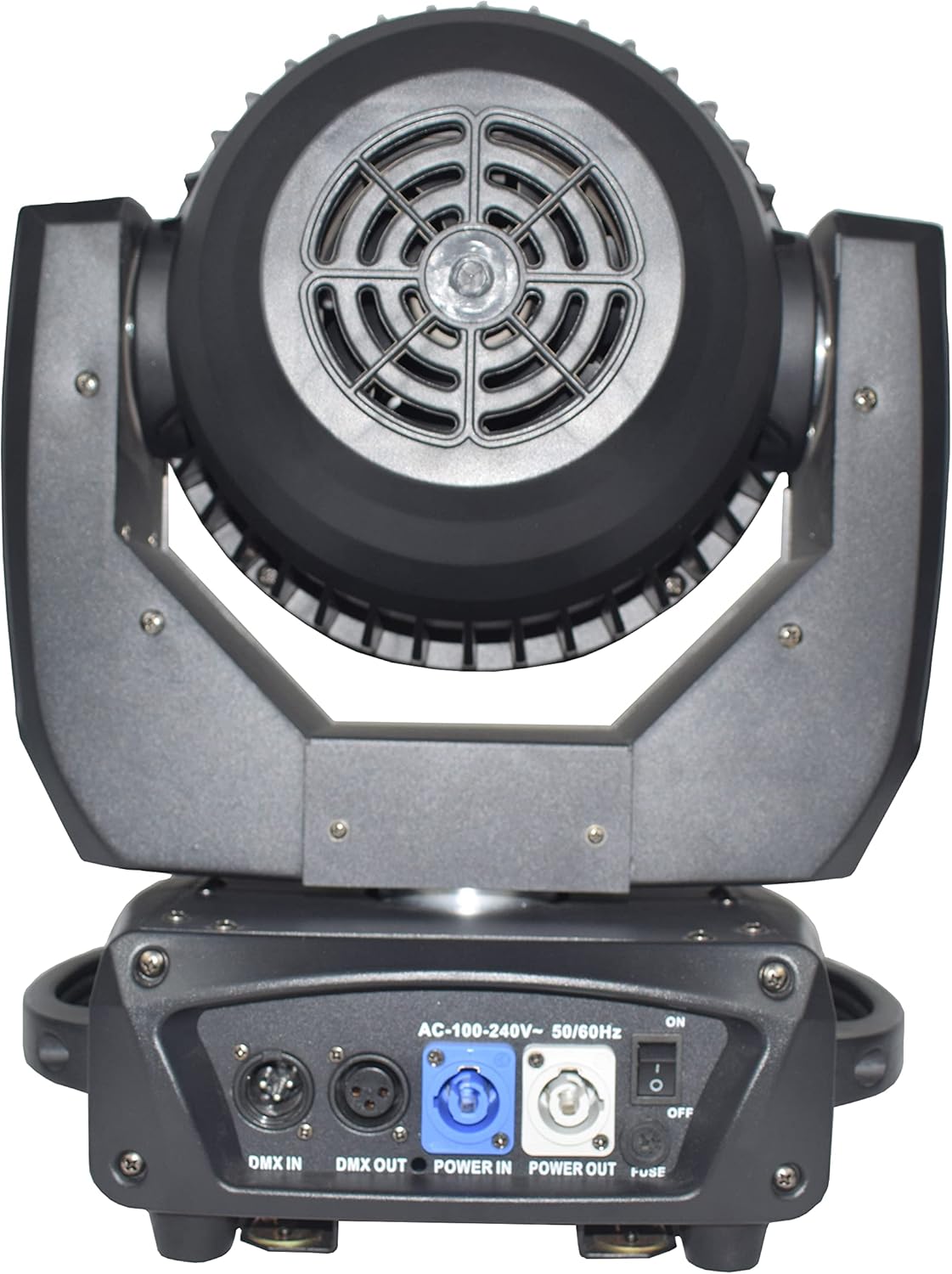
Figure 2: Rear view of the fixture, highlighting the DMX IN/OUT and Powercon IN/OUT connections.
5. Operating Instructions
5.1 Control Panel
The fixture features a blue LCD display and control buttons (Menu, Up, Down, Enter) for navigating settings and selecting operating modes.
5.2 DMX Control Mode
In DMX mode, the fixture is controlled by an external DMX controller. Set the DMX address for each fixture using the control panel. The LEDZOOM 1915F utilizes 16 DMX channels. Refer to the DMX Channel Chart (not provided in this manual, typically found in a separate appendix or full product manual) for specific channel functions.
5.3 Master-Slave Mode
Connect multiple fixtures via DMX cables. Set one fixture as the 'Master' and the others as 'Slave'. The slave fixtures will mirror the master's operation, ideal for synchronized effects without a DMX controller.
5.4 Sound Activated Mode
The fixture can react to ambient sound via its built-in microphone. Select 'Sound Activated' mode from the control panel. The light will change patterns and colors in response to music or sound.
5.5 Auto Operation Mode
The fixture includes 8 built-in programs. Select 'Auto' mode and choose a program from the control panel. The light will execute pre-programmed sequences of colors, movements, and effects.
5.6 Specific Functions
- Zoom: Adjust the beam angle from a narrow 8° spot to a wide 50° wash.
- Color Mixing: Utilize the RGBW LEDs to create a vast spectrum of colors.
- Strobe: Control the flash rate for dynamic strobe effects.
- Dimmer: Adjust the overall brightness from 0-100%.
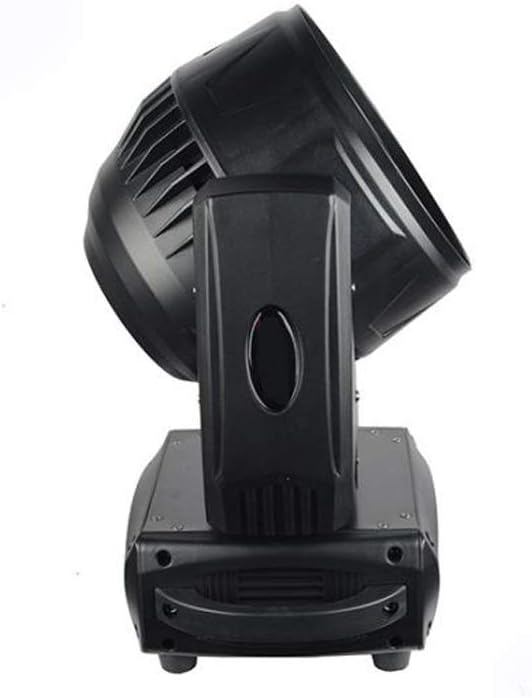
Figure 3: Side view of the fixture, illustrating the range of motion for the moving head.
6. Maintenance
Regular maintenance ensures optimal performance and longevity of your fixture.
- Cleaning: Periodically clean the lenses and exterior housing with a soft, lint-free cloth. Do not use abrasive cleaners.
- Fan Cleaning: Ensure the cooling fan vents are free from dust and debris to maintain efficient cooling.
- Inspection: Regularly check power and DMX cables for damage.
7. Troubleshooting
If you encounter issues, refer to the following common troubleshooting steps:
- No Power: Check the power cable connection, the Powercon IN/OUT, and the fuse. Ensure the power switch is in the 'ON' position.
- No DMX Control: Verify DMX cable connections. Ensure the DMX address is correctly set on the fixture and matches the controller. Confirm the DMX controller is sending a signal. Check that the fixture's DMX channel mode (e.g., 16-channel) matches the controller's output setting. An incorrect channel mode can cause continuous rebooting or unresponsiveness.
- Fixture Not Moving/Responding: Check DMX signal. If in master-slave mode, ensure the master unit is functioning correctly. If in auto or sound mode, verify settings.
- Overheating: Ensure adequate ventilation. Clean fan vents if obstructed.
- Inconsistent Zoom: If the zoom range appears inconsistent across multiple units, consult the manufacturer for potential calibration instructions.
8. Specifications
| Feature | Detail |
|---|---|
| Model | LEDZOOM 1915F |
| Light Source | 19x 15W RGBW 4-in-1 LEDs |
| Input Voltage | AC90-260V, 50/60Hz |
| Power Consumption | 295W |
| DMX Channels | 16 Channels |
| Control Signal | DMX512, Master-Slave, Sound Activated, Auto Operation |
| Zoom Angle | 8° - 50° Motorized |
| Light Output | 6900 LUX (8°), 1120 LUX (50°) @5M |
| LED Lifespan | 50,000 hours |
| Display | Blue LCD |
| Connectors | 3-pin DMX IN/OUT, Powercon IN/OUT |
| Max Ambient Temperature | 45°C |
| IP Rating | IP20 |
| Noise Level | 55dB at 3' |
| Dimensions (DWH) | 185mm x 310mm x 400mm (7.28"L x 12.2"W x 15.75"H) |
| Net Weight | 7.8 kg (17.16 lbs) |
9. Warranty and Support
Specific warranty information and customer support details are not provided in this manual. Please refer to your purchase documentation or contact the retailer/manufacturer directly for warranty claims and technical assistance.