
Introduction
Thank you for choosing the CFGROW LED Flame Effect Light. This manual provides detailed instructions for the safe and efficient use of your new flame lamp. Please read this manual thoroughly before operation and retain it for future reference.
Product Overview
The CFGROW LED Flame Effect Light is a versatile, USB rechargeable lamp designed to create a realistic flame effect. It features multiple lighting modes, gravity sensing, and a remote control for convenient operation. Its waterproof design and magnetic base offer flexible placement options for both indoor and outdoor environments.
Key Features:
- Realistic Flame Effect: Generates a dynamic, flickering flame simulation.
- Multiple Lighting Modes: Includes realistic dancing flames, soft slow breathing flames, warm constant light, and gravity-induced mode.
- Remote Control: Allows control of multiple lights, mode selection, brightness adjustment, and timer settings from a distance of 9.8 - 16.4 feet (3-5 meters).
- Gravity Sensing: Automatically adjusts the flame direction to always appear upright, regardless of the lamp's orientation.
- USB Rechargeable: Equipped with a 1200mAh battery, providing up to 20 hours of operation in flame mode on a full charge. Charges via USB port.
- Magnetic Base & Hanging Hook: Offers flexible mounting options, allowing attachment to metal surfaces or hanging.
- Waterproof (IP44): Suitable for outdoor use, resistant to rain and splashes.

Image: The CFGROW LED Flame Effect Light shown alongside its infrared wireless remote control, illustrating the product's design and primary control method.

Image: A visual representation of the lamp's dimensions (5.11 inches height, 2.63 inches diameter) compared to a standard soda can, highlighting the 1200mAh USB rechargeable battery capacity. Details include the magnetic base, USB charging port, hanging hook design, and ON/OFF button.
Setup
- Initial Charge: Before first use, fully charge the flame light using the provided USB cable. Connect the cable to the lamp's USB charging port and a compatible USB power source (e.g., computer, power bank, USB charger). The charging time is approximately 4 hours.
- Remote Control Battery: Ensure the remote control has a working CR2 battery installed.
- Placement: Choose a desired location. The lamp can be placed on a flat surface, hung using its flip-out hook, or attached to a metal surface via its magnetic base.

Image: Four examples demonstrating versatile placement: inside a lampshade or lantern, stuck to a metallic surface, hanging from a fixture, and placed on a table.
Operation
Using the ON/OFF Button:
Press the ON/OFF button located on the lamp's base to cycle through the four lighting modes:
- Realistic Dancing Flames
- Soft Slow Breathing Flames
- Warm Constant Light
- Gravity Induced Mode (flame direction adjusts automatically)
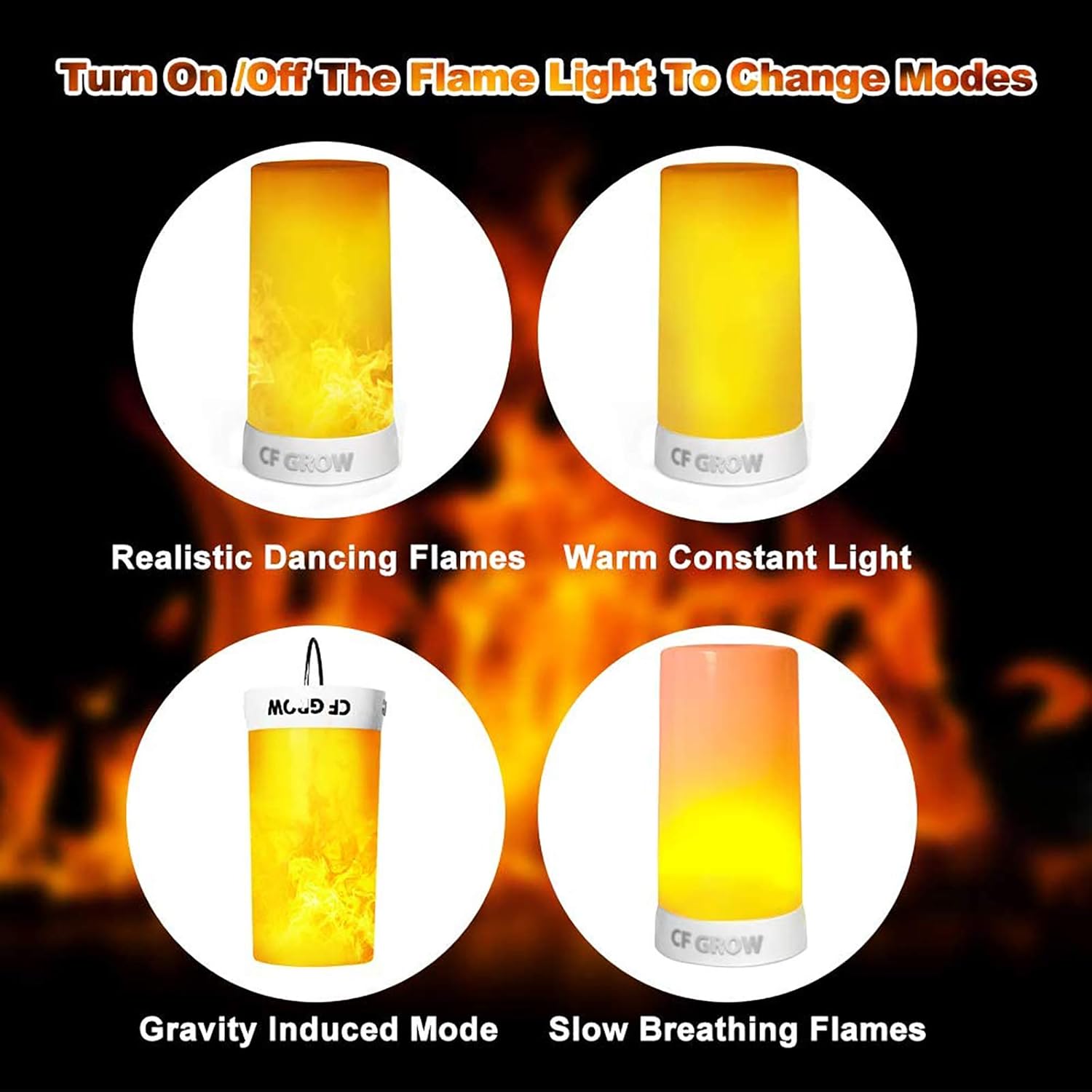
Image: A visual guide illustrating the four distinct lighting modes: Realistic Dancing Flames, Warm Constant Light, Gravity Induced Mode, and Slow Breathing Flames.
Using the IR Wireless Remote Control:
The remote control allows for more precise adjustments and timer functions. Ensure the remote is pointed towards the lamp within the effective range of 9.8 - 16.4 feet (3-5 meters).
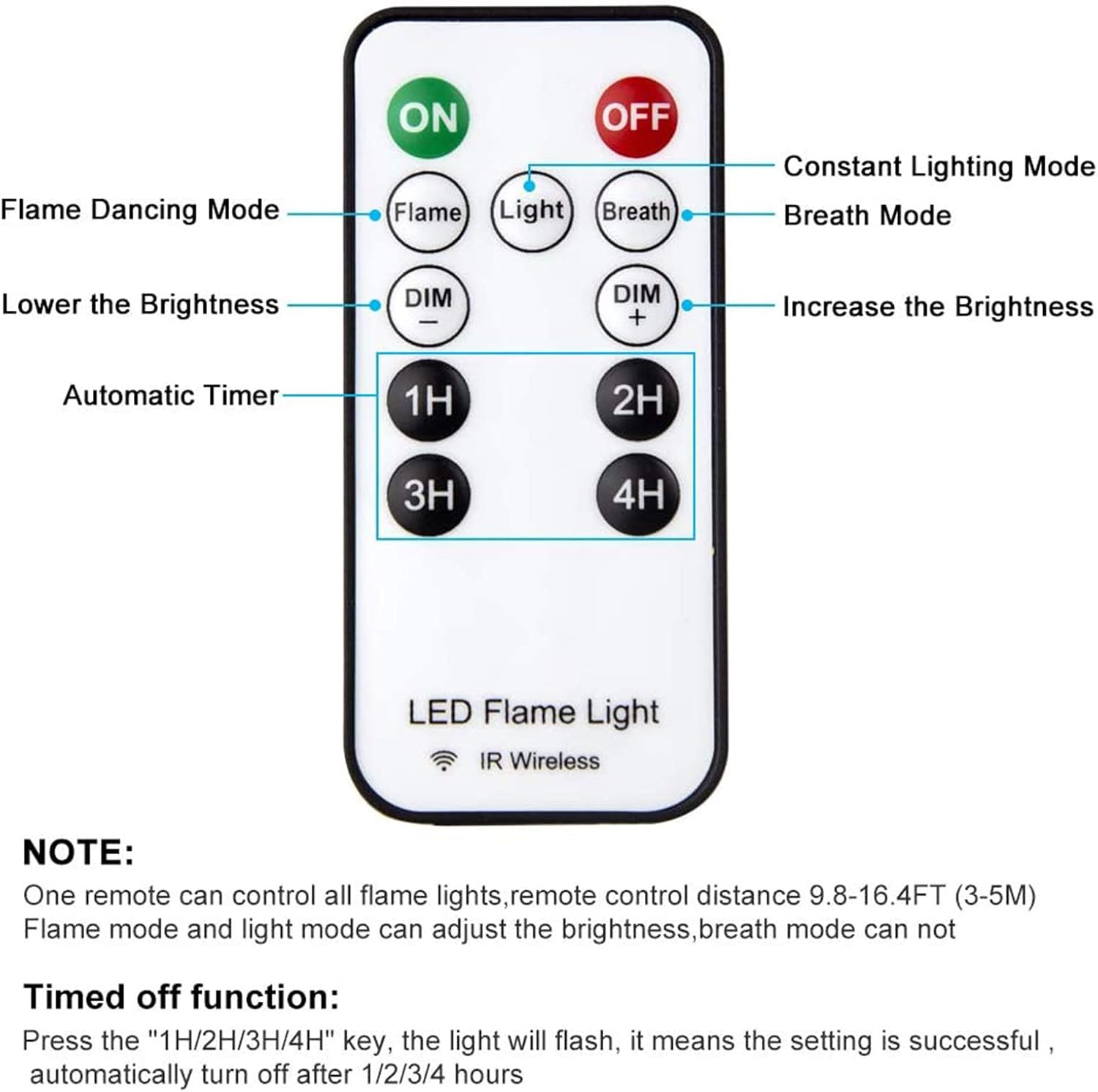
Image: A detailed diagram of the remote control, labeling buttons for ON/OFF, Flame Dancing Mode, Constant Lighting Mode, Breath Mode, Brightness Adjustment (DIM+/DIM-), and Automatic Timer (1H, 2H, 3H, 4H).
- ON/OFF: Powers the light on or off.
- Flame: Activates the realistic dancing flame mode.
- Light: Activates the warm constant light mode.
- Breath: Activates the soft slow breathing flame mode.
- DIM+/DIM-: Adjusts the brightness level for Flame and Light modes. Brightness is not adjustable in Breath mode.
- Timer (1H/2H/3H/4H): Sets the light to automatically turn off after 1, 2, 3, or 4 hours. Pressing a timer button will cause the light to flash, indicating the setting is successful. This is a one-way timer; the light will need to be turned on manually after it automatically shuts off.
Note:
- One remote control can operate multiple flame lights simultaneously.
- The remote control range is approximately 9.8 - 16.4 feet (3-5 meters).
Charging
The CFGROW LED Flame Effect Light is powered by a built-in 1200mAh rechargeable battery. To charge the device:
- Locate the USB charging port on the side of the lamp.
- Connect the small end of the included USB charging cable to the lamp's port.
- Connect the larger end of the USB cable to a standard USB power source (e.g., computer, power adapter, power bank).
- The charging indicator (if present, usually a small LED) will illuminate during charging and turn off or change color when fully charged.
- A full charge takes approximately 4 hours and provides up to 20 hours of operation in flame mode.
Image: A close-up view of the USB charging port on the side of the flame light, where the USB cable is connected for recharging the internal battery.
Maintenance
- Cleaning: Wipe the lamp with a soft, dry cloth. Do not use abrasive cleaners or solvents.
- Water Resistance: The lamp has an IP44 waterproof rating, meaning it is protected against splashing water from any direction. It is suitable for outdoor use in light rain but should not be submerged in water.
- Storage: When not in use for extended periods, store the lamp in a cool, dry place and ensure it is fully charged every few months to maintain battery health.
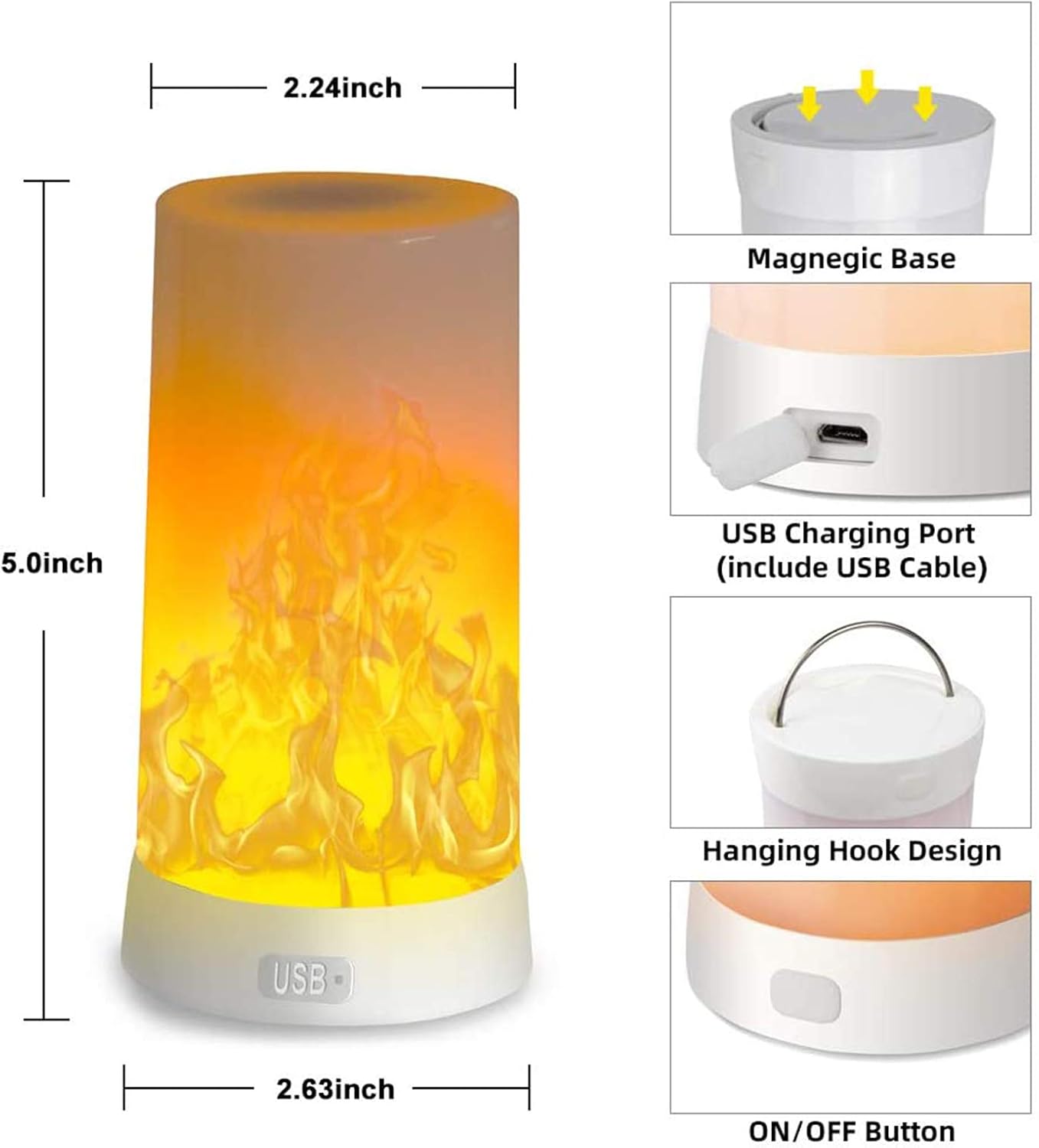
Image: The flame effect light shown with water droplets, illustrating its IP44 waterproof capability, suitable for outdoor conditions.
Troubleshooting
| Problem | Possible Cause | Solution |
|---|---|---|
| Light does not turn on. | Battery is depleted. | Charge the lamp fully using the USB cable. |
| Remote control not working. | Remote battery is low or depleted; remote is out of range or not pointed at the lamp. | Replace the CR2 battery in the remote. Ensure the remote is within 9.8-16.4 feet and pointed towards the lamp. |
| Flame effect appears incorrect or static. | Incorrect mode selected; gravity sensor interference. | Cycle through modes using the ON/OFF button or remote to select the desired flame effect. Ensure the lamp is placed on a stable surface for optimal gravity sensing. |
| Light turns off unexpectedly. | Timer function activated; battery is low. | Check if a timer was set. Recharge the lamp if the battery is low. |
Specifications
- Model: LED-LEF
- Brand: CFGROW
- Light Source: LED
- Power Source: Battery Powered (USB Rechargeable)
- Battery Capacity: 1200mAh Lithium
- Charging Time: Approximately 4 hours
- Operating Time: Up to 20 hours (Flame Mode)
- Wattage: 5 Watts
- Voltage: 5 Volts
- Material: Plastic, Metal Base
- Dimensions: 2.63" Diameter x 5.11" Height
- Item Weight: 6.7 ounces (0.19 Kilograms)
- Water Resistance: IP44
- Control Method: Remote Control, On-device button
- Included Components: LED Flame Effect Light, USB Charging Cable, Remote Control (with 1 CR2 battery)
Safety Information
- Do not disassemble or modify the product.
- Keep away from extreme temperatures and direct sunlight.
- Do not expose the product to fire or high heat.
- Use only the provided USB cable or a certified equivalent for charging.
- Keep out of reach of children.
- Dispose of batteries according to local regulations.
Warranty and Support
The CFGROW LED Flame Effect Light comes with a 1-year warranty from the date of purchase. This warranty covers manufacturing defects and malfunctions under normal use.
For warranty claims, technical support, or any questions regarding your product, please contact CFGROW customer service. Please have your purchase receipt and product model number (LED-LEF) available when contacting support.
Contact information for support is typically found on the product packaging or the retailer's website where the product was purchased.