
Introduction
This manual provides detailed instructions for the installation, operation, and maintenance of your JVC KD-TD91BTS CD Receiver and the PAC Audio SWI-RC Steering Wheel Control Interface. Please read this manual thoroughly before use to ensure proper operation and to prevent damage.
Safety Information
- Ensure all connections are secure and properly insulated to prevent short circuits.
- Do not operate the unit in a manner that distracts from driving.
- Consult a professional for installation if you are unsure about any steps.
- Keep the unit away from moisture and extreme temperatures.
Package Contents
Verify that all items are present:
- JVC KD-TD91BTS CD Receiver
- PAC Audio SWI-RC Steering Wheel Control Interface
- Wiring Harnesses
- Mounting Hardware
- Instruction Manuals

Image: JVC KD-TD91BTS CD Receiver, PAC Audio SWI-RC Steering Wheel Control Interface, wiring, and installation tools.
Setup and Installation
JVC KD-TD91BTS CD Receiver Installation
- Preparation: Disconnect the vehicle's negative battery terminal before beginning installation.
- Mounting: Securely mount the JVC KD-TD91BTS receiver into the vehicle's dashboard opening using the provided mounting hardware. Ensure proper ventilation around the unit.
- Wiring Connections:
- Connect the main power harness (yellow for constant 12V, red for switched 12V, black for ground).
- Connect speaker wires (typically color-coded).
- Connect the antenna cable.
- Connect the external microphone for Bluetooth hands-free calling.
- If using external amplifiers, connect RCA pre-out cables.
- Initial Power-Up: Reconnect the battery. Turn on the vehicle ignition and then the receiver to verify basic functionality.

Image: Rear view of the JVC KD-TD91BTS CD Receiver, illustrating the various ports for power, speakers, and auxiliary connections.
PAC Audio SWI-RC Steering Wheel Control Interface Installation
- Identify Vehicle Wiring: Refer to your vehicle's wiring diagram to identify the steering wheel control wires.
- Connect SWI-RC: Connect the SWI-RC interface to the JVC KD-TD91BTS receiver's wired remote control input. Connect the SWI-RC's vehicle-specific wires to the corresponding steering wheel control wires in your vehicle.
- Programming: Follow the specific programming instructions provided with the PAC Audio SWI-RC to configure it for your vehicle and the JVC receiver. This typically involves setting DIP switches or pressing a program button in a specific sequence.
- Test Functionality: After programming, test all steering wheel control buttons to ensure they operate the receiver as expected (e.g., volume up/down, track skip, mode).
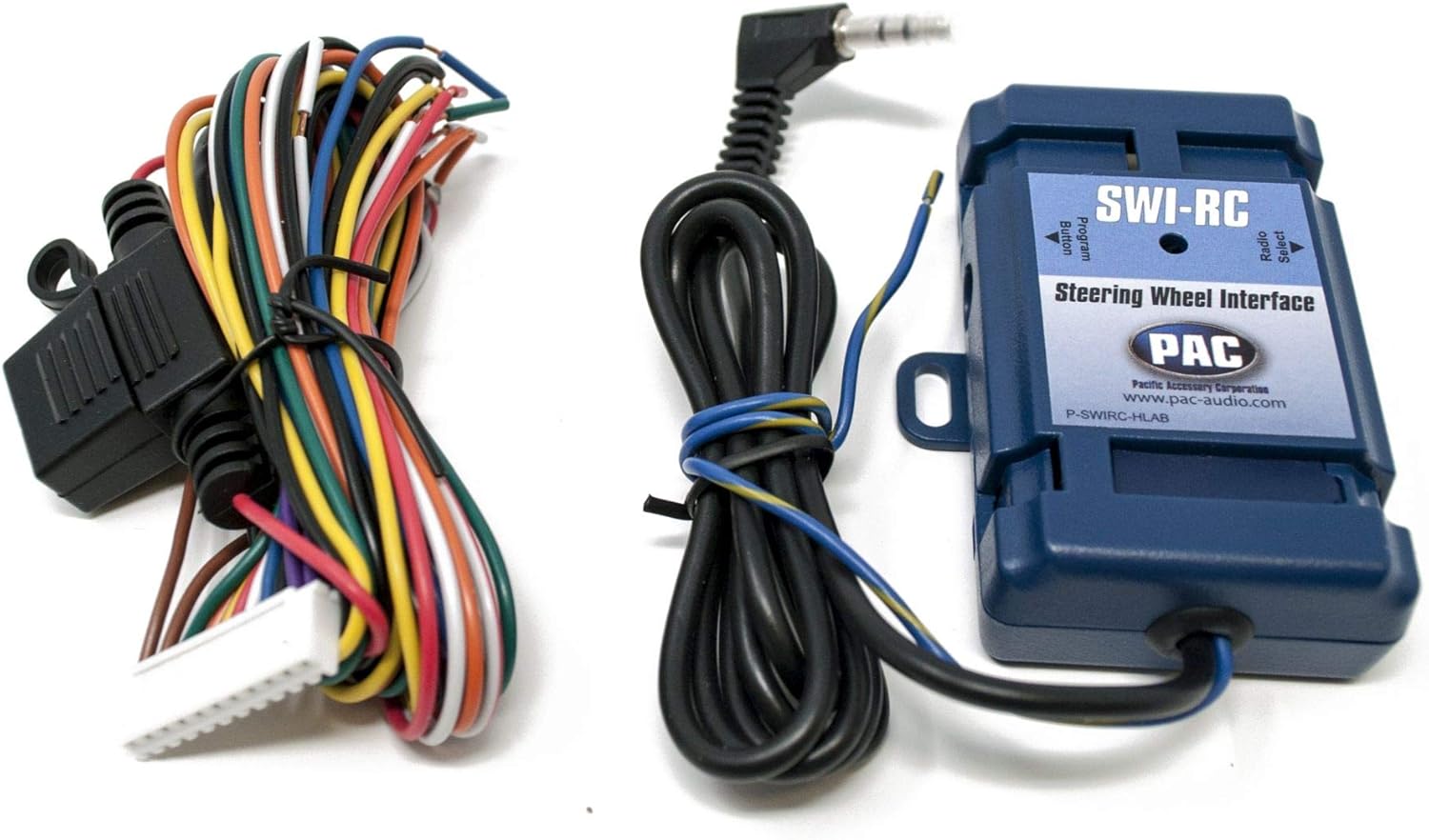
Image: The PAC Audio SWI-RC Steering Wheel Control Interface module with its associated wiring harness, ready for connection.
Operating Instructions
Basic Operations
- Power On/Off: Press the SRC button to turn the unit on. Press and hold SRC to turn off.
- Source Selection: Press the SRC button repeatedly to cycle through available sources (CD, USB, Bluetooth Audio, Tuner, AUX, SiriusXM).
- Volume Control: Rotate the large rotary knob to adjust volume.
- Menu Navigation: Use the rotary knob and surrounding buttons to navigate menus and settings.

Image: Front panel of the JVC KD-TD91BTS CD Receiver, displaying its illuminated buttons and LCD screen with blue accents.
Bluetooth Connectivity
- Pairing:
- Ensure Bluetooth is enabled on your mobile device.
- On the KD-TD91BTS, select the Bluetooth source.
- Search for "KD-TD91BTS" on your device and select it to pair.
- Confirm the pairing code if prompted.
- Hands-Free Calling: Once paired, you can make and receive calls using the receiver's microphone and speakers.
- Audio Streaming: Play audio from your paired device through the receiver.
USB Playback
- Insert a USB device into the front USB port.
- The unit will automatically switch to the USB source and begin playback.
- Supported formats include MP3, WMA, WAV, and FLAC (up to 96kHz/24bit).
Amazon Alexa Integration
- Download the JVC Remote App on your smartphone.
- Connect your smartphone to the KD-TD91BTS via Bluetooth.
- Launch the JVC Remote App and follow the instructions to link with your Amazon Alexa account.
- Press the dedicated Alexa button on the receiver or use the JVC Remote App to activate Alexa voice commands.
Audio Settings
- Equalizer: Access the 13-band graphic EQ to customize sound. 11 preset EQ settings are available.
- Time Alignment: Adjust speaker output timing for optimal sound staging.
- Loudness Control: Enhance bass and treble at low volumes.
- Bass Boost: Increase bass output.
- High-Pass/Low-Pass Filters: Configure for speaker and subwoofer optimization.
Maintenance
- Cleaning: Use a soft, dry cloth to clean the unit's display and buttons. Do not use abrasive cleaners or solvents.
- CD Slot: Keep the CD slot free of dust and debris. Avoid inserting damaged or irregular-shaped discs.
- Firmware Updates: Periodically check the JVC website for firmware updates to ensure optimal performance and compatibility.
Troubleshooting
| Problem | Possible Cause | Solution |
|---|---|---|
| No power | Blown fuse, incorrect wiring, disconnected battery. | Check vehicle fuses and receiver fuse. Verify power and ground connections. Reconnect battery. |
| No sound | Volume too low, mute activated, incorrect speaker wiring, incorrect source selected. | Increase volume. Deactivate mute. Check speaker connections. Select correct audio source. |
| Bluetooth pairing fails | Bluetooth not enabled on device, device too far, interference, previous pairing issues. | Ensure Bluetooth is on. Bring device closer. Clear previous pairings on both devices and retry. |
| Steering wheel controls not working | SWI-RC incorrectly wired or programmed, incompatible vehicle. | Review SWI-RC installation and programming instructions. Verify compatibility with your vehicle. |
Specifications
- Model: JVC KD-TD91BTS
- Power Output: 50W x 4 (MOS-FET), 22W RMS x 4
- Pre-Outs: 2 Pairs (2.5V, Front + Rear/Subwoofer Selectable)
- USB: Front USB Input (1.5A Charging), supports MP3, WMA, WAV, FLAC (96kHz/24bit)
- Bluetooth: Yes (Wired-Mic Included), Phone Book Access Profile (PBAP), Automatic Pairing
- Equalizer: 13-Band Graphic EQ with 11 Preset EQ Settings
- Display: 2-Line VA (Vertical Alignment) LCD with Variable Color Illumination
- Compatibility: Amazon Alexa, SiriusXM Ready (Tuner Sold Separately), Pandora/Spotify Control (Android/iPhone)
- Dimensions: 17 x 15.25 x 9.75 inches (Product)
- Weight: 5 pounds
Warranty and Support
For warranty information and technical support, please refer to the official JVC website or contact JVC customer service. Keep your proof of purchase for warranty claims.
JVC Support: Visit JVC USA Support
PAC Audio Support: For SWI-RC specific support, visit PAC Audio Support


