
Samsung Electronics SM-R825USKAXAR
Samsung Galaxy Watch Active 2 User Manual
Brand: Samsung Electronics | Model: SM-R825USKAXAR
Introduction
The Samsung Galaxy Watch Active 2 is designed to enhance your daily life with advanced health monitoring, fitness tracking, and seamless communication. This manual provides essential information for setting up, operating, and maintaining your device to ensure optimal performance.
What's in the Box
- Samsung Galaxy Watch Active 2
- Charging Cable
Setup
Follow these steps for the initial setup of your Samsung Galaxy Watch Active 2:
- Unboxing and Band Attachment: Carefully remove the watch from its packaging. Attach the included leather watch bands to the watch body. Ensure the buttons on the watch are on the left side when attaching the bands. The quick-release pins on the bands make attachment simple: insert one side into the lug hole, pull down the pin, and align the other side with the opposite lug hole before releasing the pin.
- Initial Power On: Press and hold the power button located on the bottom-right side of the watch to turn it on.
- Pairing with Your Smartphone:
- Ensure your smartphone has the "Galaxy Wearable" application installed. If not, download it from the Galaxy Apps, Google Play Store, or App Store.
- Open the Galaxy Wearable app on your phone. The app should automatically detect your Galaxy Watch Active 2.
- Follow the on-screen prompts on both your watch and phone to confirm the pairing process.
- Agree to the terms and conditions. You may choose to restore from a previous backup if you have one, or set up as a new device.
- Charging: Place your Galaxy Watch Active 2 on the included wireless charging cable. The watch supports Qi wireless charging, allowing it to be charged on compatible wireless charging pads, including Samsung's Duo wireless charging pad.
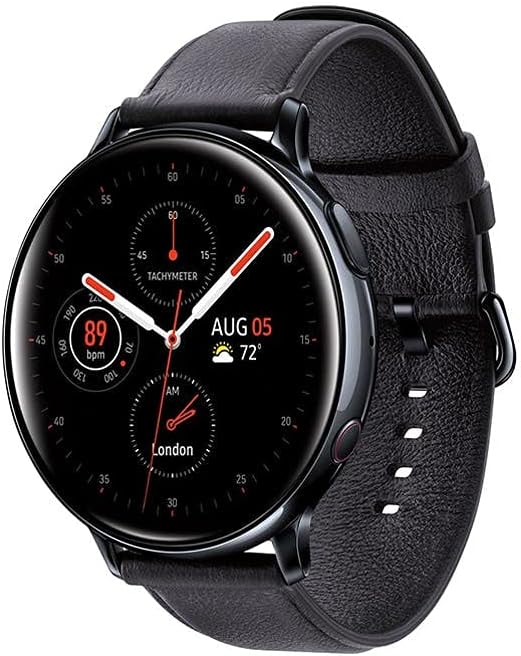
Image: Samsung Galaxy Watch Active 2 with black leather band, showcasing its sleek design.
Operating Your Watch
The Galaxy Watch Active 2 offers intuitive navigation and a range of features to enhance your daily activities.
Navigation
- Swipe Left/Right: Swipe left from the watch face to access widgets (e.g., daily activity, heart rate, weather). Swipe right to view notifications.
- Swipe Down: Swipe down from the top of the watch face to access the Quick Panel for quick settings like brightness, volume, Do Not Disturb mode, and battery saving.
- Home Key (Bottom-Right Button): Press to return to the watch face from any screen. Double-press to launch a customizable shortcut (default is Bixby).
- Back Key (Top-Right Button): Press to go back to the previous screen.
- Touch Bezel: The Galaxy Watch Active 2 features a digital touch bezel. Swipe your finger around the edge of the screen to scroll through menus and lists. This provides a tactile feedback similar to a physical rotating bezel.
- Palm Gesture: Place your palm over the watch face to quickly turn off the screen.
Key Features
- Advanced Health Monitoring: The watch features advanced sensors to monitor your heart rate. It can automatically alert you if your watch detects a high or low heart rate.
- Fitness Tracking: Track your pace and achieve your run goals with advanced sensors. The watch supports various fitness activities like running, cycling, swimming, and more.
- Notifications: Receive notifications for messages (including WhatsApp), calls, and other app alerts directly on your wrist. You can respond to messages using voice, emojis, or a T9 keyboard.
- LTE Connectivity (Unlocked LTE models): With LTE connectivity, you can leave your phone behind and still make calls, send messages, and receive notifications.
- Long-lasting Battery: The Galaxy Watch Active 2's battery can last for more than a day on a single charge. It supports wireless power share with compatible Samsung Galaxy phones.
- Customization: Personalize your watch with a variety of watch faces, bands, and finishes to match your style.
Maintenance
To ensure the longevity and optimal performance of your Samsung Galaxy Watch Active 2, follow these maintenance guidelines:
- Cleaning: Regularly wipe the watch face and band with a soft, lint-free cloth. For stubborn dirt, dampen the cloth slightly with water. Avoid using harsh chemicals or abrasive materials.
- Water Exposure: While the watch is water-resistant (IP68), it is recommended to dry it thoroughly after exposure to water, especially the charging contacts, to prevent corrosion. Use the Water Lock Mode when swimming or in wet environments.
- Charging Contacts: Keep the charging contacts on the back of the watch and the charging cable clean and free of debris to ensure efficient charging.
- Storage: Store the watch in a cool, dry place away from direct sunlight and extreme temperatures when not in use.
- Band Care: If using leather bands, avoid prolonged exposure to water or sweat, as this can damage the material. Clean them with a damp cloth and allow them to air dry.
Troubleshooting
If you encounter issues with your Samsung Galaxy Watch Active 2, try the following troubleshooting steps:
- Watch Not Turning On: Ensure the watch is sufficiently charged. Place it on the charging cable and wait a few minutes before attempting to power it on again.
- Connectivity Issues (Bluetooth/LTE):
- Check if Bluetooth is enabled on both your watch and smartphone.
- Restart both the watch and your smartphone.
- Ensure the Galaxy Wearable app is updated to the latest version.
- For LTE models, verify your mobile data plan is active and properly configured with your carrier.
- Notifications Not Appearing:
- Check notification settings in the Galaxy Wearable app to ensure desired apps are enabled.
- Verify that "Show only while wearing" and "Show while using phone" settings are configured as desired.
- Ensure Do Not Disturb or Goodnight mode is not active on your watch or phone.
- Screen Unresponsive: If the screen is unresponsive, try restarting the watch by holding down the Home key (bottom-right button) until the Samsung logo appears.
- Battery Draining Quickly:
- Reduce screen brightness.
- Disable the "Always On Display" feature.
- Limit background app refresh and frequent heart rate monitoring.
- Turn off Wi-Fi or LTE when not needed.
- Factory Reset: As a last resort, if issues persist, you can perform a factory reset from the watch settings. This will erase all data on the watch and restore it to its original factory settings.
Specifications
| Feature | Detail |
|---|---|
| Product Dimensions | 1.73 x 1.73 x 0.43 inches |
| Item Weight | 6.8 ounces (192 Grams) |
| Item Model Number | SM-R825USKAXAR |
| Batteries | 1 Lithium Ion battery required |
| Standing Screen Display Size | 44 Millimeters |
| Memory Storage Capacity | 1 GB |
| Operating System | Android (Tizen OS) |
| Special Feature | Wireless |
| Connectivity Technology | Bluetooth, Cellular, GPS |
| Wireless Communication Standard | Bluetooth |
| Battery Cell Composition | Lithium Ion |
| GPS | True |
| Shape | Round |
| Manufacturer | Samsung Electronics |
| First Available Date | October 10, 2019 |
Warranty and Support
For detailed warranty information and further support, please refer to the official resources:
Related documentsSM-R825USKAXAR


Ask a question about this manual
Ask about setup, troubleshooting, compatibility, parts, safety, or missing instructions. Manuals+ will review the question and use this page’s manual context to help answer it.