
1. Introduction and Overview
This manual provides essential information for the safe and effective use of your Nikon NIKKOR Z DX 50-250mm VR telephoto zoom lens. Please read these instructions thoroughly before using the product and retain them for future reference.
The NIKKOR Z DX 50-250mm f/4.5-6.3 VR lens is designed for Z series mirrorless cameras with an APS-C size/DX format sensor. It offers a versatile telephoto zoom range, making it suitable for various photographic situations, from portraits to distant subjects.
2. Product Features
- 50-250mm Zoom Range: Equivalent to a 75-375mm lens in 35mm format, providing extensive telephoto reach.
- Built-in VR Image Stabilization: Offers up to 5 stops of vibration reduction, enhancing sharpness in handheld shooting.
- Assignable Control Ring: Customizable for various functions such as aperture, ISO, or exposure compensation.
- Optical Image Stabilization: Ensures stable images and videos.
- Compact and Lightweight Design: Facilitates portability and ease of use with Z series cameras.
- Fast and Silent Autofocus: Utilizes a stepping motor (STM) for quiet and precise focusing, beneficial for both stills and video.
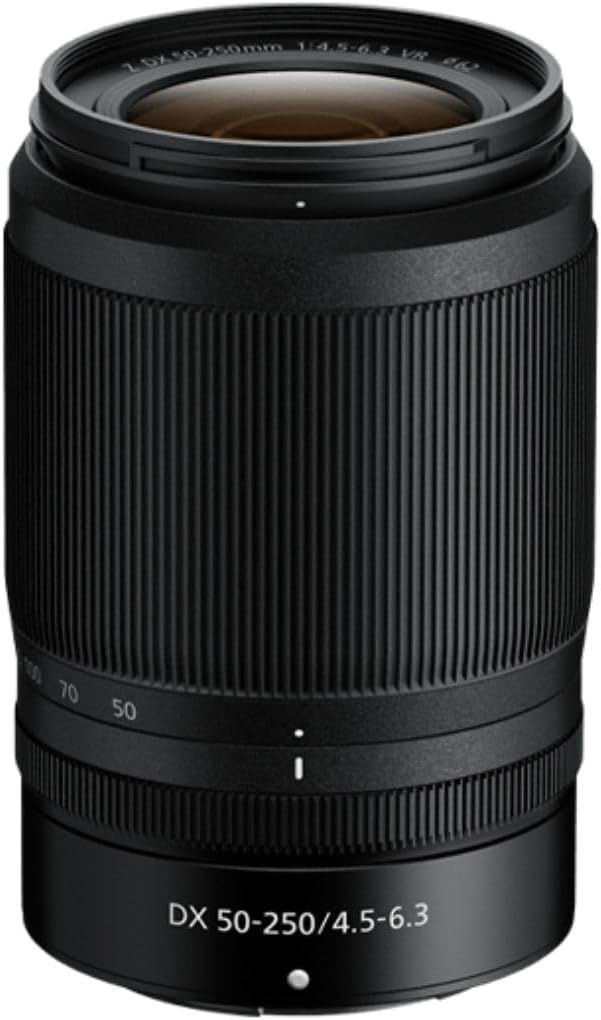
Figure 1: Front view of the Nikon NIKKOR Z DX 50-250mm VR lens.

Figure 2: Side view of the Nikon NIKKOR Z DX 50-250mm VR lens with the zoom extended.
3. What's in the Box
Upon opening the product packaging, ensure all items are present:
- Nikon NIKKOR Z DX 50-250mm VR Lens
- LC-62B 62mm Snap-On Front Lens Cap
- LF-N1 Rear Lens Cap
4. Setup
4.1 Attaching the Lens
- Ensure the camera is turned off.
- Remove the body cap from the camera and the rear lens cap from the lens.
- Align the mounting mark on the lens with the mounting mark on the camera body.
- Rotate the lens counter-clockwise until it clicks into place. Do not force the lens.
4.2 Removing the Lens
- Ensure the camera is turned off.
- While pressing the lens release button on the camera, rotate the lens clockwise until it detaches.
- Attach the front and rear lens caps to protect the lens elements.
5. Operating Instructions
5.1 Zooming
To zoom in or out, rotate the zoom ring on the lens. The focal length markings (50, 70, 100, 135, 200, 250mm) indicate the current zoom position.
5.2 Vibration Reduction (VR)
The lens features built-in Vibration Reduction (VR) to minimize blur caused by camera shake. VR can be activated or deactivated via the camera's menu settings. It is recommended to enable VR for handheld shooting, especially in low light or at longer focal lengths. For tripod-mounted shots, it is generally advisable to disable VR.
5.3 Autofocus (AF) and Manual Focus (MF)
The lens supports both autofocus and manual focus. The AF/MF switch on the lens barrel allows you to select the desired focus mode. In AF mode, the camera will automatically focus on your subject. In MF mode, rotate the focus ring to adjust focus manually.
5.4 Assignable Control Ring
The control ring on the lens can be customized through your camera's menu to adjust settings such as aperture, ISO sensitivity, or exposure compensation. Refer to your camera's manual for detailed instructions on customizing the control ring.
Video 1: "Z50: Experienced by Alex Stead" - Demonstrates the Nikon Z50 camera and NIKKOR Z DX 50-250mm VR lens in various travel and lifestyle photography scenarios, highlighting its compact size and versatility.
Video 2: "Z50: Experienced by Shawn Corrigan" - Showcases the Nikon Z50 camera and NIKKOR Z DX 50-250mm VR lens in action during dynamic shooting, emphasizing its ease of use and image quality for creative photography.
6. Maintenance
6.1 Lens Cleaning
- Use a blower brush to remove dust and loose particles from the lens surface.
- For smudges or fingerprints, use a soft, clean microfiber cloth specifically designed for optics, along with a small amount of lens cleaning solution. Apply the solution to the cloth, not directly to the lens.
- Avoid touching the lens elements with your fingers.
6.2 Storage
- When not in use, always attach the front and rear lens caps.
- Store the lens in a cool, dry place away from direct sunlight and extreme temperatures.
- If storing for extended periods, consider using a dehumidifying cabinet or silica gel packets to prevent mold growth.
6.3 Dust and Drip Resistance
This lens features a dust- and drip-resistant design. While it offers enhanced protection against dust and water droplets, it is not waterproof. Avoid exposing the lens to heavy rain or submerging it in water.
Video 3: "NIKKOR Z Lens Technology" - Explains the advanced optical technologies and coatings used in NIKKOR Z lenses, including anti-reflection coatings and multi-focusing systems, contributing to superior image quality.
Video 4: "Z Mount Structure & Design" - Provides an in-depth look at the technical aspects of the Nikon Z Mount system, detailing its flange back distance and inner mount diameter, and how these contribute to lens performance and design flexibility.
7. Troubleshooting
| Problem | Possible Cause | Solution |
|---|---|---|
| Lens not attaching to camera | Incorrect alignment or obstruction. | Ensure mounting marks are aligned and rotate gently until it clicks. Check for debris. |
| Images are blurry | Camera shake, incorrect focus, or VR off. | Activate VR, ensure proper focus, or use a faster shutter speed. |
| Autofocus is slow or inaccurate | Low light, low contrast subject, or incorrect AF mode. | Switch to a different AF mode, use manual focus, or provide more light. |
| Dust spots on images | Dust on lens elements or camera sensor. | Clean lens elements. If spots persist, clean camera sensor (refer to camera manual or professional service). |
8. Specifications
- Model Number: 20085
- Focal Length: 50-250mm (35mm equivalent: 75-375mm)
- Maximum Aperture: f/4.5-6.3
- Minimum Aperture: f/22-32
- Lens Mount: Nikon Z Mount
- Format: DX (APS-C)
- Image Stabilization: Yes, VR (Vibration Reduction) up to 5 stops
- Autofocus: Yes, Stepping Motor (STM)
- Filter Size: 62mm
- Dimensions (Diameter x Length): 2.91 x 4.33 inches (74 x 110 mm)
- Weight: 14.2 ounces (405 g)
9. Warranty and Support
This Nikon product is covered by a limited warranty. For specific warranty terms, conditions, and registration information, please refer to the warranty card included with your product or visit the official Nikon website.
For technical support, service, or inquiries, please contact Nikon customer service or visit an authorized Nikon service center. Contact information can be found on the official Nikon website or in your product documentation.
Nikon Official Website: www.nikonusa.com


