
Introduction
Thank you for purchasing the NICRON F51 LED Flashlight. This compact and powerful flashlight is designed for various applications, including outdoor activities, emergency situations, and general use. Please read this manual carefully before using the product to ensure safe and optimal performance.

Image: The NICRON F51 LED Flashlight, a compact and durable lighting device.
Package Contents
Ensure all items are present in the package:
- NICRON F51 Flashlight Unit
- Dedicated Lithium Rechargeable Battery (NRB-L750 750mAh) x 1
- Micro USB Cable x 1
- Spare Waterproof O-ring x 1

Image: Contents of the NICRON F51 package, including the flashlight, battery, USB cable, and spare O-ring.
Setup
Battery Installation
The NICRON F51 flashlight supports two types of batteries:
- Dedicated 14500 Lithium-ion Rechargeable Battery (included): Provides maximum brightness and runtime.
- AAA Battery (not included): Can be used as an alternative, but maximum brightness will be limited to 140 lumens.
- Unscrew the tail cap of the flashlight.
- Insert the battery with the positive (+) end facing towards the flashlight head.
- Screw the tail cap back on tightly to ensure proper contact and waterproof sealing.
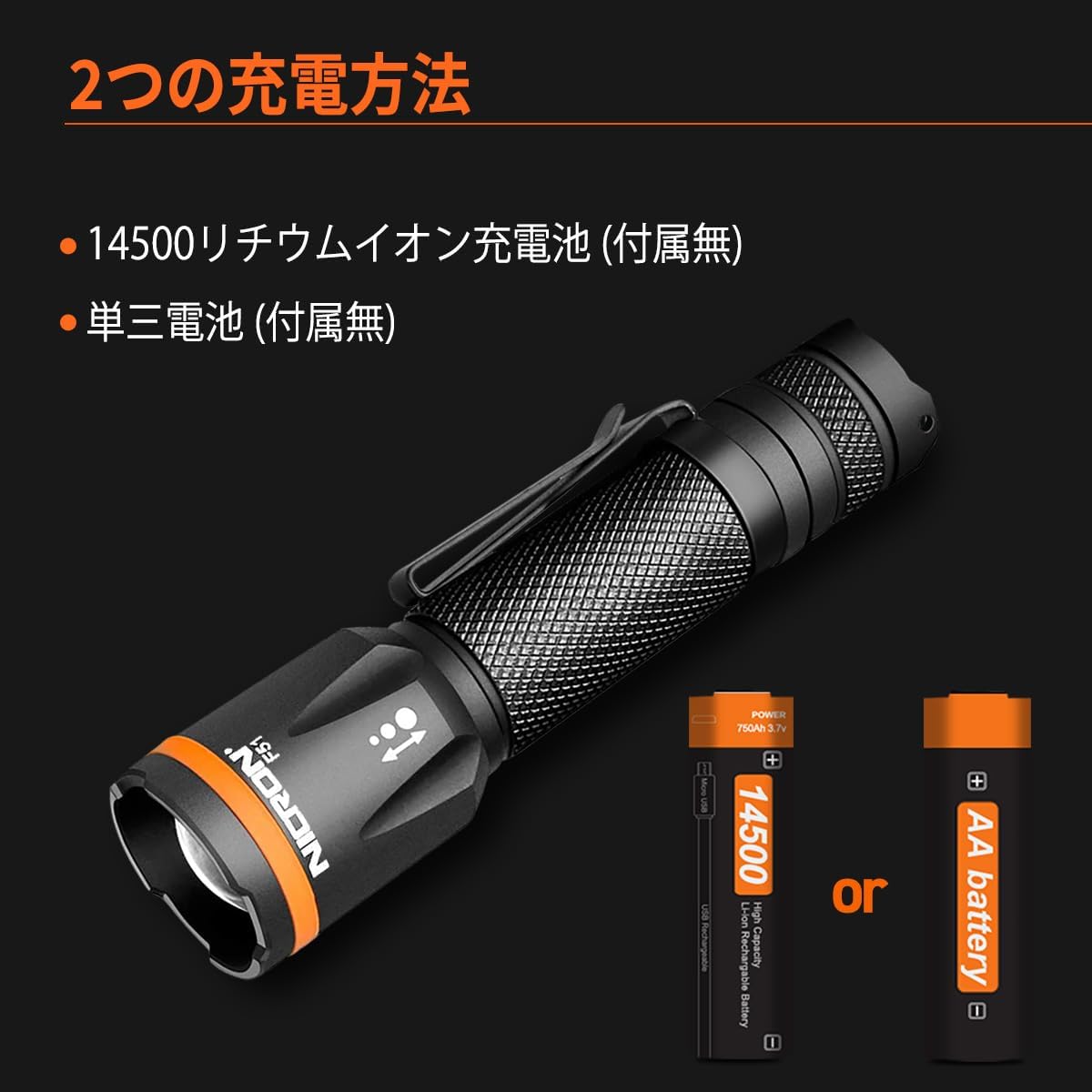
Image: Illustration showing the two battery options for the NICRON F51: a 14500 rechargeable battery or a standard AA battery.
Charging the Dedicated Battery
The included 14500 Lithium-ion rechargeable battery can be charged directly:
- Locate the Micro USB charging port on the battery itself.
- Connect the Micro USB cable to the battery and a suitable USB power source (e.g., computer, wall adapter).
- The battery will indicate charging status (e.g., red for charging, green for fully charged).

Image: Close-up view of the 14500 rechargeable battery being charged via a Micro USB cable.
Operating Instructions
Power On/Off and Mode Selection
The flashlight is operated using the tail switch button:
- Full Press: Press the tail switch completely until it clicks to turn the flashlight ON or OFF.
- Soft Press / Half Press: When the flashlight is ON, a soft press (without clicking) will cycle through the brightness modes: High → Medium → Low.

Image: Diagram illustrating the operation of the tail switch button for power control and mode selection (High, Medium, Low).
Adjustable Focus Function
The NICRON F51 features an adjustable focus to switch between a wide floodlight and a concentrated spotlight beam:
- To adjust the focus, slide the head of the flashlight forward or backward.
- Sliding forward typically narrows the beam for a spotlight effect.
- Sliding backward widens the beam for a floodlight effect.

Image: Visual representation of the adjustable focus mechanism on the NICRON F51, showing how to switch between a wide and narrow beam.

Image: The NICRON F51 flashlight emitting a focused beam, highlighting its key features including 600 lumens, 6.0 hours runtime, 123m beam distance, 3800cd intensity, 1.0m drop resistance, and IPX4 waterproof rating.
Maintenance
Cleaning
- Wipe the flashlight body with a soft, damp cloth.
- Do not use abrasive cleaners or solvents, as they may damage the finish.
- Clean the lens gently with a lens cloth to maintain optimal light output.
O-Ring Care
- Periodically inspect the O-rings for wear or damage.
- Apply a thin layer of silicone grease to the O-rings to maintain their waterproof seal.
- Replace damaged O-rings with the provided spare or genuine NICRON parts.
Storage
- If storing the flashlight for an extended period, remove the battery to prevent leakage.
- Store in a cool, dry place away from direct sunlight and extreme temperatures.
Troubleshooting
- Flashlight does not turn on:
- Check if the battery is inserted correctly with the positive (+) end facing the head.
- Ensure the tail cap is screwed on tightly.
- Replace the battery with a fully charged one or a fresh AAA battery.
- Light output is dim:
- The battery may be low; recharge or replace it.
- If using an AAA battery, note that maximum output is limited to 140 lumens.
- Clean the lens if it is dirty.
- Water ingress:
- Ensure the tail cap is fully tightened.
- Inspect the O-rings for damage or improper seating. Replace if necessary.
Specifications
| Feature | Detail |
|---|---|
| Model Number | F51 |
| Light Source | LED |
| Material | Aluminum |
| Color | Black |
| Product Size | 2.6 x 2.6 x 10.3 cm |
| Weight | 60 g (excluding battery) |
| Power Source | 14500 Lithium-ion Rechargeable Battery (NRB-L750 750mAh) or AAA Battery x 1 |
| Max Brightness (14500 Battery) | 600 Lumens |
| Max Brightness (AAA Battery) | 140 Lumens |
| Illumination Distance | 123 meters |
| Drop Test Resistance | 1 meter |
| Dustproof/Waterproof Rating | IPX4 |
| Features | Focus function, Waterproof function, Clip-on |
Performance Table (ANSI/FL1 Standard)
Performance data varies based on battery type:
| Using 14500 Lithium-ion Rechargeable Battery | |||
|---|---|---|---|
| Mode | High | Medium | Low |
| Lumens | 600 | 250 | 100 |
| Runtime | 1H | 2.5H | 5.5H |
| Using AAA Battery | |||
|---|---|---|---|
| Mode | High | Medium | Low |
| Lumens | 140 | 65 | 35 |
| Runtime | 1H | 2H | 6H |

Image: Detailed performance tables for the NICRON F51, showing lumen output and runtime for both 14500 Lithium-ion and AAA batteries across different brightness modes.

Image: Diagram highlighting the key components and dimensions of the NICRON F51 flashlight, including the lens, handle, clip, and tail switch button, with measurements of 20mm diameter and 103mm length.
Safety Warnings
- Do not shine the light directly into eyes, as it may cause temporary vision impairment.
- Keep out of reach of children.
- Do not disassemble the flashlight head or tail cap unnecessarily, as this may void the warranty or damage the device.
- Use only recommended batteries. Mixing battery types or using damaged batteries can be dangerous.
- While the flashlight is IPX4 waterproof, it is not designed for prolonged submersion.

Image: The NICRON F51 flashlight being splashed with water, demonstrating its IPX4 waterproof capability, suitable for use in rainy conditions.
Warranty and Support
Warranty Information
NICRON products are manufactured to high-quality standards. For specific warranty details, please refer to the warranty card included with your purchase or visit the official NICRON website. Keep your proof of purchase for warranty claims.
Customer Support
If you encounter any issues or have questions regarding your NICRON F51 flashlight, please contact NICRON customer support through the retailer where you purchased the product or via the official NICRON website. You can find more information and contact details on the NICRON Brand Store.


