
MOUNT PRO PR1003-1
Contents
MOUNT PRO Triple Monitor Mount Instruction Manual
Model: PR1003-1
1. Overview
The MOUNT PRO Triple Monitor Mount is designed to enhance your workspace by providing a versatile and ergonomic solution for mounting up to three computer monitors. This gas spring triple monitor arm allows for extensive adjustability, including rotation, swivel, and tilt functions, enabling you to achieve optimal viewing angles and reduce desk clutter.

Figure 1: The MOUNT PRO Triple Monitor Mount supporting three displays, showcasing its design and two mounting options (C-clamp and grommet base).
2. Key Features
- Full Motion Adjustability: Enjoy 360° rotation, ±90° swivel, and -90°/+90° tilt functions for each monitor, allowing for precise positioning and ergonomic comfort.
- Wide Compatibility: Supports most 13" to 27" LCD computer monitors with VESA 75mm x 75mm and 100mm x 100mm mounting patterns. Each arm can hold monitors weighing from 4.4 lbs to 17.6 lbs.
- Dual Installation Options: Choose between C-Clamp mounting for desks 0.39" to 3.15" thick, or Grommet Base installation for desks up to 1.97" thick.
- Space-Saving Design: Frees up valuable desk space by elevating monitors, contributing to a cleaner and more organized workstation.
- Integrated Cable Management: Easily detachable system helps keep power and AV cords neatly organized and out of sight.

Figure 2: Compatibility details for the monitor mount, including supported screen sizes, weight capacity per arm, and VESA mounting standards.
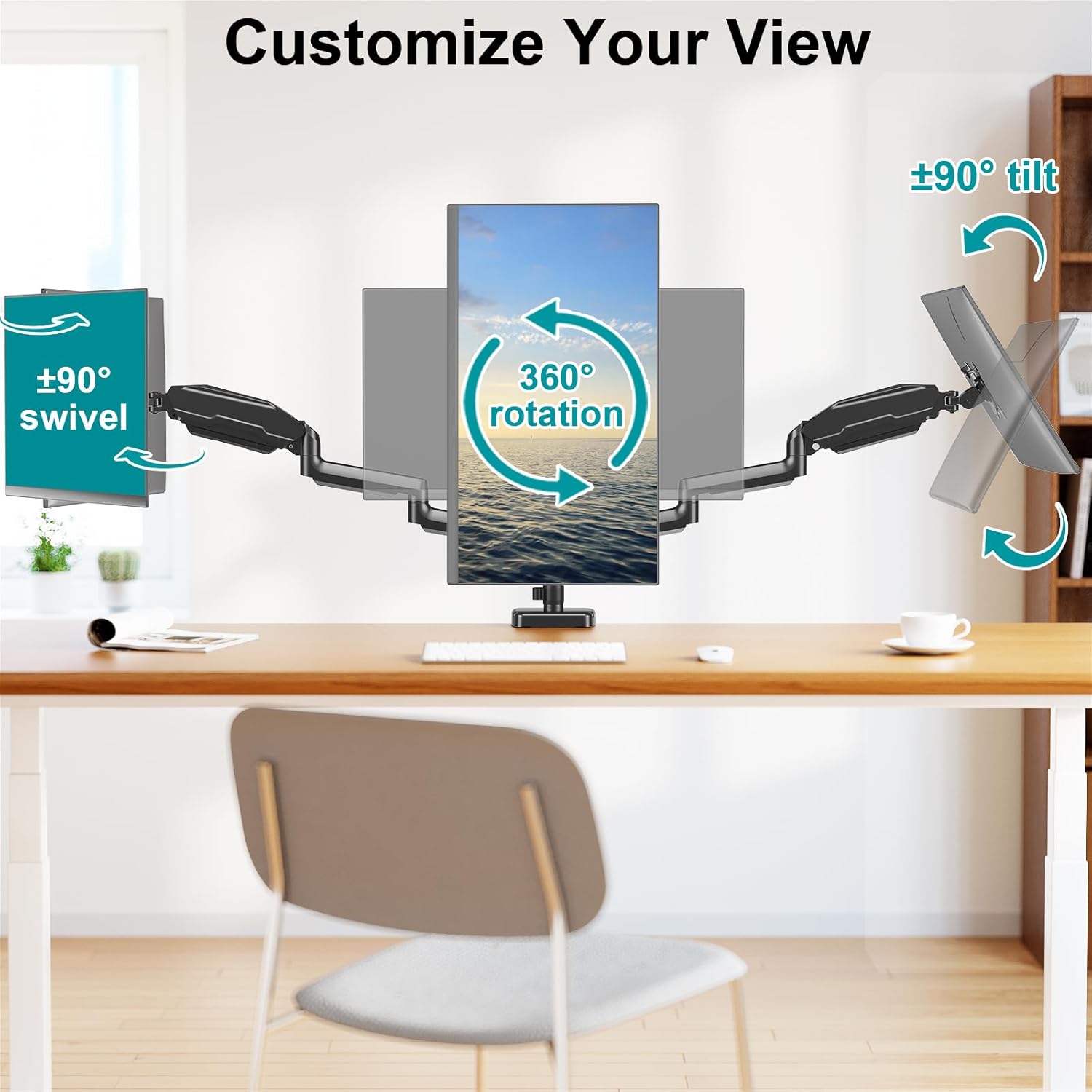
Figure 3: Illustrates the full range of motion for monitor adjustment, including rotation, swivel, and tilt capabilities.
3. Setup Instructions
3.1. Unboxing and Parts Identification
Carefully unpack all components from the box. Verify that all parts listed in the instruction manual are present and undamaged before proceeding with assembly.

Figure 4: An example of a fully set up triple monitor workstation using the MOUNT PRO mount, highlighting its space-saving benefits.
3.2. Mounting Options
The MOUNT PRO Triple Monitor Mount offers two primary installation methods to suit various desk types:
- C-Clamp Installation: This method is suitable for desks with a thickness between 0.39 inches and 3.15 inches. It involves clamping the mount directly to the edge of your desk.
- Grommet Base Installation: For desks with existing grommet holes or those where drilling is an option, this method supports desk thicknesses up to 1.97 inches.
Note: If your monitor is heavy or your desktop is thin, consider purchasing a reinforcement plate to distribute the mount's pressure and prevent desk damage.

Figure 5: Detailed view of the C-Clamp and Grommet Base installation methods, including compatible desk thickness ranges.
3.3. Attaching Monitors
The monitor mount supports VESA patterns of 75x75mm and 100x100mm. Secure your monitors to the VESA plates using the provided screws. Ensure the monitors are properly aligned and tightened for stability.

Figure 6: Examples of various monitor configurations possible with the triple monitor mount, including landscape, portrait, and mixed setups.
4. Operating Instructions
4.1. Adjusting Monitor Position
The gas spring arms allow for smooth and effortless adjustments. To adjust the height, gently push or pull the monitor to the desired vertical position. The gas spring mechanism will hold it in place. For swivel and tilt, simply move the monitor to the desired angle. The 360° rotation allows for easy switching between landscape and portrait orientations.
Tip: If the monitor sags or rises too easily, adjust the gas spring tension using the provided Allen key. Turn clockwise to increase tension for heavier monitors, and counter-clockwise to decrease tension for lighter monitors.
5. Maintenance Guidelines
- Cleaning: Use a soft, damp cloth to clean the surface of the mount. Avoid abrasive cleaners or solvents that may damage the finish.
- Periodic Checks: Regularly inspect all screws and connections to ensure they remain tight and secure. Re-tighten if necessary.
- Gas Spring Adjustment: Re-adjust the gas spring tension if you notice monitors sagging or if they become difficult to move.
- Cable Management: Periodically check the cable management system to ensure cables are not pinched or stressed.
6. Troubleshooting Common Issues
| Problem | Possible Cause | Solution |
|---|---|---|
| Monitor sags or does not stay at desired height. | Gas spring tension is too low for the monitor's weight. | Increase gas spring tension by turning the adjustment screw clockwise. Refer to the detailed installation manual for specific adjustment points. |
| Monitor is difficult to move or adjust. | Gas spring tension is too high, or pivot points are too tight. | Decrease gas spring tension by turning the adjustment screw counter-clockwise. Loosen screws at pivot points slightly if movement is restricted. |
| Mount feels unstable or wobbles. | Mounting clamp/grommet base is not securely tightened, or desk surface is unstable. | Ensure the C-Clamp or grommet base is fully tightened to the desk. If the desk is thin or fragile, consider using a reinforcement plate. |
| Monitors are not level. | Individual monitor arms are not adjusted to the same height or angle. | Adjust each monitor arm individually using the height, tilt, and swivel functions until all monitors are level. |
For more detailed troubleshooting, please refer to the official Troubleshooting Guide (PDF).
7. Product Specifications
| Specification | Detail |
|---|---|
| Brand | MOUNT PRO |
| Model Number | PR1003-1 |
| Material | Metal |
| Item Weight | 14.08 pounds |
| Package Dimensions | 17.17 x 13.15 x 6.65 inches |
| Color | Black |
| Minimum Compatible Monitor Size | 13 Inches |
| Maximum Compatible Monitor Size | 27 Inches |
| Load Capacity (per arm) | 4.4 lbs to 17.6 lbs |
| VESA Compatibility | 75x75mm, 100x100mm |
| Movement Type | Rotate, Swivel, Tilt |
| Maximum Tilt Angle | 90 Degrees |
| Mounting Type | Tabletop Mount (C-Clamp or Grommet Base) |
8. Warranty and Support
MOUNT PRO monitor stands come with a lifetime of technical support. If you have any questions or require assistance with your product, please contact MOUNT PRO customer service.
For additional information, you may refer to the official Installation Manual (PDF).
Ask a question about this manual
Ask about setup, troubleshooting, compatibility, parts, safety, or missing instructions. Manuals+ will review the question and use this page’s manual context to help answer it.