
Introduction
This manual provides detailed instructions for the safe and efficient use of your FONESTAR DOTS-N Bluetooth TWS Speaker. Please read this manual thoroughly before operating the device and retain it for future reference.
The FONESTAR DOTS-N is a portable Bluetooth TWS speaker featuring Bluetooth 4.2 and NFC connectivity. It offers powerful sound with enhanced bass, playback controls, and hands-free calling. Equipped with a rechargeable Li-Ion battery providing up to 10 hours of autonomy, it also includes a 3.5mm auxiliary input. Its compact design makes it suitable for home use.
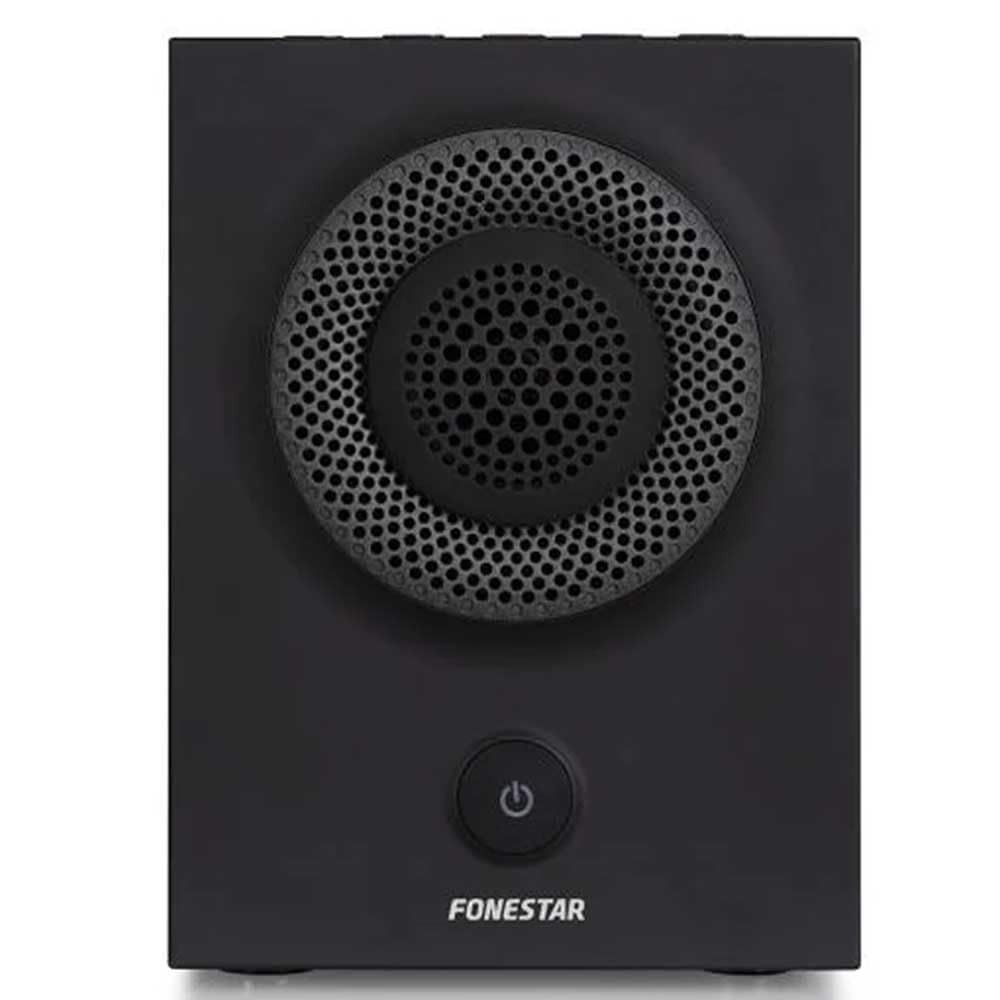
Figure 1: Front view of the FONESTAR DOTS-N Bluetooth TWS Speaker.
Setup
1. Unpacking
Carefully remove all components from the packaging. Ensure all items listed below are present:
- FONESTAR DOTS-N Bluetooth TWS Speaker
- USB to Micro USB Charging Cable
- 3.5mm Stereo Audio Cable
- User Manual (this document)
2. Charging the Speaker
Before first use, fully charge the speaker. Connect the Micro USB end of the charging cable to the speaker's charging port and the USB-A end to a compatible USB power adapter (not included) or a computer's USB port.
- The charging indicator light will illuminate during charging.
- Charging time is approximately 3 hours for a full charge.
- The indicator light will change or turn off once charging is complete.
3. Powering On/Off
To power on the speaker, press and hold the power button (usually indicated by a ⏻ symbol) for a few seconds until you hear an audible prompt or see an indicator light. To power off, repeat the process.
Operating Instructions
1. Bluetooth Pairing
The speaker supports Bluetooth 4.2 for wireless audio streaming.
- Ensure the speaker is powered on and in pairing mode (usually indicated by a flashing LED). If not, press the Bluetooth pairing button or power button briefly to enter pairing mode.
- On your smartphone, tablet, or other Bluetooth-enabled device, go to the Bluetooth settings.
- Search for available devices and select "FONESTAR DOTS-N" from the list.
- Once paired, the speaker will emit an audible confirmation, and the LED indicator will typically become solid.
2. NFC Pairing (Near Field Communication)
For devices with NFC, pairing can be done quickly:
- Ensure NFC is enabled on your device and the speaker is powered on.
- Tap your NFC-enabled device gently against the NFC area on the speaker (refer to product diagram for exact location, if available).
- Confirm the pairing request on your device.
3. True Wireless Stereo (TWS) Function
The TWS function allows you to pair two FONESTAR DOTS-N speakers together for a stereo sound experience.
- Ensure both DOTS-N speakers are powered on and not connected to any other Bluetooth device.
- On one speaker (this will be the primary speaker), press and hold the TWS button (if available) or a designated button for TWS pairing.
- The primary speaker will search for the secondary speaker. Once connected, both speakers will emit a confirmation sound.
- Now, connect your Bluetooth device to the primary speaker as described in the "Bluetooth Pairing" section. Audio will play in stereo through both speakers.
4. Auxiliary Input (AUX)
For non-Bluetooth devices, use the included 3.5mm stereo audio cable.
- Connect one end of the 3.5mm audio cable to the AUX-in port on the speaker.
- Connect the other end to the headphone jack or audio output of your device.
- The speaker will automatically switch to AUX mode or may require manual selection via a mode button.
5. Playback Control and Hands-Free Calls
The speaker features integrated controls for music playback and managing calls:
- Play/Pause: Press the Play/Pause button (often combined with the power button or a dedicated button).
- Volume Up/Down: Use the volume buttons (+ / -) on the speaker.
- Next/Previous Track: Long press or double-press the volume buttons, or use dedicated track skip buttons if present.
- Answer/End Call: Press the Play/Pause button during an incoming call to answer, and again to end the call.
- Reject Call: Press and hold the Play/Pause button during an incoming call.
Maintenance
1. Cleaning
- Always power off the speaker before cleaning.
- Use a soft, dry, lint-free cloth to wipe the exterior surfaces.
- Do not use abrasive cleaners, waxes, or solvents as they may damage the finish.
- Avoid getting moisture into any openings.
2. Storage
- Store the speaker in a cool, dry place away from direct sunlight and extreme temperatures.
- If storing for an extended period, charge the battery to approximately 50% every few months to maintain battery health.
3. Battery Care
- Do not expose the battery to excessive heat, fire, or direct sunlight.
- Avoid fully discharging the battery frequently, as this can reduce its lifespan.
- Only use the provided charging cable or a certified equivalent.
Troubleshooting
| Problem | Possible Cause | Solution |
|---|---|---|
| Speaker does not power on. | Battery is depleted. | Charge the speaker using the provided USB cable. |
| Cannot pair via Bluetooth. | Speaker is not in pairing mode; device is too far; interference. | Ensure speaker is in pairing mode. Move device closer (within 10m). Turn off other Bluetooth devices. |
| No sound or low volume. | Volume too low on speaker or source device; incorrect input mode. | Increase volume on both speaker and source device. Check if the correct input (Bluetooth/AUX) is selected. |
| TWS pairing fails. | Speakers are already paired to another device; incorrect TWS pairing procedure. | Ensure both speakers are disconnected from other devices. Follow TWS pairing steps carefully. |
| Sound distortion. | Volume too high; low battery; poor signal. | Reduce volume. Charge the speaker. Move source device closer to the speaker. |
Technical Specifications

Figure 2: Dimensions of the FONESTAR DOTS-N Bluetooth TWS Speaker.
| Model Name | DOTS-N |
| Brand | FONESTAR |
| Connectivity Technology | Bluetooth 4.2, NFC, 3.5mm AUX |
| Wireless Range | Up to 10 meters (33 feet) |
| Audio Output Mode | Stereo (with TWS) |
| Speaker Type | 3" Coaxial Woofer with Tweeter, 3" Subwoofer, 4" Passive Radiator |
| Max Speaker Output Power | 12 Watts RMS |
| Frequency Response | 80 - 20,000 Hz |
| Signal-to-Noise Ratio | ≥ 75 dB |
| Power Source | Battery Powered (Rechargeable Li-ion) |
| Battery Capacity | 2200 mAh, 7.4 V |
| Battery Autonomy | Up to 10 hours (at 50% volume) |
| Charging Time | Approximately 3 hours |
| Control Method | Tactile (Touch) |
| Special Features | High-res audio, Bluetooth, Integrated microphone, USB port (for charging) |
| Compatible Devices | Smartphones, Tablets |
| Recommended Use | For home |
| Color | Black |
| Dimensions (W x H x D) | 125 x 175 x 158 mm (approx. 4.9 x 6.9 x 6.2 inches) |
| Item Weight | 1.82 kg (approx. 4.01 lbs) |
| Waterproof | No |
Note: Specifications are subject to change without prior notice. Battery autonomy may vary depending on usage, volume level, and music type.
Warranty Information
FONESTAR products are designed and manufactured to the highest quality standards. This product is covered by a limited warranty against manufacturing defects from the date of purchase. The specific terms and duration of the warranty may vary by region and retailer.
Please retain your proof of purchase (receipt or invoice) as it will be required for any warranty claims. The warranty does not cover damage caused by misuse, accident, unauthorized modification, or normal wear and tear.
For detailed warranty terms and conditions, please refer to the warranty card included with your product or contact your local FONESTAR distributor or retailer.
Customer Support
If you encounter any issues that are not resolved by the troubleshooting guide, or if you require further assistance, please contact FONESTAR customer support or your authorized retailer.
When contacting support, please be prepared to provide the following information:
- Product Model: FONESTAR DOTS-N
- Date of Purchase
- Description of the issue
- Your contact information
For the most up-to-date support information, including contact details and FAQs, please visit the official FONESTAR website.