
Introduction
This manual provides comprehensive instructions for the setup, operation, maintenance, and troubleshooting of your Logitech G703 Hero Lightspeed Wireless Gaming Mouse. Designed for precision and responsiveness, this mouse features the 16,000 DPI Hero optical sensor and Lightspeed wireless technology, along with customizable RGB illumination.
Product Overview
The Logitech G703 Hero is a high-performance wireless gaming mouse engineered for competitive play and daily use. Key features include:
- HERO 16K Sensor: Delivers precise 1:1 tracking and 16,000 max DPI.
- LIGHTSPEED Wireless: Provides pro-grade connectivity with an incredibly fast 1 ms report rate.
- Ergonomic Design: Shaped for comfort with rubber grips.
- Programmable Buttons: Six customizable buttons for personalized control.
- Adjustable Weight: Includes an optional 10g removable weight.
- LIGHTSYNC RGB Lighting: Customizable 16.8M color illumination.
- POWERPLAY Compatible: Supports continuous wireless charging with a POWERPLAY mouse pad (sold separately).
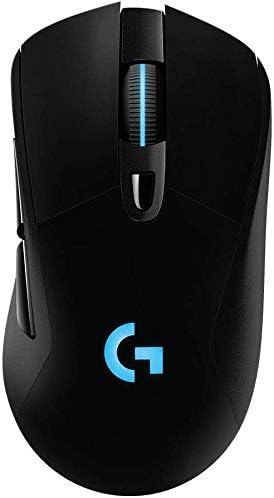
Figure 1: Top view of the Logitech G703 Hero Wireless Gaming Mouse, showcasing its ergonomic design and illuminated 'G' logo.

Figure 2: Exploded view illustrating key components including 6 programmable buttons, advanced button tensioning, charging/data cable, wireless extension adapter, LIGHTSPEED wireless nano receiver, ergonomic design with rubber grip, and 16.8M color RGB lighting.

Figure 3: Bottom and side profile of the G703 mouse, highlighting the ON/OFF switch, HERO 16K sensor, and the slot for the 10g removable weight. Dimensions are also shown.

Figure 4: Details of the HERO 16K Sensor, emphasizing 1:1 tracking, 16,000 max DPI, and class-leading efficiency.

Figure 5: Illustration of LIGHTSPEED Wireless technology, providing pro-grade connectivity with an incredibly fast 1 ms report rate.

Figure 6: The G703 mouse shown with a POWERPLAY mouse pad, indicating compatibility for continuous wireless charging and up to 60 hours of rechargeable battery life.
Setup
- Charge the Mouse: Connect the included charging/data cable to the mouse and a USB port on your computer. Allow the mouse to fully charge before first use.
- Connect the LIGHTSPEED Receiver: Insert the LIGHTSPEED wireless nano receiver into an available USB port on your computer. For optimal performance, use the included wireless extension adapter to position the receiver closer to the mouse.
- Power On: Locate the ON/OFF switch on the bottom of the mouse and slide it to the 'ON' position.
- Install G HUB Software: For full customization of buttons, DPI settings, and RGB lighting, download and install the Logitech G HUB software from the official Logitech website.
- Optional Weight: If desired, insert the 10g removable weight into the designated slot on the bottom of the mouse for personalized feel and balance.
Operating Instructions
Button Functions
The G703 Hero features six programmable buttons. By default, these buttons perform standard mouse functions. You can customize their actions using the Logitech G HUB software.
- Left Click (Button 1): Primary action.
- Right Click (Button 2): Secondary action.
- Middle Click/Scroll Wheel (Button 3): Activates middle click, scrolls up/down.
- DPI Cycle (Button 4): Cycles through preset DPI sensitivity levels.
- Forward (Button 5): Navigates forward in web browsers or applications.
- Back (Button 6): Navigates backward in web browsers or applications.
DPI Adjustment
The DPI (Dots Per Inch) setting determines the mouse cursor's sensitivity. Use the DPI Cycle button (Button 4) to switch between different DPI profiles. You can configure these profiles in the G HUB software to match your preferences for various games or tasks.
RGB Lighting Customization
The G703 Hero features LIGHTSYNC RGB lighting on the 'G' logo and scroll wheel. Use the Logitech G HUB software to select from 16.8 million colors, synchronize lighting effects with other Logitech G devices, or create custom animations.
Battery Management
The mouse offers up to 60 hours of battery life on a single charge. When the battery is low, the RGB lighting may flash to indicate the need for recharging. Connect the charging/data cable to continue using the mouse while it charges. For continuous wireless charging, the mouse is compatible with the Logitech POWERPLAY Wireless Charging System (sold separately).
Maintenance
To ensure optimal performance and longevity of your Logitech G703 Hero mouse, follow these maintenance guidelines:
- Cleaning: Use a soft, lint-free cloth to wipe down the mouse surface. For stubborn dirt, slightly dampen the cloth with water. Avoid harsh chemicals or abrasive materials.
- Sensor Care: Keep the optical sensor on the bottom of the mouse clean and free of dust or debris. Use a can of compressed air to gently clear any obstructions.
- Storage: When not in use for extended periods, store the mouse in a clean, dry environment away from extreme temperatures.
Troubleshooting
| Problem | Possible Solution |
|---|---|
| Mouse not responding |
|
| Lag or intermittent connection |
|
| DPI or button settings not working |
|
| RGB lighting not functioning |
|
Specifications
- Brand: Logitech
- Model: G703 Hero Lightspeed
- Connectivity Technology: Wireless (LIGHTSPEED)
- Movement Detection Technology: Optical (HERO 16K Sensor)
- Max DPI: 16,000
- Programmable Buttons: 6
- RGB Lighting: LIGHTSYNC RGB (16.8M colors)
- Weight: 7.8 ounces (without optional weight)
- Optional Weight: 10g
- Battery Life: Up to 60 hours (without lighting), up to 35 hours (with default lighting)
- Dimensions (L x W x H): 5.67 x 3.35 x 3.31 inches (Package Dimensions)
- Color: Black
- First Available Date: December 11, 2017
Warranty and Support
This product is sold as "Renewed" and may come with specific return policies. Please refer to your purchase documentation for details on the return policy, which typically allows for returns or replacements within 90 days. For technical support, driver updates, and additional resources, please visit the official Logitech support website.
Logitech Support Website: support.logi.com


