
1. Introduction
This manual provides detailed instructions for the safe and proper installation and operation of your Pipishell PIMF4 Full Motion TV Wall Mount. Please read all instructions carefully before beginning installation to ensure correct setup and to prevent potential injury or damage. Keep this manual for future reference.
2. Safety Information
Always ensure the wall structure can support the combined weight of the mount and your television. If you are unsure about the strength of your wall, consult a qualified professional. Do not exceed the maximum weight capacity of 99 lbs (45 kg). This mount is designed for installation on 12" or 16" wood studs, solid concrete, or brick walls. Do not install on drywall alone. Always use appropriate safety gear during installation.
3. Package Contents
Verify that all components are present and undamaged before installation. The package includes the full motion TV wall mount, various mounting hardware (screws, anchors, washers), and a step-by-step instruction guide. If any parts are missing or damaged, please contact customer service.
4. Specifications
| Model Number | PIMF4 |
| TV Size Compatibility | 26-65 inches |
| Weight Capacity | Up to 99 lbs (45 kg) |
| VESA Compatibility | 100x100mm to 400x400mm |
| Mounting Type | Full Motion Wall Mount |
| Movement Type | Articulating, Swivel, Tilt, Level |
| Swivel Range | +/-45° |
| Tilt Range | +5°/-15° |
| Level Adjustment | +/-3° |
| Extension from Wall | 3.7" to 16.42" |
| Material | Alloy Steel |
| Color | Black |
5. Compatibility Check
Before installation, confirm your TV's compatibility with the Pipishell PIMF4 mount.
- TV Size: Compatible with most 26-65 inch flat or curved TVs.
- TV Weight: Supports TVs up to 99 lbs (45 kg).
- VESA Pattern: Check the four mounting holes on the back of your TV. The distance between these holes (width x height) must be between 100x100mm and 400x400mm.
- Wall Type: Designed for installation on 12" or 16" wood studs, solid concrete, or brick walls.
- TV Ports: Ensure the mount will not block any necessary TV ports or cables.

Image: Compatibility overview for Pipishell TV Wall Mount, showing supported TV sizes (26-65in), VESA patterns (Max 400x400mm, Min 100x100mm), and wall types (12"/16" Wood Studs).

Image: Illustration advising users to locate TV ports to ensure the mount does not block cables.
6. Installation Guide
Follow these steps for a secure and successful installation. It is recommended to have two people for TV mounting.
Step 1: Attach TV Brackets
Secure the TV brackets to the back of your television using the appropriate screws and washers provided. Ensure the brackets are centered and firmly attached.

Image: Step 1 of installation, showing how to attach the TV brackets to the television.
Step 2: Install Wall Plate
Locate the desired mounting position on your wall. Use a stud finder to identify wood studs if applicable. Mark the drill holes and pre-drill according to the instructions. Secure the pre-assembled wall plate to the wall using the provided lag bolts and washers. Ensure it is level and securely fastened.
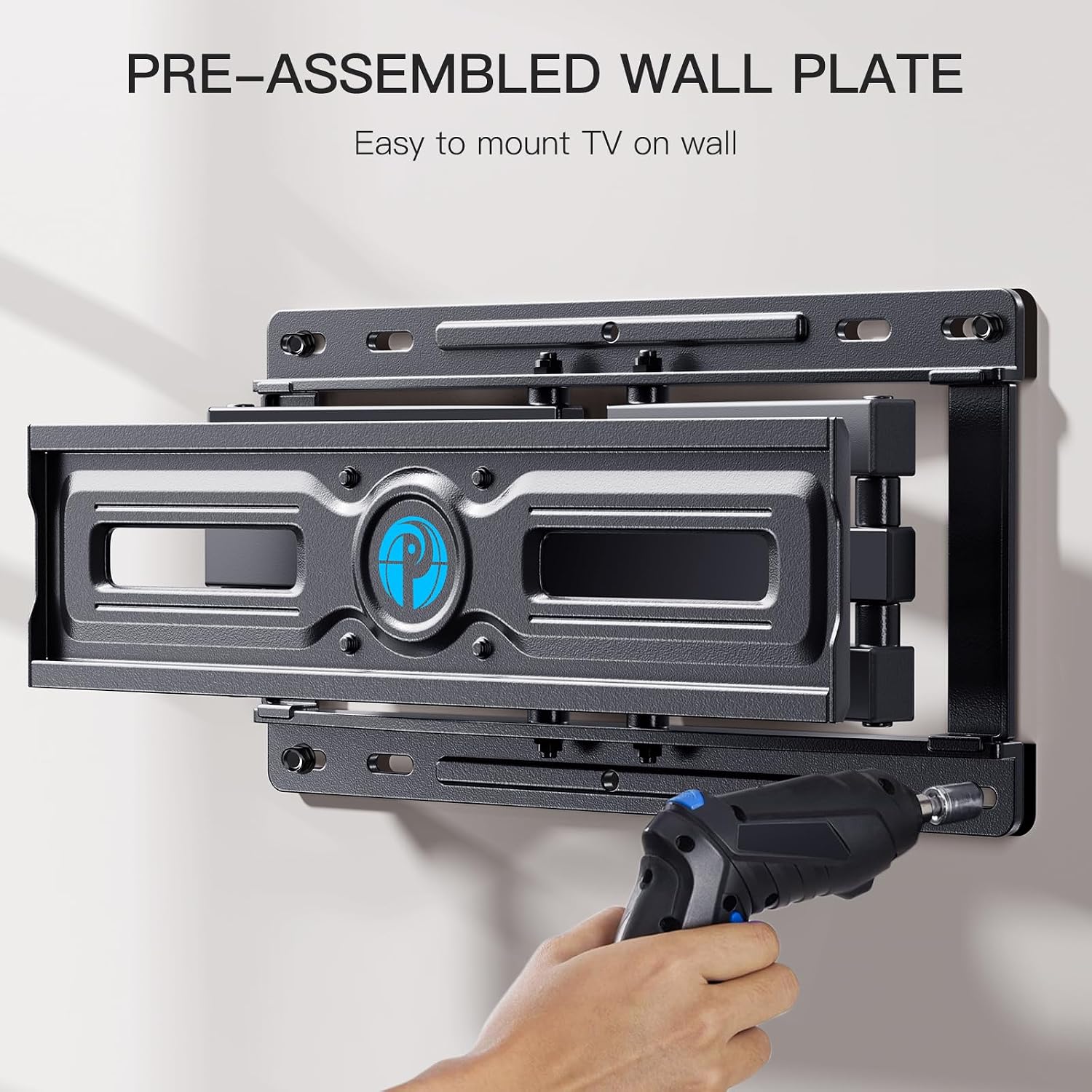
Image: The pre-assembled wall plate, ready for mounting, highlighting its design for easy installation.

Image: Step 2 of installation, demonstrating the process of installing the wall plate.
Step 3: Hang TV
Carefully lift the TV with the attached brackets and hook them onto the wall plate. Ensure the TV is securely seated on the mount. Engage any safety locks or screws to prevent accidental dislodgement.

Image: Step 3 of installation, showing how to hang the TV onto the wall mount.
Installation Video
Video: Official Pipishell demonstration of the full motion TV mount's features and installation process.
7. Operating and Adjustments
The Pipishell PIMF4 mount offers various adjustments for optimal viewing.
- Extension and Retraction: Gently pull the TV away from the wall to extend it up to 16.42 inches for closer viewing. Push the TV back towards the wall to retract it to 3.7 inches to save space.
- Swivel: The mount allows for a +/-45° swivel from left to right. Carefully push or pull the TV to the desired angle.
- Tilt: Adjust the vertical viewing angle with a +5°/-15° tilt range. Loosen the tilt adjustment screws, set the desired angle, and re-tighten the screws.
- Leveling: After installation, fine-tune the TV's horizontal level by +/-3°. This can be done by adjusting the leveling screws on the TV brackets.

Image: Visual guide to the mount's adjustable features including extension, retraction, tilt (+5°/-15°), and level (±3°).
Video: Official Pipishell video demonstrating the full motion capabilities, including swivel, tilt, and extension of the TV wall mount.
8. Maintenance
Regular maintenance ensures the longevity and safe operation of your TV wall mount.
- Periodic Inspection: Periodically check all screws and connections to ensure they remain tight and secure.
- Cleaning: Clean the mount with a soft, dry cloth. Avoid using abrasive cleaners or solvents that could damage the finish.
- Movement Check: Occasionally move the TV through its full range of motion to ensure smooth operation of the articulating arms.
9. Troubleshooting
If you encounter any issues with your TV wall mount, refer to the following common solutions:
- TV Not Level: Use the +/-3° leveling adjustment feature to correct the horizontal alignment. Ensure all mounting screws are tightened evenly.
- Difficulty Moving TV: Check for any obstructions or overtightened joints. Lubricate moving parts if necessary with a silicone-based spray (avoid oil-based lubricants).
- Mount Feels Loose: Immediately remove the TV and re-check all wall plate and TV bracket connections. Ensure lag bolts are securely fastened into studs or concrete. Do not use the mount if it feels unstable.
10. Warranty and Customer Support
Pipishell is committed to providing professional customer service. If you have any questions regarding the installation, product selection, or require assistance, please do not hesitate to contact our U.S.-based product support team. Refer to your product packaging or the official Pipishell website for contact details.


