
1. Introduction
Thank you for choosing the Philips Shaver S3134/51. This electric rotary shaver is designed for both wet and dry use, offering a comfortable and efficient shaving experience. Please read this user manual carefully before using the appliance and save it for future reference. This manual provides essential information on safe operation, setup, usage, maintenance, and troubleshooting.
2. Important Safety Information
To ensure safe operation and prevent injury, always follow these basic safety precautions:
- Unplug before use: This appliance is designed for cordless operation only. Always disconnect the shaver from the power outlet before use.
- Do not use the appliance if it is damaged.
- Keep the charging adapter dry. Do not immerse it in water or use it in wet conditions.
- This appliance can be used by children aged 8 years and above and persons with reduced physical, sensory or mental capabilities or lack of experience and knowledge if they have been given supervision or instruction concerning use of the appliance in a safe way and understand the hazards involved.
- Children shall not play with the appliance. Cleaning and user maintenance shall not be made by children without supervision.
- Only use the original Philips charger provided with the appliance.
- Do not open the appliance to replace the rechargeable battery.
3. Package Contents
The Philips Shaver S3134/51 package typically includes:
- Philips Shaver S3134/51
- Charging Adapter
- Protective Cap
- Cleaning Brush
- User Manual
4. Getting Started (Setup)
4.1 Charging the Shaver
Before first use, or when the battery indicator shows low charge, fully charge your shaver. A full charge provides up to 60 minutes of cordless shaving time.
- Ensure the shaver is switched off.
- Insert the small plug of the charging adapter into the shaver's charging socket.
- Plug the adapter into a wall outlet.
- The battery indicator light will illuminate to show charging status. When fully charged, the light may turn solid or switch off, depending on the model.
- A full charge typically takes approximately 1 hour.
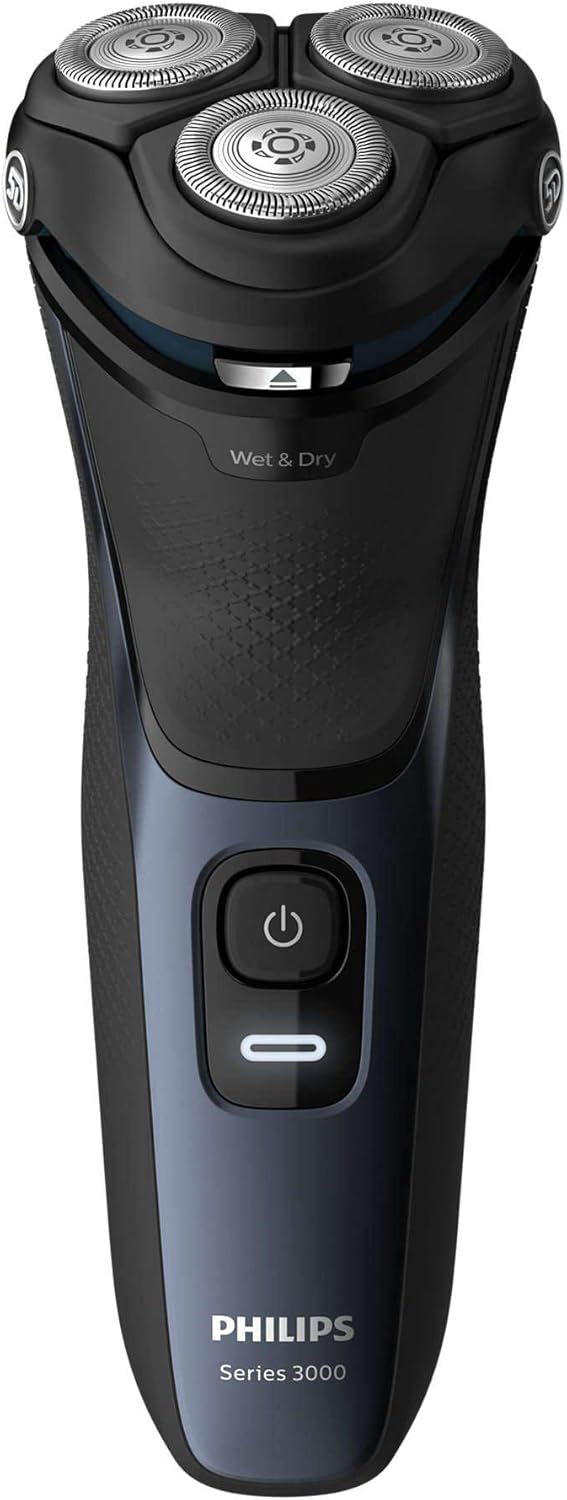
Figure 1: Front view of the Philips Shaver S3134/51, showing the power button and 'Wet & Dry' indicator.
5. Operating the Shaver
5.1 Powering On/Off
- To turn on the shaver, press the power button once.
- To turn off the shaver, press the power button again.
5.2 Wet Shaving
For a refreshing and comfortable shave, you can use the shaver with foam or gel.
- Wet your face and apply shaving foam or gel.
- Turn on the shaver.
- Move the shaver in slow, circular motions over your skin.
- Rinse the shaving heads under running water during and after shaving to prevent clogging.
5.3 Dry Shaving
For a quick and convenient shave, use the shaver on dry skin.
- Ensure your skin is clean and dry.
- Turn on the shaver.
- Move the shaver in slow, circular motions over your skin.
5.4 Using the Pop-Up Trimmer
The integrated pop-up trimmer is ideal for maintaining your mustache and sideburns.
- Ensure the shaver is turned on.
- Slide the trimmer release button upwards to activate the trimmer.
- Hold the trimmer perpendicular to your skin and move it gently to trim desired areas.
- When finished, push the trimmer back down until it clicks into place.

Figure 2: Side view of the Philips Shaver S3134/51 with the precision pop-up trimmer extended.
6. Cleaning and Maintenance
Regular cleaning ensures optimal performance and extends the lifespan of your shaver.
6.1 Daily Cleaning
- After each use, turn off the shaver and unplug it from the charger.
- Open the shaving unit by pressing the release button (if applicable) or gently pulling the shaving head assembly upwards.
- Rinse the shaving unit thoroughly under warm running water.
- Shake off excess water and leave the shaving unit open to air dry.
- Close the shaving unit.
6.2 Deep Cleaning (Weekly/Monthly)
For a more thorough cleaning:
- Perform daily cleaning steps.
- Remove the shaving heads from the shaving unit.
- Clean the individual cutters and guards with the provided cleaning brush. Do not clean more than one cutter and guard at a time, as they are matching sets.
- Rinse all parts under warm running water.
- Allow all parts to air dry completely before reassembling.
6.3 Replacing Shaving Heads
For optimal shaving performance, it is recommended to replace the shaving heads every two years. Replacement heads can be purchased from authorized Philips retailers or the Philips website. Refer to your shaver's packaging or the Philips website for the correct replacement head type for model S3134/51.
7. Troubleshooting
| Problem | Possible Cause | Solution |
|---|---|---|
| Shaver does not turn on. | Battery is empty. | Charge the shaver for at least 1 hour. |
| Shaver does not charge. | Adapter not properly connected or faulty. | Ensure the adapter is securely plugged into both the shaver and the wall outlet. Try a different outlet. If the issue persists, contact Philips support. |
| Poor shaving performance. | Shaving heads are dirty or worn out. | Clean the shaving heads thoroughly. If performance does not improve, consider replacing the shaving heads. |
| Skin irritation after shaving. | Incorrect shaving technique or sensitive skin. | Ensure you are using gentle, circular motions. Try wet shaving with foam or gel. Allow your skin to adapt to the new shaver. |
If you encounter problems not listed here, or if the suggested solutions do not resolve the issue, please contact Philips Customer Support.
8. Specifications
- Model Number: S3134/51
- Brand: PHILIPS
- Power Source: Battery Powered (Rechargeable Lithium-ion)
- Battery Life: Up to 60 minutes cordless shaving
- Charging Time: Approximately 1 hour for a full charge
- Shaving System: Rotary, 5D Pivot & Flex Heads
- Blade Material: Stainless Steel
- Usage: Wet & Dry
- Included Components: Shaver, Charger
- Dimensions (L x W x H): 2.79 x 24.64 x 16.51 cm
- Weight: 281 Grams
- Color: Storm Blue
9. Warranty and Support
This Philips appliance comes with a standard manufacturer's warranty. Please refer to the warranty card included in your package or visit the official Philips website for detailed warranty terms and conditions specific to your region.
For product support, frequently asked questions, or to register your product, please visit the Philips support website or contact your local Philips customer service center. Contact information can typically be found on the Philips website or in the documentation provided with your product.
Online Support: www.philips.com/support


