
Introduction
This manual provides essential information for the safe and effective operation of your Best Choice Products Air Compression Shiatsu Neck Back Massager. Please read this manual thoroughly before first use and retain it for future reference.
Important Safety Information
Do not use while sleeping or taking a bath. Keep away from water. Do not use if you have a medical condition that could be affected by heat or massage. Unplug and allow to cool before storing. Do not use if cord is damaged. Always follow standard electrical safety precautions.
Package Contents
- Massage Chair Pad
- Remote Control
- Power Adapter
- Removable Covers
Setup
The massager is designed for use on various seating surfaces such as chairs, sofas, and recliners. No assembly is required.
- Place the massage chair pad on a stable and comfortable chair or sofa. Ensure the pad is securely positioned.
- Utilize the integrated mounting straps on the back of the massager to secure it to your chair, preventing slippage during use.
- Connect the power adapter to the massager's power input, then plug the adapter into a standard electrical outlet.
- Ensure the remote control is easily accessible. The massager includes a remote holder for convenient storage.

Image: The massager can be easily placed on various chairs for comfortable use.

Image: The lightweight design allows for versatile use in various settings, including sofas, office chairs, dining chairs, and recliners.
Operating Instructions
Familiarize yourself with the remote control to utilize the various massage functions.

Image: Key features of the massager, including the remote control and its holder.
Remote Control Overview
The remote control allows you to customize your massage experience. Refer to the remote's layout for specific button functions.
- Power Button: Turns the massager On/Off.
- Auto Mode: Activates a pre-programmed massage sequence.
- Neck Massage: Controls the neck massage nodes. Adjustable up to 2.75 inches. Use arrow buttons to raise or lower.
- 2D/3D Massage: Toggles between 2D (inward/outward) and 3D (deep-kneading, mimicking finger pressure) massage modes for the back.
- Rolling Massage: Activates a gentle rolling motion along the back and spine.
- Spot Massage: Allows you to target specific areas for focused massage.
- Heat Function: Turns on/off the infrared heat for the back and neck shiatsu balls.
- Air Compression: Controls the inflation of air bags for waist and thigh massage.
- Vibration: Activates the vibrating seat function.
Massage Modes and Functions
- Unique 2D/3D Massage: Oscillating nodes provide massage to the neck, back, and lower body. Select "2D" for an inward and outward motion or "3D" to mimic finger pressure and a deep-kneading massage. This function works in conjunction with the vibrating seat to help release tension.

Image: Visual representation of 2D, 3D, and Rolling massage movements, and the heat function.
- Heat Function: Shiatsu balls in the backrest and neck utilize infrared heat to relax muscles, improve blood circulation, and enhance the massage experience.
- Rolling and Spot Massage: The rolling massage setting gently glides along the back and spine to alleviate muscle pain. Precision spot massage uses fine-tuned pressure and oscillating rollers to relieve pain in your neck, back, lower back, and hips.
- Air Compression Massage: A series of air bags inflate and deflate to relax your waist and thigh muscles, gently positioning you for optimal stress relief.
- Adjustable Neck Massage: The neck massage nodes can be freely raised and lowered to fit your comfort. Use the arrow buttons next to the neck function on the remote control; press and hold until the desired height is reached.
Maintenance
- Cleaning: Unplug the massager before cleaning. Use a soft, damp cloth to wipe down the surface. Do not use abrasive cleaners or immerse the unit in water. The removable covers can be washed according to their care instructions.
- Storage: When not in use, store the massager in a cool, dry place. Avoid placing heavy objects on top of the massager.
Troubleshooting
| Problem | Possible Cause | Solution |
|---|---|---|
| Massager does not turn on. | Power cord not securely plugged in. No power from outlet. | Ensure power cord is fully inserted. Test outlet with another device. |
| Massage feels weak or inconsistent. | Incorrect mode selected. Overheating protection activated. | Check remote settings. Allow unit to cool down for 30 minutes before restarting. |
| Heat function not working. | Heat function not activated. | Press the heat button on the remote control. Allow a few minutes for heat to build. |
Specifications
- Overall Dimensions: 24.5"(L) x 19.25"(W) x 32.25"(H)
- Neck Massager (From Seat): 24"(H)
- Seat Dimensions: 20.75"(L) x 16.25"(W)
- Back Dimensions: 24.5"(L) x 4.5"(W) x 31"(H)
- Power Cord Dimensions: 120"(L)
- Remote Dimensions: 6.5"(L) x 2.5"(W)
- Remote Cord Dimensions: 32.5"(L)
- Weight: 17.4 lbs.
- Material: Polyurethane, Polyester
- Model Number: SKY5467
- Power Source: Corded Electric
- Manufacturer: Best Choice Products
- First Available: October 4, 2019
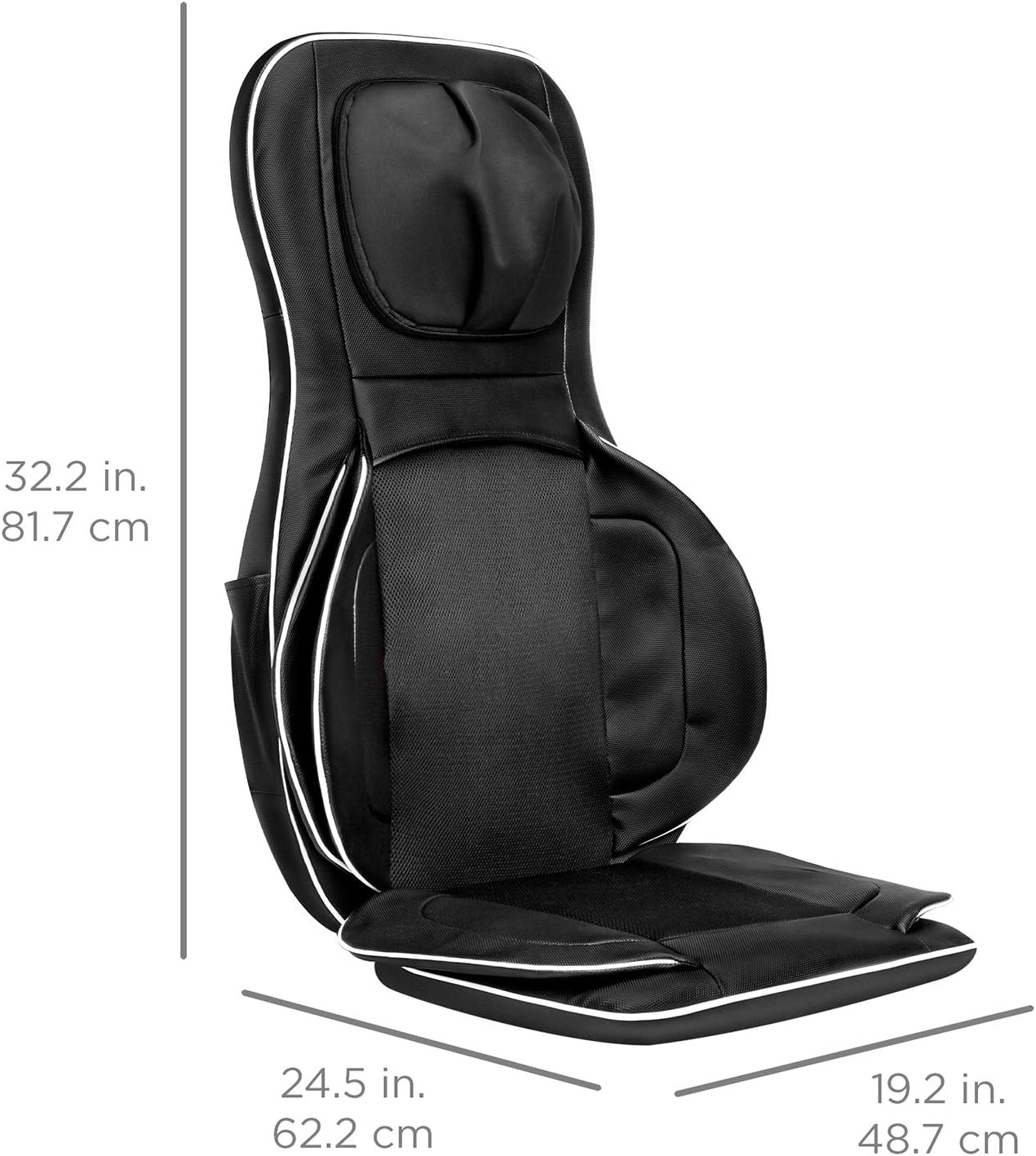
Image: Detailed dimensions of the massager for reference.
Warranty and Support
For any questions, concerns, or warranty information, please contact Best Choice Products customer support. Refer to the official product page or included documentation for contact details.
An official Instructions for Use (IFU) PDF document is available for download: Download User Guide (PDF).
