
ECOVACS OZMO 905
ECOVACS Deebot OZMO 905 Robot Vacuum and Mop User Manual
Model: OZMO 905
1. Introduction
Thank you for choosing the ECOVACS Deebot OZMO 905 Robot Vacuum and Mop. This device is designed to provide efficient and intelligent cleaning for your home, combining vacuuming and mopping functionalities. It features Smart Navi 3.0 laser navigation for precise mapping and virtual boundary creation via the ECOVACS Home app.
Please read this manual thoroughly before operating the Deebot to ensure safe and optimal performance. Keep this manual for future reference.
2. Important Safety Instructions
When using an electrical appliance, basic precautions should always be followed, including the following:
- Read all instructions before using this appliance.
- Do not operate the Deebot in areas with open flames or fragile objects.
- Ensure the charging dock is placed against a wall on a level surface.
- Keep hair, loose clothing, fingers, and all parts of the body away from openings and moving parts.
- Do not allow children to play with the Deebot.
- Use only as described in this manual. Use only manufacturer's recommended attachments.
- Do not use without dust bin and/or filters in place.
- Do not use to pick up large objects, sharp objects, or liquids.
- Unplug the charging dock when not in use and before cleaning.
3. Package Contents
Verify that all components are present and in good condition:
- ECOVACS Deebot OZMO 905 Robot Vacuum and Mop
- Charging Dock
- Power Adapter
- Side Brushes (2 pairs)
- Main Brush (pre-installed)
- Direct Suction Inlet (alternative to main brush)
- Dust Bin with Filter (pre-installed)
- OZMO Water Tank
- Washable Mopping Pads (2)
- Cleaning Tool
- Instruction Manual

This image displays the ECOVACS Deebot OZMO 905 from two perspectives: the top, highlighting the power button and clean, minimalist design, and the bottom, revealing the main brush, side brushes, and the OZMO mopping system.
4. Setup and First Use
4.1 Charging Dock Placement
Place the charging dock on a hard, level surface against a wall. Ensure there is at least 0.5 meters (1.6 feet) of clear space on both sides of the dock and 1.5 meters (4.9 feet) in front of it. Plug in the power adapter.
4.2 Installing Side Brushes
Press the side brushes onto the spindles at the bottom of the Deebot until they click into place. Ensure the color of the brush matches the color of the spindle (if applicable).
4.3 Initial Charge
Place the Deebot on the charging dock. The indicator light on the robot will pulse. Allow the Deebot to charge completely before its first use. A full charge typically takes approximately 5 hours.
4.4 ECOVACS Home App Setup
- Download the "ECOVACS Home" app from your mobile device's app store.
- Register an account and log in.
- Follow the in-app instructions to add your Deebot OZMO 905. This typically involves connecting to the robot's Wi-Fi network and then to your home Wi-Fi (2.4GHz network required).
5. Operating Your Deebot
5.1 Cleaning Modes
The Deebot OZMO 905 offers various cleaning modes:
- Auto Cleaning: The Deebot cleans in a systematic pattern. This is the default mode.
- Area Cleaning: Clean specific areas or rooms defined in the app.
- Custom Cleaning: Draw a custom cleaning area on the map in the app.
- Mopping Mode: Attach the OZMO water tank and mopping pad for simultaneous vacuuming and mopping.

The Deebot OZMO 905 is shown actively mopping a hard floor, demonstrating its 2-in-1 vacuuming and mopping capability.
5.2 Smart Navi 3.0 Laser Navigation
The Deebot uses laser technology to scan and map your home, creating an interactive map in the ECOVACS Home app. This allows for efficient cleaning paths and advanced features.

This image illustrates the robot's Smart Navi 3.0 laser navigation system, projecting laser lines to accurately map and plan its cleaning path within a room.
5.3 Virtual Boundaries
Using the ECOVACS Home app, you can draw virtual boundaries on the map to restrict the Deebot from entering certain areas. This is useful for protecting delicate items or preventing access to specific rooms.
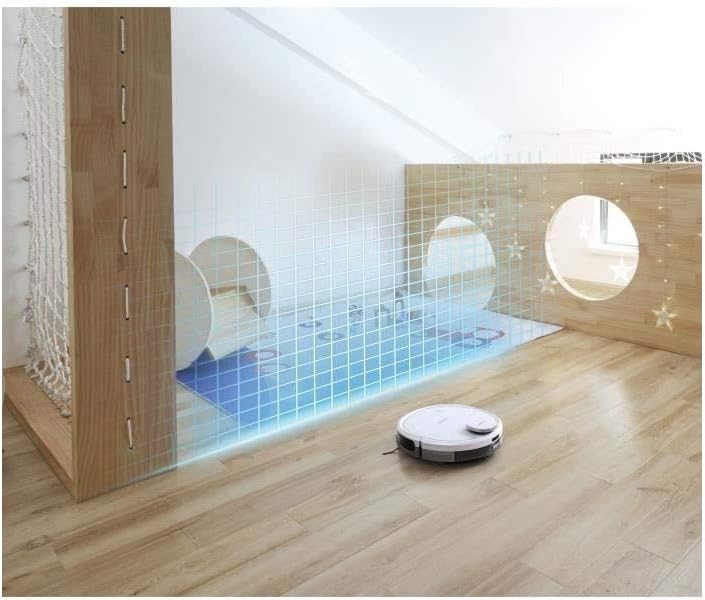
The robot is depicted operating near a virtual boundary, represented by a grid, showcasing its ability to avoid designated areas as set by the user.
5.4 Power Levels and Speeds
The Deebot offers 3 power levels and speeds, adjustable via the ECOVACS Home app, allowing you to customize cleaning intensity based on your needs and floor type.

The Deebot OZMO 905 is shown cleaning a room with a systematic, efficient back-and-forth pattern, ensuring thorough coverage.
6. Maintenance and Care
Regular maintenance ensures optimal performance and extends the lifespan of your Deebot.
6.1 Dust Bin and Filters
- Empty the dust bin after each use.
- Clean the filter regularly using the provided cleaning tool. Filters are washable; allow them to air dry completely before re-inserting.
6.2 Main Brush and Side Brushes
- Remove and clean the main brush weekly. Use the cleaning tool to cut and remove any hair or debris tangled around it.
- Inspect side brushes for wear and tear. Replace them when visibly damaged or worn (typically every 3-6 months).
6.3 OZMO Water Tank and Mopping Pads
- Empty any remaining water from the tank after each mopping session.
- Wash mopping pads after each use. They are machine washable.
6.4 Sensors and Charging Contacts
Wipe the anti-drop sensors, anti-collision sensors, and charging contacts on both the Deebot and the charging dock with a clean, dry cloth periodically to ensure proper function.
7. Troubleshooting
If your Deebot encounters an issue, refer to the following common problems and solutions:
| Problem | Possible Cause | Solution |
|---|---|---|
| Deebot does not start or respond. | Low battery; power switch off. | Ensure Deebot is charged; turn on the power switch. |
| Deebot cannot return to charging dock. | Charging dock obstructed; Deebot too far from dock. | Clear obstacles around the dock; place Deebot closer to the dock. |
| Deebot gets stuck frequently. | Cables, rugs, or small objects on the floor. | Clear the cleaning area of obstacles. Use virtual boundaries for problem areas. |
| Poor cleaning performance. | Full dust bin; clogged filter; worn brushes. | Empty dust bin; clean/replace filter; clean/replace brushes. |
| Mopping function not working. | Empty water tank; clogged water outlet; dry mopping pad. | Fill water tank; clean water outlet; moisten mopping pad. |
| App connection issues. | Incorrect Wi-Fi password; 5GHz Wi-Fi network; robot too far from router. | Ensure 2.4GHz Wi-Fi; verify password; move robot closer to router or use a Wi-Fi extender. |
For more detailed troubleshooting, refer to the ECOVACS Home app or the official ECOVACS website.
8. Specifications
| Feature | Detail |
|---|---|
| Model | OZMO 905 |
| Brand | ECOVACS |
| Dimensions (L x W x H) | 35 cm x 35 cm x 10.2 cm |
| Weight | 7 kg |
| Color | White |
| Battery Type | Lithium-ion |
| Battery Life | Up to 90 minutes |
| Noise Level | 66 dB |
| Power Levels | 3 |
| Control Method | Application (ECOVACS Home App), Voice Control |
| Navigation Type | Smart Navi 3.0 Laser Navigation |
| Cleaning Functions | Vacuuming, Mopping (2-in-1 OZMO Technology) |
| Filter Type | Fabric, Cartridge |
| Recommended Surface | Hard floors, Carpets |
9. Warranty and Support
ECOVACS provides a 24-month product warranty for the Deebot OZMO 905. For any assistance or warranty claims, please contact ECOVACS customer support.
Local support is available Monday to Friday, from 9:00 AM to 1:00 PM and 2:00 PM to 6:00 PM.

This image features the ECOVACS logo alongside text indicating a 2-year worry-free after-sales service, emphasizing customer support.
For further support, visit the official ECOVACS website or refer to the ECOVACS Home app for FAQs and contact information.
10. Product Videos
No official product video URLs were provided in the product data. Please refer to the manufacturer's official channels for instructional videos.
Related documentsOZMO 905


Ask a question about this manual
Ask about setup, troubleshooting, compatibility, parts, safety, or missing instructions. Manuals+ will review the question and use this page’s manual context to help answer it.