
1. Introduction
Thank you for choosing the B Bubos 5L Cool Mist Humidifier, Model BU-H0103. This device is designed to improve air quality and comfort in your home or office by adding moisture to the air. It features a 5-liter capacity, top-fill design, adjustable mist output, timer function, aromatherapy capability, and quiet ultrasonic operation.
Please read this manual thoroughly before use to ensure proper operation and maintenance.
2. Safety Information
- Always place the humidifier on a firm, flat, water-resistant surface.
- Do not place the humidifier near heat sources or in direct sunlight.
- Keep out of reach of children and pets.
- Unplug the unit before filling, cleaning, or moving.
- Do not immerse the base in water.
- Use only clean, cool tap water or distilled water.
- Do not add essential oils directly into the water tank; use the designated aroma box.
3. Product Components
The B Bubos Humidifier consists of the following main parts:
- Water Tank: 5-liter capacity, transparent for easy water level monitoring.
- Base Unit: Contains the control panel, ultrasonic atomizer, and heating element.
- Top Cover/Mist Nozzle: Directs mist output.
- Aroma Box: Small tray for essential oils.
4. Setup
- Unpack: Carefully remove all packaging materials and place the humidifier on a stable surface.
- Fill Water Tank: Remove the top cover. Pour clean, cool water directly into the tank opening. Do not exceed the maximum fill line.

Figure 4.1: Filling the water tank from the top.
- Replace Cover: Place the top cover back onto the water tank securely.
- Connect Power: Plug the power cord into a suitable electrical outlet.
Setup Demonstration Video
Video 4.1: This video demonstrates the top-fill water refill process and basic operation of a similar humidifier model.
5. Operating Instructions
The humidifier features an intuitive control panel with touch buttons for various functions.
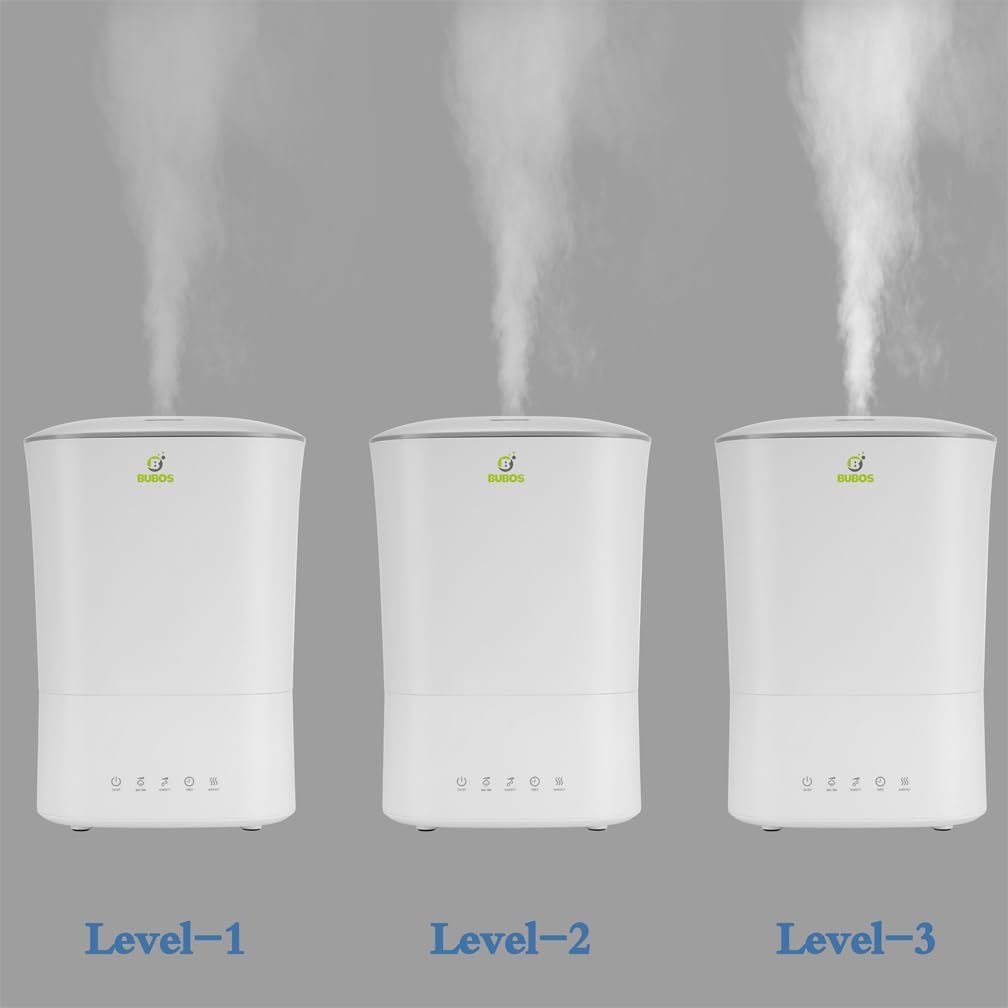
Figure 5.1: Humidifier Control Panel and Indicator Lights.
- Power On/Off & Sleep Mode: Press the ON/OFF/SLEEP button to turn the unit on or off. Long press for Sleep Mode, which dims the display and operates quietly.
- Adjust Mist Output: Press the MIST button repeatedly to cycle through 3 mist levels (Low, Medium, High).

Figure 5.2: Mist Output Levels.
- Humidity Control: Press the HUMIDITY button to set your desired relative humidity (RH) level from 45% to 95%. The unit will automatically maintain this level.
- Timer Function: Press the TIMER button to set an operating time from 1 to 8 hours. The unit will automatically shut off after the set time.
- Warm Mist Function: Press the WARM MIST button to activate the warm mist feature.
- Night Light: Press the COLOR LIGHT button to turn the night light on or off. Long press the HUMIDITY button to turn off the night light completely.
- Aromatherapy: Pull out the aroma box located at the back of the base unit. Add a few drops of essential oil onto the pad inside the box. Slide the box back into place.

Figure 5.3: Adding essential oils to the aroma box.
Operation Demonstration Video
Video 5.1: This video illustrates the adjustment of cool and warm mist settings for optimal comfort.
6. Maintenance and Cleaning
Regular cleaning is essential to prevent mineral buildup and ensure optimal performance and hygiene.
- Daily Maintenance: Empty and rinse the water tank and base daily. Refill with fresh water.
- Weekly Cleaning:
- Unplug the humidifier.
- Remove the water tank and empty any remaining water from the tank and base.
- Pour 2 cups of undiluted white vinegar into the water tank and base. Let it sit for 20 minutes.
- Use a soft brush or cloth to gently clean the inside of the tank and the base, paying attention to the ultrasonic atomizer.
- Rinse all components thoroughly with clean water until the vinegar smell is gone.
- Wipe all surfaces dry before reassembling or storing.
- Aroma Box Cleaning: Clean the aroma box and replace the essential oil pad as needed.
Cleaning Demonstration Video
Video 6.1: This video provides a tutorial for cleaning the internal components of a humidifier.
7. Troubleshooting
| Problem | Possible Cause | Solution |
|---|---|---|
| No mist or low mist output | Low water level; mineral buildup; mist nozzle blocked. | Refill water tank; clean the unit as per maintenance instructions; ensure mist nozzle is clear. |
| Unusual odor | Stagnant water; dirty water tank. | Empty and clean the water tank and base thoroughly. Use fresh water daily. |
| Water leakage | Overfilled tank; improper placement of tank/lid; damaged seal. | Do not overfill; ensure tank and lid are correctly seated; check for any visible damage to seals. |
| Unit not turning on | Not plugged in; power outage; unit malfunction. | Check power connection; verify power outlet; contact customer support if issue persists. |
8. Specifications
| Feature | Detail |
|---|---|
| Brand | B Bubos |
| Model Number | BU-H0103 |
| Capacity | 5 Liters |
| Power/Wattage | 22 watts |
| Voltage | 110 Volts |
| Material | Plastic |
| Auto Shut-off | Yes |
| Runtime | Up to 18 hours |
| Special Features | Adjustable Humidity Control, Auto Shut Off, Night Light, Quiet, Removable Tank |
| Item Weight | 2.27 kg |
| Product Dimensions | 22.2D x 22.2W x 32H Centimetres |
| Operation Mode | Ultrasonic |
| Room Type | Bedroom, Nursery, Office |
9. Warranty and Support
The B Bubos 5L Cool Mist Humidifier (Model BU-H0103) comes with a 1-year warranty from the date of purchase. This warranty covers defects in materials and workmanship under normal use.
For technical support, warranty claims, or any questions regarding your product, please refer to the contact information provided with your purchase or visit the official B Bubos website for lifetime support.