
HengGuan P801
User Manual
HengGuan HG 1/12 RC US Military Truck
Model: P801
Introduction
Thank you for purchasing the HengGuan HG 1/12 RC US Military Truck, Model P801. This highly detailed 1/12 scale remote-controlled military truck is designed for enthusiasts seeking a realistic and powerful off-road experience. Featuring an 8-wheel drive system and durable construction, it is built to tackle various terrains. This manual provides essential information for setup, operation, maintenance, and troubleshooting to ensure optimal performance and longevity of your model.
Please read this manual thoroughly before operating the truck to ensure safe and correct usage.
Package Contents
Verify that all components listed below are included in your package:
- Model Body with metal chassis
- Electronic Speed Controller (ESC)
- 550 Motor
- 2 x 15KG Steering Servos
- 1 x 3KG Shaft Gear Servo
- 2.4G Radio Transmitter
- Receiver
- User Manual (this document)
Note: The 7.4V 3000mAh Li-Po Battery, Battery Charger, LED Light, and Sound System are not included and must be purchased separately.
Specifications
| Feature | Detail |
|---|---|
| Model ID | HG-P801 |
| Scale | 1/12 |
| Length | 739.5 mm |
| Width | 218.5 mm |
| Height | 242.5 mm |
| Wheel Diameter | R111 mm |
| ESC | 320A |
| Motor | 550 Type |
| Steering Servo | 2 x 15KG |
| Shaft Gear Servo | 1 x 3KG |
| Radio System | 2.4 GHz |
| Recommended Age | 14 years and up |
| Item Weight | 30 pounds (approx. 13.6 kg) |
| Material | High-quality plastic and metal |
Setup
Follow these steps for initial setup of your RC Military Truck:
- Battery Installation:
Locate the battery compartment, typically on the underside or within the chassis. Connect a fully charged 7.4V 3000mAh Li-Po battery (not included) to the ESC's battery connector. Ensure the polarity is correct. Secure the battery within the compartment to prevent movement during operation.

Image: Underside view of the HG-P801 RC Military Truck, showing the metal chassis, drivetrain components, and wiring. The battery compartment is typically located centrally for balanced weight distribution.
- Transmitter Battery Installation:
Open the battery cover on the back of the 2.4G radio transmitter. Insert the required batteries (usually AA batteries, not included) according to the polarity indicators. Close the cover securely.
- Binding the Transmitter and Receiver:
Ensure both the truck's power switch and the transmitter's power switch are OFF. Turn on the transmitter. Then, turn on the truck's power switch. The receiver's LED indicator should show a solid light, indicating a successful bind. If not, refer to the specific binding instructions provided with your radio system.
- Pre-Operation Check:
Before driving, check all connections, ensure screws are tight, and verify that the steering and throttle respond correctly to the transmitter inputs. Inspect the tires for proper inflation and secure attachment.

Image: A detailed front-side view of the HG-P801 RC Military Truck, highlighting its realistic design, 8-wheel configuration, and robust chassis.
Operating Instructions
Familiarize yourself with the controls and operational guidelines for the HG-P801 RC Military Truck.
Transmitter Controls:
- Throttle Trigger: Pull to move forward, push to brake/reverse.
- Steering Wheel: Turn left or right to steer the truck.
- Trim Adjustments: Fine-tune steering and throttle to ensure the truck drives straight and stops when the trigger is neutral.
- Speed Settings: Some transmitters may have multi-speed settings or dual-rate adjustments for throttle and steering sensitivity.
Driving Tips:
- Start Slowly: Begin with gentle throttle inputs to get a feel for the truck's response.
- Off-Road Performance: The 8-wheel drive system provides superior off-road capability. Experiment with different terrains like dirt, gravel, and grass.
- Steering: Practice smooth steering inputs, especially at higher speeds, to maintain control.
- Battery Life: Monitor battery levels. Performance will decrease as the battery drains. Stop operation when performance noticeably drops to avoid over-discharging the Li-Po battery.
- Environmental Considerations: Avoid operating in wet conditions or extreme temperatures to prevent damage to electronic components.

Image: Front view of the HG-P801 RC Military Truck, showcasing its detailed front grille, headlights, and the ability to open the cabin doors for enhanced realism.
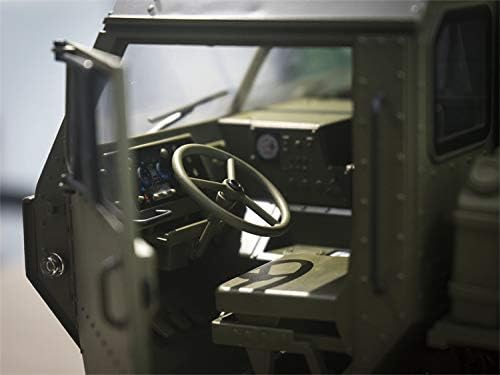
Image: Close-up interior view of the HG-P801 RC Military Truck's cabin, highlighting the detailed dashboard and steering wheel, adding to the realistic simulation.
Maintenance
Regular maintenance will extend the life and performance of your RC truck:
- Cleaning: After each use, especially in dusty or dirty environments, clean the truck with a soft brush or compressed air. Avoid using water directly on electronic components.
- Inspections: Regularly check for loose screws, damaged wires, or worn parts. Tighten any loose fasteners.
- Lubrication: Periodically lubricate moving parts such as gears and universal joints with appropriate RC-grade lubricant.
- Battery Care: Store Li-Po batteries in a cool, dry place at storage voltage (around 3.8V per cell). Never fully discharge or overcharge Li-Po batteries. Use a compatible Li-Po charger.
- Tire Maintenance: Check tire pressure and wear. Replace tires if they are significantly worn or damaged.

Image: Rear view of the HG-P801 RC Military Truck, showcasing the detailed bed, rear wheels, and suspension components.

Image: Side profile of the HG-P801 RC Military Truck, emphasizing its long chassis, multiple axles, and realistic military vehicle proportions.
Troubleshooting
Refer to this section for common issues and their solutions:
| Problem | Possible Cause | Solution |
|---|---|---|
| Truck does not respond to transmitter. |
|
|
| Truck moves slowly or lacks power. |
|
|
| Steering is erratic or unresponsive. |
|
|
| Unusual noises during operation. |
|
|
Warranty and Support
HengGuan products are manufactured to high standards. For warranty information or technical support, please contact your retailer or the manufacturer directly. Keep your purchase receipt as proof of purchase.
For further assistance, you may refer to the official HengGuan website or contact their customer service department. Details are typically provided on the product packaging or through your point of purchase.
Note: Damage caused by improper use, modification, or lack of maintenance is not covered under warranty.
Ask a question about this manual
Ask about setup, troubleshooting, compatibility, parts, safety, or missing instructions. Manuals+ will review the question and use this page’s manual context to help answer it.