
DOGNESS F03
DOGNESS F03 Automatic Pet Feeder User Manual
Model: F03
Introduction
The DOGNESS F03 Automatic Pet Feeder is designed to provide scheduled and portion-controlled meals for your pets. With a 6-liter capacity, it is suitable for both dogs and cats. The feeder can be controlled via a mobile application, allowing for precise programming of feeding frequency and quantity. It operates on AC power and features a backup battery system to ensure continuous feeding during power outages.

Image 1: Front view of the DOGNESS F03 Automatic Pet Feeder, showcasing its sleek white design and the food dispensing area.
Package Contents
- DOGNESS F03 Automatic Pet Feeder Unit
- Food Bowl
- Power Adapter
- User Manual (this document)
Setup
- Unpack the Feeder: Carefully remove all components from the packaging.
- Assemble the Food Bowl: Attach the food bowl to the main feeder unit. Ensure it is securely in place.
- Power Connection: Connect the power adapter to the feeder and plug it into a standard wall outlet.
- Install Backup Batteries (Optional but Recommended): For uninterrupted operation during power outages, install three (3) D-size batteries (R20) into the battery compartment located at the bottom of the unit. Batteries are not included.
- Fill the Food Reservoir: Open the lid of the feeder and pour dry pet food into the reservoir. The feeder has a 6-liter capacity.
- Download the App: Download the DOGNESS app from your smartphone's app store (available on iOS and Android).
- Connect to Wi-Fi: Follow the in-app instructions to connect your feeder to your home Wi-Fi network. This enables remote control and scheduling features.

Image 2: The DOGNESS F03 feeder with the food bowl attached and containing pet food, ready for use.
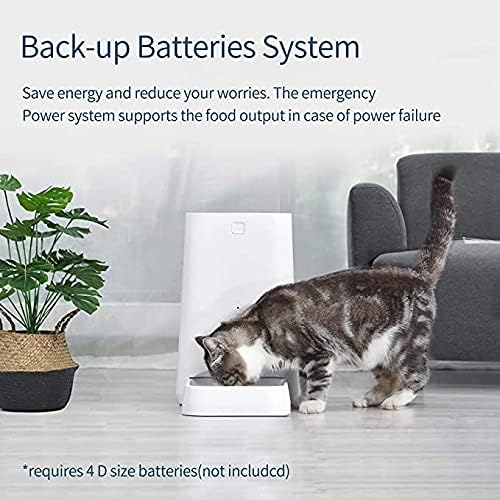
Image 3: A cat eating from the DOGNESS F03 feeder, illustrating the importance of the backup battery system for continuous feeding.

Image 4: Side view of the DOGNESS F03 feeder, highlighting the transparent food reservoir for easy monitoring of food levels.
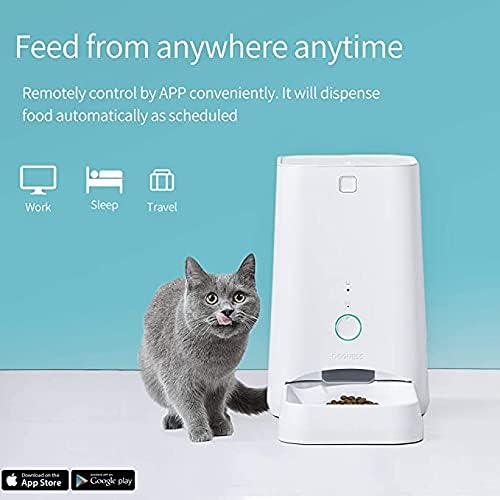
Image 5: A cat next to the DOGNESS F03 feeder, with text indicating "Feed from anywhere anytime" and icons for app control, emphasizing remote management.
Operating Instructions
Manual Feeding
- Press the manual feed button on the feeder to dispense a single portion of food.
- Alternatively, use the DOGNESS app to manually dispense food at any time.
Scheduled Feeding (App Control)
- Open the DOGNESS app on your smartphone.
- Select your F03 feeder from the device list.
- Navigate to the "Feeding Schedule" or "Meal Plan" section.
- Set desired feeding times and portion sizes. The app allows for multiple meals per day with customizable quantities.
- Save your settings. The feeder will now automatically dispense food according to your schedule.

Image 6: A dog and cat eating from the DOGNESS F03 feeder, highlighting key features such as damp-proof design, anti-clogging mechanism, high-precision sensor, and app control.
Voice Recording (if applicable)
- Some models allow for recording a short voice message that plays during feeding times. Refer to the app for specific instructions on recording and setting up voice playback.

Image 7: A puppy interacting with the DOGNESS F03 feeder, with visual cues indicating sound waves, suggesting a voice recording or playback feature to call pets for meals.
Maintenance
- Cleaning the Food Bowl: The food bowl is detachable for easy cleaning. Wash it regularly with mild soap and water, then dry thoroughly before reattaching.
- Cleaning the Reservoir: Periodically empty the food reservoir and wipe it clean with a dry or slightly damp cloth. Ensure it is completely dry before refilling with food.
- Check for Obstructions: Regularly inspect the food dispensing mechanism for any food blockages or debris.
- Food Freshness: Store dry pet food in a cool, dry place. Do not use wet food in this feeder.
Troubleshooting
- Feeder Not Dispensing Food:
- Check if the food reservoir is empty.
- Ensure the feeder is properly plugged in or that backup batteries are installed and charged.
- Inspect the dispensing mechanism for any clogs or obstructions.
- Verify that the feeding schedule is correctly set in the app.
- App Connection Issues:
- Ensure your Wi-Fi network is active and the signal is strong where the feeder is located.
- Restart your router and the feeder.
- Re-pair the feeder with the app if necessary, following the in-app instructions.
- Confirm that the app is updated to the latest version.
- Incorrect Portion Sizes:
- Review and adjust the portion settings within the DOGNESS app.
- Ensure the correct type of dry kibble is being used, as different kibble sizes can affect dispensed volume.
- Power Outage: The feeder is equipped with a backup battery system. If AC power is lost, it will automatically switch to battery power to continue dispensing scheduled meals, provided D-size batteries are installed.
Specifications
| Feature | Detail |
|---|---|
| Model Number | F03 |
| Capacity | 6 Liters |
| Dimensions (L x W x H) | 20 x 18 x 35 cm |
| Weight | 2.3 Kilograms |
| Material | Polyethylene Terephthalate (PET) |
| Power Source | AC Power Adapter, 3 x D-size Batteries (R20, not included) for backup |
| Target Species | Dogs, Cats |
| Control Method | Mobile Application (iOS/Android) |
Warranty and Support
Specific warranty information may vary by region and retailer. Please refer to your purchase documentation or the official DOGNESS website for detailed warranty terms and conditions.
For technical support, troubleshooting assistance, or inquiries about your DOGNESS F03 Automatic Pet Feeder, please visit the official DOGNESS support page or contact their customer service directly. Contact information can typically be found on the product packaging or the official brand website.
Related documentsF03


Ask a question about this manual
Ask about setup, troubleshooting, compatibility, parts, safety, or missing instructions. Manuals+ will review the question and use this page’s manual context to help answer it.