
Introduction
This manual provides detailed instructions for the proper setup, operation, maintenance, and troubleshooting of your AIRCARE Digital Whole-House Console-Style Evaporative Humidifier, Model TE3140DSLV. Please read these instructions carefully before using the appliance to ensure safe and efficient operation. Retain this manual for future reference.
Important Safety Instructions
Always follow basic safety precautions when using electrical appliances to reduce the risk of fire, electric shock, and injury to persons.
- Read all instructions before using the humidifier.
- Place the humidifier on a firm, level, water-resistant surface.
- Do not operate the humidifier with a damaged cord or plug.
- Keep the cord away from heated surfaces.
- Do not block air openings.
- Unplug the humidifier before filling, cleaning, or servicing.
- This appliance has a polarized plug (one blade is wider than the other). To reduce the risk of electric shock, this plug is intended to fit into a polarized outlet only one way. If the plug does not fit fully into the outlet, reverse the plug. If it still does not fit, contact a qualified electrician. Do not attempt to defeat this safety feature.
- Proposition 65 Warning: This product can expose you to chemicals including lead, which is known to the State of California to cause cancer and birth defects or other reproductive harm. For more information go to www.P65Warnings.ca.gov.
Setup and Assembly
1. Unpacking
Carefully remove the humidifier from its packaging. Inspect the unit for any damage. Retain packaging materials for future storage or transport.

Image 1.1: Front view of the AIRCARE TE3140DSLV humidifier. This image shows the overall design of the unit, featuring a matte grey finish with a silver-toned front panel and the AIRCARE ESSENTIALS logo.
2. Placement
For optimal performance, place the humidifier on a level surface in a central location within the area you wish to humidify. Ensure it is at least 6 inches away from walls and furniture to allow for proper airflow. Avoid placing it near heat sources or in direct sunlight.

Image 1.2: The humidifier positioned in a room, demonstrating recommended placement away from walls and furniture. The unit is shown on a wooden floor next to a colorful cabinet.
3. Wick Installation
Your humidifier uses an HDC411 wick. The first wick is included with your unit. To install:
- Open the top cover of the humidifier.
- Locate the wick support frame.
- Insert the new HDC411 wick into the frame, ensuring it is seated correctly.
- Close the top cover securely.
4. Filling the Water Reservoir
The humidifier has a 4.75-gallon water capacity. Use cool, clean tap water. Do not use hot water or add essential oils directly into the water reservoir.
- Ensure the unit is unplugged before filling.
- Open the water fill door/lid.
- Pour water directly into the reservoir until it reaches the MAX fill line.
- Close the water fill door/lid.
Operation
Control Panel Overview
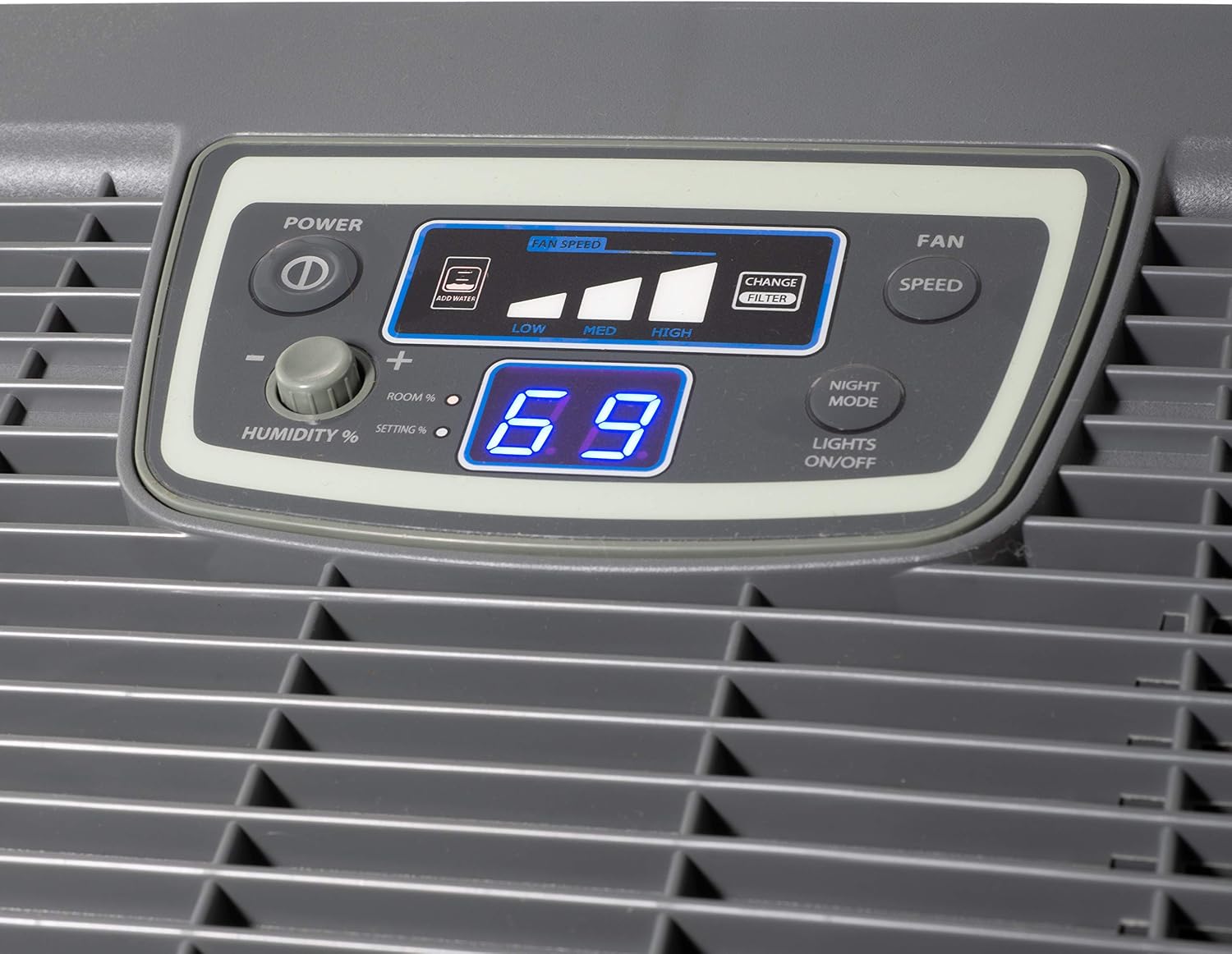
Image 2.1: Detailed view of the digital control panel, showing buttons for Power, Humidity %, Fan Speed, Night Mode, and Lights On/Off, along with the digital display showing current humidity and fan speed indicators.
1. Power On/Off
Press the POWER button (marked with a circle and vertical line) to turn the humidifier on or off.
2. Setting Desired Humidity
Use the HUMIDITY % buttons (+ and -) to adjust your desired humidity level. The digital display will show the target humidity percentage. The unit will automatically operate to maintain this level.
3. Fan Speed Control
Press the FAN SPEED button to cycle through Low, Medium, and High fan settings. The selected speed will be indicated on the display. The fan automatically shuts off when the desired humidity level is reached or when the unit is empty.
4. Night Mode / Lights On/Off
Press the NIGHT MODE / LIGHTS ON/OFF button to dim or turn off the display lights for nighttime operation.
5. Filter Change Indicator
The control panel includes a CHANGE FILTER indicator. When this light illuminates, it is time to inspect or replace the humidifier wick.
Maintenance
Regular maintenance ensures optimal performance and extends the life of your humidifier.
1. Wick Replacement
The HDC411 wick should be replaced regularly, typically every 1-3 months depending on water quality and usage. A dirty or hardened wick reduces humidification efficiency.
- Unplug the humidifier.
- Remove the top cover and the old wick.
- Dispose of the old wick responsibly.
- Install a new AIRCARE HDC411 wick as described in the Setup section.
2. Cleaning the Water Reservoir and Base
Clean the water reservoir and base weekly to prevent mineral buildup and bacterial growth.
- Unplug the humidifier and empty any remaining water.
- Remove the wick and set aside.
- Wipe down all surfaces with a soft cloth and a mild detergent solution.
- Rinse thoroughly with clean water to remove all detergent residue.
- For stubborn mineral deposits, use a descaling solution or a mixture of white vinegar and water. Allow it to soak, then scrub and rinse.
- Ensure all parts are dry before reassembling.
Troubleshooting Guide
| Problem | Possible Cause | Solution |
|---|---|---|
| Humidifier does not turn on. | No power; unit not plugged in; power button not pressed. | Ensure the unit is securely plugged into a working outlet. Press the power button. Check circuit breaker. |
| No humidity output or low output. | Low water level; dirty or dry wick; fan speed too low; desired humidity reached. | Refill water reservoir. Replace or clean wick. Increase fan speed. Check desired humidity setting. |
| "CHANGE FILTER" indicator is on. | Wick needs inspection or replacement. | Inspect the wick. If it is hard or discolored, replace it with a new HDC411 wick. |
| Unit is noisy. | Unit not level; fan obstruction; mineral buildup. | Place the unit on a firm, level surface. Check for any obstructions in the fan area. Clean the unit to remove mineral buildup. |
Specifications
| Model Name | Evaporative Humidifier |
| Model Number | TE3140DSLV |
| Brand | AIRCARE |
| Coverage Area | Up to 3,000 sq. ft. |
| Water Capacity | 4.75 gallons |
| Run Time | Up to 45 hours |
| Operation Mode | Evaporative |
| Included Components | Wick (HDC411) |
| Product Dimensions | 15"D x 24"W x 20"H |
| Item Weight | 22 Pounds |
| Color | Matte Grey |
| UPC | 043129501201 |

Image 3.1: Diagram illustrating the dimensions of the humidifier: 24 inches wide, 15 inches deep, and 20 inches high.
Warranty and Customer Support
AIRCARE humidifiers are designed for reliable performance. For specific warranty details, please refer to the warranty card included with your product or visit the official AIRCARE website. Keep your purchase receipt as proof of purchase.
Customer Support
If you have any questions, require assistance, or need to order replacement parts (such as the HDC411 wick), please contact AIRCARE customer support. Contact information can typically be found on the manufacturer's website or on the product packaging.
For online resources, visit the AIRCARE Store on Amazon.


