
1. Introduction
Thank you for purchasing the CLY 15W LED Motion Sensor Floodlight. This manual provides essential information for the safe installation, operation, and maintenance of your floodlight. Please read these instructions carefully before installation and retain them for future reference.
2. Product Overview
The CLY 15W LED Motion Sensor Floodlight is designed for outdoor security lighting, featuring a motion sensor for automatic illumination. It is constructed with durable materials and rated IP66 for weather resistance.
Product Structure

Figure 2.1: Exploded view of the floodlight components.
The floodlight consists of a Nano lampshade, 14SMD LEDs, a metal reflector, an induction head (PIR sensor), a one-piece back shell for heat dissipation, a mounting bracket, and securing screws.
3. Safety Instructions
- Ensure the power supply is disconnected before installation, maintenance, or cleaning.
- Installation should be performed by a qualified electrician or professional to ensure safety and compliance with local electrical codes.
- Do not look directly into the LED light source when it is illuminated, as this may cause eye damage.
- Ensure the mounting surface is strong enough to support the weight of the fixture.
- Use appropriate wiring and connectors suitable for outdoor use and rated for the floodlight's power requirements.
- Do not modify the product in any way, as this will void the warranty and may pose safety risks.
4. Setup and Installation
The floodlight can be installed in various outdoor locations such as walls, ground, or ceilings. Choose a location that provides optimal coverage and motion detection.
Installation Types

Figure 4.1: Various installation methods and mounting steps.
The image illustrates three common installation types: wall installation, ground installation, and ceiling installation. The bracket allows for flexible positioning.
Mounting Steps
- Step 1: Mark Drilling Points - Position the mounting bracket on the desired surface and mark the drilling points.
- Step 2: Drill Holes - Use a drill to create holes at the marked points. Insert wall anchors if necessary.
- Step 3: Secure Bracket - Attach the mounting bracket to the surface using the provided screws.
- Step 4: Mount Floodlight - Secure the floodlight fixture to the bracket, adjusting the angle as needed.
Wiring
Ensure all wiring connections are secure and waterproof. The floodlight is designed with outdoor wire standards for durability.

Figure 4.2: IP66 Waterproof design and outdoor-grade wiring.
The floodlight has an IP66 waterproof rating, making it suitable for various weather conditions. Ensure the electrical connections are also protected from moisture.
Product Dimensions

Figure 4.3: Floodlight dimensions.
Refer to the dimensions for planning your installation space.
5. Operating Instructions
The CLY floodlight features an integrated motion sensor with adjustable settings.
Motion Sensor Settings

Figure 5.1: Motion sensor adjustment switches.
The motion sensor has two adjustable settings, typically located on the underside of the sensor unit:
- Lighting Time: Adjusts how long the light stays on after motion is detected. Options usually include 10 seconds, 45 seconds, 120 seconds, and 600 seconds.
- Day/Night Mode: This switch determines when the sensor is active.
- Day Mode: The light will activate upon motion detection during both day and night (working 24 hours).
- Night Mode: The light will only activate upon motion detection during nighttime or low-light conditions.
Sensing Performance

Figure 5.2: Motion sensor coverage area.
The motion sensor has a sensing distance of approximately 4-6 meters and a sensing angle of 120 degrees. The light provides an irradiation distance of up to 8 meters.
6. Maintenance
Regular maintenance ensures optimal performance and longevity of your floodlight.
- Cleaning: Periodically clean the surface of the floodlight and the motion sensor lens with a soft, damp cloth to remove dirt, dust, or debris. Do not use abrasive cleaners or solvents.
- Inspection: Regularly check the wiring and mounting for any signs of damage, corrosion, or loosening. Ensure all connections remain secure and waterproof.
- Heat Dissipation: The floodlight features a metal back shell for integrated heat dissipation. Ensure the back of the fixture is not obstructed to allow for proper cooling.
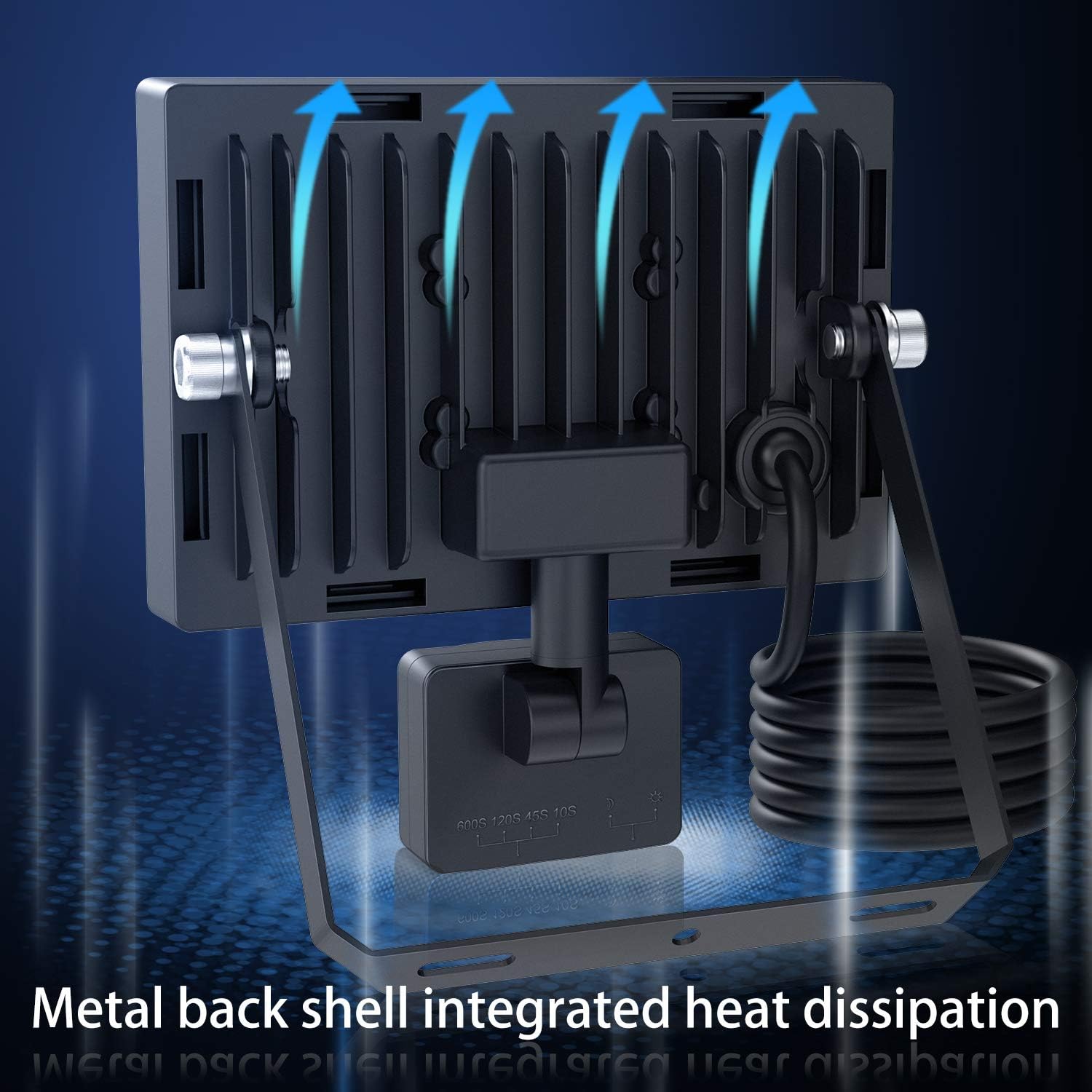
Figure 6.1: Integrated heat dissipation design.
7. Troubleshooting
If you encounter issues with your floodlight, refer to the following common problems and solutions:
| Problem | Possible Cause | Solution |
|---|---|---|
| Light does not turn on. | No power supply. Sensor in 'Night Mode' during daytime. Faulty wiring. | Check power connection and circuit breaker. Switch sensor to 'Day Mode' for testing, or wait until night. Inspect wiring for loose connections or damage. |
| Light stays on continuously. | Continuous motion detected. Sensor sensitivity too high. Sensor faulty. | Ensure no constant movement in sensor range. Adjust sensor sensitivity (if applicable, not explicitly shown on this model). Contact customer support. |
| Light flashes or flickers. | Unstable power supply. Loose wiring connection. Product defect. | Check power source stability. Verify all wiring connections are secure. Contact customer support. |
| Motion sensor not detecting. | Obstruction in sensor's field of view. Sensor set to 'Night Mode' during day. Incorrect mounting height/angle. | Clear any objects blocking the sensor. Ensure sensor is in appropriate mode for conditions. Adjust sensor position for optimal coverage. |
8. Specifications
Key technical specifications for the CLY 15W LED Motion Sensor Floodlight:
| Feature | Specification |
|---|---|
| Model Number | FLB015 |
| Brand | CLY |
| Wattage | 15W |
| Luminous Flux | 1200LM |
| Color Temperature | 6500K |
| Material | Aluminum |
| IP Rating | IP66 Waterproof |
| Product Dimensions (L x W x H) | 15.7 x 18.1 x 22.8 cm (approx. 118 x 145 x 19 mm for light head) |
| Motion Sensor Range | 4-6 meters |
| Motion Sensor Angle | 120 degrees |
| Irradiation Distance | 8 meters |
| Lighting Time Settings | 10s, 45s, 120s, 600s |
| Assembly Required | Yes |
| Included Components | 1*Security Light, Mounting Hardware, User Manual |
9. Warranty and Support
The CLY 15W LED Motion Sensor Floodlight comes with a 2-year manufacturer's warranty from the date of purchase. This warranty covers defects in materials and workmanship under normal use.
For warranty claims, technical support, or any inquiries regarding your product, please contact the manufacturer:
Manufacturer: Shenzhen Oumeike Lighting Technology Co., Ltd
Address: 19-20, Anye Road, Yuanshan Street, Longgang District, Shenzhen, Guangdong, China
Please retain your proof of purchase for warranty service.


