
1. Product Overview
The Retekess V112 is a compact and lightweight AM/FM portable radio designed for ease of use and portability. It features a built-in rechargeable battery, an LCD digital display, and supports stereo audio output via headphones. This manual provides detailed instructions for its operation and maintenance.
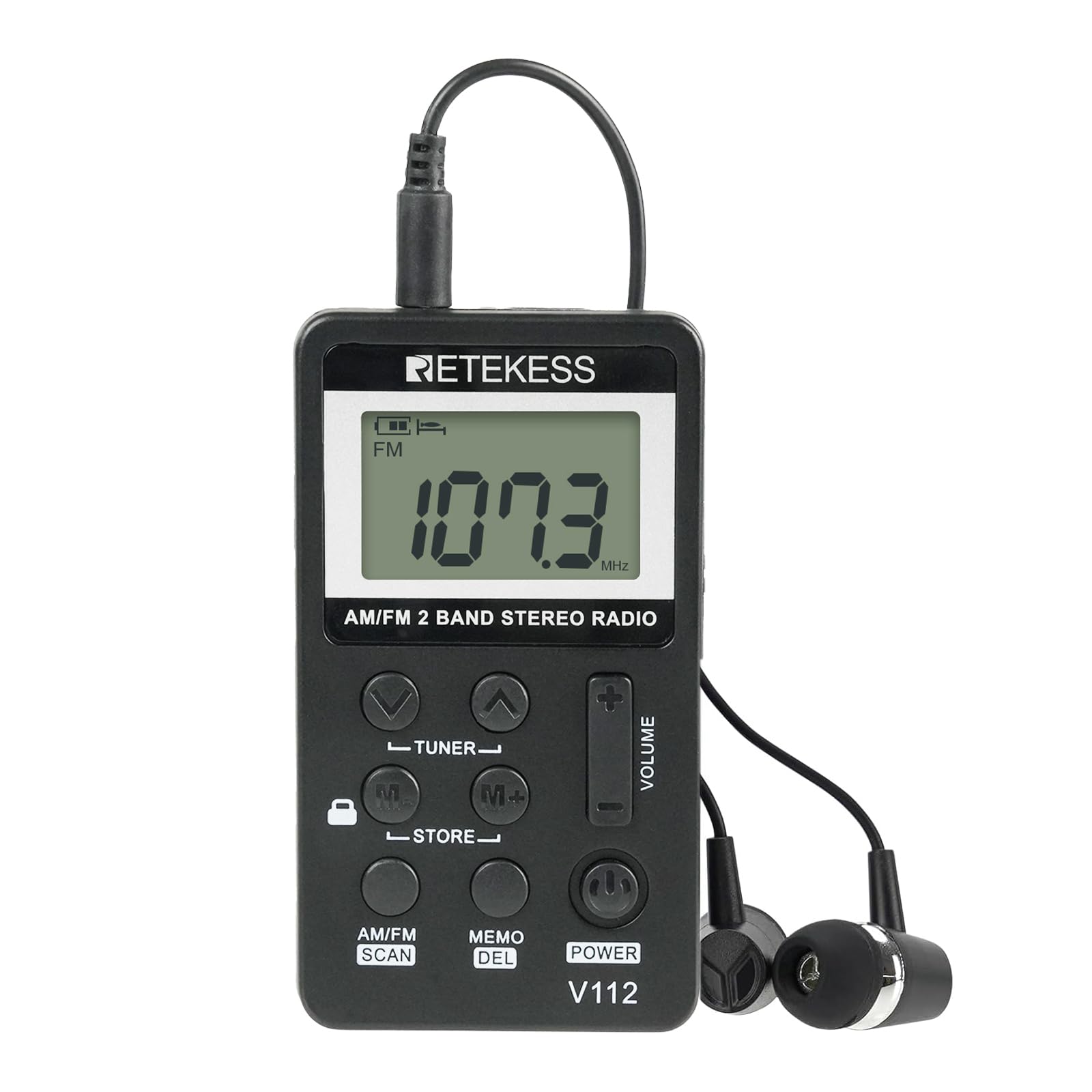
Image 1.1: Retekess V112 Mini AM/FM Portable Radio with included headphones.
Key Features:
- AM/FM 2-band stereo radio reception.
- High-quality sound output through headphones.
- 31-level digital volume control.
- LCD digital display for frequency and status.
- Automatic and manual station search and storage (up to 58 presets).
- Built-in 500mAh rechargeable lithium battery, offering over 10 hours of playback.
- Adjustable sleep timer (0-90 minutes).
- Key lock function to prevent accidental operation.
- Compact and lightweight design (45g / 0.1lb).
2. Package Contents
Please check the package carefully to ensure all items are present:
- 1 x Retekess V112 Portable Radio
- 1 x Earpiece (Headphones)
- 1 x Type-C USB Charging Cable
- 1 x Long Hanging Rope (Lanyard)
- 1 x User Manual (English)

Image 2.1: All items included in the Retekess V112 product package.
3. Setup
3.1 Initial Charging
Before first use, fully charge the radio's built-in lithium battery. Connect the supplied Type-C USB charging cable to the radio's charging port and to a DC 5V power source (e.g., a computer USB port or a standard USB wall adapter, not included). The charging time is approximately 2-3 hours, but for the first charge, ensure it charges for more than 4 hours to optimize battery life.

Image 3.1: The Retekess V112 radio being charged via its USB-C port.
3.2 Connecting Headphones
Headphones are required for listening to the radio as they also function as the antenna. Insert the 3.5mm jack of the included earpiece into the headphone port on the radio.

Image 3.2: The Retekess V112 radio with headphones connected, illustrating their use.
3.3 Attaching the Lanyard
For portability and to prevent loss, attach the long hanging rope (lanyard) to the designated loop on the radio.
4. Operating Instructions
4.1 Power On/Off
- To power on, press the POWER button.
- To power off, press and hold the POWER button for a few seconds.
4.2 Volume Control
Use the VOLUME + and VOLUME - buttons on the side of the radio to adjust the listening volume. The radio offers 31 levels of volume control.
4.3 Band Selection (AM/FM)
Press the AM/FM SCAN button briefly to switch between AM and FM bands.

Image 4.1: The Retekess V112 radio displaying an FM frequency, indicating its band reception capability.
4.4 Tuning for Stations

Image 4.2: A close-up view of the Retekess V112 radio's controls, highlighting its ease of operation.
4.4.1 Automatic Scan and Store (ATS)
- Press and hold the AM/FM SCAN button. The radio will automatically scan for available stations and store them into presets.
- The radio can store up to 29 AM and 29 FM stations.
4.4.2 Manual Tuning
- Press the TUNER + or TUNER - buttons to manually adjust the frequency step by step.
- Press and hold TUNER + or TUNER - to automatically scan for the next strong station.
4.5 Storing and Recalling Presets
4.5.1 Storing a Station Manually
- Tune to the desired station using manual or automatic tuning.
- Press the STORE button. The preset number will flash on the display.
- Use the M+ or M- buttons to select the desired preset memory location.
- Press the STORE button again to confirm and save the station.
4.5.2 Recalling a Stored Station
- Press the M+ or M- buttons to cycle through the stored preset stations.
4.5.3 Deleting a Stored Station
- Tune to the preset station you wish to delete.
- Press and hold the MEMO DEL button until the station is deleted.
4.6 Sleep Timer
The radio features a sleep timer that can automatically turn off the device after a set period (0-90 minutes). This is useful for listening before sleep.

Image 4.3: The Retekess V112 radio featuring its sleep timer function.
- To activate or adjust the sleep timer, press the POWER button briefly while the radio is on. The display will show the current sleep timer setting.
- Use the TUNER + or TUNER - buttons to adjust the time in 10-minute increments.
- Wait a few seconds for the setting to be saved, or press the POWER button again to confirm.
- Setting the timer to '00' disables the sleep timer.
4.7 Key Lock Function
To prevent accidental button presses, slide the LOCK switch (usually on the side or top of the radio) to the locked position. Slide it back to unlock.
4.8 Battery Indicator
The LCD display shows a battery icon indicating the current charge level. Recharge the radio when the battery icon is low or flashing.

Image 4.4: A detailed view of the Retekess V112 radio's LCD display, showing frequency and battery status.
5. Maintenance
5.1 Charging the Battery
The radio is powered by a built-in 500mAh rechargeable lithium battery. To charge, connect the Type-C USB cable to a DC 5V power source. A full charge takes approximately 2-3 hours. Avoid overcharging for extended periods.
5.2 Cleaning
Wipe the radio with a soft, dry cloth. Do not use abrasive cleaners, solvents, or strong chemicals, as these can damage the surface or internal components.
5.3 Storage
When not in use for extended periods, store the radio in a cool, dry place. Avoid extreme temperatures and direct sunlight. It is recommended to fully charge the battery every few months to maintain its health.
6. Troubleshooting
| Problem | Possible Cause | Solution |
|---|---|---|
| Radio does not power on. | Battery is depleted. | Charge the radio for at least 2-3 hours. |
| No sound or low volume. | Volume is too low or muted. Headphones not connected properly. | Increase volume using VOLUME +. Ensure headphones are fully plugged in. |
| Poor radio reception. | Weak signal, environmental interference, headphones not acting as antenna. | Ensure headphones are fully plugged in and extended. Move to a different location (e.g., outdoors, near a window). Adjust the radio's orientation. |
| Buttons are unresponsive. | Key lock function is activated. | Slide the LOCK switch to the unlocked position. |
| Radio turns off unexpectedly. | Sleep timer is active. Battery is low. | Check sleep timer settings and disable if not desired. Recharge the battery. |
7. Specifications
| Feature | Specification |
|---|---|
| Brand | Retekess |
| Model | V112 |
| Frequency Range | FM: 64-108MHz, AM: 520/522-1710KHz |
| Sensitivity | FM≤8uV, AM≤20mV/m |
| Power Supply | Built-in 500mAh rechargeable lithium battery |
| Charging Input | DC 5V, Type-C USB socket |
| Charging Time | 2-3 hours |
| Dimensions (L x W x H) | 85 x 48 x 13 mm (3.3 x 1.8 x 0.5 inches) |
| Weight | 45g (0.1 lb) |
| Display Type | LCD |
| Audio Output | 3.5mm Headphone Jack |
8. Warranty and Support
Retekess provides customer support for the V112 Mini AM/FM Portable Radio. This product comes with a 1-year warranty and a 30-day return policy. For any issues or inquiries, please contact Retekess customer service through the platform where the product was purchased. We aim to respond within 12 hours.