
Introduction
The Motorola E202 is a digital cordless phone designed for ease of use and practicality. It features a bright backlit display, speakerphone functionality, and a "Do Not Disturb" mode. This model incorporates essential calling features, including advanced call blocking technology that allows you to block up to 10 unwanted numbers. This manual provides detailed instructions for setting up, operating, and maintaining your Motorola E202 cordless phone.
Package Contents
Before you begin, please ensure all items listed below are present in your package:
- Cordless Handset and Base Unit
- Additional Cordless Handset and Charger
- Power Adapter (x2)
- Rechargeable Ni-MH Batteries (x4)
- Telephone Line Cord
- User Manual (this document)

Image: The Motorola E202 Digital Cordless Phone, showing the handset resting in its base unit.
Setup
- Install Batteries: Open the battery compartment cover on the back of each handset. Insert the two supplied Ni-MH rechargeable batteries, observing the correct polarity (+ and -). Close the battery compartment cover securely.

Image: Side view of the Motorola E202 handset, showing the battery compartment area.
- Connect Base Unit:
- Connect one end of the telephone line cord to the TEL LINE socket on the back of the main base unit.
- Connect the other end of the telephone line cord to your telephone wall socket.
- Connect one power adapter to the POWER socket on the main base unit and plug the other end into a mains power outlet.
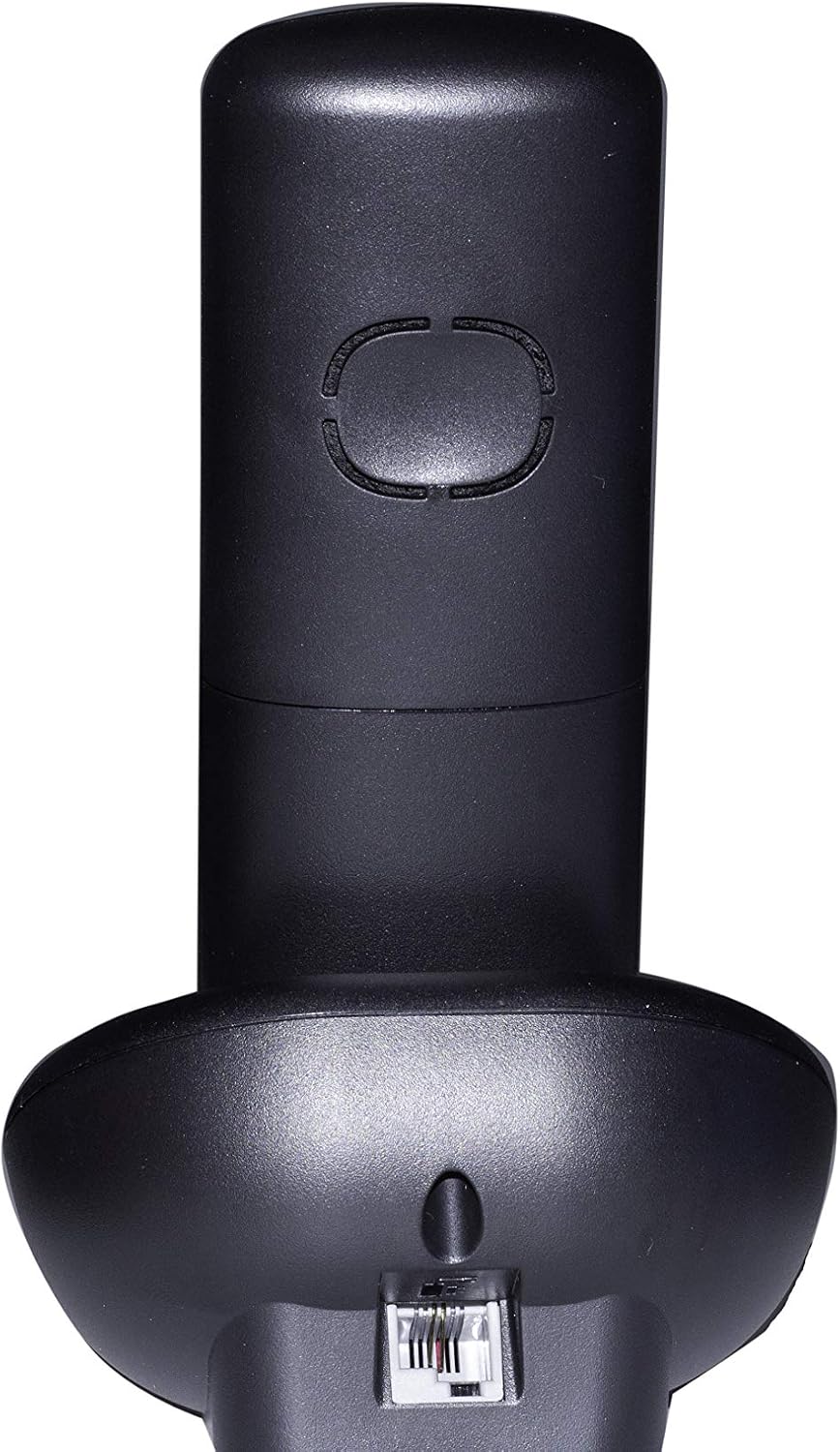
Image: Rear view of the Motorola E202 base unit, showing the telephone line and power input ports.
- Connect Additional Charger: Connect the second power adapter to the POWER socket on the additional charger unit and plug the other end into a mains power outlet.
- Charge Handsets: Place each handset on its respective base/charger unit. The handsets will emit a short beep, and the display will indicate charging. Allow the handsets to charge for at least 16 hours before first use to ensure optimal battery performance.
Operating Instructions

Image: Front view of the Motorola E202 handset, highlighting the display and keypad.
Making and Receiving Calls
- Make a Call: Press the Green Call button (looks like a phone receiver), then dial the number. Alternatively, dial the number first and then press the Green Call button.
- Receive a Call: When the phone rings, press the Green Call button.
- End a Call: Press the Red End Call button (looks like a phone receiver with a line through it) or place the handset back on the base/charger.
- Speakerphone: During a call, press the Speakerphone button (looks like a speaker icon) to activate or deactivate the speakerphone.
Phonebook
- The phonebook can store up to 50 names and numbers.
- To access the phonebook, press the Up/Down navigation buttons when the handset is idle.
- Follow the on-screen prompts to add, edit, or delete entries.
Call Blocking
- The Motorola E202 features advanced call blocking technology, allowing you to block up to 10 specific numbers.
- To block a number, navigate to the Call Blocking menu via the handset's menu options.
- You can also activate the "Do Not Disturb" function by pressing the dedicated "Do Not Disturb" button (looks like a crescent moon).
Caller ID and Redial
- Caller ID: The handset display shows the caller's name and number (if available and subscribed to Caller ID service). The Caller ID list stores up to 20 names and numbers.
- Redial: The phone automatically stores the last 10 dialed numbers. Press the Redial button (looks like an 'R' or a curved arrow) to access and redial these numbers.
Maintenance
To ensure the longevity and optimal performance of your Motorola E202 cordless phone, follow these maintenance guidelines:
- Cleaning: Wipe the handset and base unit with a soft, damp cloth. Do not use abrasive cleaners or solvents.
- Battery Care: Use only the specified rechargeable Ni-MH batteries. If the phone will not be used for an extended period, remove the batteries to prevent leakage.
- Placement: Keep the phone away from heat sources, direct sunlight, and moisture. Avoid placing it near other electrical appliances that may cause interference.
- Avoid Drops: Handle the handset with care to prevent damage from accidental drops.
Troubleshooting
If you encounter issues with your Motorola E202, refer to the following common problems and solutions:
| Problem | Solution |
|---|---|
| No dial tone. |
|
| Cannot make or receive calls. |
|
| Poor sound quality or interference. |
|
| Handset display is blank. |
|
Specifications
| Feature | Detail |
|---|---|
| Brand | Motorola |
| Model | E202 |
| Color | Black |
| Phone Type | Cordless Phone |
| Number of Handsets | 2 (Dual Cordless Phone) |
| Batteries Required | 2 AAA Ni-MH rechargeable batteries per handset (included) |
| Material | Acrylonitrile Butadiene Styrene (ABS) |
| Item Dimensions (LxWxH) | 20 x 30 x 20 cm (approximate, likely packaging dimensions) |
| Answering System Type | Digital |
| Compatible Devices | Other cordless devices of the same model, automatic answering, fax |
| Multi-line Operation | Yes |
| Caller ID | Yes (Caller ID list with 20 names and numbers) |
| Phonebook Capacity | 50 names and numbers |
| Call Blocking | Blocks up to 10 numbers, "Do Not Disturb" function |
| Redial Memory | Last 10 numbers |
| Talk Time | Up to 10 hours |
| Standby Time | Up to 200 hours |
Warranty
The Motorola E202 Digital Cordless Phone comes with a 24-month warranty from the date of purchase. This warranty covers manufacturing defects and material faults under normal use. Please retain your proof of purchase for warranty claims. The warranty does not cover damage caused by misuse, accidents, unauthorized repairs, or normal wear and tear.
Support
For further assistance, technical support, or to report a problem not covered in this manual, please refer to the official Motorola support channels. You can often find additional resources, FAQs, and contact information on the official Motorola website. A PDF version of this user manual is also available for download from the product's Amazon page or Motorola's support site.
For the most up-to-date support information, please visit: www.motorola.com/support


